Aplicaciones web orientadas a servicios y mashups

Versión para imprimir.

por Gilberto Pacheco Gallegos

1. Conocimientos requeridos

2. Instrucciones de navegación

  • Los siguientes controles te permitirán navegar por todo el contenido del sitio.

    Oculta el menú de navegación.

    Muestra el menú de navegación.

    skip_previous
    arrow_back (Tecla flecha a la izquierda)
    Swipe hacia la derecha

    Regresa a la página anterior.

    skip_next
    arrow_forward (Tecla flecha a la derecha)
    Swipe hacia la izquierda

    Avanza a la página siguiente.

3. Software a instalar

Microsoft Edge Chromium
Mozilla Firefox
Google Chrome
PHP y Xdebug
Para Linux y apple

Se puede instalar desde las tiendas de software.

Para Windows
  1. Video de Instalación..

  2. Descarga la versión Thread Safe que corresponda a la arquitectura de tu computadora (x64 o x86, la maypría son x64) desde https://windows.php.net/download#php-8.4.

  3. Crea una carpeta con nombre php en el disco C: y descompacta ahí el php

  4. Añade la ruta C:\php a la variable de ambiente PATH.

    1. Haz clic en el logo de Windows.

    2. Haz clic en Configuración.

    3. Haz clic en Sistema.

    4. Haz clic en Acerca de.

    5. Haz clic en Configuración avanzada del sistema. Te pide que autorices. Autoriza.

    6. Haz clic en Variables de entorno.

    7. En Variables del sistema selecciona Path y haz clic en Editar...

    8. Haz clic en Nuevo. Se abre una entrada y en ella teclea C:\php. Haz clic en Aceptar.

    9. Haz clic en Aceptar para cerrar las variables de entorno.

    10. Haz clic en Aceptar para cerrar las propiedades del sistema.

  5. Sigue las instrucciones de https://xdebug.org/wizard:

    • En el botón de Windows haz clic derecho y selecciona Terminal.

    • En la terminal teclea el comando
      php -i output

    • Copia toda la salida, que es bastante larga, y pégala en la página de Xdebug y cliquea Analyse my phpinfo() output y sigue las instrucciones.

  6. Crea el archivo C:\php\php.ini con el siguiente contenido

    extension = php_mbstring.dll
      extension=php_pdo_sqlite.dll
      extension=php_pdo_mysql.dll
      extension=php_openssl.dll
      extension=php_sockets.dll
      extension=php_fileinfo.dll
      extension=php_curl.dll
      display_errors = Off
      zend_extension = xdebug
      xdebug.mode = debug
      xdebug.start_with_request = yes
      
Git
Visual Studio Code

Video de Instalación..

Usa la URL https://code.visualstudio.com/.

Instala las extensiones:

  • es6-string-html de Tobermory
  • anuragsingk-PHP Server de Anuragsingk
  • PHP Debug de Xdebug
  • PHP Extension Pack de Xdebug
  • PHP Intelephsense de Ben Mewburn
  • PHP IntelliSense de Damjan Cvetko
  • Live Server de Ritwick Dey
  • SQLite Viewer de Florian Klampfer
  • Zip Tools de Adam Raichu
  • SFTP de Natizyskunk

Haz clic en el engrane de abajo a la izquierda y seleciona Settings. En Extensions > PHP Server configuration configura lo siguiente

Phpserver Ip
localhost
Phpserver port
80

4. Aplicaciones Orientadas a Servicios

Versión para imprimir.

A. Introduccion

  • En esta lección se presentan los conceptos de:

    • aplicaciones web orientadas a servicios y

    • mashups.

B. Nube computacional

  • Es el conjunto de servidores remotos en Internet para gestionar archivos y aplicaciones.

  • Una de las ventajas de una nube es que permite que los usuarios utilicen archivos y aplicaciones sin tener que instalar programas en una computadora con acceso a Internet.

  • El concepto de nube salió de los diagramas de red, donde Internet se representa como una nube, en una abstracción de la infraestructura que representa.

C. Aplicación web

D. Servicio en la nube

Utilidad o función que se utiliza a través de Internet.

E. Tipos de servicios

Software as a Service (SaaS)

El más utilizado. El software está alojado en servidores de los proveedores y el cliente accede a ellos a través del navegador web. Todo lo relacionado con mantenimiento, soporte y disponibilidad es manejado por el proveedor.

Platform as a Service (PaaS)

En este tipo de servicios en la nube el proveedor ofrece acceso a un entorno basado en cloud en el cual los usuarios pueden crear, ejecutar, distribuir y administrar sus propias aplicaciones.

Infrastructure as a Service (IaaS)

Un proveedor de servicios proporciona aceso a recursos como servidores con una capacidad de cómputo contratada, almacenamiento y acceso a red.

F. Servicios que se ofrecen en la nube

  • Almacenamiento

  • Herramientas de Productividad

  • Desarrollo de Aplicaciones

  • Hosting

  • Videoconferencias

  • Mapas

  • Streamming

G. Servicios de nube más usados

Amazon Web Services (AWS)

https://aws.amazon.com/

Microsoft Azure

https://azure.microsoft.com/.

Google Cloud

https://cloud.google.com/.

H. Aplicación orientada a servicios

Es una aplicación en la que algunas partes se realizan en un servidor independiente.

Características

  • El procesamiento se reparte en varias computadoras.

  • Un servicio puede ser utilizado por varias aplicaciones.

I. Aplicación web orientada a servicios

  • Aplicación web en la que algunas operaciones se realizan en el servidor web y sus resultados se descargan al navegador web sin cambiar la página desplegada.

J. Aplicación web hibrida (Mashup)

Es una aplicación que usa otras aplicaciones web.

Estructura

Proveedor de contenidos

Fuente de los datos. Los datos están disponibles vía una API y diferentes protocolos web como RSS, REST y Web Service.

El sitio mashup

Es la nueva aplicación web que provee un nuevo servicio utilizando diferente información y de la que no es dueña.

El navegador web cliente

Interfaz de usuario del mashup. En una aplicación web, el contenido puede ser mezclado por los web browser clientes usando lenguaje web del lado del cliente, por ejemplo, HTML y JavaScript.

Fuente: Wikipedia

K. Resumen

  • En esta lección se tocaron los siguientes temas:

    • Nube computacional.

    • Aplicación web.

    • Servicio en la nube.

    • Tipos de servicios.

    • Servicios que se ofrecen en la nube.

    • Servicios de nube más usados.

    • Aplicación orientada a servicios.

    • Aplicación web orientada a servicios.

    • Aplicación web hibrida (Mashup).

5. Ejemplo de servicio

Versión para imprimir.

A. Introducción

En esta lección se explica el funcionamiento de un servicio muy sencillo.

Puedes probar el ejemplo en http://srvejemplo.rf.gd/.

B. Diagrama de despliegue

Diagrama de despliegue

C. Funcionamiento

1. Iniciamos al ejecutar código en el cliente

index.html

const resp =
 await fetch("servicio.php")
if (resp.ok) {
 const texto =
  await resp.text()
 alert(texto)
} else {
 throw new Error(
  resp.statusText)
}

2. Se invoca el servicio en el servidor

index.html

const resp =
 await fetch("servicio.php")
if (resp.ok) {
 const texto =
  await resp.text()
 alert(texto)
} else {
 throw new Error(
  resp.statusText)
}

Ejecuta fetch y envía request (solicitud).

Request

GET /servicio.php HTTP/1.1 Accept: */*
Accept-Encoding: gzip, deflate
Accept-Language: es-ES,es;q=0.9,en;q=0.8
Connection: keep-alive
Cookie: __gsas=ID=329641bd2728ff51:T=1743534294:RT=1743534294:S=ALNI_MavjA3FPY-hDE5wNZO5LxFSOVeIIQ; __test=fe8a33dadb44b3adb2a0bc1ff8c44c98
Host: srvejemplo.rf.gd
Referer: http://srvejemplo.rf.gd/?i=1
User-Agent: Mozilla/5.0 (Windows NT 10.0; Win64; x64) AppleWebKit/537.36 (KHTML, like Gecko) Chrome/135.0.0.0 Safari/537.36

servicio.php

<?php

echo "Hola";

Despierta y recibe request.

3. El servicio procesa la request y genera la response

index.html

const resp =
 await fetch("servicio.php")
if (resp.ok) {
 const texto =
  await resp.text()
 alert(texto)
} else {
 throw new Error(
  resp.statusText)
}

Hace wait esperando response.

servicio.php

<?php

echo "Hola";

Procesa la request y genera
la response (respuesta).

Response

HTTP/1.1 200 OK Server: openresty
Date: Fri, 02 May 2025 03:17:54 GMT
Content-Type: text/html; charset=UTF-8
Transfer-Encoding: chunked
Connection: keep-alive
Cache-Control: max-age=0
Expires: Fri, 02 May 2025 03:17:54 GMT
Hola

El code (o código) 200
indica que terminó
con éxito.

4. El servicio devuelve la response, que es recibida en el cliente

index.html

const resp =
 await fetch("servicio.php")
if (resp.ok) {
 const texto =
  await resp.text()
 alert(texto)
} else {
 throw new Error(
  resp.statusText)
}

Despierta y recibe response.

Response

HTTP/1.1 200 OK Server: openresty
Date: Fri, 02 May 2025 03:17:54 GMT
Content-Type: text/html; charset=UTF-8
Transfer-Encoding: chunked
Connection: keep-alive
Cache-Control: max-age=0
Expires: Fri, 02 May 2025 03:17:54 GMT
Hola

Memoria

resp
ok
true
text
Hola

resp tiene lo mismo
que la response,
pero en un objeto
de JavaScript.

servicio.php

<?php

echo "Hola";

Devuelve response y se duerme.

5. Verifica si la conexión terminó con éxito

index.html

const resp =
 await fetch("servicio.php")
if (resp.ok) {
 const texto =
  await resp.text()
 alert(texto)
} else {
 throw new Error(
  resp.statusText)
}

Memoria

resp
ok
true
text
Hola

6. Como la conexión terminó con éxito, recupera el texto de response

index.html

const resp =
 await fetch("servicio.php")
if (resp.ok) {
 const texto =
  await resp.text()
 alert(texto)
} else {
 throw new Error(
  resp.statusText)
}

Memoria

resp
ok
true
text
Hola
texto
Hola

El texto recuperado
queda en la
constante texto.

7. Muestra el texto en un alert

index.html

const resp =
 await fetch("servicio.php")
if (resp.ok) {
 const texto =
  await resp.text()
 alert(texto)
} else {
 throw new Error(
  resp.statusText)
}

Memoria

resp
ok
true
text
Hola
texto
Hola

Alert

Hola

8. Al cerrar el alert, termina el evento

index.html

const resp =
 await fetch("servicio.php")
if (resp.ok) {
 const texto =
  await resp.text()
 alert(texto)
} else {
 throw new Error(
  resp.statusText)
}

D. Hazlo funcionar (con videos)

  1. Prueba el ejemplo en http://srvejemplo.rf.gd/.

  2. Descarga el archivo /src/srvejemplo.zip y descompáctalo.

  3. Crea una cuenta de email pqra ti, por ejemplo, pepito@google.com. Si ya tienes un email, omite este paso,

  4. Crea una cuenta de GitHub usando el email anterior y selecciona el nombre de usuario unsando la parte inicial del correo electrónico, por ejemplo pepito. Si ya tienes una cuenta, omite este paso.

  5. Crea un repositorio nuevo. En el nombre del repositorio debes poner el nombre de tu sitio; por ejemplo servicio

  6. Importa el proyecto de GitHub a Visual Studio Code

  7. Edita los archivos que desees.

  8. Prueba tu sitio localmente.

  9. Necesitas un hosting. En este ejemplo se muestra como usar el hosting. https://infinityfree.com/ Si no lo has usado, lo primero que tienes que hacer es entrar a registrar tu email con el botón Registrar. Si ya tienes tu email registrado, omite este paso.

  10. Crea una cuenta y un dominio para el ejemplo y crea directamente los archivos. Si ya tienes cuenta, entra a ella y crea un nuevo dominio con sus archivos.

  11. Sube tus archivos a GitHub. En este ejemplo no necesitas esperar 11 o más minutos.

E. Hazlo funcionar (texto)

  1. Prueba el ejemplo en http://srvejemplo.rf.gd/.

  2. Descarga el archivo /src/srvejemplo.zip y descompáctalo.

  3. Crea tu proyecto en GitHub:

    1. Crea una cuenta de email para tí, por ejemplo, pepito@google.com. Si ya tienes un email, omite este paso.

    2. Crea una cuenta de GitHub usando el email anterior y selecciona el nombre de usuario unsando la parte inicial del correo electrónico, por ejemplo pepito. Si ya tienes una cuenta, omite este paso.

    3. Crea un repositorio nuevo. En la página principal de GitHub cliquea 📘 New.

    4. En la página Create a new repository introduce los siguientes datos:

      • Proporciona el nombre de tu repositorio debajo de donde dice Repository name *.

      • Mantén la selección Public para que otros usuarios puedan ver tu proyecto.

      • Verifica la casilla Add a README file. En este archivo se muestra información sobre tu proyecto.

      • Cliquea License: None. y selecciona la licencia que consideres más adecuada para tu proyecto.

      • Cliquea Create repository.

  4. Importa el proyecto en GitHub:

    1. En la página principal de tu proyecto en GitHub, en la pestaña < > Code, cliquea < > Code y en la sección Branches y copia la dirección que está en HTTPS, debajo de Clone.

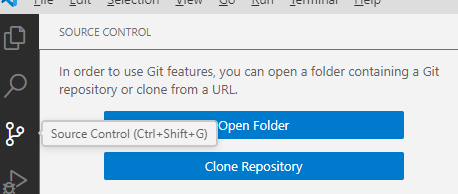
    2. En Visual Studio Code, usa el botón de la izquierda para Source Control.

      Imagen de Source Control
    3. Cliquea el botón Clone Repository.

    4. Pega la url que copiaste anteriormente hasta arriba, donde dice algo como Provide repository URL y presiona la teclea Intro.

    5. Selecciona la carpeta donde se guardará la carpeta del proyecto.

    6. Abre la carpeta del proyecto importado.

    7. Añade el contenido de la carpeta descompactada que contiene el código del ejemplo.

  5. Edita los archivos que desees.

  6. Haz clic derecho en index.html, selecciona PHP Server: serve project y se abre el navegador para que puedas probar localmente el ejemplo.

  7. Para depurar paso a paso haz lo siguiente:

    1. En el navegador, haz clic derecho en la página que deseas depurar y selecciona inspeccionar.

    2. Recarga la página, de preferencia haciendo clic derecho en el ícono de volver a cargar la página Ïmagen del ícono de recarga y seleccionando vaciar caché y volver a cargar de manera forzada (o algo parecido). Si no aparece un menú emergente, simplemente cliquea volver a cargar la página Ïmagen del ícono de recarga. Revisa que no aparezca ningún error ni en la pestañas Consola, ni en Red.

    3. Selecciona la pestaña Fuentes (o Sources si tu navegador está en Inglés).

    4. Selecciona el archivo donde vas a empezar a depurar.

    5. Haz clic en el número de la línea donde vas a empezar a depurar.

    6. En Visual Studio Code, abre el archivo de PHP donde vas a empezar a depurar.

    7. Haz clic en Run and Debug .

    8. Si no está configurada la depuración, haz clic en create a launch json file.

    9. Haz clic en la flechita RUN AND DEBUG, al lado de la cual debe decir Listen for Xdebug .

    10. Aparece un cuadro con los controles de depuración

    11. Selecciona otra vez el archivo de PHP y haz clic en el número de la línea donde vas a empezar a depurar.

    12. Regresa al navegador, recarga la página y empieza a usarla.

    13. Si se ejecuta alguna de las líneas de código seleccionadas, aparece resaltada en la pestaña de fuentes. Usa los controles de depuración para avanzar, como se muestra en este video.

  8. Entra al hosting que elijas y añade directamente los archivos.

  9. Abre un navegador y prueba el proyecto en tu hosting.

  10. En el hosting InfinityFree, la primera vez que corres la página, puede marcar un mensaje de error, pero al recargar funciona correctamente. Puedes evitar este problema usando un dominio propio.

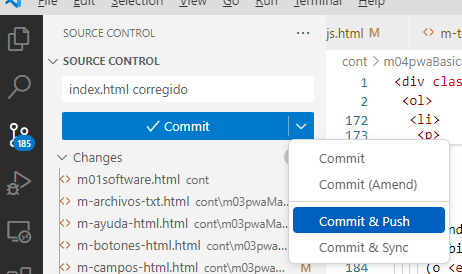
  11. Para subir el código a GitHub, en la sección de SOURCE CONTROL, en Message introduce un mensaje sobre los cambios que hiciste, por ejemplo index.html corregido, selecciona v y luego Commit & Push.

    Imagen de Commit & Push

F. Archivos

G. index.html

1
<!DOCTYPE html>
2
<html lang="es">
3
4
<head>
5
6
 <meta charset="UTF-8">
7
 <meta name="viewport" content="width=device-width">
8
9
 <title>Ejemplo de servicio</title>
10
11
</head>
12
13
<body>
14
 <h1>Ejemplo de servicio</h1>
15
16
 <button onclick="ejecuta()">
17
  Ejecuta
18
 </button>
19
20
 <script>
21
22
  async function ejecuta() {
23
   try {
24
    // Se conecta a servicio.php y recibe su respuesta.
25
    const respuesta =
26
     await fetch("servicio.php")
27
    if (respuesta.ok) {
28
     const texto =
29
      await respuesta.text()
30
     alert(texto)
31
    } else {
32
     throw new Error(
33
      respuesta.statusText)
34
    }
35
   } catch (error) {
36
    console.error(error)
37
    alert(error.message)
38
   }
39
  }
40
41
 </script>
42
43
</body>
44
45
</html>

H. servicio.php

1
<?php
2
3
echo "Hola";
4

I. Resumen

  • En esta lección se mostró el funcionamiento de un servicio.

6. Arquitectura orientada a servicios

Versión para imprimir.

A. Introducción

  • En esta lección se presentan el concepto y los componentes de una arquitectura orientada a servicios.

B. Arquitectura orientada a servicios

  • Estilo de arquitectura de TI que se apoya en la orientación a servicios.

  • La orientación a servicios es una forma de pensar en servicios, su construcción y sus resultados.

  • Un servicio es una representación lógica de una actividad de negocio que tiene un resultado de negocio específico (ejemplo: comprobar el crédito de un cliente, obtener datos de clima, consolidar reportes de perforación).

Fuente: https://es.wikipedia.org/wiki/Arquitectura_orientada_a_servicios

C. Ventajas

  • Reduce el nivel de acoplamiento.

  • Clara definición de roles de desarrollo.

  • Definición de seguridad más clara.

  • Fácil de probar.

  • Mejora el mantenimiento.

  • Favorece la reutilización.

  • Favorece el desarrollo en paralelo.

  • Favorece la escalabilidad.

  • Permite un mapeo directo entre los procesos y los sistemas.

  • Permite un monitoreo preciso.

  • Permite la interoperabilidad.

Fuente: http://soa-fpuna.blogspot.com/2011/11/ventajas-y-desventajas.html

D. Principios de diseño de un servicio

  • Definición clara y estandarizada mediante descriptores de servicio, donde se indique:

    • Nombre del Servicio.

    • Forma de accesos.

    • Funcionalidades que ofrece.

    • Descripción de los datos de entrada de cada funcionalidad que ofrece.

    • Descripción de los datos de salida de cada funcionalidad que ofrece.

  • Sin estado: no guardan valores para ser usados en otras llamadas. (es posible acceder a bases de datos.)

  • Pueden también ejecutar unidades discretas de trabajo como serían editar y procesar una transacción.

  • No dependen del estado de otras funciones o procesos.

Fuente: https://ederluisdsd.wordpress.com/2013/03/17/principios-de-diseno-soa/

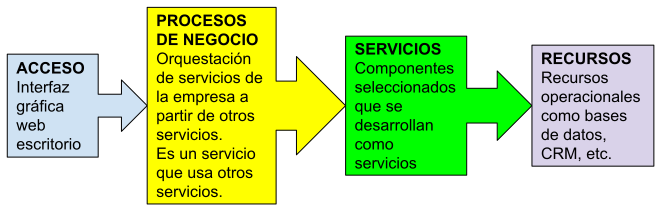
E. Capas

Capas de SOA
Capa de acceso
  • Interfaz de usuario que invoca a los procesos de negocio.

  • Interfaces web, escritorio, móvil, etc.

  • Pueden ejecutarse en varios dispositivos.

Capa de procesos de negocio
  • Integración de uno o más servicios que resuelven un problema de negocio.

Capa de servicio
  • Componentes que se han desarrollado como servicios.

Capa de recursos
  • Recursos operacionales: CRM, ERP, HR, BD.

  • Tecnologías (Java, .NET, PHP).

Fuente: https://www.slideshare.net/imcinstitute/service-oriented-architecture-soa-15-introduction-to-soa

F. Diagrama de Arquitectura

Capas de SOA

G. Introducción a XML

1. XML

  • Siglas en inglés de eXtensible Markup Language, traducido como Lenguaje de Marcado Extensible o Lenguaje de Marcas Extensible.

  • Metalenguaje que permite definir lenguajes de marcas.

  • Desarrollado por el World Wide Web Consortium (W3C).

  • Utilizado para almacenar datos en forma legible.

Fuente: https://es.wikipedia.org/wiki/Extensible_Markup_Language

2. Ejemplo de XML

1<?xml version="1.0" encoding="UTF-8" ?>
2<!DOCTYPE MiContacto SYSTEM "MiContacto.dtd">
3<Contacto>
4 <Nombre>Juan</Nombre>
5 <Email>juan@gm.com</Email>
6 <Telefonos>
7 <Telefono>5555555555</Telefono>
8 <Telefono>8888888888</Telefono>
9 </Telefonos>
10</Contacto>

3. DTD MiContacto

1<?xml version="1.0" encoding="ISO-8859-1" ?>
2<!-- Este es el DTD de Contacto -->
3<!ELEMENT Contacto (Nombre, Email, Telefonos)>
4<!ELEMENT Nombre (#PCDATA)>
5<!ELEMENT Email (#PCDATA)>
6<!ELEMENT Telefonos (Telefono)*>
7<!ELEMENT Telefono (#PCDATA)>

H. Introducción a SOAP

1. SOAP

  • Originalmente siglas de Simple Object Access Protocol, Protocolo de Acceso Simple a Objetos.

  • Hoy en día solo es SOAP, sin un significado especial.

  • Protocolo estándar que define cómo dos objetos en diferentes procesos pueden comunicarse por medio de intercambio de datos XML.

  • Es uno de los protocolos utilizados para implementar servicios web.

Fuente: https://es.wikipedia.org/wiki/Simple_Object_Access_Protocol

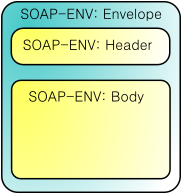
2. Estructura de los mensajes de SOAP

Mensajes SOAP
  • Usan formato XML.

  • 3 elementos:

    Envelope o sobre

    El elemento raíz.

    Header o encabezado

    Especificación de como procesar los datos.

    Body o cuerpo

    El conenido del mensaje.

Fuente: https://es.wikipedia.org/wiki/Simple_Object_Access_Protocol

3. Ejemplo de solicitud SOAP

1<soap:Envelope xmlns:soap="http://schemas.xmlsoap.org/soap/envelope/">
2 <soap:Header>
3 <t:Transaction xmlns:t="alguna-URI" soap:mustUnderstand="1">
4 5
5 </t:Transaction>
6 </soap:Header>
7 <soap:Body>
8 <getDetalleDeProducto xmlns="http://warehouse.example.com/ws">
9 <productoId>827635</productoId>
10 </getDetalleDeProducto>
11 </soap:Body>
12</soap:Envelope>

4. Ejemplo de respuesta SOAP

1<soap:Envelope xmlns:soap="http://schemas.xmlsoap.org/soap/envelope/">
2 <soap:Body>
3 <getRespuestaDetalleDeProducto xmlns="http://warehouse.example.com/ws">
4 <getResultadoDetalleDeProducto>
5 <productId>827635</productId>
6 <nombre>Balón de Futbol</nombre>
7 <descripcion>Balón de futbol de 11” de vinil.</descripcion>
8 <precio>300.0</precio>
9 </getResultadoDetalleDeProducto>
10 </getRespuestaDetalleDeProducto>
11 </soap:Body>
12</soap:Envelope>

I. Introducción a WSDL

1. WSDL

  • Siglas de Web Services Description Language, es un formato de XML que se utiliza para describir servicios Web.

  • Describe los requisitos del protocolo y los formatos de los mensajes necesarios para interactuar con los servicios listados en su catálogo.

  • Las operaciones y mensajes que soporta se describen en abstracto y se ligan después al protocolo concreto de red y al formato del mensaje.

  • Se usa a menudo en combinación con SOAP y XML Schema.

  • Los tipos de datos especiales se incluyen en el archivo WSDL en forma de XML Schema.

  • El cliente puede usar SOAP para hacer la llamada a una de las funciones listadas en el WSDL.

Fuente: https://es.wikipedia.org/wiki/Simple_Object_Access_Protocol

2. Elementos de WSDL

types

Define los tipos de datos usados en los mensajes. Se utilizan los tipos definidos en la especificación XML Schema.

message

Define los elementos de mensaje. Cada mensaje puede consistir en una serie de partes lógicas. Las partes pueden ser de cualquiera de los tipos definidos en el elemento message.

portType

Define las operaciones permitidas y los mensajes intercambiados en el Servicio.

binding

Especifica los protocolos de comunicación usados.

service

Conjunto de puertos y dirección de los mismos. Esta parte final hace referencia a lo aportado por las secciones anteriores.

Con estos elementos no sabemos qué hace un servicio pero sí disponemos de la información necesaria para interactuar con él (funciones, mensajes de entrada/salida, protocolos, etcétera).

3. Ejemplo de WSDL

1<definitions name=“PrecioProd“
2 targetNamespace="http://example.com/stockquote.wsdl"
3 xmlns:tns="http://example.com/stockquote.wsdl"
4 xmlns:xsd1="http://example.com/stockquote.xsd"
5 xmlns:soap="http://schemas.xmlsoap.org/wsdl/soap/"
6 xmlns="http://schemas.xmlsoap.org/wsdl/">
7 <types>
8 <schema targetNamespace="http://example.com/stockquote.xsd"
9 xmlns="http://www.w3.org/2000/10/XMLSchema">
10 <element name="SolPrecioProd">
11 <complexType>
12 <all>
13 <element name="productoId" type="decimal"/>
14 </all>
15 </complexType>
16 </element>
17 <element name="PrecioProd">
18 <complexType>
19 <all>
20 <element name="precio" type="float"/>
21 </all>
22 </complexType>
23 </element>
24 </schema>
25 </types>
26 <message name="InputGetPrecioProd">
27 <part name="body" element="xsd1:SolPrecioProd"/>
28 </message>
29 <message name="OutputGetPrecioProd">
30 <part name="body" element="xsd1:PrecioProd"/>
31 </message>
32 <portType name="PortTypePrecioProd">
33 <operation name="GetPrecioProd">
34 <input message="tns:InputGetPrecioProd"/>
35 <output message="tns:OutputGetPrecioProd"/>
36 </operation>
37 </portType>
38 <binding name="BindPrecioProdSoap" type="tns:PortTypePrecioProd">
39 <soap:binding style="document" transport="http://schemas.xmlsoap.org/soap/http"/>
40 <operation name="GetPrecioProd">
41 <soap:operation soapAction="http://example.com/GetPrecioProd"/>
42 <input>
43 <soap:body use="literal"/>
44 </input>
45 <output>
46 <soap:body use="literal"/>
47 </output>
48 </operation>
49 </binding>
50 <service name="ServPrecioProd">
51 <documentation>Devuelve el precio de un producto.</documentation>
52 <port name="PuertoPrecioProd" binding="tns:BindPrecioProdSoap">
53 <soap:address location="http://example.com/precioprod"/>
54 </port>
55 </service>
56</definitions>

J. UDDI

Este estándar no se usa.

  • Siglas del catálogo de negocios de Internet denominado Universal Description, Discovery and Integration.

  • El registro en el catálogo se hace en XML.

  • Es una iniciativa industrial abierta (sufragada por la OASIS) entroncada en el contexto de los servicios Web.

  • El registro de un negocio en UDDI tiene tres partes:

    Páginas blancas

    dirección, contacto y otros identificadores conocidos.

    Páginas amarillas

    categorización industrial basada en taxonomías.

    Páginas verdes

    información técnica sobre los servicios que aportan las propias empresas.

  • Es uno de los estándares básicos de los servicios web, cuyo objetivo es ser accedido por los mensajes SOAP y dar paso a documentos WSDL, en los que se describen los requisitos del protocolo y los formatos del mensaje solicitado para interactuar con los servicios Web del catálogo de registros.

Fuente: https://es.wikipedia.org/wiki/UDDI

K. Introducción a REST

1. REST

  • Siglas para Representational State Transfer o transferencia de estado representacional.

  • Estilo de arquitectura de software para sistemas distribuidos en la World Wide Web.

Fuentes: https://es.wikipedia.org/wiki/Transferencia_de_Estado_Representacional y https://bbvaopen4u.com/es/actualidad/api-rest-que-es-y-cuales-son-sus-ventajas-en-el-desarrollo-de-proyectos

2. Solicitud HTTP

  • Toda página web tiene una URL asociada, pero también puede representar una entidad, que puede ser una colección de datos, por ejemplo, https://mirest.com/contactos, o un objeto, por ejemplo, https://mirest.com/contactos/69.

  • Para interactuar con la URL hay que enviarle una solicitud, que consta de:

    URL

    Con parámetros opcionales que consisten en nombre y valor asociado, separados por & (como cuando buscas en Google).

    conjunto de encabezados

    Proporcionan información sobre la computadora y el programa que envían los datos, así como la informacion que esperan recibir.

    cuerpo
    carga útil

    Contiene datos adicionales,Pueden representarse en los siguientes formatos:

    • application/x-www-form-urlencoded

    • multipart/form-data

    • text/plain

    • XML

    • JSON

    • YAML

    Método de envío

    Indica la acción que debe realizarse sobre la URL, usando los datos adicionales.

Fuente: https://developer.mozilla.org/es/docs/Web/HTTP/Methods

3. Métodos de envío HTTP

TRACE

Realiza una prueba de enviar un mensaje mensaje al servidor de la URL y recibirlo de regreso sin modificaciones.

OPTIONS

Devuelve una descripción de las opciones de comunicación de laURL.

CONNECT

Establece un tunel bidireccional hacia el servidor.

GET

Devuelve los datos de la colección u objeto asociados con la URL, sin modificar el estado del servidor.

Puede tomarse en cuenta los parámetros que lleva la URL, como si fueran las condiciones de una cláusula WHERE de SQL.

HEAD

Devuelve una respuesta como la de GET, pero sin el cuerpo de la respuesta.

POST

Envía una entidad a una URL.

Si la URL representa una lista que no contiene esa entidad, la agrega.

Los datos de la entidad se indican en el cuerpo de la solicitud.

A menudo causa un cambio o efectos secundarios en el servidor.

PUT

Reemplaza toda la entidad indicada en la URL con el contenido del cuerpo de la solicitud.

PATCH

Modifica parcialmente la entidad de la URL, modificando solamente los datos enviados en el cuerpo de la solicitud.

DELETE

Eliminar la entidad de la URL

Fuente: https://developer.mozilla.org/es/docs/Web/HTTP/Methods

L. Resumen

  • En esta lección se introdujeron los siguientes temas:

    • Arquitectura orientada a servicios

    • Ventajas de una arquitectura orientada a servicios

    • Principios de diseño de un servici

    • Capas de una arquitectura orientada a servicios

    • Diagrama de Arquitectura

    • XML

    • SOAP

    • WSDL

    • UDDI

    • REST

7. Servicio que devuelve JSON

Versión para imprimir.

A. Introducción

A partir de esta lección se introducen elementos de software que facilitan el desarrollo de aplicaciones orientadas a servicios.

Este ejemplo recibe los datos JSON generados por un servicio.

Puedes probar el ejemplo en http://srvdevuelve.rf.gd/.

B. La función consume

  • El código que se muestra en el ejemplo de servicio se repite en muchos ejemplos posteriores, pero además debe realizar algunas cuastiones adicionales. Para simplificar el trabajo, se introduce la función consume, que realiza todo lo necesario para controlar la conxión desde el navegador web hacia el servidor.

  • Para usarla, debes importar el archivo donde está definida esta función y luego invocarla pasándole el resultado de invocar la función fetch que comunica al servicio.

  • A lo largo de esta lección, se profundiza en el uso y estructura de esta función.

C. La función recibeJson

  • Recibe una URL a donde debe conectarse y opcionalmente el método HTTP a usar, que por default es GET. Ejecuta un fetch indicando que el cliente acepta solo los formatos JSON y problem details para la respuesta.

  • Para usarla, debes importar el archivo donde está definida esta función y luego invocarla pasándole la URL del servicio y, opcionalmente, el método HTTP.

  • A lo largo de esta lección, se profundiza en el uso y estructura de esta función.

D. La función devuelveJson

  • Para devolver al cliente los resultados de la ejecución de un servicio, se usa la función devuelveJson, escrita en PHP.

  • Para usarla, debes importar el archivo donde está definida esta función usando require o require_once y luego invocarla pasándole el resultado generado por el servicio.

  • A lo largo de esta lección, se profundiza en el uso y estructura de esta función.

E. La clase ProblemDetailsError

  • Se acuerdo con el RFC 9457 en https://www.rfc-editor.org/info/rfc9457, cuando un servicio falla, debe devolver una estructura JSON conocida como Problem Details que informa los detalles del fallo.

  • El tipo de fallo se describe en el campo type; adicionalmente, todo tipo de fallo debe tener una pequeña página donde se describe el problema. En estos ejemplos, se usa la carpeta errors para almacenar las páginas que decriben los errores.

  • Para usarla en JavaScript, debes importar el archivo donde está definida esta clase.

F. La función muestraError

  • Maneja los errores en el navegador web de una manera uniforme.

  • Cuando se tiene un error normal de JavaScript, se muestra la excepción correspondiente en la consola del navegador y el mensaje de la excepción en un cuadro de alert.

  • Cuando es un ProblemDetails, cuya estructure se revisa en la lección sobre validaciones, sus propiedades se muestran en la consola del navegador y en un cuadro de alert.

  • Para usarla, debes importar el archivo donde está definida esta función y colocarla dentro de un catch. Se le pasa como parámetro la excepción atrapada por el catch.

  • A lo largo de esta lección y las siguientes, se profundiza en el uso y estructura de esta función.

G. Diagrama de despliegue

Diagrama de despliegue

H. Funcionamiento

1. Iniciamos al ejecutar código en el cliente

index.html

const respuesta = await consume(
 recibeJson("php/devuelve.php"))
const json =
 await respuesta.json()
alert(
 `Mensaje: ${json.mensaje}
Nombre: ${json.nombre}`)

2. Se invoca el servicio en el servidor

index.html

const respuesta = await consume(
 recibeJson("php/devuelve.php"))
const json =
 await respuesta.json()
alert(
 `Mensaje: ${json.mensaje}
Nombre: ${json.nombre}`)

Envía la solicitud (request) a la red para que
se ejecute el servicio asociado con la URL.

Request

GET /srv/devuelve.php HTTP/1.1 Accept: application/json, application/problem+json
Accept-Encoding: gzip, deflate
Accept-Language: es-ES,es;q=0.9,en;q=0.8
Connection: keep-alive
Cookie: __gsas=ID=329641bd2728ff51:T=1743534294:RT=1743534294:S=ALNI_MavjA3FPY-hDE5wNZO5LxFSOVeIIQ; __test=fe8a33dadb44b3adb2a0bc1ff8c44c98
Host: srvdevuelve.rf.gd
Referer: http://srvdevuelve.rf.gd/?i=1
User-Agent: Mozilla/5.0 (Windows NT 10.0; Win64; x64) AppleWebKit/537.36 (KHTML, like Gecko) Chrome/135.0.0.0 Safari/537.36

srv/devuelve.php

devuelveJson([
 "nombre" => "pp",
 "mensaje" => "Hola."
]);

Despierta y recibe request.

3. El servicio procesa la request y genera la response

index.html

const respuesta = await consume(
 recibeJson("php/devuelve.php"))
const json =
 await respuesta.json()
alert(
 `Mensaje: ${json.mensaje}
Nombre: ${json.nombre}`)

Hace wait esperando response.

srv/devuelve.php

devuelveJson([
 "nombre" => "pp",
 "mensaje" => "Hola."
]);

Procesa la request y
genera response
(respuesta).

Response

HTTP/1.1 200 OK Server: openresty
Date: Fri, 02 May 2025 03:41:22 GMT
Content-Type: application/json
Transfer-Encoding: chunked
Connection: keep-alive
Cache-Control: max-age=0
Expires: Fri, 02 May 2025 03:41:22 GMT
{"nombre":"pp","mensaje":"Hola."}

4. El servicio devuelve la response, que es recibida en el cliente

index.html

const respuesta = await consume(
 recibeJson("php/devuelve.php"))
const json =
 await respuesta.json()
alert(
 `Mensaje: ${json.mensaje}
Nombre: ${json.nombre}`)

Despierta y recibe response.

Response

HTTP/1.1 200 OK Server: openresty
Date: Fri, 02 May 2025 03:41:22 GMT
Content-Type: application/json
Transfer-Encoding: chunked
Connection: keep-alive
Cache-Control: max-age=0
Expires: Fri, 02 May 2025 03:41:22 GMT
{"nombre":"pp","mensaje":"Hola."}

Memoria

respuesta
status
200
body
{"nombre":"pp","mensaje":"Hola."}
json
nombre
"pp"
mensaje
"Hola."

srv/devuelve.php

devuelveJson([
 "nombre" => "pp",
 "mensaje" => "Hola."
]);

Devuelve response y se duerme.

5. Muestra el objeto recibido en un alert

index.html

const respuesta = await consume(
 recibeJson("php/devuelve.php"))
const json =
 await respuesta.json()
alert(
 `Mensaje: ${json.mensaje}
Nombre: ${json.nombre}`)

Memoria

respuesta
status
200
body
{"nombre":"pp","mensaje":"Hola."}
json
nombre
"pp"
mensaje
"Hola."

Alert

Nombre: pp
Mensaje: Hola.

6. Al cerrar el alert, termina el evento

index.html

const respuesta = await consume(
 recibeJson("php/devuelve.php"))
const json =
 await respuesta.json()
alert(
 `Mensaje: ${json.mensaje}
Nombre: ${json.nombre}`)

I. Hazlo funcionar (con videos)

  1. Prueba el ejemplo en http://srvdevuelve.rf.gd/.

  2. Descarga el archivo /src/srvdevuelve.zip y descompáctalo.

  3. Crea una cuenta de email pqra ti, por ejemplo, pepito@google.com. Si ya tienes un email, omite este paso.

  4. Crea una cuenta de GitHub usando el email anterior y selecciona el nombre de usuario unsando la parte inicial del correo electrónico, por ejemplo pepito. Si ya tienes una cuenta, omite este paso.

  5. Crea un repositorio nuevo. En el nombre del repositorio debes poner el nombre de tu sitio; por ejemplo devuelvejson

  6. Importa el proyecto de GitHub a Visual Studio Code

  7. Edita los archivos que desees.

  8. Prueba tu sitio localmente.

  9. Necesitas un hosting. En este ejemplo se muestra como usar el hosting. https://infinityfree.com/ Si no lo has usado, lo primero que tienes que hacer es entrar a registrar tu email con el botón Registrar. Si ya tienes tu email registrado, omite este paso.

  10. Crea una cuenta. Si ya tienes cuenta, entra a ella y crea un nuevo domino. En este ejemplo no se crean los archivos directamente en el hosting.

  11. Sube tus archivos al hosting usando ftp.

  12. Sube tus archivos a GitHub. En este ejemplo no hay archivo sw.js ni necesitas esperar 11 o más minutos.

J. Hazlo funcionar (texto)

  1. Prueba el ejemplo en http://srvdevuelve.rf.gd/.

  2. Descarga el archivo /src/srvdevuelve.zip y descompáctalo.

  3. Crea tu proyecto en GitHub:

    1. Crea una cuenta de email para tí, por ejemplo, pepito@google.com. Si ya tienes un email, omite este paso.

    2. Crea una cuenta de GitHub usando el email anterior y selecciona el nombre de usuario unsando la parte inicial del correo electrónico, por ejemplo pepito. Si ya tienes una cuenta, omite este paso.

    3. Crea un repositorio nuevo. En la página principal de GitHub cliquea 📘 New.

    4. En la página Create a new repository introduce los siguientes datos:

      • Proporciona el nombre de tu repositorio debajo de donde dice Repository name *.

      • Mantén la selección Public para que otros usuarios puedan ver tu proyecto.

      • Verifica la casilla Add a README file. En este archivo se muestra información sobre tu proyecto.

      • Cliquea License: None. y selecciona la licencia que consideres más adecuada para tu proyecto.

      • Cliquea Create repository.

  4. Importa el proyecto en GitHub:

    1. En la página principal de tu proyecto en GitHub, en la pestaña < > Code, cliquea < > Code y en la sección Branches y copia la dirección que está en HTTPS, debajo de Clone.

    2. En Visual Studio Code, usa el botón de la izquierda para Source Control.

      Imagen de Source Control
    3. Cliquea el botón Clone Repository.

    4. Pega la url que copiaste anteriormente hasta arriba, donde dice algo como Provide repository URL y presiona la teclea Intro.

    5. Selecciona la carpeta donde se guardará la carpeta del proyecto.

    6. Abre la carpeta del proyecto importado.

    7. Añade el contenido de la carpeta descompactada que contiene el código del ejemplo.

  5. Edita los archivos que desees.

  6. Haz clic derecho en index.html, selecciona PHP Server: serve project y se abre el navegador para que puedas probar localmente el ejemplo.

  7. Para depurar paso a paso haz lo siguiente:

    1. En el navegador, haz clic derecho en la página que deseas depurar y selecciona inspeccionar.

    2. Recarga la página, de preferencia haciendo clic derecho en el ícono de volver a cargar la página Ïmagen del ícono de recarga y seleccionando vaciar caché y volver a cargar de manera forzada (o algo parecido). Si no aparece un menú emergente, simplemente cliquea volver a cargar la página Ïmagen del ícono de recarga. Revisa que no aparezca ningún error ni en la pestañas Consola, ni en Red.

    3. Selecciona la pestaña Fuentes (o Sources si tu navegador está en Inglés).

    4. Selecciona el archivo donde vas a empezar a depurar.

    5. Haz clic en el número de la línea donde vas a empezar a depurar.

    6. En Visual Studio Code, abre el archivo de PHP donde vas a empezar a depurar.

    7. Haz clic en Run and Debug .

    8. Si no está configurada la depuración, haz clic en create a launch json file.

    9. Haz clic en la flechita RUN AND DEBUG, al lado de la cual debe decir Listen for Xdebug .

    10. Aparece un cuadro con los controles de depuración

    11. Selecciona otra vez el archivo de PHP y haz clic en el número de la línea donde vas a empezar a depurar.

    12. Regresa al navegador, recarga la página y empieza a usarla.

    13. Si se ejecuta alguna de las líneas de código seleccionadas, aparece resaltada en la pestaña de fuentes. Usa los controles de depuración para avanzar, como se muestra en este video.

  8. Sube el proyecto al hosting que elijas.

    1. Crea una nueva carpeta para crear un nuevo proyecto que estará conectado directamente al servidor web por ftp.

    2. Abre la nueva carpeta con Visual Studio Code.

    3. Tecle al mismo Mayúsculas+Control+P y selecciona SFTP: Config. Aparece un archivo de configuración de FTP. Llena los datos con la configuración de FTP de tu servidor, excepto la contraseña.

    4. Cliquea el botón de SFTP y luego haz clic en la URL de tu servidos. En la barra superior te pide la contraseña y ENTER.

    5. Pásate a la parte de archivos y coloca tus archivos.

    6. Cliquea con el botón derecho en la sección de archivos y selecciona Sync: Local -> Remote.

  9. Abre un navegador y prueba el proyecto en tu hosting.

  10. En el hosting InfinityFree, la primera vez que corres la página, puede marcar un mensaje de error, pero al recargar funciona correctamente. Puedes evitar este problema usando un dominio propio.

  11. Para subir el código a GitHub, en la sección de SOURCE CONTROL, en Message introduce un mensaje sobre los cambios que hiciste, por ejemplo index.html corregido, selecciona v y luego Commit & Push.

    Imagen de Commit & Push

K. Archivos

L. index.html

1
<!DOCTYPE html>
2
<html lang="es">
3
4
<head>
5
6
 <meta charset="UTF-8">
7
 <meta name="viewport" content="width=device-width">
8
9
 <title>Servicio que devuelve JSON</title>
10
11
</head>
12
13
<body>
14
15
 <h1>Servicio que devuelve JSON</h1>
16
17
 <p><button id="boton">Recupera datos</button></p>
18
19
 <script type="module">
20
21
  import { consume } from "./js/lib/consume.js"
22
  import { recibeJson } from "./js/lib/recibeJson.js"
23
  import { muestraError } from "./js/lib/muestraError.js"
24
25
  boton.addEventListener("click", recibeDatos)
26
27
  async function recibeDatos() {
28
   try {
29
    const respuesta = await consume(
30
     recibeJson("php/devuelve.php"))
31
    const json =
32
     await respuesta.json()
33
    alert(
34
     `Mensaje: ${json.mensaje}
35
Nombre: ${json.nombre}`)
36
   } catch (error) {
37
    muestraError(error)
38
   }
39
  }
40
41
 </script>
42
43
</body>
44
45
</html>

M. Carpeta « php »

A. php / devuelve.php

1
<?php
2
3
require_once __DIR__ . "/lib/devuelveJson.php";
4
5
devuelveJson([
6
 "nombre" => "pp",
7
 "mensaje" => "Hola.",
8
]);
9

B. Carpeta « php / lib »

1. php / lib / devuelveJson.php

1
<?php
2
3
require_once __DIR__ . "/devuelveResultadoNoJson.php";
4
5
function devuelveJson($resultado)
6
{
7
 $json = json_encode($resultado);
8
 if ($json === false) {
9
  devuelveResultadoNoJson();
10
 } else {
11
  header("Content-Type: application/json; charset=utf-8");
12
  echo $json;
13
 }
14
 exit();
15
}
16

2. php / lib / devuelveResultadoNoJson.php

1
<?php
2
3
require_once __DIR__ . "/INTERNAL_SERVER_ERROR.php";
4
5
function devuelveResultadoNoJson()
6
{
7
 http_response_code(INTERNAL_SERVER_ERROR);
8
 header("Content-Type: application/problem+json; charset=utf-8");
9
10
 echo '{' .
11
  "status: " . INTERNAL_SERVER_ERROR .
12
  '"title": "El resultado no puede representarse como JSON."' .
13
  '"type": "/errors/resultadonojson.html"' .
14
  '}';
15
}
16

3. php / lib / INTERNAL_SERVER_ERROR.php

1
<?php
2
3
const INTERNAL_SERVER_ERROR = 500;

N. Carpeta « errors »

A. errors / errorinterno.html

1
<!DOCTYPE html>
2
<html lang="es">
3
4
<head>
5
6
 <meta charset="UTF-8">
7
 <meta name="viewport" content="width=device-width">
8
9
 <title>Error interno del servidor</title>
10
11
</head>
12
13
<body>
14
15
 <h1>Error interno del servidor</h1>
16
17
 <p>Se presentó de forma inesperada un error interno del servidor.</p>
18
19
</body>
20
21
</html>

B. errors / resultadonojson.html

1
<!DOCTYPE html>
2
<html lang="es">
3
4
<head>
5
6
 <meta charset="UTF-8">
7
 <meta name="viewport" content="width=device-width">
8
9
 <title>El resultado no puede representarse como JSON</title>
10
11
</head>
12
13
<body>
14
15
 <h1>El resultado no puede representarse como JSON</h1>
16
17
 <p>
18
  Debido a un error interno del servidor, el resultado generado, no se puede
19
  recuperar.
20
 </p>
21
22
</body>
23
24
</html>

O. Carpeta « js »

A. Carpeta « js / lib »

1. js / lib / consume.js

1
import { ProblemDetailsError } from "./ProblemDetailsError.js"
2
3
/**
4
 * Espera a que la promesa de un fetch termine. Si
5
 * hay error, lanza una excepción.
6
 * 
7
 * @param {Promise<Response> } servicio
8
 */
9
export async function consume(servicio) {
10
 const respuesta = await servicio
11
 if (respuesta.ok) {
12
  return respuesta
13
 } else {
14
  const contentType = respuesta.headers.get("Content-Type")
15
  if (
16
   contentType !== null && contentType.startsWith("application/problem+json")
17
  )
18
   throw new ProblemDetailsError(await respuesta.json())
19
  else
20
   throw new Error(respuesta.statusText)
21
 }
22
}

2. js / lib / muestraError.js

1
import { ProblemDetailsError } from "./ProblemDetailsError.js"
2
3
/**
4
 * Muestra los datos de una Error en la consola y en un cuadro de alerta.
5
 * @param { ProblemDetailsError | Error | null } error descripción del error.
6
 */
7
export function muestraError(error) {
8
9
 if (error === null) {
10
11
  console.error("Error")
12
  alert("Error")
13
14
 } else if (error instanceof ProblemDetailsError) {
15
16
  const problemDetails = error.problemDetails
17
18
  let mensaje =
19
   typeof problemDetails["title"] === "string" ? problemDetails["title"] : ""
20
  if (typeof problemDetails["detail"] === "string") {
21
   if (mensaje !== "") {
22
    mensaje += "\n\n"
23
   }
24
   mensaje += problemDetails["detail"]
25
  }
26
  if (mensaje === "") {
27
   mensaje = "Error"
28
  }
29
  console.error(error, problemDetails)
30
  alert(mensaje)
31
32
 } else {
33
34
  console.error(error)
35
  alert(error.message)
36
37
 }
38
39
}

3. js / lib / ProblemDetailsError.js

1
export class ProblemDetailsError extends Error {
2
3
 /**
4
  * Detalle de los errores devueltos por un servicio.
5
  * Crea una instancia de ProblemDetailsError.
6
  * @param {object} problemDetails Objeto con la descripcipon del error.
7
  */
8
 constructor(problemDetails) {
9
10
  super(typeof problemDetails["detail"] === "string"
11
   ? problemDetails["detail"]
12
   : (typeof problemDetails["title"] === "string"
13
    ? problemDetails["title"]
14
    : "Error"))
15
16
  this.problemDetails = problemDetails
17
18
 }
19
20
}

4. js / lib / recibeJson.js

1
2
/**
3
 * @param {string} url
4
 * @param { "GET" | "POST"| "PUT" | "PATCH" | "DELETE" | "TRACE" | "OPTIONS"
5
 *  | "CONNECT" | "HEAD" } metodoHttp
6
 */
7
export async function recibeJson(url, metodoHttp = "GET") {
8
 return fetch(
9
  url,
10
  {
11
   method: metodoHttp,
12
   headers: { "Accept": "application/json, application/problem+json" }
13
  }
14
 )
15
}

P. jsconfig.json

  • Este archivo ayuda a detectar errores en los archivos del proyecto.

  • Lo utiliza principalmente Visual Studio Code.

  • No se explica aquí su estructura, pero puede encontrarse la explicación de todo en la documentación del sitio de Visual Studio Code.

1
{
2
 "compilerOptions": {
3
  "checkJs": true,
4
  "strictNullChecks": true,
5
  "target": "ES6",
6
  "module": "Node16",
7
  "moduleResolution": "Node16",
8
  "lib": [
9
   "ES2017",
10
   "WebWorker",
11
   "DOM"
12
  ]
18
}

Q. Resumen

  • En esta lección se mostró el funcionamiento de un ejemplo recibe los datos JSON generados por un servicio.

8. Servicio que recibe y devuelve JSON

Versión para imprimir.

A. Introducción

  • Este ejemplo envía y recibe datos JSON.

  • Muchos servicios de Internet utilizan esta forma de comunicación.

  • Puedes probar el ejemplo en http://srvjson.rf.gd/.

B. La función enviaJsonRecibeJson

  • Se introduce la función enviaJsonRecibeJson, que convierte un dato en una cadena JSON, la envía con un fetch hacia el servidor y espera un JSON o un problem detail.

  • Para usarla, debes importar el archivo donde está definida esta función y luego invocarla pasándole la URL, los datos y el método de envío, que por omisión es POST.

  • A lo largo de esta lección, se profundiza en el uso y estructura de esta función.

C. La función recibeJson

  • Para que los servicios en el servidor puedan recuperar un texto en formato JSON y convertirlo en un objeto, se introduce la función recibeJson, escrita en PHP.

  • Para usarla, debes importarla con require o require_once, invocarla y recibir la referencia al objeto recibido.

  • A lo largo de esta lección, se profundiza en el uso y estructura de esta función.

D. Diagrama de despliegue

Diagrama de despliegue

E. Funcionamiento

1. Iniciamos al ejecutar código en el cliente

index.html

const datos = {
 saludo: "Hola",
 nombre: "pp"
}
const respuesta = await consume(
 enviaJsonRecibeJson(
  "php/json.php", datos))
const json =
 await respuesta.json()
alert(json)

2. Se crea la literal de objeto

index.html

const datos = {
 saludo: "Hola",
 nombre: "pp"
}
const respuesta = await consume(
 enviaJsonRecibeJson(
  "php/json.php", datos))
const json =
 await respuesta.json()
alert(json)

Memoria

datos
saludo
"Hola"
nombre
"pp"

3. Se invoca el servicio en el servidor

index.html

const datos = {
 saludo: "Hola",
 nombre: "pp"
}
const respuesta = await consume(
 enviaJsonRecibeJson(
  "php/json.php", datos))
const json =
 await respuesta.json()
alert(json)

Ejecuta fetch y envía request (solicitud).

Memoria

datos
saludo
"Hola"
nombre
"pp"

Request

POST /srv/json.php HTTP/1.1 Accept: application/json, application/problem+json
Accept-Encoding: gzip, deflate
Accept-Language: es-ES,es;q=0.9,en;q=0.8
Connection: keep-alive
Content-Length: 31
Content-Type: application/json
Cookie: __gsas=ID=329641bd2728ff51:T=1743534294:RT=1743534294:S=ALNI_MavjA3FPY-hDE5wNZO5LxFSOVeIIQ; __test=fe8a33dadb44b3adb2a0bc1ff8c44c98
Host: srvjson.rf.gd
Origin: http://srvjson.rf.gd
Referer: http://srvjson.rf.gd/?i=1
User-Agent: Mozilla/5.0 (Windows NT 10.0; Win64; x64) AppleWebKit/537.36 (KHTML, like Gecko) Chrome/135.0.0.0 Safari/537.36
{"saludo":"Hola","nombre":"pp"}

srv/json.php

$json = leeJson();
$saludo = $json->saludo;
$nombre = $json->nombre;
$resultado =
 "{$saludo} {$nombre}.";
devuelveJson($resultado);

Despierta y recibe request.

4. El servicio lee los datos

index.html

const datos = {
 saludo: "Hola",
 nombre: "pp"
}
const respuesta = await consume(
 enviaJsonRecibeJson(
  "php/json.php", datos))
const json =
 await respuesta.json()
alert(json)

Hace wait esperando response.

Memoria

datos
saludo
"Hola"
nombre
"pp"

srv/json.php

$json = leeJson();
$saludo = $json->saludo;
$nombre = $json->nombre;
$resultado =
 "{$saludo} {$nombre}.";
devuelveJson($resultado);

Request

POST /srv/json.php HTTP/1.1 Accept: application/json, application/problem+json
Accept-Encoding: gzip, deflate
Accept-Language: es-ES,es;q=0.9,en;q=0.8
Connection: keep-alive
Content-Length: 31
Content-Type: application/json
Cookie: __gsas=ID=329641bd2728ff51:T=1743534294:RT=1743534294:S=ALNI_MavjA3FPY-hDE5wNZO5LxFSOVeIIQ; __test=fe8a33dadb44b3adb2a0bc1ff8c44c98
Host: srvjson.rf.gd
Origin: http://srvjson.rf.gd
Referer: http://srvjson.rf.gd/?i=1
User-Agent: Mozilla/5.0 (Windows NT 10.0; Win64; x64) AppleWebKit/537.36 (KHTML, like Gecko) Chrome/135.0.0.0 Safari/537.36
{"saludo":"Hola","nombre":"pp"}

Memoria (Servidor)

$json
saludo
"Hola"
nombre
"pp"
$saludo
"Hola"
$nombre
"pp"

5. El servicio procesa los datos

index.html

const datos = {
 saludo: "Hola",
 nombre: "pp"
}
const respuesta = await consume(
 enviaJsonRecibeJson(
  "php/json.php", datos))
const json =
 await respuesta.json()
alert(json)

Hace wait esperando response.

Memoria

datos
saludo
"Hola"
nombre
"pp"

srv/json.php

$json = leeJson();
$saludo = $json->saludo;
$nombre = $json->nombre;
$resultado =
 "{$saludo} {$nombre}.";
devuelveJson($resultado);

Memoria (Servidor)

$json
saludo
"Hola"
nombre
"pp"
$saludo
"Hola"
$nombre
"pp"
$resultado
"Hola pp."

6. El servicio genera la response

index.html

const datos = {
 saludo: "Hola",
 nombre: "pp"
}
const respuesta = await consume(
 enviaJsonRecibeJson(
  "php/json.php", datos))
const json =
 await respuesta.json()
alert(json)

Hace wait esperando response.

Memoria

datos
saludo
"Hola"
nombre
"pp"

srv/json.php

$json = leeJson();
$saludo = $json->saludo;
$nombre = $json->nombre;
$resultado =
 "{$saludo} {$nombre}.";
devuelveJson($resultado);

Memoria (Servidor)

$json
saludo
"Hola"
nombre
"pp"
$saludo
"Hola"
$nombre
"pp"
$resultado
"Hola pp."

Response

HTTP/1.1 200 OK Server: openresty
Date: Fri, 02 May 2025 03:57:08 GMT
Content-Type: application/json
Transfer-Encoding: chunked
Connection: keep-alive
Cache-Control: max-age=0
Expires: Fri, 02 May 2025 03:57:08 GMT
"Hola pp."

7. El servicio devuelve la response, que es recibida en el cliente

index.html

const datos = {
 saludo: "Hola",
 nombre: "pp"
}
const respuesta = await consume(
 enviaJsonRecibeJson(
  "php/json.php", datos))
const json =
 await respuesta.json()
alert(json)

Despierta y recibe response.

Memoria

datos
saludo
"Hola"
nombre
"pp"
respuesta
status
200
body
"Hola pp."
json
"Hola pp."

Response

HTTP/1.1 200 OK Server: openresty
Date: Fri, 02 May 2025 03:57:08 GMT
Content-Type: application/json
Transfer-Encoding: chunked
Connection: keep-alive
Cache-Control: max-age=0
Expires: Fri, 02 May 2025 03:57:08 GMT
"Hola pp."

srv/json.php

$json = leeJson();
$saludo = $json->saludo;
$nombre = $json->nombre;
$resultado =
 "{$saludo} {$nombre}.";
devuelveJson($resultado);

Devuelve response y se duerme.

8. Muestra el valor recibido recibido en un alert

index.html

const datos = {
 saludo: "Hola",
 nombre: "pp"
}
const respuesta = await consume(
 enviaJsonRecibeJson(
  "php/json.php", datos))
const json =
 await respuesta.json()
alert(json)

Memoria

datos
saludo
"Hola"
nombre
"pp"
respuesta
status
200
body
"Hola pp."
json
"Hola pp."

Alert

Hola pp.

9. Al cerrar el alert, termina el evento

index.html

const datos = {
 saludo: "Hola",
 nombre: "pp"
}
const respuesta = await consume(
 enviaJsonRecibeJson(
  "php/json.php", datos))
const json =
 await respuesta.json()
alert(json)

F. Hazlo funcionar (con videos)

  1. Prueba el ejemplo en http://srvjson.rf.gd/.

  2. Descarga el archivo /src/srvjson.zip y descompáctalo.

  3. Crea una cuenta de email pqra ti, por ejemplo, pepito@google.com. Si ya tienes un email, omite este paso.

  4. Crea una cuenta de GitHub usando el email anterior y selecciona el nombre de usuario unsando la parte inicial del correo electrónico, por ejemplo pepito. Si ya tienes una cuenta, omite este paso.

  5. Crea un repositorio nuevo. En el nombre del repositorio debes poner el nombre de tu sitio; por ejemplo devuelvejson

  6. Importa el proyecto de GitHub a Visual Studio Code

  7. Edita los archivos que desees.

  8. Prueba tu sitio localmente.

  9. Necesitas un hosting. En este ejemplo se muestra como usar el hosting. https://infinityfree.com/ Si no lo has usado, lo primero que tienes que hacer es entrar a registrar tu email con el botón Registrar. Si ya tienes tu email registrado, omite este paso.

  10. Crea una cuenta. Si ya tienes cuenta, entra a ella y crea un nuevo domino. En este ejemplo no se crean los archivos directamente en el hosting.

  11. Sube tus archivos al hosting usando ftp.

  12. Sube tus archivos a GitHub. En este ejemplo no hay archivo sw.js ni necesitas esperar 11 o más minutos.

G. Hazlo funcionar (texto)

  1. Prueba el ejemplo en http://srvjson.rf.gd/.

  2. Descarga el archivo /src/srvjson.zip y descompáctalo.

  3. Crea tu proyecto en GitHub:

    1. Crea una cuenta de email para tí, por ejemplo, pepito@google.com. Si ya tienes un email, omite este paso.

    2. Crea una cuenta de GitHub usando el email anterior y selecciona el nombre de usuario unsando la parte inicial del correo electrónico, por ejemplo pepito. Si ya tienes una cuenta, omite este paso.

    3. Crea un repositorio nuevo. En la página principal de GitHub cliquea 📘 New.

    4. En la página Create a new repository introduce los siguientes datos:

      • Proporciona el nombre de tu repositorio debajo de donde dice Repository name *.

      • Mantén la selección Public para que otros usuarios puedan ver tu proyecto.

      • Verifica la casilla Add a README file. En este archivo se muestra información sobre tu proyecto.

      • Cliquea License: None. y selecciona la licencia que consideres más adecuada para tu proyecto.

      • Cliquea Create repository.

  4. Importa el proyecto en GitHub:

    1. En la página principal de tu proyecto en GitHub, en la pestaña < > Code, cliquea < > Code y en la sección Branches y copia la dirección que está en HTTPS, debajo de Clone.

    2. En Visual Studio Code, usa el botón de la izquierda para Source Control.

      Imagen de Source Control
    3. Cliquea el botón Clone Repository.

    4. Pega la url que copiaste anteriormente hasta arriba, donde dice algo como Provide repository URL y presiona la teclea Intro.

    5. Selecciona la carpeta donde se guardará la carpeta del proyecto.

    6. Abre la carpeta del proyecto importado.

    7. Añade el contenido de la carpeta descompactada que contiene el código del ejemplo.

  5. Edita los archivos que desees.

  6. Haz clic derecho en index.html, selecciona PHP Server: serve project y se abre el navegador para que puedas probar localmente el ejemplo.

  7. Para depurar paso a paso haz lo siguiente:

    1. En el navegador, haz clic derecho en la página que deseas depurar y selecciona inspeccionar.

    2. Recarga la página, de preferencia haciendo clic derecho en el ícono de volver a cargar la página Ïmagen del ícono de recarga y seleccionando vaciar caché y volver a cargar de manera forzada (o algo parecido). Si no aparece un menú emergente, simplemente cliquea volver a cargar la página Ïmagen del ícono de recarga. Revisa que no aparezca ningún error ni en la pestañas Consola, ni en Red.

    3. Selecciona la pestaña Fuentes (o Sources si tu navegador está en Inglés).

    4. Selecciona el archivo donde vas a empezar a depurar.

    5. Haz clic en el número de la línea donde vas a empezar a depurar.

    6. En Visual Studio Code, abre el archivo de PHP donde vas a empezar a depurar.

    7. Haz clic en Run and Debug .

    8. Si no está configurada la depuración, haz clic en create a launch json file.

    9. Haz clic en la flechita RUN AND DEBUG, al lado de la cual debe decir Listen for Xdebug .

    10. Aparece un cuadro con los controles de depuración

    11. Selecciona otra vez el archivo de PHP y haz clic en el número de la línea donde vas a empezar a depurar.

    12. Regresa al navegador, recarga la página y empieza a usarla.

    13. Si se ejecuta alguna de las líneas de código seleccionadas, aparece resaltada en la pestaña de fuentes. Usa los controles de depuración para avanzar, como se muestra en este video.

  8. Sube el proyecto al hosting que elijas.

    1. Crea una nueva carpeta para crear un nuevo proyecto que estará conectado directamente al servidor web por ftp.

    2. Abre la nueva carpeta con Visual Studio Code.

    3. Tecle al mismo Mayúsculas+Control+P y selecciona SFTP: Config. Aparece un archivo de configuración de FTP. Llena los datos con la configuración de FTP de tu servidor, excepto la contraseña.

    4. Cliquea el botón de SFTP y luego haz clic en la URL de tu servidos. En la barra superior te pide la contraseña y ENTER.

    5. Pásate a la parte de archivos y coloca tus archivos.

    6. Cliquea con el botón derecho en la sección de archivos y selecciona Sync: Local -> Remote.

  9. Abre un navegador y prueba el proyecto en tu hosting.

  10. En el hosting InfinityFree, la primera vez que corres la página, puede marcar un mensaje de error, pero al recargar funciona correctamente. Puedes evitar este problema usando un dominio propio.

  11. Para subir el código a GitHub, en la sección de SOURCE CONTROL, en Message introduce un mensaje sobre los cambios que hiciste, por ejemplo index.html corregido, selecciona v y luego Commit & Push.

    Imagen de Commit & Push

H. Archivos

I. index.html

1
<!DOCTYPE html>
2
<html lang="es">
3
4
<head>
5
6
 <meta charset="UTF-8">
7
 <meta name="viewport" content="width=device-width">
8
9
 <title>Servicio que recibe y devuelve JSON</title>
10
11
</head>
12
13
<body>
14
15
 <h1>Servicio que recibe y devuelve JSON</h1>
16
17
 <p><button id="boton">Envía y recibe JSON</button></p>
18
19
 <script type="module">
20
21
  import { consume } from "./js/lib/consume.js"
22
  import { enviaJsonRecibeJson } from "./js/lib/enviaJsonRecibeJson.js"
23
  import { muestraError } from "./js/lib/muestraError.js"
24
25
  boton.addEventListener("click", procesaJson)
26
27
  async function procesaJson() {
28
   try {
29
    const datos = {
30
     saludo: "Hola",
31
     nombre: "pp"
32
    }
33
    const respuesta = await consume(
34
     enviaJsonRecibeJson(
35
      "php/json.php", datos))
36
    const json =
37
     await respuesta.json()
38
    alert(json)
39
   } catch (error) {
40
    muestraError(error)
41
   }
42
  }
43
44
 </script>
45
46
</body>
47
48
</html>

J. Carpeta « php »

A. php / json.php

1
<?php
2
3
require_once __DIR__ . "/lib/recibeJson.php";
4
require_once __DIR__ . "/lib/devuelveJson.php";
5
6
$json = recibeJson();
7
$saludo = $json->saludo;
8
$nombre = $json->nombre;
9
$resultado = "{$saludo} {$nombre}.";
10
devuelveJson($resultado);
11

B. Carpeta « php / lib »

1. php / lib / BAD_REQUEST.php

1
<?php
2
3
const BAD_REQUEST = 400;
4

2. php / lib / devuelveJson.php

1
<?php
2
3
require_once __DIR__ . "/devuelveResultadoNoJson.php";
4
5
function devuelveJson($resultado)
6
{
7
 $json = json_encode($resultado);
8
 if ($json === false) {
9
  devuelveResultadoNoJson();
10
 } else {
11
  header("Content-Type: application/json; charset=utf-8");
12
  echo $json;
13
 }
14
 exit();
15
}
16

3. php / lib / devuelveResultadoNoJson.php

1
<?php
2
3
require_once __DIR__ . "/INTERNAL_SERVER_ERROR.php";
4
5
function devuelveResultadoNoJson()
6
{
7
 http_response_code(INTERNAL_SERVER_ERROR);
8
 header("Content-Type: application/problem+json; charset=utf-8");
9
10
 echo '{' .
11
  "status: " . INTERNAL_SERVER_ERROR .
12
  '"title": "El resultado no puede representarse como JSON."' .
13
  '"type": "/errors/resultadonojson.html"' .
14
  '}';
15
}
16

4. php / lib / INTERNAL_SERVER_ERROR.php

1
<?php
2
3
const INTERNAL_SERVER_ERROR = 500;

5. php / lib / recibeJson.php

1
<?php
2
3
require_once __DIR__ . "/BAD_REQUEST.php";
4
5
function recibeJson()
6
{
7
 $json = json_decode(file_get_contents("php://input"));
8
9
 if ($json === null) {
10
11
  http_response_code(BAD_REQUEST);
12
  header("Content-Type: application/problem+json; charset=utf-8");
13
14
  echo '{' .
15
   "status: " . BAD_REQUEST .
16
   '"title": "Los datos recibidos no están en formato JSON."' .
17
   '"type": "/errors/datosnojson.html"' .
18
   '}';
19
20
  exit();
21
 }
22
23
 return $json;
24
}
25

K. Carpeta « js »

A. Carpeta « js / lib »

1. js / lib / consume.js

1
import { ProblemDetailsError } from "./ProblemDetailsError.js"
2
3
/**
4
 * Espera a que la promesa de un fetch termine. Si
5
 * hay error, lanza una excepción.
6
 * 
7
 * @param {Promise<Response> } servicio
8
 */
9
export async function consume(servicio) {
10
 const respuesta = await servicio
11
 if (respuesta.ok) {
12
  return respuesta
13
 } else {
14
  const contentType = respuesta.headers.get("Content-Type")
15
  if (
16
   contentType !== null && contentType.startsWith("application/problem+json")
17
  )
18
   throw new ProblemDetailsError(await respuesta.json())
19
  else
20
   throw new Error(respuesta.statusText)
21
 }
22
}

2. js / lib / enviaJsonRecibeJson.js

1
2
/**
3
 * @param { string } url
4
 * @param { Object } body
5
 * @param { "GET" | "POST"| "PUT" | "PATCH" | "DELETE" | "TRACE" | "OPTIONS"
6
 *  | "CONNECT" | "HEAD" } metodoHttp
7
 */
8
export async function enviaJsonRecibeJson(url, body, metodoHttp = "POST") {
9
 return fetch(
10
  url,
11
  {
12
   method: metodoHttp,
13
   headers: {
14
    "Content-Type": "application/json",
15
    "Accept": "application/json, application/problem+json"
16
   },
17
   body: JSON.stringify(body)
18
  }
19
 )
20
}

3. js / lib / muestraError.js

1
import { ProblemDetailsError } from "./ProblemDetailsError.js"
2
3
/**
4
 * Muestra los datos de una Error en la consola y en un cuadro de alerta.
5
 * @param { ProblemDetailsError | Error | null } error descripción del error.
6
 */
7
export function muestraError(error) {
8
9
 if (error === null) {
10
11
  console.error("Error")
12
  alert("Error")
13
14
 } else if (error instanceof ProblemDetailsError) {
15
16
  const problemDetails = error.problemDetails
17
18
  let mensaje =
19
   typeof problemDetails["title"] === "string" ? problemDetails["title"] : ""
20
  if (typeof problemDetails["detail"] === "string") {
21
   if (mensaje !== "") {
22
    mensaje += "\n\n"
23
   }
24
   mensaje += problemDetails["detail"]
25
  }
26
  if (mensaje === "") {
27
   mensaje = "Error"
28
  }
29
  console.error(error, problemDetails)
30
  alert(mensaje)
31
32
 } else {
33
34
  console.error(error)
35
  alert(error.message)
36
37
 }
38
39
}

4. js / lib / ProblemDetailsError.js

1
export class ProblemDetailsError extends Error {
2
3
 /**
4
  * Detalle de los errores devueltos por un servicio.
5
  * Crea una instancia de ProblemDetailsError.
6
  * @param {object} problemDetails Objeto con la descripcipon del error.
7
  */
8
 constructor(problemDetails) {
9
10
  super(typeof problemDetails["detail"] === "string"
11
   ? problemDetails["detail"]
12
   : (typeof problemDetails["title"] === "string"
13
    ? problemDetails["title"]
14
    : "Error"))
15
16
  this.problemDetails = problemDetails
17
18
 }
19
20
}

L. jsconfig.json

  • Este archivo ayuda a detectar errores en los archivos del proyecto.

  • Lo utiliza principalmente Visual Studio Code.

  • No se explica aquí su estructura, pero puede encontrarse la explicación de todo en la documentación del sitio de Visual Studio Code.

1
{
2
 "compilerOptions": {
3
  "checkJs": true,
4
  "strictNullChecks": true,
5
  "target": "ES6",
6
  "module": "Node16",
7
  "moduleResolution": "Node16",
8
  "lib": [
9
   "ES2017",
10
   "WebWorker",
11
   "DOM"
12
  ]
18
}

M. Carpeta « errors »

A. errors / datosnojson.html

1
<!DOCTYPE html>
2
<html lang="es">
3
4
<head>
5
6
 <meta charset="UTF-8">
7
 <meta name="viewport" content="width=device-width">
8
9
 <title>Los datos recibidos no están en formato JSON</title>
10
11
</head>
12
13
<body>
14
15
 <h1>Los datos recibidos no están en formato JSON</h1>
16
17
</body>
18
19
</html>

B. errors / errorinterno.html

1
<!DOCTYPE html>
2
<html lang="es">
3
4
<head>
5
6
 <meta charset="UTF-8">
7
 <meta name="viewport" content="width=device-width">
8
9
 <title>Error interno del servidor</title>
10
11
</head>
12
13
<body>
14
15
 <h1>Error interno del servidor</h1>
16
17
 <p>Se presentó de forma inesperada un error interno del servidor.</p>
18
19
</body>
20
21
</html>

C. errors / resultadonojson.html

1
<!DOCTYPE html>
2
<html lang="es">
3
4
<head>
5
6
 <meta charset="UTF-8">
7
 <meta name="viewport" content="width=device-width">
8
9
 <title>El resultado no puede representarse como JSON</title>
10
11
</head>
12
13
<body>
14
15
 <h1>El resultado no puede representarse como JSON</h1>
16
17
 <p>
18
  Debido a un error interno del servidor, el resultado generado, no se puede
19
  recuperar.
20
 </p>
21
22
</body>
23
24
</html>

N. Resumen

  • En esta lección se mostró un ejemplo que envía JSON a un servicio y, como respuesta, recibe datos JSON de ese mismo servicio.

9. Servicio que procesa una forma

Versión para imprimir.

A. Introducción

  • Este ejemplo muestra como procesar el contenido de una forma usando servicios.

  • Puedes probar el ejemplo en http://srvform.rf.gd/.

B. La función enviaFormRecibeJson

  • Se introduce la función enviaFormRecibeJson, que permite enviar los datos capturados en un formulario hacia una URL.

  • Se utiliza el formato mutipart/form-data, lo cual permite transmitir el contenido de archivos.

  • Para usarla, debes importar el archivo donde está definida esta función y luego invocarla pasándole la URL del servicio que precesa los datos, el formulario y el método de envío, que por omisión es POST.

  • A lo largo de esta lección y las siguientes, se profundiza en el uso y estructura de esta función.

C. La función recibeTexto

  • Para que los servicios en el servidor puedan recuperar los datos tipo texto enviados por un formulario, por cookies o parámetros en la URL, se introduce la función recibeTexto, escrita en PHP.

  • Para usarla, debes importarla con require o require_once, invocarla pasándole el nombre del parámetro o campo que deseas leer y recibir el texto resultante. Si el nombre no está incluido en la solicitud, se recibe false.

  • A lo largo de esta lección y las siguientes, se profundiza en el uso y estructura de esta función.

D. Diagrama de despliegue

Diagrama de despliegue

E. Funcionamiento

1. El usuario captura datos y activa la forma

Forma

2. Se activa el código del evento submit.

Forma

index.html

const respuesta = await consume(
 enviaFormRecibeJson(
  "php/procesa.php", formulario))
const json =
  await respuesta.json()
alert(json)

3. Se invoca el servicio, incluyendo los datos de la forma

Forma

index.html

const respuesta = await consume(
 enviaFormRecibeJson(
  "php/procesa.php", formulario))
const json =
  await respuesta.json()
alert(json)

Request

POST /srv/procesa.php HTTP/1.1 Accept: application/json, application/problem+json
Accept-Encoding: gzip, deflate
Accept-Language: es-ES,es;q=0.9,en;q=0.8
Connection: keep-alive
Content-Length: 236
Content-Type: multipart/form-data;
boundary=----WebKitFormBoundaryVUFwGKBTJiUGOO3V
Cookie: __gsas=ID=329641bd2728ff51:T=1743534294:RT=1743534294:S=ALNI_MavjA3FPY-hDE5wNZO5LxFSOVeIIQ;
__test=6409d42a9d124b0fcecbb489e113453c
Host: srvform.rf.gd
Origin: http://srvform.rf.gd
Referer: http://srvform.rf.gd/?i=1
User-Agent: Mozilla/5.0 (Windows NT 10.0; Win64; x64) AppleWebKit/537.36 (KHTML, like Gecko) Chrome/135.0.0.0 Safari/537.36

saludo: hola
nombre: pp
------WebKitFormBoundaryVUFwGKBTJiUGOO3V
Content-Disposition: form-data; name="saludo"

hola
------WebKitFormBoundaryVUFwGKBTJiUGOO3V
Content-Disposition: form-data; name="nombre"

pp
------WebKitFormBoundaryVUFwGKBTJiUGOO3V--

srv/procesa.php

$saludo = recibeTexto("saludo");
$nombre = recibeTexto("nombre");
$resultado =
 "{$saludo} {$nombre}.";
devuelveJson($resultado);

Despierta y recibe request.

4. El servicio lee los datos

index.html

const respuesta = await consume(
 enviaFormRecibeJson(
  "php/procesa.php", formulario))
const json =
 await respuesta.json()
alert(json)

Hace wait esperando response.

srv/procesa.php

$saludo = recibeTexto("saludo");
$nombre = recibeTexto("nombre");
$resultado =
 "{$saludo} {$nombre}.";
devuelveJson($resultado);

Request

POST /srv/procesa.php HTTP/1.1 Accept: application/json, application/problem+json
Accept-Encoding: gzip, deflate
Accept-Language: es-ES,es;q=0.9,en;q=0.8
Connection: keep-alive
Content-Length: 236
Content-Type: multipart/form-data;
boundary=----WebKitFormBoundaryVUFwGKBTJiUGOO3V
Cookie: __gsas=ID=329641bd2728ff51:T=1743534294:RT=1743534294:S=ALNI_MavjA3FPY-hDE5wNZO5LxFSOVeIIQ;
__test=6409d42a9d124b0fcecbb489e113453c
Host: srvform.rf.gd
Origin: http://srvform.rf.gd
Referer: http://srvform.rf.gd/?i=1
User-Agent: Mozilla/5.0 (Windows NT 10.0; Win64; x64) AppleWebKit/537.36 (KHTML, like Gecko) Chrome/135.0.0.0 Safari/537.36

saludo: hola
nombre: pp
------WebKitFormBoundaryVUFwGKBTJiUGOO3V
Content-Disposition: form-data; name="saludo"

hola
------WebKitFormBoundaryVUFwGKBTJiUGOO3V
Content-Disposition: form-data; name="nombre"

pp
------WebKitFormBoundaryVUFwGKBTJiUGOO3V--

Memoria (Servidor)

$saludo
"hola"
$nombre
"pp"

5. El servicio procesa los datos

index.html

const respuesta = await consume(
 enviaFormRecibeJson(
  "php/procesa.php", formulario))
const json =
 await respuesta.json()
alert(json)

Hace wait esperando response.

srv/procesa.php

$saludo = recibeTexto("saludo");
$nombre = recibeTexto("nombre");
$resultado =
 "{$saludo} {$nombre}.";
devuelveJson($resultado);

Memoria (Servidor)

$saludo
"hola"
$nombre
"pp"
$resultado
"hola pp"

6. El servicio genera la response

index.html

const respuesta = await consume(
 enviaFormRecibeJson(
  "php/procesa.php", formulario))
const json =
 await respuesta.json()
alert(json)

Hace wait esperando response.

srv/procesa.php

$saludo = recibeTexto("saludo");
$nombre = recibeTexto("nombre");
$resultado =
 "{$saludo} {$nombre}.";
devuelveJson($resultado);

Memoria (Servidor)

$saludo
"hola"
$nombre
"pp"
$resultado
"hola pp"

Response

HTTP/1.1 200 OK Server: openresty
Date: Fri, 02 May 2025 13:14:10 GMT
Content-Type: application/json
Transfer-Encoding: chunked
Connection: keep-alive
Cache-Control: max-age=0
Expires: Fri, 02 May 2025 13:14:10 GMT
"Hola pp."

7. El servicio devuelve la response, que es recibida en el cliente

index.html

const respuesta = await consume(
 enviaFormRecibeJson(
  "php/procesa.php", formulario))
const json =
 await respuesta.json()
alert(json)

Despierta y recibe response.

Response

HTTP/1.1 200 OK Server: openresty
Date: Fri, 02 May 2025 13:14:10 GMT
Content-Type: application/json
Transfer-Encoding: chunked
Connection: keep-alive
Cache-Control: max-age=0
Expires: Fri, 02 May 2025 13:14:10 GMT
"Hola pp."

Memoria

respuesta
status
200
body
"Hola pp."
json
"Hola pp."

srv/procesa.php

$saludo = recibeTexto("saludo");
$nombre = recibeTexto("nombre");
$resultado =
 "{$saludo} {$nombre}.";
devuelveJson($resultado);

Devuelve response y se duerme.

8. Muestra el texto recibido en un alert

index.html

const respuesta = await consume(
 enviaFormRecibeJson(
  "php/procesa.php", formulario))
const json =
 await respuesta.json()
alert(json)

Memoria

respuesta
status
200
body
"Hola pp."
json
"Hola pp."

Alert

hola pp

9. Al cerrar el alert, termina el evento

index.html

const respuesta = await consume(
 enviaFormRecibeJson(
  "php/procesa.php", formulario))
const json =
 await respuesta.json()
alert(json)

F. Hazlo funcionar (con videos)

  1. Prueba el ejemplo en http://srvform.rf.gd/.

  2. Descarga el archivo /src/srvform.zip y descompáctalo.

  3. Crea una cuenta de email pqra ti, por ejemplo, pepito@google.com. Si ya tienes un email, omite este paso.

  4. Crea una cuenta de GitHub usando el email anterior y selecciona el nombre de usuario unsando la parte inicial del correo electrónico, por ejemplo pepito. Si ya tienes una cuenta, omite este paso.

  5. Crea un repositorio nuevo. En el nombre del repositorio debes poner el nombre de tu sitio; por ejemplo devuelvejson

  6. Importa el proyecto de GitHub a Visual Studio Code

  7. Edita los archivos que desees.

  8. Prueba tu sitio localmente.

  9. Necesitas un hosting. En este ejemplo se muestra como usar el hosting. https://infinityfree.com/ Si no lo has usado, lo primero que tienes que hacer es entrar a registrar tu email con el botón Registrar. Si ya tienes tu email registrado, omite este paso.

  10. Crea una cuenta. Si ya tienes cuenta, entra a ella y crea un nuevo domino. En este ejemplo no se crean los archivos directamente en el hosting.

  11. Sube tus archivos al hosting usando ftp.

  12. Sube tus archivos a GitHub. En este ejemplo no hay archivo sw.js ni necesitas esperar 11 o más minutos.

G. Hazlo funcionar (texto)

  1. Prueba el ejemplo en http://srvform.rf.gd/.

  2. Descarga el archivo /src/srvform.zip y descompáctalo.

  3. Crea tu proyecto en GitHub:

    1. Crea una cuenta de email para tí, por ejemplo, pepito@google.com. Si ya tienes un email, omite este paso.

    2. Crea una cuenta de GitHub usando el email anterior y selecciona el nombre de usuario unsando la parte inicial del correo electrónico, por ejemplo pepito. Si ya tienes una cuenta, omite este paso.

    3. Crea un repositorio nuevo. En la página principal de GitHub cliquea 📘 New.

    4. En la página Create a new repository introduce los siguientes datos:

      • Proporciona el nombre de tu repositorio debajo de donde dice Repository name *.

      • Mantén la selección Public para que otros usuarios puedan ver tu proyecto.

      • Verifica la casilla Add a README file. En este archivo se muestra información sobre tu proyecto.

      • Cliquea License: None. y selecciona la licencia que consideres más adecuada para tu proyecto.

      • Cliquea Create repository.

  4. Importa el proyecto en GitHub:

    1. En la página principal de tu proyecto en GitHub, en la pestaña < > Code, cliquea < > Code y en la sección Branches y copia la dirección que está en HTTPS, debajo de Clone.

    2. En Visual Studio Code, usa el botón de la izquierda para Source Control.

      Imagen de Source Control
    3. Cliquea el botón Clone Repository.

    4. Pega la url que copiaste anteriormente hasta arriba, donde dice algo como Provide repository URL y presiona la teclea Intro.

    5. Selecciona la carpeta donde se guardará la carpeta del proyecto.

    6. Abre la carpeta del proyecto importado.

    7. Añade el contenido de la carpeta descompactada que contiene el código del ejemplo.

  5. Edita los archivos que desees.

  6. Haz clic derecho en index.html, selecciona PHP Server: serve project y se abre el navegador para que puedas probar localmente el ejemplo.

  7. Para depurar paso a paso haz lo siguiente:

    1. En el navegador, haz clic derecho en la página que deseas depurar y selecciona inspeccionar.

    2. Recarga la página, de preferencia haciendo clic derecho en el ícono de volver a cargar la página Ïmagen del ícono de recarga y seleccionando vaciar caché y volver a cargar de manera forzada (o algo parecido). Si no aparece un menú emergente, simplemente cliquea volver a cargar la página Ïmagen del ícono de recarga. Revisa que no aparezca ningún error ni en la pestañas Consola, ni en Red.

    3. Selecciona la pestaña Fuentes (o Sources si tu navegador está en Inglés).

    4. Selecciona el archivo donde vas a empezar a depurar.

    5. Haz clic en el número de la línea donde vas a empezar a depurar.

    6. En Visual Studio Code, abre el archivo de PHP donde vas a empezar a depurar.

    7. Haz clic en Run and Debug .

    8. Si no está configurada la depuración, haz clic en create a launch json file.

    9. Haz clic en la flechita RUN AND DEBUG, al lado de la cual debe decir Listen for Xdebug .

    10. Aparece un cuadro con los controles de depuración

    11. Selecciona otra vez el archivo de PHP y haz clic en el número de la línea donde vas a empezar a depurar.

    12. Regresa al navegador, recarga la página y empieza a usarla.

    13. Si se ejecuta alguna de las líneas de código seleccionadas, aparece resaltada en la pestaña de fuentes. Usa los controles de depuración para avanzar, como se muestra en este video.

  8. Sube el proyecto al hosting que elijas.

    1. Crea una nueva carpeta para crear un nuevo proyecto que estará conectado directamente al servidor web por ftp.

    2. Abre la nueva carpeta con Visual Studio Code.

    3. Tecle al mismo Mayúsculas+Control+P y selecciona SFTP: Config. Aparece un archivo de configuración de FTP. Llena los datos con la configuración de FTP de tu servidor, excepto la contraseña.

    4. Cliquea el botón de SFTP y luego haz clic en la URL de tu servidos. En la barra superior te pide la contraseña y ENTER.

    5. Pásate a la parte de archivos y coloca tus archivos.

    6. Cliquea con el botón derecho en la sección de archivos y selecciona Sync: Local -> Remote.

  9. Abre un navegador y prueba el proyecto en tu hosting.

  10. En el hosting InfinityFree, la primera vez que corres la página, puede marcar un mensaje de error, pero al recargar funciona correctamente. Puedes evitar este problema usando un dominio propio.

  11. Para subir el código a GitHub, en la sección de SOURCE CONTROL, en Message introduce un mensaje sobre los cambios que hiciste, por ejemplo index.html corregido, selecciona v y luego Commit & Push.

    Imagen de Commit & Push

H. Archivos

I. index.html

1
<!DOCTYPE html>
2
<html lang="es">
3
4
<head>
5
6
 <meta charset="UTF-8">
7
 <meta name="viewport" content="width=device-width">
8
9
 <title>Servicio que procesa un formulario</title>
10
11
</head>
12
13
<body>
14
15
 <h1>Servicio que procesa un formulario</h1>
16
17
 <form id="formulario">
18
19
  <p>
20
   <label>
21
    Saludo:
22
    <!-- Como este input tiene name="saludo", su valor se recupera en el
23
     servidor con recibeTexto("saludo") -->
24
    <input name="saludo">
25
   </label>
26
  </p>
27
28
  <p>
29
   <label>
30
    Nombre:
31
    <!-- Como este input tiene name="nombre", su valor se recupera en el
32
     servidor con recibeTexto("nombre") -->
33
    <input name="nombre">
34
   </label>
35
  </p>
36
37
  <p><button type="submit">Procesa</button></p>
38
39
 </form>
40
41
 <script type="module">
42
43
  import { consume } from "./js/lib/consume.js"
44
  import { enviaFormRecibeJson } from "./js/lib/enviaFormRecibeJson.js"
45
  import { muestraError } from "./js/lib/muestraError.js"
46
47
  formulario.addEventListener("submit", submit)
48
49
  /**
50
   * @param {Event} event
51
   */
52
  async function submit(event) {
53
   try {
54
    event.preventDefault()
55
    const respuesta = await consume(
56
     enviaFormRecibeJson(
57
      "php/procesa.php", formulario))
58
    const json =
59
     await respuesta.json()
60
    alert(json)
61
   } catch (error) {
62
    muestraError(error)
63
   }
64
  }
65
66
 </script>
67
68
</body>
69
70
</html>

J. Carpeta « php »

A. php / procesa.php

1
<?php
2
3
require_once __DIR__ . "/lib/recibeTexto.php";
4
require_once __DIR__ . "/lib/devuelveJson.php";
5
6
$saludo = recibeTexto("saludo");
7
$nombre = recibeTexto("nombre");
8
$resultado = "{$saludo} {$nombre}.";
9
devuelveJson($resultado);
10

B. Carpeta « php / lib »

1. php / lib / devuelveJson.php

1
<?php
2
3
require_once __DIR__ . "/devuelveResultadoNoJson.php";
4
5
function devuelveJson($resultado)
6
{
7
 $json = json_encode($resultado);
8
 if ($json === false) {
9
  devuelveResultadoNoJson();
10
 } else {
11
  header("Content-Type: application/json; charset=utf-8");
12
  echo $json;
13
 }
14
 exit();
15
}
16

2. php / lib / devuelveResultadoNoJson.php

1
<?php
2
3
require_once __DIR__ . "/INTERNAL_SERVER_ERROR.php";
4
5
function devuelveResultadoNoJson()
6
{
7
 http_response_code(INTERNAL_SERVER_ERROR);
8
 header("Content-Type: application/problem+json; charset=utf-8");
9
10
 echo '{' .
11
  "status: " . INTERNAL_SERVER_ERROR .
12
  '"title": "El resultado no puede representarse como JSON."' .
13
  '"type": "/errors/resultadonojson.html"' .
14
  '}';
15
}
16

3. php / lib / INTERNAL_SERVER_ERROR.php

1
<?php
2
3
const INTERNAL_SERVER_ERROR = 500;

4. php / lib / recibeTexto.php

1
<?php
2
3
/**
4
 * Devuelve el texto de un parámetro enviado al
5
 * servidor por medio de GET, POST o cookie.
6
 * 
7
 * Si el parámetro no se recibe, devuelve false.
8
 */
9
function recibeTexto(string $parametro): false|string
10
{
11
 /* Si el parámetro está asignado en $_REQUEST,
12
  * devuelve su valor; de lo contrario, devuelve false.
13
  */
14
 $valor = isset($_REQUEST[$parametro])
15
  ? $_REQUEST[$parametro]
16
  : false;
17
 return $valor;
18
}
19

K. Carpeta « js »

A. Carpeta « js / lib »

1. js / lib / consume.js

1
import { ProblemDetailsError } from "./ProblemDetailsError.js"
2
3
/**
4
 * Espera a que la promesa de un fetch termine. Si
5
 * hay error, lanza una excepción.
6
 * 
7
 * @param {Promise<Response> } servicio
8
 */
9
export async function consume(servicio) {
10
 const respuesta = await servicio
11
 if (respuesta.ok) {
12
  return respuesta
13
 } else {
14
  const contentType = respuesta.headers.get("Content-Type")
15
  if (
16
   contentType !== null && contentType.startsWith("application/problem+json")
17
  )
18
   throw new ProblemDetailsError(await respuesta.json())
19
  else
20
   throw new Error(respuesta.statusText)
21
 }
22
}

2. js / lib / enviaFormRecibeJson.js

1
/**
2
 * Envía los datos de un formolario a la url usando la codificación
3
 * multipart/form-data.
4
 * @param {string} url
5
 * @param {HTMLFormElement} formulario
6
 * @param { "GET" | "POST"| "PUT" | "PATCH" | "DELETE" | "TRACE" | "OPTIONS"
7
 *  | "CONNECT" | "HEAD" } metodoHttp
8
 */
9
export function enviaFormRecibeJson(url, formulario, metodoHttp = "POST") {
10
 return fetch(
11
  url,
12
  {
13
   method: metodoHttp,
14
   headers: { "Accept": "application/json, application/problem+json" },
15
   body: new FormData(formulario)
16
  }
17
 )
18
}

3. js / lib / muestraError.js

1
import { ProblemDetailsError } from "./ProblemDetailsError.js"
2
3
/**
4
 * Muestra los datos de una Error en la consola y en un cuadro de alerta.
5
 * @param { ProblemDetailsError | Error | null } error descripción del error.
6
 */
7
export function muestraError(error) {
8
9
 if (error === null) {
10
11
  console.error("Error")
12
  alert("Error")
13
14
 } else if (error instanceof ProblemDetailsError) {
15
16
  const problemDetails = error.problemDetails
17
18
  let mensaje =
19
   typeof problemDetails["title"] === "string" ? problemDetails["title"] : ""
20
  if (typeof problemDetails["detail"] === "string") {
21
   if (mensaje !== "") {
22
    mensaje += "\n\n"
23
   }
24
   mensaje += problemDetails["detail"]
25
  }
26
  if (mensaje === "") {
27
   mensaje = "Error"
28
  }
29
  console.error(error, problemDetails)
30
  alert(mensaje)
31
32
 } else {
33
34
  console.error(error)
35
  alert(error.message)
36
37
 }
38
39
}

4. js / lib / ProblemDetailsError.js

1
export class ProblemDetailsError extends Error {
2
3
 /**
4
  * Detalle de los errores devueltos por un servicio.
5
  * Crea una instancia de ProblemDetailsError.
6
  * @param {object} problemDetails Objeto con la descripcipon del error.
7
  */
8
 constructor(problemDetails) {
9
10
  super(typeof problemDetails["detail"] === "string"
11
   ? problemDetails["detail"]
12
   : (typeof problemDetails["title"] === "string"
13
    ? problemDetails["title"]
14
    : "Error"))
15
16
  this.problemDetails = problemDetails
17
18
 }
19
20
}

L. Carpeta « errors »

A. errors / errorinterno.html

1
<!DOCTYPE html>
2
<html lang="es">
3
4
<head>
5
6
 <meta charset="UTF-8">
7
 <meta name="viewport" content="width=device-width">
8
9
 <title>Error interno del servidor</title>
10
11
</head>
12
13
<body>
14
15
 <h1>Error interno del servidor</h1>
16
17
 <p>Se presentó de forma inesperada un error interno del servidor.</p>
18
19
</body>
20
21
</html>

B. errors / resultadonojson.html

1
<!DOCTYPE html>
2
<html lang="es">
3
4
<head>
5
6
 <meta charset="UTF-8">
7
 <meta name="viewport" content="width=device-width">
8
9
 <title>El resultado no puede representarse como JSON</title>
10
11
</head>
12
13
<body>
14
15
 <h1>El resultado no puede representarse como JSON</h1>
16
17
 <p>
18
  Debido a un error interno del servidor, el resultado generado, no se puede
19
  recuperar.
20
 </p>
21
22
</body>
23
24
</html>

M. jsconfig.json

  • Este archivo ayuda a detectar errores en los archivos del proyecto.

  • Lo utiliza principalmente Visual Studio Code.

  • No se explica aquí su estructura, pero puede encontrarse la explicación de todo en la documentación del sitio de Visual Studio Code.

1
{
2
 "compilerOptions": {
3
  "checkJs": true,
4
  "strictNullChecks": true,
5
  "target": "ES6",
6
  "module": "Node16",
7
  "moduleResolution": "Node16",
8
  "lib": [
9
   "ES2017",
10
   "WebWorker",
11
   "DOM"
12
  ]
18
}

N. Resumen

  • En esta lección se mostró un servicio que procesa una forma.

10. Servicio que valida datos

Versión para imprimir.

A. Introducción

  • Este ejemplo muestra como validar que los datos recibidos por un formulario sean correctos.

  • Puedes probar el ejemplo en http://srvvalida.rf.gd/.

B. Diagrama de despliegue

Diagrama de despliegue

C. Escenario con datos incorrectos

1. El usuario activa la forma sin capturar datos

Forma

2. Se activa el código del evento submit

Forma

index.html

const respuesta = await consume(
 enviaFormRecibeJson(
  "php/valida.php", formulario))
const json =
 await respuesta.json()
alert(json)

3. Se invoca el servicio, incluyendo los datos de la forma

Forma

index.html

const respuesta = await consume(
 enviaFormRecibeJson(
  "php/valida.php", formulario))
const json =
 await respuesta.json()
alert(json)

Request

POST /srv/valida.php HTTP/1.1 Accept: application/json, application/problem+json
Accept-Encoding: gzip, deflate
Accept-Language: es-ES,es;q=0.9,en;q=0.8
Connection: keep-alive
Content-Length: 230
Content-Type: multipart/form-data;
boundary=----WebKitFormBoundaryWv6BXE9Yr1Q8AqnN
Cookie: __gsas=ID=329641bd2728ff51:T=1743534294:RT=1743534294:S=ALNI_MavjA3FPY-hDE5wNZO5LxFSOVeIIQ; __test=6409d42a9d124b0fcecbb489e113453c
Host: srvvalida.rf.gd
Origin: http://srvvalida.rf.gd
Referer: http://srvvalida.rf.gd/?i=1
User-Agent: Mozilla/5.0 (Windows NT 10.0; Win64; x64) AppleWebKit/537.36 (KHTML, like Gecko) Chrome/135.0.0.0 Safari/537.36

saludo:
nombre:
------WebKitFormBoundaryWv6BXE9Yr1Q8AqnN
Content-Disposition: form-data; name="saludo"


------WebKitFormBoundaryWv6BXE9Yr1Q8AqnN
Content-Disposition: form-data; name="nombre"


------WebKitFormBoundaryWv6BXE9Yr1Q8AqnN--

srv/valida.php

$saludo = recibeTexto("saludo");
$nombre = recibeTexto("nombre");
if (
 $saludo === false
 || $saludo === ""
) {
 throw new ProblemDetails(
  status: ProblemDetails::BadRequest,
  type: "/errors/faltasaludo.html",
  title: "Falta el saludo.",
 );
}
if (
 $nombre === false
 || $nombre === ""
) {
 throw new ProblemDetails(
  status: ProblemDetails::BadRequest,
  type: "/errors/faltanombre.html",
  title: "Falta el nombre.",
 );
}
$resultado =
 "{$saludo} {$nombre}.";
devuelveJson($resultado);

Despierta y recibe request.

4. El servicio lee los datos

index.html

const respuesta = await consume(
 enviaFormRecibeJson(
  "php/valida.php", formulario))
const json =
 await respuesta.json()
alert(json)

Hace wait esperando response.

srv/valida.php

$saludo = recibeTexto("saludo");
$nombre = recibeTexto("nombre");
if (
 $saludo === false
 || $saludo === ""
) {
 throw new ProblemDetails(
  status: ProblemDetails::BadRequest,
  type: "/errors/faltasaludo.html",
  title: "Falta el saludo.",
 );
}
if (
 $nombre === false
 || $nombre === ""
) {
 throw new ProblemDetails(
  status: ProblemDetails::BadRequest,
  type: "/errors/faltanombre.html",
  title: "Falta el nombre.",
 );
}
$resultado =
 "{$saludo} {$nombre}.";
devuelveJson($resultado);

Request

POST /srv/valida.php HTTP/1.1 Accept: application/json, application/problem+json
Accept-Encoding: gzip, deflate
Accept-Language: es-ES,es;q=0.9,en;q=0.8
Connection: keep-alive
Content-Length: 230
Content-Type: multipart/form-data;
boundary=----WebKitFormBoundaryWv6BXE9Yr1Q8AqnN
Cookie: __gsas=ID=329641bd2728ff51:T=1743534294:RT=1743534294:S=ALNI_MavjA3FPY-hDE5wNZO5LxFSOVeIIQ; __test=6409d42a9d124b0fcecbb489e113453c
Host: srvvalida.rf.gd
Origin: http://srvvalida.rf.gd
Referer: http://srvvalida.rf.gd/?i=1
User-Agent: Mozilla/5.0 (Windows NT 10.0; Win64; x64) AppleWebKit/537.36 (KHTML, like Gecko) Chrome/135.0.0.0 Safari/537.36

saludo:
nombre:
------WebKitFormBoundaryWv6BXE9Yr1Q8AqnN
Content-Disposition: form-data; name="saludo"


------WebKitFormBoundaryWv6BXE9Yr1Q8AqnN
Content-Disposition: form-data; name="nombre"


------WebKitFormBoundaryWv6BXE9Yr1Q8AqnN--

Memoria (Servidor)

$saludo
""
$nombre
""

5. El servicio comprueba que el saludo sea válido

index.html

const respuesta = await consume(
 enviaFormRecibeJson(
  "php/valida.php", formulario))
const json =
 await respuesta.json()
alert(json)

Hace wait esperando response.

srv/valida.php

$saludo = recibeTexto("saludo");
$nombre = recibeTexto("nombre");
if (
 $saludo === false
 || $saludo === ""
) {
 throw new ProblemDetails(
  status: ProblemDetails::BadRequest,
  type: "/errors/faltasaludo.html",
  title: "Falta el saludo.",
 );
}
if (
 $nombre === false
 || $nombre === ""
) {
 throw new ProblemDetails(
  status: ProblemDetails::BadRequest,
  type: "/errors/faltanombre.html",
  title: "Falta el nombre.",
 );
}
$resultado =
 "{$saludo} {$nombre}.";
devuelveJson($resultado);

Memoria (Servidor)

$saludo
""
$nombre
""

6. Como el saludo no es válido, aborta y genera la response

index.html

const respuesta = await consume(
 enviaFormRecibeJson(
  "php/valida.php", formulario))
const json =
 await respuesta.json()
alert(json)

Hace wait esperando response.

srv/valida.php

$saludo = recibeTexto("saludo");
$nombre = recibeTexto("nombre");
if (
 $saludo === false
 || $saludo === ""
) {
 throw new ProblemDetails(
  status: ProblemDetails::BadRequest,
  type: "/errors/faltasaludo.html",
  title: "Falta el saludo.",
 );
}
if (
 $nombre === false
 || $nombre === ""
) {
 throw new ProblemDetails(
  status: ProblemDetails::BadRequest,
  type: "/errors/faltanombre.html",
  title: "Falta el nombre.",
 );
}
$resultado =
 "{$saludo} {$nombre}.";
devuelveJson($resultado);

Response

HTTP/1.1 400 Bad Request Server: openresty
Date: Fri, 02 May 2025 13:53:21 GMT
Content-Type: application/problem+json
Transfer-Encoding: chunked
Connection: keep-alive
{"title":"Falta el saludo.","type":"\/errors\/faltasaludo.html"}

7. El servicio devuelve la response, que es recibida en el cliente

index.html

const respuesta = await consume(
 enviaFormRecibeJson(
  "php/valida.php", formulario))
const json =
 await respuesta.json()
alert(json)

Despierta y recibe response.

Response

HTTP/1.1 400 Bad Request Server: openresty
Date: Fri, 02 May 2025 13:53:21 GMT
Content-Type: application/problem+json
Transfer-Encoding: chunked
Connection: keep-alive
{"title":"Falta el saludo.","type":"\/errors\/faltasaludo.html"}

srv/valida.php

$saludo = recibeTexto("saludo");
$nombre = recibeTexto("nombre");
if (
 $saludo === false
 || $saludo === ""
) {
 throw new ProblemDetails(
  status: ProblemDetails::BadRequest,
  type: "/error/faltasaludo.html",
  title: "Falta el saludo.",
 );
}
if (
 $nombre === false
 || $nombre === ""
) {
 throw new ProblemDetails(
  status: ProblemDetails::BadRequest,
  type: "/error/faltanombre.html",
  title: "Falta el nombre.",
 );
}
$resultado =
 "{$saludo} {$nombre}.";
devuelveJson($resultado);

Devuelve response y se duerme.

8. Como hay error, lanza una excepción cuyos detalles se muestran en la consola y en un alert

index.html

const respuesta = await consume(
 enviaFormRecibeJson(
  "php/valida.php", formulario))
const json =
 await respuesta.json()
alert(json)

Memoria

error
ProblemDetails
status
400
type
"/errors/faltasaludo.html"
title
"Falta el saludo."

Alert

Falta el saludo

Consola

POST http://srvvalida.rf.gd/php/valida.php 400 (Bad Request) enviaFormRecibeJson.js:10 enviaFormRecibeJson @ enviaFormRecibeJson.js:10
submit @ ?i=1:56
ProblemDetailsError: Falta el saludo. muestraError.js:29
at consume (consume.js:16:10)
at async HTMLFormElement.submit (?i=1:55:22)
{status: 400, title: 'Falta el saludo.', type: '/erros/faltasaludo.html'} "status": 400
"title": "Falta el saludo."
"type": "/erros/faltasaludo.html"
[[Orototype]]: Object
muestraError @ muestraError.js:29
(anónimo) @ manejaErrores.js:32

9. Al cerrar el alert, termina el evento

index.html

const respuesta = await consume(
 enviaFormRecibeJson(
  "php/valida.php", formulario))
const json =
 await respuesta.json()
alert(json)

Consola

POST http://srvvalida.rf.gd/php/valida.php 400 (Bad Request) enviaFormRecibeJson.js:10 enviaFormRecibeJson @ enviaFormRecibeJson.js:10
submit @ ?i=1:56
ProblemDetailsError: Falta el saludo. muestraError.js:29
at consume (consume.js:16:10)
at async HTMLFormElement.submit (?i=1:55:22)
{status: 400, title: 'Falta el saludo.', type: '/erros/faltasaludo.html'} "status": 400
"title": "Falta el saludo."
"type": "/erros/faltasaludo.html"
[[Orototype]]: Object
muestraError @ muestraError.js:29
(anónimo) @ manejaErrores.js:32

D. Escenario con datos correctos

Versión para imprimir.

1. El usuario captura datos y activa la forma

Forma

2. Se activa el código del evento submit.

Forma

index.html

const respuesta = await consume(
 enviaFormRecibeJson(
  "php/valida.php", formulario))
const json =
 await respuesta.json()
alert(json)

3. Se invoca el servicio, incluyendo los datos de la forma

Forma

index.html

const respuesta = await consume(
 enviaFormRecibeJson(
 "php/valida.php", formulario))
const json =
 await respuesta.json()
alert(json)

Request

POST /srv/valida.php HTTP/1.1 Accept: application/json, application/problem+json
Accept-Encoding: gzip, deflate
Accept-Language: es-ES,es;q=0.9,en;q=0.8
Connection: keep-alive
Content-Length: 236
Content-Type: multipart/form-data; boundary=----WebKitFormBoundaryFZzsTiGaX53RKhff
Cookie: __gsas=ID=329641bd2728ff51:T=1743534294:RT=1743534294:S=ALNI_MavjA3FPY-hDE5wNZO5LxFSOVeIIQ; __test=6409d42a9d124b0fcecbb489e113453c
Host: srvvalida.rf.gd
Origin: http://srvvalida.rf.gd
Referer: http://srvvalida.rf.gd/?i=1
User-Agent: Mozilla/5.0 (Windows NT 10.0; Win64; x64) AppleWebKit/537.36 (KHTML, like Gecko) Chrome/135.0.0.0 Safari/537.36

saludo: hola
nombre: pp
------WebKitFormBoundaryFZzsTiGaX53RKhff
Content-Disposition: form-data; name="saludo"

hola
------WebKitFormBoundaryFZzsTiGaX53RKhff
Content-Disposition: form-data; name="nombre"

pp
------WebKitFormBoundaryFZzsTiGaX53RKhff--

srv/valida.php

$saludo = recibeTexto("saludo");
$nombre = recibeTexto("nombre");
if (
 $saludo === false
 || $saludo === ""
) {
 throw new ProblemDetails(
  status: ProblemDetails::BadRequest,
  type: "/error/faltasaludo.html",
  title: "Falta el saludo.",
 );
}
if (
 $nombre === false
 || $nombre === ""
) {
 throw new ProblemDetails(
  status: ProblemDetails::BadRequest,
  type: "/error/faltanombre.html",
  title: "Falta el nombre.",
 );
}
$resultado =
 "{$saludo} {$nombre}.";
devuelveJson($resultado);

Despierta y recibe request.

4. El servicio lee los datos

index.html

const respuesta = await consume(
 enviaFormRecibeJson(
  "php/valida.php", formulario))
const json =
 await respuesta.json()
alert(json)

Hace wait esperando response.

srv/valida.php

$saludo = recibeTexto("saludo");
$nombre = recibeTexto("nombre");
if (
 $saludo === false
 || $saludo === ""
) {
 throw new ProblemDetails(
  status: ProblemDetails::BadRequest,
  type: "/error/faltasaludo.html",
  title: "Falta el saludo.",
 );
}
if (
 $nombre === false
 || $nombre === ""
) {
 throw new ProblemDetails(
  status: ProblemDetails::BadRequest,
  type: "/error/faltanombre.html",
  title: "Falta el nombre.",
 );
}
$resultado =
 "{$saludo} {$nombre}.";
devuelveJson($resultado);

Request

POST /srv/valida.php HTTP/1.1 Accept: application/json, application/problem+json
Accept-Encoding: gzip, deflate
Accept-Language: es-ES,es;q=0.9,en;q=0.8
Connection: keep-alive
Content-Length: 236
Content-Type: multipart/form-data; boundary=----WebKitFormBoundaryFZzsTiGaX53RKhff
Cookie: __gsas=ID=329641bd2728ff51:T=1743534294:RT=1743534294:S=ALNI_MavjA3FPY-hDE5wNZO5LxFSOVeIIQ; __test=6409d42a9d124b0fcecbb489e113453c
Host: srvvalida.rf.gd
Origin: http://srvvalida.rf.gd
Referer: http://srvvalida.rf.gd/?i=1
User-Agent: Mozilla/5.0 (Windows NT 10.0; Win64; x64) AppleWebKit/537.36 (KHTML, like Gecko) Chrome/135.0.0.0 Safari/537.36

saludo: hola
nombre: pp
------WebKitFormBoundaryFZzsTiGaX53RKhff
Content-Disposition: form-data; name="saludo"

hola
------WebKitFormBoundaryFZzsTiGaX53RKhff
Content-Disposition: form-data; name="nombre"

pp
------WebKitFormBoundaryFZzsTiGaX53RKhff--

Memoria (Servidor)

$saludo
"hola"
$nombre
"pp"

5. El servicio comprueba que el saludo sea válido

index.html

const respuesta = await consume(
 enviaFormRecibeJson(
  "php/valida.php", formulario))
const json =
 await respuesta.json()
alert(json)

Hace wait esperando response.

srv/valida.php

$saludo = recibeTexto("saludo");
$nombre = recibeTexto("nombre");
if (
 $saludo === false
 || $saludo === ""
) {
 throw new ProblemDetails(
  status: ProblemDetails::BadRequest,
  type: "/error/faltasaludo.html",
  title: "Falta el saludo.",
 );
}
if (
 $nombre === false
 || $nombre === ""
) {
 throw new ProblemDetails(
  status: ProblemDetails::BadRequest,
  type: "/error/faltanombre.html",
  title: "Falta el nombre.",
 );
}
$resultado =
 "{$saludo} {$nombre}.";
devuelveJson($resultado);

Memoria (Servidor)

$saludo
"hola"
$nombre
"pp"

6. Como el saludo es válido, se comprueba que el nombre sea válido

index.html

const respuesta = await consume(
 enviaFormRecibeJson(
  "php/valida.php", formulario))
const json =
 await respuesta.json()
alert(json)

Hace wait esperando response.

srv/valida.php

$saludo = recibeTexto("saludo");
$nombre = recibeTexto("nombre");
if (
 $saludo === false
 || $saludo === ""
) {
 throw new ProblemDetails(
  status: ProblemDetails::BadRequest,
  type: "/error/faltasaludo.html",
  title: "Falta el saludo.",
 );
}
if (
 $nombre === false
 || $nombre === ""
) {
 throw new ProblemDetails(
  status: ProblemDetails::BadRequest,
  type: "/error/faltanombre.html",
  title: "Falta el nombre.",
 );
}
$resultado =
 "{$saludo} {$nombre}.";
devuelveJson($resultado);

Memoria (Servidor)

$saludo
"hola"
$nombre
"pp"

7. Como el nombre es válido, procesa los datos

index.html

const respuesta = await consume(
 enviaFormRecibeJson(
  "php/valida.php", formulario))
const json =
 await respuesta.json()
alert(json)

Hace wait esperando response.

srv/valida.php

$saludo = recibeTexto("saludo");
$nombre = recibeTexto("nombre");
if (
 $saludo === false
 || $saludo === ""
) {
 throw new ProblemDetails(
  status: ProblemDetails::BadRequest,
  type: "/error/faltasaludo.html",
  title: "Falta el saludo.",
 );
}
if (
 $nombre === false
 || $nombre === ""
) {
 throw new ProblemDetails(
  status: ProblemDetails::BadRequest,
  type: "/error/faltanombre.html",
  title: "Falta el nombre.",
 );
}
$resultado =
 "{$saludo} {$nombre}.";
devuelveJson($resultado);

Memoria (Servidor)

$saludo
"hola"
$nombre
"pp"
$resultado
"hola pp"

8. El servicio genera la response

index.html

const respuesta = await consume(
 enviaFormRecibeJson(
  "php/valida.php", formulario))
const json =
 await respuesta.json()
alert(json)

Hace wait esperando response.

srv/valida.php

$saludo = recibeTexto("saludo");
$nombre = recibeTexto("nombre");
if (
 $saludo === false
 || $saludo === ""
) {
 throw new ProblemDetails(
  status: ProblemDetails::BadRequest,
  type: "/error/faltasaludo.html",
  title: "Falta el saludo.",
 );
}
if (
 $nombre === false
 || $nombre === ""
) {
 throw new ProblemDetails(
  status: ProblemDetails::BadRequest,
  type: "/error/faltanombre.html",
  title: "Falta el nombre.",
 );
}
$resultado =
 "{$saludo} {$nombre}.";
devuelveJson($resultado);

Memoria (Servidor)

$saludo
"hola"
$nombre
"pp"
$resultado
"hola pp"

Response

HTTP/1.1 200 OK Server: openresty
Date: Fri, 02 May 2025 14:52:14 GMT
Content-Type: application/json
Transfer-Encoding: chunked
Connection: keep-alive
Cache-Control: max-age=0
Expires: Fri, 02 May 2025 14:52:14 GMT
"Hola pp."

9. El servicio devuelve la response, que es recibida en el cliente

index.html

const respuesta = await consume(
 enviaFormRecibeJson(
  "php/valida.php", formulario))
const json =
 await respuesta.json()
alert(json)

Despierta y recibe response.

Response

HTTP/1.1 200 OK Server: openresty
Date: Fri, 02 May 2025 14:52:14 GMT
Content-Type: application/json
Transfer-Encoding: chunked
Connection: keep-alive
Cache-Control: max-age=0
Expires: Fri, 02 May 2025 14:52:14 GMT
"Hola pp."

Memoria

respuesta
status
200
body
"Hola pp."
json
"Hola pp."

srv/valida.php

$saludo = recibeTexto("saludo");
$nombre = recibeTexto("nombre");
if (
 $saludo === false
 || $saludo === ""
) {
 throw new ProblemDetails(
  status: ProblemDetails::BadRequest,
  type: "/error/faltasaludo.html",
  title: "Falta el saludo.",
 );
}
if (
 $nombre === false
 || $nombre === ""
) {
 throw new ProblemDetails(
  status: ProblemDetails::BadRequest,
  type: "/error/faltanombre.html",
  title: "Falta el nombre.",
 );
}
$resultado =
 "{$saludo} {$nombre}.";
devuelveJson($resultado);

Devuelve response y se duerme.

10. Muestra el texto recibido en un alert

index.html

const respuesta = await consume(
 enviaFormRecibeJson(
  "php/valida.php", formulario))
const json =
 await respuesta.json()
alert(json)

Memoria

respuesta
status
200
body
"Hola pp."
json
"Hola pp."

Alert

hola pp

11. Al cerrar el alert, termina el evento

index.html

const respuesta = await consume(
 enviaFormRecibeJson(
  "php/valida.php", formulario))
const json =
 await respuesta.json()
alert(json)

E. Hazlo funcionar (con videos)

  1. Prueba el ejemplo en http://srvvalida.rf.gd/.

  2. Descarga el archivo /src/srvvalida.zip y descompáctalo.

  3. Crea una cuenta de email pqra ti, por ejemplo, pepito@google.com. Si ya tienes un email, omite este paso.

  4. Crea una cuenta de GitHub usando el email anterior y selecciona el nombre de usuario unsando la parte inicial del correo electrónico, por ejemplo pepito. Si ya tienes una cuenta, omite este paso.

  5. Crea un repositorio nuevo. En el nombre del repositorio debes poner el nombre de tu sitio; por ejemplo devuelvejson

  6. Importa el proyecto de GitHub a Visual Studio Code

  7. Edita los archivos que desees.

  8. Prueba tu sitio localmente.

  9. Necesitas un hosting. En este ejemplo se muestra como usar el hosting. https://infinityfree.com/ Si no lo has usado, lo primero que tienes que hacer es entrar a registrar tu email con el botón Registrar. Si ya tienes tu email registrado, omite este paso.

  10. Crea una cuenta. Si ya tienes cuenta, entra a ella y crea un nuevo domino. En este ejemplo no se crean los archivos directamente en el hosting.

  11. Sube tus archivos al hosting usando ftp.

  12. Sube tus archivos a GitHub. En este ejemplo no hay archivo sw.js ni necesitas esperar 11 o más minutos.

F. Hazlo funcionar (texto)

  1. Prueba el ejemplo en http://srvvalida.rf.gd/.

  2. Descarga el archivo /src/srvvalida.zip y descompáctalo.

  3. Crea tu proyecto en GitHub:

    1. Crea una cuenta de email para tí, por ejemplo, pepito@google.com. Si ya tienes un email, omite este paso.

    2. Crea una cuenta de GitHub usando el email anterior y selecciona el nombre de usuario unsando la parte inicial del correo electrónico, por ejemplo pepito. Si ya tienes una cuenta, omite este paso.

    3. Crea un repositorio nuevo. En la página principal de GitHub cliquea 📘 New.

    4. En la página Create a new repository introduce los siguientes datos:

      • Proporciona el nombre de tu repositorio debajo de donde dice Repository name *.

      • Mantén la selección Public para que otros usuarios puedan ver tu proyecto.

      • Verifica la casilla Add a README file. En este archivo se muestra información sobre tu proyecto.

      • Cliquea License: None. y selecciona la licencia que consideres más adecuada para tu proyecto.

      • Cliquea Create repository.

  4. Importa el proyecto en GitHub:

    1. En la página principal de tu proyecto en GitHub, en la pestaña < > Code, cliquea < > Code y en la sección Branches y copia la dirección que está en HTTPS, debajo de Clone.

    2. En Visual Studio Code, usa el botón de la izquierda para Source Control.

      Imagen de Source Control
    3. Cliquea el botón Clone Repository.

    4. Pega la url que copiaste anteriormente hasta arriba, donde dice algo como Provide repository URL y presiona la teclea Intro.

    5. Selecciona la carpeta donde se guardará la carpeta del proyecto.

    6. Abre la carpeta del proyecto importado.

    7. Añade el contenido de la carpeta descompactada que contiene el código del ejemplo.

  5. Edita los archivos que desees.

  6. Haz clic derecho en index.html, selecciona PHP Server: serve project y se abre el navegador para que puedas probar localmente el ejemplo.

  7. Para depurar paso a paso haz lo siguiente:

    1. En el navegador, haz clic derecho en la página que deseas depurar y selecciona inspeccionar.

    2. Recarga la página, de preferencia haciendo clic derecho en el ícono de volver a cargar la página Ïmagen del ícono de recarga y seleccionando vaciar caché y volver a cargar de manera forzada (o algo parecido). Si no aparece un menú emergente, simplemente cliquea volver a cargar la página Ïmagen del ícono de recarga. Revisa que no aparezca ningún error ni en la pestañas Consola, ni en Red.

    3. Selecciona la pestaña Fuentes (o Sources si tu navegador está en Inglés).

    4. Selecciona el archivo donde vas a empezar a depurar.

    5. Haz clic en el número de la línea donde vas a empezar a depurar.

    6. En Visual Studio Code, abre el archivo de PHP donde vas a empezar a depurar.

    7. Haz clic en Run and Debug .

    8. Si no está configurada la depuración, haz clic en create a launch json file.

    9. Haz clic en la flechita RUN AND DEBUG, al lado de la cual debe decir Listen for Xdebug .

    10. Aparece un cuadro con los controles de depuración

    11. Selecciona otra vez el archivo de PHP y haz clic en el número de la línea donde vas a empezar a depurar.

    12. Regresa al navegador, recarga la página y empieza a usarla.

    13. Si se ejecuta alguna de las líneas de código seleccionadas, aparece resaltada en la pestaña de fuentes. Usa los controles de depuración para avanzar, como se muestra en este video.

  8. Sube el proyecto al hosting que elijas.

    1. Crea una nueva carpeta para crear un nuevo proyecto que estará conectado directamente al servidor web por ftp.

    2. Abre la nueva carpeta con Visual Studio Code.

    3. Tecle al mismo Mayúsculas+Control+P y selecciona SFTP: Config. Aparece un archivo de configuración de FTP. Llena los datos con la configuración de FTP de tu servidor, excepto la contraseña.

    4. Cliquea el botón de SFTP y luego haz clic en la URL de tu servidos. En la barra superior te pide la contraseña y ENTER.

    5. Pásate a la parte de archivos y coloca tus archivos.

    6. Cliquea con el botón derecho en la sección de archivos y selecciona Sync: Local -> Remote.

  9. Abre un navegador y prueba el proyecto en tu hosting.

  10. En el hosting InfinityFree, la primera vez que corres la página, puede marcar un mensaje de error, pero al recargar funciona correctamente. Puedes evitar este problema usando un dominio propio.

  11. Para subir el código a GitHub, en la sección de SOURCE CONTROL, en Message introduce un mensaje sobre los cambios que hiciste, por ejemplo index.html corregido, selecciona v y luego Commit & Push.

    Imagen de Commit & Push

G. Archivos

Haz clic en los triángulos para expandir las carpetas

H. index.html

1
<!DOCTYPE html>
2
<html lang="es">
3
4
<head>
5
6
 <meta charset="UTF-8">
7
 <meta name="viewport" content="width=device-width">
8
9
 <title>Servicio que valida datos</title>
10
11
 <script type="module" src="js/lib/manejaErrores.js"></script>
12
13
</head>
14
15
<body>
16
17
 <h1>Servicio que valida datos</h1>
18
19
 <form id="formulario">
20
21
  <p>
22
   <label>
23
    Saludo:
24
    <!-- Como este input tiene name="saludo", su valor se recupera en el
25
     servidor con recibeTexto("saludo") -->
26
    <input name="saludo">
27
   </label>
28
  </p>
29
30
  <p>
31
   <label>
32
    Nombre:
33
    <!-- Como este input tiene name="nombre", su valor se recupera en el
34
     servidor con recibeTexto("nombre") -->
35
    <input name="nombre">
36
   </label>
37
  </p>
38
39
  <p><button type="submit">Procesa</button></p>
40
41
 </form>
42
43
 <script type="module">
44
45
  import { consume } from "./js/lib/consume.js"
46
  import { enviaFormRecibeJson } from "./js/lib/enviaFormRecibeJson.js"
47
48
  formulario.addEventListener("submit", submit)
49
50
  /**
51
   * @param {Event} event
52
   */
53
  async function submit(event) {
54
   event.preventDefault()
55
   const respuesta = await consume(
56
    enviaFormRecibeJson(
57
     "php/valida.php", formulario))
58
   const json =
59
    await respuesta.json()
60
   alert(json)
61
  }
62
63
 </script>
64
65
</body>
66
67
</html>

I. Carpeta « php »

Versión para imprimir.

A. php / valida.php

1
<?php
2
3
require_once __DIR__ . "/lib/manejaErrores.php";
4
require_once __DIR__ . "/lib/BAD_REQUEST.php";
5
require_once __DIR__ . "/lib/recibeTexto.php";
6
require_once __DIR__ . "/lib/ProblemDetailsException.php";
7
require_once __DIR__ . "/lib/devuelveJson.php";
8
9
$saludo = recibeTexto("saludo");
10
$nombre = recibeTexto("nombre");
11
12
if (
13
 $saludo === false
14
 || $saludo === ""
15
)
16
 throw new ProblemDetailsException([
17
  "status" => BAD_REQUEST,
18
  "title" => "Falta el saludo.",
19
  "type" => "/erros/faltasaludo.html"
20
 ]);
21
22
if (
23
 $nombre === false
24
 || $nombre === ""
25
)
26
 throw new ProblemDetailsException([
27
  "status" => BAD_REQUEST,
28
  "title" => "Falta el nombre.",
29
  "type" => "/errors/faltanombre.html"
30
 ]);
31
32
$resultado = "{$saludo} {$nombre}.";
33
34
devuelveJson($resultado);
35

B. Carpeta « php / lib »

1. php / lib / BAD_REQUEST.php

1
<?php
2
3
const BAD_REQUEST = 400;
4

2. php / lib / devuelveJson.php

1
<?php
2
3
require_once __DIR__ . "/devuelveResultadoNoJson.php";
4
5
function devuelveJson($resultado)
6
{
7
 $json = json_encode($resultado);
8
 if ($json === false) {
9
  devuelveResultadoNoJson();
10
 } else {
11
  header("Content-Type: application/json; charset=utf-8");
12
  echo $json;
13
 }
14
 exit();
15
}
16

3. php / lib / devuelveResultadoNoJson.php

1
<?php
2
3
require_once __DIR__ . "/INTERNAL_SERVER_ERROR.php";
4
5
function devuelveResultadoNoJson()
6
{
7
 http_response_code(INTERNAL_SERVER_ERROR);
8
 header("Content-Type: application/problem+json; charset=utf-8");
9
10
 echo '{' .
11
  "status: " . INTERNAL_SERVER_ERROR .
12
  '"title": "El resultado no puede representarse como JSON."' .
13
  '"type": "/errors/resultadonojson.html"' .
14
  '}';
15
}
16

4. php / lib / INTERNAL_SERVER_ERROR.php

1
<?php
2
3
const INTERNAL_SERVER_ERROR = 500;

5. php / lib / manejaErrores.php

1
<?php
2
3
require_once __DIR__ . "/INTERNAL_SERVER_ERROR.php";
4
require_once __DIR__ . "/ProblemDetailsException.php";
5
6
// Hace que se lance una excepción automáticamente cuando se genere un error.
7
set_error_handler(function ($severity, $message, $file, $line) {
8
 throw new ErrorException($message, 0, $severity, $file, $line);
9
});
10
11
// Código cuando una excepción no es atrapada.
12
set_exception_handler(function (Throwable $excepcion) {
13
 if ($excepcion instanceof ProblemDetailsException) {
14
  devuelveProblemDetails($excepcion->problemDetails);
15
 } else {
16
  devuelveProblemDetails([
17
   "status" => INTERNAL_SERVER_ERROR,
18
   "title" => "Error interno del servidor",
19
   "detail" => $excepcion->getMessage(),
20
   "type" => "/errors/errorinterno.html",
21
  ]);
22
 }
23
 exit();
24
});
25
26
function devuelveProblemDetails(array $array)
27
{
28
 $json = json_encode($array);
29
 if ($json === false) {
30
  devuelveResultadoNoJson();
31
 } else {
32
  http_response_code(isset($array["status"]) ? $array["status"] : 500);
33
  header("Content-Type: application/problem+json; charset=utf-8");
34
  echo $json;
35
 }
36
}
37

6. php / lib / ProblemDetailsException.php

1
<?php
2
3
require_once __DIR__ . "/INTERNAL_SERVER_ERROR.php";
4
5
/**
6
 * Detalle de los errores devueltos por un servicio.
7
 */
8
class ProblemDetailsException extends Exception
9
{
10
11
 public array $problemDetails;
12
13
 public function __construct(
14
  array $problemDetails,
15
 ) {
16
  
17
  parent::__construct(
18
   isset($problemDetails["detail"])
19
    ? $problemDetails["detail"]
20
    : (isset($problemDetails["title"])
21
     ? $problemDetails["title"]
22
     : "Error"),
23
   $problemDetails["status"]
24
    ? $problemDetails["status"]
25
    : INTERNAL_SERVER_ERROR
26
  );
27
28
  $this->problemDetails = $problemDetails;
29
 }
30
}
31

7. php / lib / recibeJson.php

1
<?php
2
3
require_once __DIR__ . "/BAD_REQUEST.php";
4
5
function recibeJson()
6
{
7
 $json = json_decode(file_get_contents("php://input"));
8
9
 if ($json === null) {
10
11
  http_response_code(BAD_REQUEST);
12
  header("Content-Type: application/problem+json; charset=utf-8");
13
14
  echo '{' .
15
   "status: " . BAD_REQUEST .
16
   '"title": "Los datos recibidos no están en formato JSON."' .
17
   '"type": "/errors/datosnojson.html"' .
18
   '}';
19
20
  exit();
21
 }
22
23
 return $json;
24
}
25

8. php / lib / recibeTexto.php

1
<?php
2
3
/**
4
 * Devuelve el texto de un parámetro enviado al
5
 * servidor por medio de GET, POST o cookie.
6
 * 
7
 * Si el parámetro no se recibe, devuelve false.
8
 */
9
function recibeTexto(string $parametro): false|string
10
{
11
 /* Si el parámetro está asignado en $_REQUEST,
12
  * devuelve su valor; de lo contrario, devuelve false.
13
  */
14
 $valor = isset($_REQUEST[$parametro])
15
  ? $_REQUEST[$parametro]
16
  : false;
17
 return $valor;
18
}
19

J. Carpeta « errors »

Versión para imprimir.

A. errors / errorinterno.html

1
<!DOCTYPE html>
2
<html lang="es">
3
4
<head>
5
6
 <meta charset="UTF-8">
7
 <meta name="viewport" content="width=device-width">
8
9
 <title>Error interno del servidor</title>
10
11
</head>
12
13
<body>
14
15
 <h1>Error interno del servidor</h1>
16
17
 <p>Se presentó de forma inesperada un error interno del servidor.</p>
18
19
</body>
20
21
</html>

B. errors / faltanombre.html

1
<!DOCTYPE html>
2
<html lang="es">
3
4
<head>
5
6
 <meta charset="UTF-8">
7
 <meta name="viewport" content="width=device-width">
8
9
 <title>Falta el nombre</title>
10
11
</head>
12
13
<body>
14
15
 <h1>Falta el nombre</h1>
16
17
</body>
18
19
</html>

C. errors / faltasaludo.html

1
<!DOCTYPE html>
2
<html lang="es">
3
4
<head>
5
6
 <meta charset="UTF-8">
7
 <meta name="viewport" content="width=device-width">
8
9
 <title>Falta el saludo</title>
10
11
</head>
12
13
<body>
14
15
 <h1>Falta el saludo</h1>
16
17
</body>
18
19
</html>

D. errors / resultadonojson.html

1
<!DOCTYPE html>
2
<html lang="es">
3
4
<head>
5
6
 <meta charset="UTF-8">
7
 <meta name="viewport" content="width=device-width">
8
9
 <title>El resultado no puede representarse como JSON</title>
10
11
</head>
12
13
<body>
14
15
 <h1>El resultado no puede representarse como JSON</h1>
16
17
 <p>
18
  Debido a un error interno del servidor, el resultado generado, no se puede
19
  recuperar.
20
 </p>
21
22
</body>
23
24
</html>

K. Carpeta « js »

Versión para imprimir.

A. Carpeta « js / lib »

1. js / lib / consume.js

1
import { ProblemDetailsError } from "./ProblemDetailsError.js"
2
3
/**
4
 * Espera a que la promesa de un fetch termine. Si
5
 * hay error, lanza una excepción.
6
 * 
7
 * @param {Promise<Response> } servicio
8
 */
9
export async function consume(servicio) {
10
 const respuesta = await servicio
11
 if (respuesta.ok) {
12
  return respuesta
13
 } else {
14
  const contentType = respuesta.headers.get("Content-Type")
15
  if (
16
   contentType !== null && contentType.startsWith("application/problem+json")
17
  )
18
   throw new ProblemDetailsError(await respuesta.json())
19
  else
20
   throw new Error(respuesta.statusText)
21
 }
22
}

2. js / lib / datosnojson.html

1
<!DOCTYPE html>
2
<html lang="es">
3
4
<head>
5
6
 <meta charset="UTF-8">
7
 <meta name="viewport" content="width=device-width">
8
9
 <title>Los datos recibidos no están en formato JSON</title>
10
11
</head>
12
13
<body>
14
15
 <h1>Los datos recibidos no están en formato JSON</h1>
16
17
</body>
18
19
</html>

3. js / lib / enviaFormRecibeJson.js

1
/**
2
 * Envía los datos de un formolario a la url usando la codificación
3
 * multipart/form-data.
4
 * @param {string} url
5
 * @param {HTMLFormElement} formulario
6
 * @param { "GET" | "POST"| "PUT" | "PATCH" | "DELETE" | "TRACE" | "OPTIONS"
7
 *  | "CONNECT" | "HEAD" } metodoHttp
8
 */
9
export function enviaFormRecibeJson(url, formulario, metodoHttp = "POST") {
10
 return fetch(
11
  url,
12
  {
13
   method: metodoHttp,
14
   headers: { "Accept": "application/json, application/problem+json" },
15
   body: new FormData(formulario)
16
  }
17
 )
18
}

4. js / lib / manejaErrores.js

1
import { muestraError } from "./muestraError.js"
2
3
/**
4
 * Intercepta Response.prototype.json para capturar errores de parseo
5
 * y asegurar que se reporten correctamente en navegadores Chromium.
6
 */
7
{
8
 const originalJson = Response.prototype.json
9
10
 Response.prototype.json = function () {
11
  // Llamamos al método original usando el contexto (this) de la respuesta
12
  return originalJson.apply(this, arguments)
13
   .catch((/** @type {any} */ error) => {
14
    // Corrige un error de Chrome que evita el manejo correcto de errores.
15
    throw new Error(error)
16
   })
17
 }
18
}
19
20
window.onerror = function (
21
  /** @type {string} */ _message,
22
  /** @type {string} */ _url,
23
  /** @type {number} */ _line,
24
  /** @type {number} */ _column,
25
  /** @type {Error} */ errorObject
26
) {
27
 muestraError(errorObject)
28
 return true
29
}
30
31
window.addEventListener('unhandledrejection', event => {
32
 muestraError(event.reason)
33
 event.preventDefault()
34
})
35

5. js / lib / muestraError.js

1
import { ProblemDetailsError } from "./ProblemDetailsError.js"
2
3
/**
4
 * Muestra los datos de una Error en la consola y en un cuadro de alerta.
5
 * @param { ProblemDetailsError | Error | null } error descripción del error.
6
 */
7
export function muestraError(error) {
8
9
 if (error === null) {
10
11
  console.error("Error")
12
  alert("Error")
13
14
 } else if (error instanceof ProblemDetailsError) {
15
16
  const problemDetails = error.problemDetails
17
18
  let mensaje =
19
   typeof problemDetails["title"] === "string" ? problemDetails["title"] : ""
20
  if (typeof problemDetails["detail"] === "string") {
21
   if (mensaje !== "") {
22
    mensaje += "\n\n"
23
   }
24
   mensaje += problemDetails["detail"]
25
  }
26
  if (mensaje === "") {
27
   mensaje = "Error"
28
  }
29
  console.error(error, problemDetails)
30
  alert(mensaje)
31
32
 } else {
33
34
  console.error(error)
35
  alert(error.message)
36
37
 }
38
39
}

6. js / lib / ProblemDetailsError.js

1
export class ProblemDetailsError extends Error {
2
3
 /**
4
  * Detalle de los errores devueltos por un servicio.
5
  * Crea una instancia de ProblemDetailsError.
6
  * @param {object} problemDetails Objeto con la descripcipon del error.
7
  */
8
 constructor(problemDetails) {
9
10
  super(typeof problemDetails["detail"] === "string"
11
   ? problemDetails["detail"]
12
   : (typeof problemDetails["title"] === "string"
13
    ? problemDetails["title"]
14
    : "Error"))
15
16
  this.problemDetails = problemDetails
17
18
 }
19
20
}

L. jsconfig.json

1
{
2
 "compilerOptions": {
3
  "checkJs": true,
4
  "strictNullChecks": true,
5
  "target": "ES6",
6
  "module": "Node16",
7
  "moduleResolution": "Node16",
8
  "lib": [
9
   "ES2017",
10
   "WebWorker",
11
   "DOM"
12
  ]
18
}

M. Resumen

11. Ejemplo de geolocalización

Ábrelo en otra pestaña.

1
<!DOCTYPE html>
2
<html lang="es">
3

   
4
<head>
5
 <meta charset="UTF-8">
6
 <meta name="viewport" content="width=device-width">
7
 <title>Maps</title>
8
</head>
9

   
10
<body>
11
 <h1>Maps</h1>
12
 <iframe
13
   src="https://www.google.com/maps/embed?pb=!1m18!1m12!1m3!1d7526.355841517565!2d-98.98640932835467!3d19.40471709504528!2m3!1f0!2f0!3f0!3m2!1i1024!2i768!4f13.1!3m3!1m2!1s0x85d1e319b9413c4f%3A0x1d391ad53ddf65d1!2sUniversidad%20Tecnol%C3%B3gica%20de%20Nezahualc%C3%B3yotl!5e0!3m2!1ses-419!2smx!4v1574352931317!5m2!1ses-419!2smx"
14
   width="600" height="450" frameborder="0" style="border:0;"
15
   allowfullscreen=""></iframe>
16
</body>
17

   
18
</html>

12. Ejemplo de redes sociales

Generado en https://developers.facebook.com/docs/plugins/page-plugin/

Ábrelo en otra pestaña.

1
<!DOCTYPE html>
2
<html lang="es">
3

   
4
<head>
5
 <meta charset="UTF-8">
6
 <meta name="viewport"
7
   content="width=device-width">
8
 <title>Face</title>
9
</head>
10

   
11
<body>
12
 <h1>Face</h1>
13
 <iframe
14
   src="https://www.facebook.com/plugins/page.php?href=https%3A%2F%2Fwww.facebook.com%2Ffacebook&tabs=timeline&width=340&height=500&small_header=false&adapt_container_width=true&hide_cover=false&show_facepile=true&appId=437040163649483"
15
   width="340" height="500"
16
   style="border:none;overflow:hidden"
17
   scrolling="no" frameborder="0"
18
   allowTransparency="true"
19
   allow="encrypted-media"></iframe>
20
</body>
21

   
22
</html>

13. Ejemplo de streaming

Ábrelo en otra pestaña.

1
<!DOCTYPE html>
2
<html lang="es">
3

   
4
<head>
5
 <meta charset="UTF-8">
6
 <meta name="viewport"
7
   content="width=device-width">
8
 <title>YouTube</title>
9
</head>
10

   
11
<body>
12
 <h1>YouTube</h1>
13
 <iframe width="560" height="315"
14
   src="https://www.youtube.com/embed/eB6txyhHFG4?si=u6wVhxbxBNSVtKFA"
15
   title="YouTube video player" frameborder="0"
16
   allow="accelerometer; autoplay; clipboard-write; encrypted-media; gyroscope; picture-in-picture; web-share"
17
   referrerpolicy="strict-origin-when-cross-origin" allowfullscreen></iframe>
18
</body>
19

   
20
</html>

14. Mostrar datos en el cliente

Versión para imprimir.

A. Introducción

  • En esta lección se presenta un ejemplo que muestra los datos devueltos por un servicio.

  • Puedes probar el ejemplo en http://srvmuestra.rf.gd/.

B. Diagrama de despliegue

Diagrama de despliegue

C. Hazlo funcionar (con videos)

  1. Prueba el ejemplo en http://srvmuestra.rf.gd/.

  2. Descarga el archivo /src/srvmuestra.zip y descompáctalo.

  3. Crea una cuenta de email pqra ti, por ejemplo, pepito@google.com. Si ya tienes un email, omite este paso.

  4. Crea una cuenta de GitHub usando el email anterior y selecciona el nombre de usuario unsando la parte inicial del correo electrónico, por ejemplo pepito. Si ya tienes una cuenta, omite este paso.

  5. Crea un repositorio nuevo. En el nombre del repositorio debes poner el nombre de tu sitio; por ejemplo devuelvejson

  6. Importa el proyecto de GitHub a Visual Studio Code

  7. Edita los archivos que desees.

  8. Prueba tu sitio localmente.

  9. Necesitas un hosting. En este ejemplo se muestra como usar el hosting. https://infinityfree.com/ Si no lo has usado, lo primero que tienes que hacer es entrar a registrar tu email con el botón Registrar. Si ya tienes tu email registrado, omite este paso.

  10. Crea una cuenta. Si ya tienes cuenta, entra a ella y crea un nuevo domino. En este ejemplo no se crean los archivos directamente en el hosting.

  11. Sube tus archivos al hosting usando ftp.

  12. Sube tus archivos a GitHub. En este ejemplo no hay archivo sw.js ni necesitas esperar 11 o más minutos.

D. Hazlo funcionar (texto)

  1. Prueba el ejemplo en http://srvmuestra.rf.gd/.

  2. Descarga el archivo /src/srvmuestra.zip y descompáctalo.

  3. Crea tu proyecto en GitHub:

    1. Crea una cuenta de email para tí, por ejemplo, pepito@google.com. Si ya tienes un email, omite este paso.

    2. Crea una cuenta de GitHub usando el email anterior y selecciona el nombre de usuario unsando la parte inicial del correo electrónico, por ejemplo pepito. Si ya tienes una cuenta, omite este paso.

    3. Crea un repositorio nuevo. En la página principal de GitHub cliquea 📘 New.

    4. En la página Create a new repository introduce los siguientes datos:

      • Proporciona el nombre de tu repositorio debajo de donde dice Repository name *.

      • Mantén la selección Public para que otros usuarios puedan ver tu proyecto.

      • Verifica la casilla Add a README file. En este archivo se muestra información sobre tu proyecto.

      • Cliquea License: None. y selecciona la licencia que consideres más adecuada para tu proyecto.

      • Cliquea Create repository.

  4. Importa el proyecto en GitHub:

    1. En la página principal de tu proyecto en GitHub, en la pestaña < > Code, cliquea < > Code y en la sección Branches y copia la dirección que está en HTTPS, debajo de Clone.

    2. En Visual Studio Code, usa el botón de la izquierda para Source Control.

      Imagen de Source Control
    3. Cliquea el botón Clone Repository.

    4. Pega la url que copiaste anteriormente hasta arriba, donde dice algo como Provide repository URL y presiona la teclea Intro.

    5. Selecciona la carpeta donde se guardará la carpeta del proyecto.

    6. Abre la carpeta del proyecto importado.

    7. Añade el contenido de la carpeta descompactada que contiene el código del ejemplo.

  5. Edita los archivos que desees.

  6. Haz clic derecho en index.html, selecciona PHP Server: serve project y se abre el navegador para que puedas probar localmente el ejemplo.

  7. Para depurar paso a paso haz lo siguiente:

    1. En el navegador, haz clic derecho en la página que deseas depurar y selecciona inspeccionar.

    2. Recarga la página, de preferencia haciendo clic derecho en el ícono de volver a cargar la página Ïmagen del ícono de recarga y seleccionando vaciar caché y volver a cargar de manera forzada (o algo parecido). Si no aparece un menú emergente, simplemente cliquea volver a cargar la página Ïmagen del ícono de recarga. Revisa que no aparezca ningún error ni en la pestañas Consola, ni en Red.

    3. Selecciona la pestaña Fuentes (o Sources si tu navegador está en Inglés).

    4. Selecciona el archivo donde vas a empezar a depurar.

    5. Haz clic en el número de la línea donde vas a empezar a depurar.

    6. En Visual Studio Code, abre el archivo de PHP donde vas a empezar a depurar.

    7. Haz clic en Run and Debug .

    8. Si no está configurada la depuración, haz clic en create a launch json file.

    9. Haz clic en la flechita RUN AND DEBUG, al lado de la cual debe decir Listen for Xdebug .

    10. Aparece un cuadro con los controles de depuración

    11. Selecciona otra vez el archivo de PHP y haz clic en el número de la línea donde vas a empezar a depurar.

    12. Regresa al navegador, recarga la página y empieza a usarla.

    13. Si se ejecuta alguna de las líneas de código seleccionadas, aparece resaltada en la pestaña de fuentes. Usa los controles de depuración para avanzar, como se muestra en este video.

  8. Sube el proyecto al hosting que elijas.

    1. Crea una nueva carpeta para crear un nuevo proyecto que estará conectado directamente al servidor web por ftp.

    2. Abre la nueva carpeta con Visual Studio Code.

    3. Tecle al mismo Mayúsculas+Control+P y selecciona SFTP: Config. Aparece un archivo de configuración de FTP. Llena los datos con la configuración de FTP de tu servidor, excepto la contraseña.

    4. Cliquea el botón de SFTP y luego haz clic en la URL de tu servidos. En la barra superior te pide la contraseña y ENTER.

    5. Pásate a la parte de archivos y coloca tus archivos.

    6. Cliquea con el botón derecho en la sección de archivos y selecciona Sync: Local -> Remote.

  9. Abre un navegador y prueba el proyecto en tu hosting.

  10. En el hosting InfinityFree, la primera vez que corres la página, puede marcar un mensaje de error, pero al recargar funciona correctamente. Puedes evitar este problema usando un dominio propio.

  11. Para subir el código a GitHub, en la sección de SOURCE CONTROL, en Message introduce un mensaje sobre los cambios que hiciste, por ejemplo index.html corregido, selecciona v y luego Commit & Push.

    Imagen de Commit & Push

E. Archivos

F. index.html

1
<!DOCTYPE html>
2
<html lang="es">
3
4
<head>
5
 <meta charset="UTF-8">
6
 <meta name="viewport" content="width=device-width">
7
8
 <title>Muestra datos</title>
9
10
 <script type="module" src="js/lib/manejaErrores.js"></script>
11
12
</head>
13
14
<body>
15
16
 <h1>Muestra datos</h1>
17
18
 <!-- Al mostrar un dato, se usan los atributos "id", "name" o "data-name"
19
  para buscar la propiedad a desplegar en la página. -->
20
21
 <p>
22
  <label>
23
   Nombre
24
   <!-- Muestra la propiedad nombre del objeto descargado, usando la propiedad
25
    value del output. -->
26
   <output name="nombre"></output>
27
  </label>
28
 </p>
29
30
 <p>
31
  <label>
32
   Apellido
33
   <!-- Muestra la propiedad apellido del objeto descargado, usando la propiedad
34
    value del input. -->
35
   <input name="apellido" type="text">
36
  </label>
37
 </p>
38
39
 <p>
40
  <label>
41
   Género
42
   <!-- Muestra la propiedad genero del objeto descargado, usando la propiedad
43
    value del select. -->
44
   <select name="genero">
45
    <option value="">Sin selección</option>
46
    <option value="pop">Pop</option>
47
    <option value="reg">Reguetón</option>
48
   </select>
49
  </label>
50
 </p>
51
52
 <p>
53
  <label>
54
   Géneración
55
   <!-- Muestra la propiedad generacion del objeto descargado, usando la
56
    propiedad value del select. -->
57
   <select name="generacion">
58
    <option value="boom">Baby Boom</option>
59
    <option value="X">X</option>
60
    <option value="">Sin selección</option>
61
    <option value="Y">Millenoals</option>
62
    <option value="Z">Z</option>
63
    <option value="alfa">Alfa</option>
64
   </select>
65
  </label>
66
 </p>
67
68
 <p>
69
  <label>
70
   Edad
71
   <!-- Muestra la propiedad edad del objeto descargado, usando la propiedad
72
    valueAsNumber del input. -->
73
   <input data-name="edad" type="number">
74
  </label>
75
 </p>
76
77
 <p>
78
  <label>
79
   Número de la suerte
80
   <!-- Muestra la propiedad numero del objeto descargado, usando la propiedad
81
    value del output. -->
82
   <output id="numero"></output>
83
  </label>
84
 </p>
85
86
 <p>
87
  <label>
88
   Avance
89
   <!-- Muestra la propiedad avance del objeto descargado, usando la propiedad
90
    value del progress. -->
91
   <progress id="avance" max="100"></progress>
92
  </label>
93
 </p>
94
95
 <p>
96
  <label>
97
   Capacidad
98
   <!-- Muestra la propiedad capacidad del objeto descargado, usando la
99
    propiedad value del meter. -->
100
   <meter id="capacidad" min="50" max="80"></meter>
101
  </label>
102
 </p>
103
104
 <p>
105
  <label>
106
   Temperatura
107
   <!-- Muestra la propiedad temperatura del objeto descargado, usando la
108
    propiedad valueAsNumber del meter. -->
109
   <input id="temperatura" type="range" min="0" max="50">
110
  </label>
111
 </p>
112
113
 <p>
114
  <label>
115
   <!-- Muestra la propiedad aprobado del objeto descargado, usando la propiedad
116
    checked del input, porque el tipo del dato es boolean y el input tiene
117
    type="checkbox". -->
118
   <input id="aprobado" type="checkbox">
119
   Aprobado
120
  </label>
121
 </p>
122
123
 <p>
124
  <label>
125
   Gracioso
126
   <!-- Muestra la propiedad gracioso del objeto descargado, usando la propiedad
127
    value del output. -->
128
   <output id="gracioso"></output>
129
  </label>
130
 </p>
131
132
 <p>
133
  <label>
134
   Emplacado
135
   <!-- Muestra la propiedad emplacado del objeto descargado, usando la
136
    propiedad value del select. -->
137
   <select name="emplacado">
138
    <option value="">Sin selección</option>
139
    <option value="true">Si</option>
140
    <option value="false">No</option>
141
   </select>
142
  </label>
143
 </p>
144
145
 <label>Dirección</label>
146
 <!-- Muestra la propiedad direccion del objeto descargado, usando la propiedad
147
  textContent del pre. -->
148
 <pre id="direccion"></pre>
149
150
 <p>
151
  <label>
152
   Encabezado
153
   <!-- Muestra la propiedad encabezado del objeto descargado, usando la
154
    propiedad innerHTML del span. -->
155
   <span id="encabezado"></span>
156
  </label>
157
 </p>
158
159
 <p>
160
  <label>
161
   Nacimiento
162
   <!-- Muestra la propiedad nacimiento del objeto descargado, usando la
163
    propiedad value del input. Revisa la especificación de input para
164
    los distintos formatos de fecha que se pueden usar. -->
165
   <input id="nacimiento" type="date">
166
  </label>
167
 </p>
168
169
 <figure>
170
  <!-- Muestra la propiedad imagen1 del objeto descargado, usando la propiedad
171
   src del img. -->
172
  <img id="imagen1" alt="Imagen 2">
173
  <figcaption>Imagen 1</figcaption>
174
 </figure>
175
176
 <figure>
177
  <!-- Muestra la propiedad imagen2 del objeto descargado, usando la propiedad
178
   src del img. Como el valor es "", se oculta el img usando hidden = true. -->
179
  <img id="imagen2" alt="Imagen 2">
180
  <figcaption>Imagen 2</figcaption>
181
 </figure>
182
183
 <!-- Muestra la propiedad pasatiempos[] del objeto descargado; como es un
184
   array, usa los elementos con name="pasatiempos[]" y les pone la propiedad
185
   checked en true si su value está en el array; de lo contrario se las pone en
186
   false. Los corchetes([]), le indican a PHP que la propiedad es un array
187
   que puede llegar a tener 0, 1 o más elementos. -->
188
 <fieldset>
189
  <legend>Pasatiempos</legend>
190
  <label>
191
   <input type="checkbox" name="pasatiempos[]" value="fut">Futbol
192
  </label>
193
  <label>
194
   <input type="checkbox" name="pasatiempos[]" value="chess">Ajedrez
195
  </label>
196
  <label>
197
   <input type="checkbox" data-name="pasatiempos[]" value="basket">Basketbol
198
  </label>
199
 </fieldset>
200
201
 <!-- Muestra la propiedad madrugador del objeto descargado; como es un
202
   array, usa los elementos con name="madrugador" y les pone la propiedad
203
   checked en true si su value está en el array; de lo contrario se las pone en
204
   false. Como el name no tiene [], el array solo tiene 0 o un elemento. -->
205
 <fieldset>
206
  <legend>Madrugador</legend>
207
  <label><input type="radio" name="madrugador" value="si">Si</label>
208
  <label><input type="radio" name="madrugador" value="no">No</label>
209
 </fieldset>
210
211
 <p>
212
  <label>
213
   Patos
214
   <!-- Muestra la propiedad patos del objeto descargado; como es un
215
     array, usa los las opciones del select con name="patos[]" y les pone la
216
     propiedad selected en true si su value está en el array; de lo contrario se
217
     las pone en false.  Los corchetes([]), le indican a PHP que la propiedad es
218
     un array que puede llegar a tener 0, 1 o más elementos. -->
219
   <select name="patos[]" multiple size="3">
220
    <option value="hugo">Hugo</option>
221
    <option value="paco">Paco</option>
222
    <option value="luis">Luis</option>
223
   </select>
224
  </label>
225
 </p>
226
</body>
227
228
<script type="module">
229
230
 import { consume } from "./js/lib/consume.js"
231
 import { recibeJson } from "./js/lib/recibeJson.js"
232
 import { muestraObjeto } from "./js/lib/muestraObjeto.js"
233
234
 descargaDatos()
235
236
 async function descargaDatos() {
237
  const respuesta = await consume(recibeJson("php/datos.php"))
238
  const json = await respuesta.json()
239
  muestraObjeto(document, json)
240
 }
241
242
</script>
243
244
</html>

G. Carpeta « php »

A. php / datos.php

1
<?php
2
3
require_once __DIR__ . "/lib/manejaErrores.php";
4
require_once __DIR__ . "/lib/devuelveJson.php";
5
6
devuelveJson([
7
 "nombre" => ["value" => "pp"],
8
 "apellido" => ["value" => "tkt"],
9
 "genero" => ["value" => "pop"],
10
 "generacion" => ["value" => ""],
11
 "edad" => ["valueAsNumber" => 18],
12
 "numero" => ["value" => 5],
13
 "avance" => ["value" => 70],
14
 "capacidad" => ["value" => 60],
15
 "temperatura" => ["valueAsNumber" => 40],
16
 "aprobado" => ["checked" => true],
17
 "gracioso" => ["value" => false],
18
 "emplacado" => ["value" => false],
19
 "direccion" => ["textContent" => "Girasoles 23\ncolonia Rosales"],
20
 "encabezado" => ["innerHTML" => "<em>Hola, soy <strong>pp</strong>"],
21
 "nacimiento" => ["value" => "2000-07-04"],
22
 "imagen1" => [
23
  "src" => "https://gilpgawoas.github.io/img/icono/maskable_icon_x48.png"
24
 ],
25
 "imagen2" => ["src" => "", "hidden" => true],
26
 "pasatiempos[]" => ["fut", "basket"],
27
 "madrugador" => ["no"],
28
 "patos[]" => ["paco", "luis"],
29
]);
30

B. Carpeta « php / lib »

1. php / lib / devuelveJson.php

1
<?php
2
3
require_once __DIR__ . "/devuelveResultadoNoJson.php";
4
5
function devuelveJson($resultado)
6
{
7
 $json = json_encode($resultado);
8
 if ($json === false) {
9
  devuelveResultadoNoJson();
10
 } else {
11
  header("Content-Type: application/json; charset=utf-8");
12
  echo $json;
13
 }
14
 exit();
15
}
16

2. php / lib / devuelveResultadoNoJson.php

1
<?php
2
3
require_once __DIR__ . "/INTERNAL_SERVER_ERROR.php";
4
5
function devuelveResultadoNoJson()
6
{
7
 http_response_code(INTERNAL_SERVER_ERROR);
8
 header("Content-Type: application/problem+json; charset=utf-8");
9
10
 echo '{' .
11
  "status: " . INTERNAL_SERVER_ERROR .
12
  '"title": "El resultado no puede representarse como JSON."' .
13
  '"type": "/errors/resultadonojson.html"' .
14
  '}';
15
}
16

3. php / lib / INTERNAL_SERVER_ERROR.php

1
<?php
2
3
const INTERNAL_SERVER_ERROR = 500;

4. php / lib / manejaErrores.php

1
<?php
2
3
require_once __DIR__ . "/INTERNAL_SERVER_ERROR.php";
4
require_once __DIR__ . "/ProblemDetailsException.php";
5
6
7
8
// Hace que se lance una excepción automáticamente cuando se genere un error.
9
set_error_handler(function ($severity, $message, $file, $line) {
10
 throw new ErrorException($message, 0, $severity, $file, $line);
11
});
12
13
// Código cuando una excepción no es atrapada.
14
set_exception_handler(function (Throwable $excepcion) {
15
 if ($excepcion instanceof ProblemDetailsException) {
16
  devuelveProblemDetails($excepcion->problemDetails);
17
 } else {
18
  devuelveProblemDetails([
19
   "status" => INTERNAL_SERVER_ERROR,
20
   "title" => "Error interno del servidor",
21
   "detail" => $excepcion->getMessage(),
22
   "type" => "/errors/errorinterno.html",
23
  ]);
24
 }
25
 exit();
26
});
27
28
function devuelveProblemDetails(array $array)
29
{
30
 $json = json_encode($array);
31
 if ($json === false) {
32
  devuelveResultadoNoJson();
33
 } else {
34
  http_response_code(isset($array["status"]) ? $array["status"] : 500);
35
  header("Content-Type: application/problem+json; charset=utf-8");
36
  echo $json;
37
 }
38
}
39

5. php / lib / ProblemDetailsException.php

1
<?php
2
3
require_once __DIR__ . "/INTERNAL_SERVER_ERROR.php";
4
5
/**
6
 * Detalle de los errores devueltos por un servicio.
7
 */
8
class ProblemDetailsException extends Exception
9
{
10
11
 public array $problemDetails;
12
13
 public function __construct(
14
  array $problemDetails,
15
 ) {
16
  
17
  parent::__construct(
18
   isset($problemDetails["detail"])
19
    ? $problemDetails["detail"]
20
    : (isset($problemDetails["title"])
21
     ? $problemDetails["title"]
22
     : "Error"),
23
   $problemDetails["status"]
24
    ? $problemDetails["status"]
25
    : INTERNAL_SERVER_ERROR
26
  );
27
28
  $this->problemDetails = $problemDetails;
29
 }
30
}
31

H. Carpeta « js »

A. Carpeta « js / lib »

1. js / lib / consume.js

1
import { ProblemDetailsError } from "./ProblemDetailsError.js"
2
3
/**
4
 * Espera a que la promesa de un fetch termine. Si
5
 * hay error, lanza una excepción.
6
 * 
7
 * @param {Promise<Response> } servicio
8
 */
9
export async function consume(servicio) {
10
 const respuesta = await servicio
11
 if (respuesta.ok) {
12
  return respuesta
13
 } else {
14
  const contentType = respuesta.headers.get("Content-Type")
15
  if (
16
   contentType !== null && contentType.startsWith("application/problem+json")
17
  )
18
   throw new ProblemDetailsError(await respuesta.json())
19
  else
20
   throw new Error(respuesta.statusText)
21
 }
22
}

2. js / lib / manejaErrores.js

1
import { muestraError } from "./muestraError.js"
2
3
/**
4
 * Intercepta Response.prototype.json para capturar errores de parseo
5
 * y asegurar que se reporten correctamente en navegadores Chromium.
6
 */
7
{
8
 const originalJson = Response.prototype.json
9
10
 Response.prototype.json = function () {
11
  // Llamamos al método original usando el contexto (this) de la respuesta
12
  return originalJson.apply(this, arguments)
13
   .catch((/** @type {any} */ error) => {
14
    // Corrige un error de Chrome que evita el manejo correcto de errores.
15
    throw new Error(error)
16
   })
17
 }
18
}
19
20
window.onerror = function (
21
  /** @type {string} */ _message,
22
  /** @type {string} */ _url,
23
  /** @type {number} */ _line,
24
  /** @type {number} */ _column,
25
  /** @type {Error} */ errorObject
26
) {
27
 muestraError(errorObject)
28
 return true
29
}
30
31
window.addEventListener('unhandledrejection', event => {
32
 muestraError(event.reason)
33
 event.preventDefault()
34
})
35

3. js / lib / muestraError.js

1
import { ProblemDetailsError } from "./ProblemDetailsError.js"
2
3
/**
4
 * Muestra los datos de una Error en la consola y en un cuadro de alerta.
5
 * @param { ProblemDetailsError | Error | null } error descripción del error.
6
 */
7
export function muestraError(error) {
8
9
 if (error === null) {
10
11
  console.error("Error")
12
  alert("Error")
13
14
 } else if (error instanceof ProblemDetailsError) {
15
16
  const problemDetails = error.problemDetails
17
18
  let mensaje =
19
   typeof problemDetails["title"] === "string" ? problemDetails["title"] : ""
20
  if (typeof problemDetails["detail"] === "string") {
21
   if (mensaje !== "") {
22
    mensaje += "\n\n"
23
   }
24
   mensaje += problemDetails["detail"]
25
  }
26
  if (mensaje === "") {
27
   mensaje = "Error"
28
  }
29
  console.error(error, problemDetails)
30
  alert(mensaje)
31
32
 } else {
33
34
  console.error(error)
35
  alert(error.message)
36
37
 }
38
39
}

4. js / lib / muestraObjeto.js

1
/**
2
 * @param {Document | HTMLElement | ShadowRoot} raizHtml
3
 * @param { any } objeto
4
 */
5
export function muestraObjeto(raizHtml, objeto) {
6
 for (const [nombre, definiciones] of Object.entries(objeto)) {
7
  if (Array.isArray(definiciones)) {
8
   muestraArray(raizHtml, nombre, definiciones)
9
  } else if (definiciones !== undefined && definiciones !== null) {
10
   muestraElemento(raizHtml, nombre, definiciones)
11
  }
12
 }
13
}
14
15
/**
16
 * @param { string } nombre
17
 */
18
export function selectorDeNombre(nombre) {
19
 return `[id="${nombre}"],[name="${nombre}"],[data-name="${nombre}"]`
20
}
21
22
/**
23
 * @param { Document | HTMLElement | ShadowRoot } raizHtml
24
 * @param { string } propiedad
25
 * @param {any[]} valores
26
 */
27
function muestraArray(raizHtml, propiedad, valores) {
28
 const conjunto = new Set(valores)
29
 const elementos = raizHtml.querySelectorAll(selectorDeNombre(propiedad))
30
 if (elementos.length === 1 && elementos[0] instanceof HTMLSelectElement) {
31
  muestraOptions(elementos[0], conjunto)
32
 } else {
33
  muestraInputs(elementos, conjunto)
34
 }
35
36
}
37
38
/**
39
 * @param {HTMLSelectElement} select
40
 * @param {Set<any>} conjunto
41
 */
42
function muestraOptions(select, conjunto) {
43
 for (let i = 0, options = select.options, len = options.length; i < len; i++) {
44
  const option = options[i]
45
  option.selected = conjunto.has(option.value)
46
 }
47
}
48
49
/**
50
 * @param {NodeListOf<Element>} elementos
51
 * @param {Set<any>} conjunto
52
 */
53
function muestraInputs(elementos, conjunto) {
54
 for (let i = 0, len = elementos.length; i < len; i++) {
55
  const elemento = elementos[i]
56
  if (elemento instanceof HTMLInputElement) {
57
   elemento.checked = conjunto.has(elemento.value)
58
  }
59
 }
60
}
61
62
const data_ = "data-"
63
const data_Length = data_.length
64
65
/**
66
 * @param {Document | HTMLElement | ShadowRoot} raizHtml
67
 * @param {string} nombre
68
 * @param {{ [s: string]: any; } } definiciones
69
 */
70
function muestraElemento(raizHtml, nombre, definiciones) {
71
 const elemento = raizHtml.querySelector(selectorDeNombre(nombre))
72
 if (elemento !== null) {
73
  for (const [propiedad, valor] of Object.entries(definiciones)) {
74
   if (propiedad in elemento) {
75
    elemento[propiedad] = valor
76
   } else if (
77
    propiedad.length > data_Length
78
    && propiedad.startsWith(data_)
79
    && elemento instanceof HTMLElement
80
   ) {
81
    elemento.dataset[propiedad.substring(data_Length)] = valor
82
   }
83
  }
84
 }
85
}

5. js / lib / ProblemDetailsError.js

1
export class ProblemDetailsError extends Error {
2
3
 /**
4
  * Detalle de los errores devueltos por un servicio.
5
  * Crea una instancia de ProblemDetailsError.
6
  * @param {object} problemDetails Objeto con la descripcipon del error.
7
  */
8
 constructor(problemDetails) {
9
10
  super(typeof problemDetails["detail"] === "string"
11
   ? problemDetails["detail"]
12
   : (typeof problemDetails["title"] === "string"
13
    ? problemDetails["title"]
14
    : "Error"))
15
16
  this.problemDetails = problemDetails
17
18
 }
19
20
}

6. js / lib / recibeJson.js

1
2
/**
3
 * @param {string} url
4
 * @param { "GET" | "POST"| "PUT" | "PATCH" | "DELETE" | "TRACE" | "OPTIONS"
5
 *  | "CONNECT" | "HEAD" } metodoHttp
6
 */
7
export async function recibeJson(url, metodoHttp = "GET") {
8
 return fetch(
9
  url,
10
  {
11
   method: metodoHttp,
12
   headers: { "Accept": "application/json, application/problem+json" }
13
  }
14
 )
15
}

I. Carpeta « errors »

A. errors / errorinterno.html

1
<!DOCTYPE html>
2
<html lang="es">
3
4
<head>
5
6
 <meta charset="UTF-8">
7
 <meta name="viewport" content="width=device-width">
8
9
 <title>Error interno del servidor</title>
10
11
</head>
12
13
<body>
14
15
 <h1>Error interno del servidor</h1>
16
17
 <p>Se presentó de forma inesperada un error interno del servidor.</p>
18
19
</body>
20
21
</html>

B. errors / resultadonojson.html

1
<!DOCTYPE html>
2
<html lang="es">
3
4
<head>
5
6
 <meta charset="UTF-8">
7
 <meta name="viewport" content="width=device-width">
8
9
 <title>El resultado no puede representarse como JSON</title>
10
11
</head>
12
13
<body>
14
15
 <h1>El resultado no puede representarse como JSON</h1>
16
17
 <p>
18
  Debido a un error interno del servidor, el resultado generado, no se puede
19
  recuperar.
20
 </p>
21
22
</body>
23
24
</html>

J. jsconfig.json

  • Este archivo ayuda a detectar errores en los archivos del proyecto.

  • Lo utiliza principalmente Visual Studio Code.

  • No se explica aquí su estructura, pero puede encontrarse la explicación de todo en la documentación del sitio de Visual Studio Code.

1
{
2
 "compilerOptions": {
3
  "checkJs": true,
4
  "strictNullChecks": true,
5
  "target": "ES6",
6
  "module": "Node16",
7
  "moduleResolution": "Node16",
8
  "lib": [
9
   "ES2017",
10
   "WebWorker",
11
   "DOM"
12
  ]
18
}

K. Resumen

  • En esta lección se indica como mostrar en el cliente los datos devueltos por un servicio.

15. Renderizado del lado del cliente

Versión para imprimir.

A. Introducción

  • Para algunas partes de una página no hay componentes gráficos que puedan mostrar valores, como en el caso de los listados. En ese caso se tiene que generar el código HTM desde el programa, proceso que se conoce como renderizado.

  • En esta lección se presenta un ejemplo de renderizado en el cliente.

  • Puedes probar el ejemplo en http://rendercli.rf.gd/.

B. Diagrama de despliegue

Diagrama de despliegue

C. Hazlo funcionar (con videos)

  1. Prueba el ejemplo en http://rendercli.rf.gd/.

  2. Descarga el archivo /src/rendercli.zip y descompáctalo.

  3. Crea una cuenta de email pqra ti, por ejemplo, pepito@google.com. Si ya tienes un email, omite este paso.

  4. Crea una cuenta de GitHub usando el email anterior y selecciona el nombre de usuario unsando la parte inicial del correo electrónico, por ejemplo pepito. Si ya tienes una cuenta, omite este paso.

  5. Crea un repositorio nuevo. En el nombre del repositorio debes poner el nombre de tu sitio; por ejemplo devuelvejson

  6. Importa el proyecto de GitHub a Visual Studio Code

  7. Edita los archivos que desees.

  8. Prueba tu sitio localmente.

  9. Necesitas un hosting. En este ejemplo se muestra como usar el hosting. https://infinityfree.com/ Si no lo has usado, lo primero que tienes que hacer es entrar a registrar tu email con el botón Registrar. Si ya tienes tu email registrado, omite este paso.

  10. Crea una cuenta. Si ya tienes cuenta, entra a ella y crea un nuevo domino. En este ejemplo no se crean los archivos directamente en el hosting.

  11. Sube tus archivos al hosting usando ftp.

  12. Sube tus archivos a GitHub. En este ejemplo no hay archivo sw.js ni necesitas esperar 11 o más minutos.

D. Hazlo funcionar (texto)

  1. Prueba el ejemplo en http://rendercli.rf.gd/.

  2. Descarga el archivo /src/rendercli.zip y descompáctalo.

  3. Crea tu proyecto en GitHub:

    1. Crea una cuenta de email para tí, por ejemplo, pepito@google.com. Si ya tienes un email, omite este paso.

    2. Crea una cuenta de GitHub usando el email anterior y selecciona el nombre de usuario unsando la parte inicial del correo electrónico, por ejemplo pepito. Si ya tienes una cuenta, omite este paso.

    3. Crea un repositorio nuevo. En la página principal de GitHub cliquea 📘 New.

    4. En la página Create a new repository introduce los siguientes datos:

      • Proporciona el nombre de tu repositorio debajo de donde dice Repository name *.

      • Mantén la selección Public para que otros usuarios puedan ver tu proyecto.

      • Verifica la casilla Add a README file. En este archivo se muestra información sobre tu proyecto.

      • Cliquea License: None. y selecciona la licencia que consideres más adecuada para tu proyecto.

      • Cliquea Create repository.

  4. Importa el proyecto en GitHub:

    1. En la página principal de tu proyecto en GitHub, en la pestaña < > Code, cliquea < > Code y en la sección Branches y copia la dirección que está en HTTPS, debajo de Clone.

    2. En Visual Studio Code, usa el botón de la izquierda para Source Control.

      Imagen de Source Control
    3. Cliquea el botón Clone Repository.

    4. Pega la url que copiaste anteriormente hasta arriba, donde dice algo como Provide repository URL y presiona la teclea Intro.

    5. Selecciona la carpeta donde se guardará la carpeta del proyecto.

    6. Abre la carpeta del proyecto importado.

    7. Añade el contenido de la carpeta descompactada que contiene el código del ejemplo.

  5. Edita los archivos que desees.

  6. Haz clic derecho en index.html, selecciona PHP Server: serve project y se abre el navegador para que puedas probar localmente el ejemplo.

  7. Para depurar paso a paso haz lo siguiente:

    1. En el navegador, haz clic derecho en la página que deseas depurar y selecciona inspeccionar.

    2. Recarga la página, de preferencia haciendo clic derecho en el ícono de volver a cargar la página Ïmagen del ícono de recarga y seleccionando vaciar caché y volver a cargar de manera forzada (o algo parecido). Si no aparece un menú emergente, simplemente cliquea volver a cargar la página Ïmagen del ícono de recarga. Revisa que no aparezca ningún error ni en la pestañas Consola, ni en Red.

    3. Selecciona la pestaña Fuentes (o Sources si tu navegador está en Inglés).

    4. Selecciona el archivo donde vas a empezar a depurar.

    5. Haz clic en el número de la línea donde vas a empezar a depurar.

    6. En Visual Studio Code, abre el archivo de PHP donde vas a empezar a depurar.

    7. Haz clic en Run and Debug .

    8. Si no está configurada la depuración, haz clic en create a launch json file.

    9. Haz clic en la flechita RUN AND DEBUG, al lado de la cual debe decir Listen for Xdebug .

    10. Aparece un cuadro con los controles de depuración

    11. Selecciona otra vez el archivo de PHP y haz clic en el número de la línea donde vas a empezar a depurar.

    12. Regresa al navegador, recarga la página y empieza a usarla.

    13. Si se ejecuta alguna de las líneas de código seleccionadas, aparece resaltada en la pestaña de fuentes. Usa los controles de depuración para avanzar, como se muestra en este video.

  8. Sube el proyecto al hosting que elijas.

    1. Crea una nueva carpeta para crear un nuevo proyecto que estará conectado directamente al servidor web por ftp.

    2. Abre la nueva carpeta con Visual Studio Code.

    3. Tecle al mismo Mayúsculas+Control+P y selecciona SFTP: Config. Aparece un archivo de configuración de FTP. Llena los datos con la configuración de FTP de tu servidor, excepto la contraseña.

    4. Cliquea el botón de SFTP y luego haz clic en la URL de tu servidos. En la barra superior te pide la contraseña y ENTER.

    5. Pásate a la parte de archivos y coloca tus archivos.

    6. Cliquea con el botón derecho en la sección de archivos y selecciona Sync: Local -> Remote.

  9. Abre un navegador y prueba el proyecto en tu hosting.

  10. En el hosting InfinityFree, la primera vez que corres la página, puede marcar un mensaje de error, pero al recargar funciona correctamente. Puedes evitar este problema usando un dominio propio.

  11. Para subir el código a GitHub, en la sección de SOURCE CONTROL, en Message introduce un mensaje sobre los cambios que hiciste, por ejemplo index.html corregido, selecciona v y luego Commit & Push.

    Imagen de Commit & Push

E. Archivos

F. index.html

1
<!DOCTYPE html>
2
<html lang="es">
3
4
<head>
5
6
 <meta charset="UTF-8">
7
 <meta name="viewport" content="width=device-width">
8
9
 <title>Render en el cliente</title>
10
11
 <script type="module" src="js/lib/manejaErrores.js"></script>
12
13
</head>
14
15
<body>
16
17
 <h1>Render en el cliente</h1>
18
19
 <dl id="lista">
20
  <dt>Cargando…</dt>
21
  <dd><progress max="100">Cargando…</progress></dd>
22
 </dl>
23
24
 <script type="module">
25
26
  import { consume } from "./js/lib/consume.js"
27
  import { recibeJson } from "./js/lib/recibeJson.js"
28
  import { htmlentities } from "./js/lib/htmlentities.js"
29
30
  descargaDatos()
31
32
  async function descargaDatos() {
33
  const respuesta = await consume(recibeJson("php/lista.php"))
34
  const json = await respuesta.json()
35
    // Genera el código HTML de la lista.
36
    let render = ""
37
    for (const modelo of json) {
38
     /* Codifica nombre y color para que cambie los caracteres especiales y
39
      * el texto no se pueda interpretar como HTML. Esta técnica evita la
40
      * inyección de código. */
41
     const nombre =
42
      typeof modelo.nombre === "string" ? htmlentities(modelo.nombre) : ""
43
     const color =
44
      typeof modelo.color === "string" ? htmlentities(modelo.color) : ""
45
     render += /* html */
46
      `<dt>${nombre}</dt>
47
       <dd>${color}</dd>`
48
    }
49
    lista.innerHTML = render
50
  }
51
52
 </script>
53
54
</body>
55
56
</html>

G. Carpeta « php »

A. php / lista.php

1
<?php
2
3
require_once __DIR__ . "/lib/manejaErrores.php";
4
require_once __DIR__ . "/lib/devuelveJson.php";
5
6
devuelveJson([
7
 [
8
  "nombre" => "pp",
9
  "color" => "azul"
10
 ],
11
 [
12
  "nombre" => "kq",
13
  "color" => "rojo"
14
 ],
15
 [
16
  "nombre" => "tt",
17
  "color" => "rosa"
18
 ],
19
 [
20
  "nombre" => "bb",
21
  "color" => "azul"
22
 ]
23
]);
24

B. Carpeta « php / lib »

1. php / lib / devuelveJson.php

1
<?php
2
3
require_once __DIR__ . "/devuelveResultadoNoJson.php";
4
5
function devuelveJson($resultado)
6
{
7
 $json = json_encode($resultado);
8
 if ($json === false) {
9
  devuelveResultadoNoJson();
10
 } else {
11
  header("Content-Type: application/json; charset=utf-8");
12
  echo $json;
13
 }
14
 exit();
15
}
16

2. php / lib / devuelveResultadoNoJson.php

1
<?php
2
3
require_once __DIR__ . "/INTERNAL_SERVER_ERROR.php";
4
5
function devuelveResultadoNoJson()
6
{
7
 http_response_code(INTERNAL_SERVER_ERROR);
8
 header("Content-Type: application/problem+json; charset=utf-8");
9
10
 echo '{' .
11
  "status: " . INTERNAL_SERVER_ERROR .
12
  '"title": "El resultado no puede representarse como JSON."' .
13
  '"type": "/errors/resultadonojson.html"' .
14
  '}';
15
}
16

3. php / lib / INTERNAL_SERVER_ERROR.php

1
<?php
2
3
const INTERNAL_SERVER_ERROR = 500;

4. php / lib / manejaErrores.php

1
<?php
2
3
require_once __DIR__ . "/INTERNAL_SERVER_ERROR.php";
4
require_once __DIR__ . "/ProblemDetailsException.php";
5
6
// Hace que se lance una excepción automáticamente cuando se genere un error.
7
set_error_handler(function ($severity, $message, $file, $line) {
8
 throw new ErrorException($message, 0, $severity, $file, $line);
9
});
10
11
// Código cuando una excepción no es atrapada.
12
set_exception_handler(function (Throwable $excepcion) {
13
 if ($excepcion instanceof ProblemDetailsException) {
14
  devuelveProblemDetails($excepcion->problemDetails);
15
 } else {
16
  devuelveProblemDetails([
17
   "status" => INTERNAL_SERVER_ERROR,
18
   "title" => "Error interno del servidor",
19
   "detail" => $excepcion->getMessage(),
20
   "type" => "/errors/errorinterno.html",
21
  ]);
22
 }
23
 exit();
24
});
25
26
function devuelveProblemDetails(array $array)
27
{
28
 $json = json_encode($array);
29
 if ($json === false) {
30
  devuelveResultadoNoJson();
31
 } else {
32
  http_response_code(isset($array["status"]) ? $array["status"] : 500);
33
  header("Content-Type: application/problem+json; charset=utf-8");
34
  echo $json;
35
 }
36
}
37

5. php / lib / ProblemDetailsException.php

1
<?php
2
3
require_once __DIR__ . "/INTERNAL_SERVER_ERROR.php";
4
5
/**
6
 * Detalle de los errores devueltos por un servicio.
7
 */
8
class ProblemDetailsException extends Exception
9
{
10
11
 public array $problemDetails;
12
13
 public function __construct(
14
  array $problemDetails,
15
 ) {
16
  
17
  parent::__construct(
18
   isset($problemDetails["detail"])
19
    ? $problemDetails["detail"]
20
    : (isset($problemDetails["title"])
21
     ? $problemDetails["title"]
22
     : "Error"),
23
   $problemDetails["status"]
24
    ? $problemDetails["status"]
25
    : INTERNAL_SERVER_ERROR
26
  );
27
28
  $this->problemDetails = $problemDetails;
29
 }
30
}
31

H. Carpeta « js »

A. Carpeta « js / lib »

1. js / lib / consume.js

1
import { ProblemDetailsError } from "./ProblemDetailsError.js"
2
3
/**
4
 * Espera a que la promesa de un fetch termine. Si
5
 * hay error, lanza una excepción.
6
 * 
7
 * @param {Promise<Response> } servicio
8
 */
9
export async function consume(servicio) {
10
 const respuesta = await servicio
11
 if (respuesta.ok) {
12
  return respuesta
13
 } else {
14
  const contentType = respuesta.headers.get("Content-Type")
15
  if (
16
   contentType !== null && contentType.startsWith("application/problem+json")
17
  )
18
   throw new ProblemDetailsError(await respuesta.json())
19
  else
20
   throw new Error(respuesta.statusText)
21
 }
22
}

2. js / lib / htmlentities.js

1
/**
2
 * Codifica un texto para que cambie los caracteres
3
 * especiales y no se pueda interpretar como
4
 * etiiqueta HTML. Esta técnica evita la inyección
5
 * de código.
6
 * @param { string } texto
7
*/
8
export function htmlentities(texto) {
9
 return texto.replace(/[<>"']/g, textoDetectado => {
10
  switch (textoDetectado) {
11
   case "<": return "<"
12
   case ">": return ">"
13
   case '"': return """
14
   case "'": return "'"
15
   default: return textoDetectado
16
  }
17
 })
18
}
19

3. js / lib / manejaErrores.js

1
import { muestraError } from "./muestraError.js"
2
3
/**
4
 * Intercepta Response.prototype.json para capturar errores de parseo
5
 * y asegurar que se reporten correctamente en navegadores Chromium.
6
 */
7
{
8
 const originalJson = Response.prototype.json
9
10
 Response.prototype.json = function () {
11
  // Llamamos al método original usando el contexto (this) de la respuesta
12
  return originalJson.apply(this, arguments)
13
   .catch((/** @type {any} */ error) => {
14
    // Corrige un error de Chrome que evita el manejo correcto de errores.
15
    throw new Error(error)
16
   })
17
 }
18
}
19
20
window.onerror = function (
21
  /** @type {string} */ _message,
22
  /** @type {string} */ _url,
23
  /** @type {number} */ _line,
24
  /** @type {number} */ _column,
25
  /** @type {Error} */ errorObject
26
) {
27
 muestraError(errorObject)
28
 return true
29
}
30
31
window.addEventListener('unhandledrejection', event => {
32
 muestraError(event.reason)
33
 event.preventDefault()
34
})
35

4. js / lib / muestraError.js

1
import { ProblemDetailsError } from "./ProblemDetailsError.js"
2
3
/**
4
 * Muestra los datos de una Error en la consola y en un cuadro de alerta.
5
 * @param { ProblemDetailsError | Error | null } error descripción del error.
6
 */
7
export function muestraError(error) {
8
9
 if (error === null) {
10
11
  console.error("Error")
12
  alert("Error")
13
14
 } else if (error instanceof ProblemDetailsError) {
15
16
  const problemDetails = error.problemDetails
17
18
  let mensaje =
19
   typeof problemDetails["title"] === "string" ? problemDetails["title"] : ""
20
  if (typeof problemDetails["detail"] === "string") {
21
   if (mensaje !== "") {
22
    mensaje += "\n\n"
23
   }
24
   mensaje += problemDetails["detail"]
25
  }
26
  if (mensaje === "") {
27
   mensaje = "Error"
28
  }
29
  console.error(error, problemDetails)
30
  alert(mensaje)
31
32
 } else {
33
34
  console.error(error)
35
  alert(error.message)
36
37
 }
38
39
}

5. js / lib / ProblemDetailsError.js

1
export class ProblemDetailsError extends Error {
2
3
 /**
4
  * Detalle de los errores devueltos por un servicio.
5
  * Crea una instancia de ProblemDetailsError.
6
  * @param {object} problemDetails Objeto con la descripcipon del error.
7
  */
8
 constructor(problemDetails) {
9
10
  super(typeof problemDetails["detail"] === "string"
11
   ? problemDetails["detail"]
12
   : (typeof problemDetails["title"] === "string"
13
    ? problemDetails["title"]
14
    : "Error"))
15
16
  this.problemDetails = problemDetails
17
18
 }
19
20
}

6. js / lib / recibeJson.js

1
2
/**
3
 * @param {string} url
4
 * @param { "GET" | "POST"| "PUT" | "PATCH" | "DELETE" | "TRACE" | "OPTIONS"
5
 *  | "CONNECT" | "HEAD" } metodoHttp
6
 */
7
export async function recibeJson(url, metodoHttp = "GET") {
8
 return fetch(
9
  url,
10
  {
11
   method: metodoHttp,
12
   headers: { "Accept": "application/json, application/problem+json" }
13
  }
14
 )
15
}

I. Carpeta « errors »

A. errors / errorinterno.html

1
<!DOCTYPE html>
2
<html lang="es">
3
4
<head>
5
6
 <meta charset="UTF-8">
7
 <meta name="viewport" content="width=device-width">
8
9
 <title>Error interno del servidor</title>
10
11
</head>
12
13
<body>
14
15
 <h1>Error interno del servidor</h1>
16
17
 <p>Se presentó de forma inesperada un error interno del servidor.</p>
18
19
</body>
20
21
</html>

B. errors / resultadonojson.html

1
<!DOCTYPE html>
2
<html lang="es">
3
4
<head>
5
6
 <meta charset="UTF-8">
7
 <meta name="viewport" content="width=device-width">
8
9
 <title>El resultado no puede representarse como JSON</title>
10
11
</head>
12
13
<body>
14
15
 <h1>El resultado no puede representarse como JSON</h1>
16
17
 <p>
18
  Debido a un error interno del servidor, el resultado generado, no se puede
19
  recuperar.
20
 </p>
21
22
</body>
23
24
</html>

J. jsconfig.json

  • Este archivo ayuda a detectar errores en los archivos del proyecto.

  • Lo utiliza principalmente Visual Studio Code.

  • No se explica aquí su estructura, pero puede encontrarse la explicación de todo en la documentación del sitio de Visual Studio Code.

1
{
2
 "compilerOptions": {
3
  "checkJs": true,
4
  "strictNullChecks": true,
5
  "target": "ES6",
6
  "module": "Node16",
7
  "moduleResolution": "Node16",
8
  "lib": [
9
   "ES2017",
10
   "WebWorker",
11
   "DOM"
12
  ]
18
}

K. Resumen

  • En esta lección se mostró un ejemplo de renderizado en el cliente.

16. Renderizado del lado del servidor

Versión para imprimir.

A. Introducción

  • Para algunas partes de una página no hay componentes gráficos que puedan mostrar valores, como en el caso de los listados. En ese caso se tiene que generar el código HTM desde el programa, proceso que se conoce como renderizado.

  • En esta lección se presenta un ejemplo de renderizado en el servidor.

  • Puedes probar el ejemplo en http://renderserv.rf.gd/.

B. Diagrama de despliegue

Diagrama de despliegue

C. Hazlo funcionar (con videos)

  1. Prueba el ejemplo en http://renderserv.rf.gd/.

  2. Descarga el archivo /src/renderserv.zip y descompáctalo.

  3. Crea una cuenta de email pqra ti, por ejemplo, pepito@google.com. Si ya tienes un email, omite este paso.

  4. Crea una cuenta de GitHub usando el email anterior y selecciona el nombre de usuario unsando la parte inicial del correo electrónico, por ejemplo pepito. Si ya tienes una cuenta, omite este paso.

  5. Crea un repositorio nuevo. En el nombre del repositorio debes poner el nombre de tu sitio; por ejemplo devuelvejson

  6. Importa el proyecto de GitHub a Visual Studio Code

  7. Edita los archivos que desees.

  8. Prueba tu sitio localmente.

  9. Necesitas un hosting. En este ejemplo se muestra como usar el hosting. https://infinityfree.com/ Si no lo has usado, lo primero que tienes que hacer es entrar a registrar tu email con el botón Registrar. Si ya tienes tu email registrado, omite este paso.

  10. Crea una cuenta. Si ya tienes cuenta, entra a ella y crea un nuevo domino. En este ejemplo no se crean los archivos directamente en el hosting.

  11. Sube tus archivos al hosting usando ftp.

  12. Sube tus archivos a GitHub. En este ejemplo no hay archivo sw.js ni necesitas esperar 11 o más minutos.

D. Hazlo funcionar (texto)

  1. Prueba el ejemplo en http://renderserv.rf.gd/.

  2. Descarga el archivo /src/renderserv.zip y descompáctalo.

  3. Crea tu proyecto en GitHub:

    1. Crea una cuenta de email para tí, por ejemplo, pepito@google.com. Si ya tienes un email, omite este paso.

    2. Crea una cuenta de GitHub usando el email anterior y selecciona el nombre de usuario unsando la parte inicial del correo electrónico, por ejemplo pepito. Si ya tienes una cuenta, omite este paso.

    3. Crea un repositorio nuevo. En la página principal de GitHub cliquea 📘 New.

    4. En la página Create a new repository introduce los siguientes datos:

      • Proporciona el nombre de tu repositorio debajo de donde dice Repository name *.

      • Mantén la selección Public para que otros usuarios puedan ver tu proyecto.

      • Verifica la casilla Add a README file. En este archivo se muestra información sobre tu proyecto.

      • Cliquea License: None. y selecciona la licencia que consideres más adecuada para tu proyecto.

      • Cliquea Create repository.

  4. Importa el proyecto en GitHub:

    1. En la página principal de tu proyecto en GitHub, en la pestaña < > Code, cliquea < > Code y en la sección Branches y copia la dirección que está en HTTPS, debajo de Clone.

    2. En Visual Studio Code, usa el botón de la izquierda para Source Control.

      Imagen de Source Control
    3. Cliquea el botón Clone Repository.

    4. Pega la url que copiaste anteriormente hasta arriba, donde dice algo como Provide repository URL y presiona la teclea Intro.

    5. Selecciona la carpeta donde se guardará la carpeta del proyecto.

    6. Abre la carpeta del proyecto importado.

    7. Añade el contenido de la carpeta descompactada que contiene el código del ejemplo.

  5. Edita los archivos que desees.

  6. Haz clic derecho en index.html, selecciona PHP Server: serve project y se abre el navegador para que puedas probar localmente el ejemplo.

  7. Para depurar paso a paso haz lo siguiente:

    1. En el navegador, haz clic derecho en la página que deseas depurar y selecciona inspeccionar.

    2. Recarga la página, de preferencia haciendo clic derecho en el ícono de volver a cargar la página Ïmagen del ícono de recarga y seleccionando vaciar caché y volver a cargar de manera forzada (o algo parecido). Si no aparece un menú emergente, simplemente cliquea volver a cargar la página Ïmagen del ícono de recarga. Revisa que no aparezca ningún error ni en la pestañas Consola, ni en Red.

    3. Selecciona la pestaña Fuentes (o Sources si tu navegador está en Inglés).

    4. Selecciona el archivo donde vas a empezar a depurar.

    5. Haz clic en el número de la línea donde vas a empezar a depurar.

    6. En Visual Studio Code, abre el archivo de PHP donde vas a empezar a depurar.

    7. Haz clic en Run and Debug .

    8. Si no está configurada la depuración, haz clic en create a launch json file.

    9. Haz clic en la flechita RUN AND DEBUG, al lado de la cual debe decir Listen for Xdebug .

    10. Aparece un cuadro con los controles de depuración

    11. Selecciona otra vez el archivo de PHP y haz clic en el número de la línea donde vas a empezar a depurar.

    12. Regresa al navegador, recarga la página y empieza a usarla.

    13. Si se ejecuta alguna de las líneas de código seleccionadas, aparece resaltada en la pestaña de fuentes. Usa los controles de depuración para avanzar, como se muestra en este video.

  8. Sube el proyecto al hosting que elijas.

    1. Crea una nueva carpeta para crear un nuevo proyecto que estará conectado directamente al servidor web por ftp.

    2. Abre la nueva carpeta con Visual Studio Code.

    3. Tecle al mismo Mayúsculas+Control+P y selecciona SFTP: Config. Aparece un archivo de configuración de FTP. Llena los datos con la configuración de FTP de tu servidor, excepto la contraseña.

    4. Cliquea el botón de SFTP y luego haz clic en la URL de tu servidos. En la barra superior te pide la contraseña y ENTER.

    5. Pásate a la parte de archivos y coloca tus archivos.

    6. Cliquea con el botón derecho en la sección de archivos y selecciona Sync: Local -> Remote.

  9. Abre un navegador y prueba el proyecto en tu hosting.

  10. En el hosting InfinityFree, la primera vez que corres la página, puede marcar un mensaje de error, pero al recargar funciona correctamente. Puedes evitar este problema usando un dominio propio.

  11. Para subir el código a GitHub, en la sección de SOURCE CONTROL, en Message introduce un mensaje sobre los cambios que hiciste, por ejemplo index.html corregido, selecciona v y luego Commit & Push.

    Imagen de Commit & Push

E. Archivos

F. index.html

1
<!DOCTYPE html>
2
<html lang="es">
3
4
<head>
5
6
 <meta charset="UTF-8">
7
 <meta name="viewport" content="width=device-width">
8
9
 <title>Render en el servidor</title>
10
11
 <script type="module" src="js/lib/manejaErrores.js"></script>
12
13
</head>
14
15
<body>
16
17
 <h1>Render en el servidor</h1>
18
19
 <dl id="lista">
20
  <dt>Cargando…</dt>
21
  <dd><progress max="100">Cargando…</progress></dd>
22
 </dl>
23
24
 <script type="module">
25
26
  import { consume } from "./js/lib/consume.js"
27
  import { recibeJson } from "./js/lib/recibeJson.js"
28
  import { muestraObjeto } from "./js/lib/muestraObjeto.js"
29
30
  descargaDatos()
31
32
  async function descargaDatos() {
33
   const respuesta = await consume(recibeJson("php/render.php"))
34
   const json = await respuesta.json()
35
   muestraObjeto(document, json)
36
  }
37
38
 </script>
39
40
</body>
41
42
</html>

G. Carpeta « php »

A. php / render.php

1
<?php
2
3
require_once __DIR__ . "/lib/manejaErrores.php";
4
require_once __DIR__ . "/lib/devuelveJson.php";
5
6
$lista = [
7
 [
8
  "nombre" => "pp",
9
  "color" => "azul"
10
 ],
11
 [
12
  "nombre" => "qk",
13
  "color" => "rojo"
14
 ],
15
 [
16
  "nombre" => "tt",
17
  "color" => "rosa"
18
 ],
19
 [
20
  "nombre" => "bb",
21
  "color" => "azul"
22
 ]
23
];
24
25
// Genera el código HTML de la lista.
26
$render = "";
27
foreach ($lista as $modelo) {
28
 /* Codifica nombre y color para que cambie los caracteres
29
   * especiales y el texto no se pueda interpretar como HTML.
30
   * Esta técnica evita la inyección de código. */
31
 $nombre = htmlentities($modelo["nombre"]);
32
 $color = htmlentities($modelo["color"]);
33
 $render .=
34
  "<dt>{$nombre}</dt>
35
    <dd>{$color}</dd>";
36
}
37
38
devuelveJson(["lista" => ["innerHTML" => $render]]);
39

B. Carpeta « php / lib »

1. php / lib / devuelveJson.php

1
<?php
2
3
require_once __DIR__ . "/devuelveResultadoNoJson.php";
4
5
function devuelveJson($resultado)
6
{
7
 $json = json_encode($resultado);
8
 if ($json === false) {
9
  devuelveResultadoNoJson();
10
 } else {
11
  header("Content-Type: application/json; charset=utf-8");
12
  echo $json;
13
 }
14
 exit();
15
}
16

2. php / lib / devuelveResultadoNoJson.php

1
<?php
2
3
require_once __DIR__ . "/INTERNAL_SERVER_ERROR.php";
4
5
function devuelveResultadoNoJson()
6
{
7
 http_response_code(INTERNAL_SERVER_ERROR);
8
 header("Content-Type: application/problem+json; charset=utf-8");
9
10
 echo '{' .
11
  "status: " . INTERNAL_SERVER_ERROR .
12
  '"title": "El resultado no puede representarse como JSON."' .
13
  '"type": "/errors/resultadonojson.html"' .
14
  '}';
15
}
16

3. php / lib / INTERNAL_SERVER_ERROR.php

1
<?php
2
3
const INTERNAL_SERVER_ERROR = 500;

4. php / lib / manejaErrores.php

1
<?php
2
3
require_once __DIR__ . "/INTERNAL_SERVER_ERROR.php";
4
require_once __DIR__ . "/ProblemDetailsException.php";
5
6
// Hace que se lance una excepción automáticamente cuando se genere un error.
7
set_error_handler(function ($severity, $message, $file, $line) {
8
 throw new ErrorException($message, 0, $severity, $file, $line);
9
});
10
11
// Código cuando una excepción no es atrapada.
12
set_exception_handler(function (Throwable $excepcion) {
13
 if ($excepcion instanceof ProblemDetailsException) {
14
  devuelveProblemDetails($excepcion->problemDetails);
15
 } else {
16
  devuelveProblemDetails([
17
   "status" => INTERNAL_SERVER_ERROR,
18
   "title" => "Error interno del servidor",
19
   "detail" => $excepcion->getMessage(),
20
   "type" => "/errors/errorinterno.html",
21
  ]);
22
 }
23
 exit();
24
});
25
26
function devuelveProblemDetails(array $array)
27
{
28
 $json = json_encode($array);
29
 if ($json === false) {
30
  devuelveResultadoNoJson();
31
 } else {
32
  http_response_code(isset($array["status"]) ? $array["status"] : 500);
33
  header("Content-Type: application/problem+json; charset=utf-8");
34
  echo $json;
35
 }
36
}
37

5. php / lib / ProblemDetailsException.php

1
<?php
2
3
require_once __DIR__ . "/INTERNAL_SERVER_ERROR.php";
4
5
/**
6
 * Detalle de los errores devueltos por un servicio.
7
 */
8
class ProblemDetailsException extends Exception
9
{
10
11
 public array $problemDetails;
12
13
 public function __construct(
14
  array $problemDetails,
15
 ) {
16
  
17
  parent::__construct(
18
   isset($problemDetails["detail"])
19
    ? $problemDetails["detail"]
20
    : (isset($problemDetails["title"])
21
     ? $problemDetails["title"]
22
     : "Error"),
23
   $problemDetails["status"]
24
    ? $problemDetails["status"]
25
    : INTERNAL_SERVER_ERROR
26
  );
27
28
  $this->problemDetails = $problemDetails;
29
 }
30
}
31

H. Carpeta « js »

A. Carpeta « js / lib »

1. js / lib / consume.js

1
import { ProblemDetailsError } from "./ProblemDetailsError.js"
2
3
/**
4
 * Espera a que la promesa de un fetch termine. Si
5
 * hay error, lanza una excepción.
6
 * 
7
 * @param {Promise<Response> } servicio
8
 */
9
export async function consume(servicio) {
10
 const respuesta = await servicio
11
 if (respuesta.ok) {
12
  return respuesta
13
 } else {
14
  const contentType = respuesta.headers.get("Content-Type")
15
  if (
16
   contentType !== null && contentType.startsWith("application/problem+json")
17
  )
18
   throw new ProblemDetailsError(await respuesta.json())
19
  else
20
   throw new Error(respuesta.statusText)
21
 }
22
}

2. js / lib / manejaErrores.js

1
import { muestraError } from "./muestraError.js"
2
3
/**
4
 * Intercepta Response.prototype.json para capturar errores de parseo
5
 * y asegurar que se reporten correctamente en navegadores Chromium.
6
 */
7
{
8
 const originalJson = Response.prototype.json
9
10
 Response.prototype.json = function () {
11
  // Llamamos al método original usando el contexto (this) de la respuesta
12
  return originalJson.apply(this, arguments)
13
   .catch((/** @type {any} */ error) => {
14
    // Corrige un error de Chrome que evita el manejo correcto de errores.
15
    throw new Error(error)
16
   })
17
 }
18
}
19
20
window.onerror = function (
21
  /** @type {string} */ _message,
22
  /** @type {string} */ _url,
23
  /** @type {number} */ _line,
24
  /** @type {number} */ _column,
25
  /** @type {Error} */ errorObject
26
) {
27
 muestraError(errorObject)
28
 return true
29
}
30
31
window.addEventListener('unhandledrejection', event => {
32
 muestraError(event.reason)
33
 event.preventDefault()
34
})
35

3. js / lib / muestraError.js

1
import { ProblemDetailsError } from "./ProblemDetailsError.js"
2
3
/**
4
 * Muestra los datos de una Error en la consola y en un cuadro de alerta.
5
 * @param { ProblemDetailsError | Error | null } error descripción del error.
6
 */
7
export function muestraError(error) {
8
9
 if (error === null) {
10
11
  console.error("Error")
12
  alert("Error")
13
14
 } else if (error instanceof ProblemDetailsError) {
15
16
  const problemDetails = error.problemDetails
17
18
  let mensaje =
19
   typeof problemDetails["title"] === "string" ? problemDetails["title"] : ""
20
  if (typeof problemDetails["detail"] === "string") {
21
   if (mensaje !== "") {
22
    mensaje += "\n\n"
23
   }
24
   mensaje += problemDetails["detail"]
25
  }
26
  if (mensaje === "") {
27
   mensaje = "Error"
28
  }
29
  console.error(error, problemDetails)
30
  alert(mensaje)
31
32
 } else {
33
34
  console.error(error)
35
  alert(error.message)
36
37
 }
38
39
}

4. js / lib / muestraObjeto.js

1
/**
2
 * @param {Document | HTMLElement | ShadowRoot} raizHtml
3
 * @param { any } objeto
4
 */
5
export function muestraObjeto(raizHtml, objeto) {
6
 for (const [nombre, definiciones] of Object.entries(objeto)) {
7
  if (Array.isArray(definiciones)) {
8
   muestraArray(raizHtml, nombre, definiciones)
9
  } else if (definiciones !== undefined && definiciones !== null) {
10
   muestraElemento(raizHtml, nombre, definiciones)
11
  }
12
 }
13
}
14
15
/**
16
 * @param { string } nombre
17
 */
18
export function selectorDeNombre(nombre) {
19
 return `[id="${nombre}"],[name="${nombre}"],[data-name="${nombre}"]`
20
}
21
22
/**
23
 * @param { Document | HTMLElement | ShadowRoot } raizHtml
24
 * @param { string } propiedad
25
 * @param {any[]} valores
26
 */
27
function muestraArray(raizHtml, propiedad, valores) {
28
 const conjunto = new Set(valores)
29
 const elementos = raizHtml.querySelectorAll(selectorDeNombre(propiedad))
30
 if (elementos.length === 1 && elementos[0] instanceof HTMLSelectElement) {
31
  muestraOptions(elementos[0], conjunto)
32
 } else {
33
  muestraInputs(elementos, conjunto)
34
 }
35
36
}
37
38
/**
39
 * @param {HTMLSelectElement} select
40
 * @param {Set<any>} conjunto
41
 */
42
function muestraOptions(select, conjunto) {
43
 for (let i = 0, options = select.options, len = options.length; i < len; i++) {
44
  const option = options[i]
45
  option.selected = conjunto.has(option.value)
46
 }
47
}
48
49
/**
50
 * @param {NodeListOf<Element>} elementos
51
 * @param {Set<any>} conjunto
52
 */
53
function muestraInputs(elementos, conjunto) {
54
 for (let i = 0, len = elementos.length; i < len; i++) {
55
  const elemento = elementos[i]
56
  if (elemento instanceof HTMLInputElement) {
57
   elemento.checked = conjunto.has(elemento.value)
58
  }
59
 }
60
}
61
62
const data_ = "data-"
63
const data_Length = data_.length
64
65
/**
66
 * @param {Document | HTMLElement | ShadowRoot} raizHtml
67
 * @param {string} nombre
68
 * @param {{ [s: string]: any; } } definiciones
69
 */
70
function muestraElemento(raizHtml, nombre, definiciones) {
71
 const elemento = raizHtml.querySelector(selectorDeNombre(nombre))
72
 if (elemento !== null) {
73
  for (const [propiedad, valor] of Object.entries(definiciones)) {
74
   if (propiedad in elemento) {
75
    elemento[propiedad] = valor
76
   } else if (
77
    propiedad.length > data_Length
78
    && propiedad.startsWith(data_)
79
    && elemento instanceof HTMLElement
80
   ) {
81
    elemento.dataset[propiedad.substring(data_Length)] = valor
82
   }
83
  }
84
 }
85
}

5. js / lib / ProblemDetailsError.js

1
export class ProblemDetailsError extends Error {
2
3
 /**
4
  * Detalle de los errores devueltos por un servicio.
5
  * Crea una instancia de ProblemDetailsError.
6
  * @param {object} problemDetails Objeto con la descripcipon del error.
7
  */
8
 constructor(problemDetails) {
9
10
  super(typeof problemDetails["detail"] === "string"
11
   ? problemDetails["detail"]
12
   : (typeof problemDetails["title"] === "string"
13
    ? problemDetails["title"]
14
    : "Error"))
15
16
  this.problemDetails = problemDetails
17
18
 }
19
20
}

6. js / lib / recibeJson.js

1
2
/**
3
 * @param {string} url
4
 * @param { "GET" | "POST"| "PUT" | "PATCH" | "DELETE" | "TRACE" | "OPTIONS"
5
 *  | "CONNECT" | "HEAD" } metodoHttp
6
 */
7
export async function recibeJson(url, metodoHttp = "GET") {
8
 return fetch(
9
  url,
10
  {
11
   method: metodoHttp,
12
   headers: { "Accept": "application/json, application/problem+json" }
13
  }
14
 )
15
}

I. Carpeta « errors »

A. errors / errorinterno.html

1
<!DOCTYPE html>
2
<html lang="es">
3
4
<head>
5
6
 <meta charset="UTF-8">
7
 <meta name="viewport" content="width=device-width">
8
9
 <title>Error interno del servidor</title>
10
11
</head>
12
13
<body>
14
15
 <h1>Error interno del servidor</h1>
16
17
 <p>Se presentó de forma inesperada un error interno del servidor.</p>
18
19
</body>
20
21
</html>

B. errors / resultadonojson.html

1
<!DOCTYPE html>
2
<html lang="es">
3
4
<head>
5
6
 <meta charset="UTF-8">
7
 <meta name="viewport" content="width=device-width">
8
9
 <title>El resultado no puede representarse como JSON</title>
10
11
</head>
12
13
<body>
14
15
 <h1>El resultado no puede representarse como JSON</h1>
16
17
 <p>
18
  Debido a un error interno del servidor, el resultado generado, no se puede
19
  recuperar.
20
 </p>
21
22
</body>
23
24
</html>

J. jsconfig.json

  • Este archivo ayuda a detectar errores en los archivos del proyecto.

  • Lo utiliza principalmente Visual Studio Code.

  • No se explica aquí su estructura, pero puede encontrarse la explicación de todo en la documentación del sitio de Visual Studio Code.

1
{
2
 "compilerOptions": {
3
  "checkJs": true,
4
  "strictNullChecks": true,
5
  "target": "ES6",
6
  "module": "Node16",
7
  "moduleResolution": "Node16",
8
  "lib": [
9
   "ES2017",
10
   "WebWorker",
11
   "DOM"
12
  ]
18
}

K. Resumen

  • En esta lección se mostró un ejemplo de renderizado en el servidor.

17. Bases de datos

Versión para imprimir.

A. Introducción

  • En esta lección se muestra el acceso a bases de datos con servicios.

  • Puedes probar el ejemplo en http://srvbd.rf.gd/.

B. Diagrama entidad relación

Diagrama entidad relaciónn

C. Diagrama relacional

Diagrama relacional

D. Diagrama de despliegue

Diagrama de despliegue

E. Hazlo funcionar (con videos)

  1. Prueba el ejemplo en a http://srvbd.rf.gd/.

  2. Descarga el archivo /src/srvbd.zip y descompáctalo.

  3. Crea una cuenta de email pqra ti, por ejemplo, pepito@google.com. Si ya tienes un email, omite este paso.

  4. Crea una cuenta de GitHub usando el email anterior y selecciona el nombre de usuario unsando la parte inicial del correo electrónico, por ejemplo pepito. Si ya tienes una cuenta, omite este paso.

  5. Crea un repositorio nuevo. En el nombre del repositorio debes poner el nombre de tu sitio; por ejemplo devuelvejson

  6. Importa el proyecto de GitHub a Visual Studio Code

  7. Edita los archivos que desees.

  8. Prueba tu sitio localmente.

  9. Necesitas un hosting. En este ejemplo se muestra como usar el hosting. https://infinityfree.com/ Si no lo has usado, lo primero que tienes que hacer es entrar a registrar tu email con el botón Registrar. Si ya tienes tu email registrado, omite este paso.

  10. Crea una cuenta. Si ya tienes cuenta, entra a ella y crea un nuevo domino. En este ejemplo no se crean los archivos directamente en el hosting.

  11. Sube tus archivos al hosting usando ftp.

  12. Sube tus archivos a GitHub. En este ejemplo no hay archivo sw.js ni necesitas esperar 11 o más minutos.

F. Hazlo funcionar (texto)

  1. Prueba el ejemplo en http://srvbd.rf.gd/.

  2. Descarga el archivo /src/srvbd.zip y descompáctalo.

  3. Crea tu proyecto en GitHub:

    1. Crea una cuenta de email para tí, por ejemplo, pepito@google.com. Si ya tienes un email, omite este paso.

    2. Crea una cuenta de GitHub usando el email anterior y selecciona el nombre de usuario unsando la parte inicial del correo electrónico, por ejemplo pepito. Si ya tienes una cuenta, omite este paso.

    3. Crea un repositorio nuevo. En la página principal de GitHub cliquea 📘 New.

    4. En la página Create a new repository introduce los siguientes datos:

      • Proporciona el nombre de tu repositorio debajo de donde dice Repository name *.

      • Mantén la selección Public para que otros usuarios puedan ver tu proyecto.

      • Verifica la casilla Add a README file. En este archivo se muestra información sobre tu proyecto.

      • Cliquea License: None. y selecciona la licencia que consideres más adecuada para tu proyecto.

      • Cliquea Create repository.

  4. Importa el proyecto en GitHub:

    1. En la página principal de tu proyecto en GitHub, en la pestaña < > Code, cliquea < > Code y en la sección Branches y copia la dirección que está en HTTPS, debajo de Clone.

    2. En Visual Studio Code, usa el botón de la izquierda para Source Control.

      Imagen de Source Control
    3. Cliquea el botón Clone Repository.

    4. Pega la url que copiaste anteriormente hasta arriba, donde dice algo como Provide repository URL y presiona la teclea Intro.

    5. Selecciona la carpeta donde se guardará la carpeta del proyecto.

    6. Abre la carpeta del proyecto importado.

    7. Añade el contenido de la carpeta descompactada que contiene el código del ejemplo.

  5. Edita los archivos que desees.

  6. Haz clic derecho en index.html, selecciona PHP Server: serve project y se abre el navegador para que puedas probar localmente el ejemplo.

  7. Para depurar paso a paso haz lo siguiente:

    1. En el navegador, haz clic derecho en la página que deseas depurar y selecciona inspeccionar.

    2. Recarga la página, de preferencia haciendo clic derecho en el ícono de volver a cargar la página Ïmagen del ícono de recarga y seleccionando vaciar caché y volver a cargar de manera forzada (o algo parecido). Si no aparece un menú emergente, simplemente cliquea volver a cargar la página Ïmagen del ícono de recarga. Revisa que no aparezca ningún error ni en la pestañas Consola, ni en Red.

    3. Selecciona la pestaña Fuentes (o Sources si tu navegador está en Inglés).

    4. Selecciona el archivo donde vas a empezar a depurar.

    5. Haz clic en el número de la línea donde vas a empezar a depurar.

    6. En Visual Studio Code, abre el archivo de PHP donde vas a empezar a depurar.

    7. Haz clic en Run and Debug .

    8. Si no está configurada la depuración, haz clic en create a launch json file.

    9. Haz clic en la flechita RUN AND DEBUG, al lado de la cual debe decir Listen for Xdebug .

    10. Aparece un cuadro con los controles de depuración

    11. Selecciona otra vez el archivo de PHP y haz clic en el número de la línea donde vas a empezar a depurar.

    12. Regresa al navegador, recarga la página y empieza a usarla.

    13. Si se ejecuta alguna de las líneas de código seleccionadas, aparece resaltada en la pestaña de fuentes. Usa los controles de depuración para avanzar, como se muestra en este video.

  8. Sube el proyecto al hosting que elijas.

    1. Crea una nueva carpeta para crear un nuevo proyecto que estará conectado directamente al servidor web por ftp.

    2. Abre la nueva carpeta con Visual Studio Code.

    3. Tecle al mismo Mayúsculas+Control+P y selecciona SFTP: Config. Aparece un archivo de configuración de FTP. Llena los datos con la configuración de FTP de tu servidor, excepto la contraseña.

    4. Cliquea el botón de SFTP y luego haz clic en la URL de tu servidos. En la barra superior te pide la contraseña y ENTER.

    5. Pásate a la parte de archivos y coloca tus archivos.

    6. Cliquea con el botón derecho en la sección de archivos y selecciona Sync: Local -> Remote.

  9. Abre un navegador y prueba el proyecto en tu hosting.

  10. En el hosting InfinityFree, la primera vez que corres la página, puede marcar un mensaje de error, pero al recargar funciona correctamente. Puedes evitar este problema usando un dominio propio.

  11. Para subir el código a GitHub, en la sección de SOURCE CONTROL, en Message introduce un mensaje sobre los cambios que hiciste, por ejemplo index.html corregido, selecciona v y luego Commit & Push.

    Imagen de Commit & Push

G. Archivos

H. index.html

1
<!DOCTYPE html>
2
<html lang="es">
3
4
<head>
5
6
 <meta charset="UTF-8">
7
 <meta name="viewport" content="width=device-width">
8
9
 <title>Acceso a base de datos</title>
10
11
 <script type="module" src="js/lib/manejaErrores.js"></script>
12
13
</head>
14
15
<body">
16
17
 <h1>Acceso a base de datos</h1>
18
19
 <p><a href="agrega.html">Agregar</a></p>
20
21
 <ul id="lista">
22
  <li><progress max="100">Cargando…</progress></li>
23
 </ul>
24
25
 <script type="module">
26
27
  import { descargaVista } from "./js/lib/descargaVista.js"
28
29
  descargaVista("php/pasatiempo-vista-index.php")
30
31
 </script>
32
33
 </body>
34
35
</html>

I. agrega.html

1
<!DOCTYPE html>
2
<html lang="es">
3
4
<head>
5
6
 <meta charset="UTF-8">
7
 <meta name="viewport" content="width=device-width">
8
9
 <title>Agregar</title>
10
11
 <script type="module" src="js/lib/manejaErrores.js"></script>
12
13
</head>
14
15
<body>
16
17
 <form id="formulario">
18
19
  <h1>Agregar</h1>
20
21
  <p><a href="index.html">Cancelar</a></p>
22
23
  <p>
24
   <label>
25
    Nombre *
26
    <input name="nombre">
27
   </label>
28
  </p>
29
30
  <p>* Obligatorio</p>
31
32
  <p><button type="submit">Agregar</button></p>
33
34
 </form>
35
36
 <script type="module">
37
38
  import { submitAccion } from "./js/lib/submitAccion.js"
39
40
  formulario.addEventListener(
41
   "submit",
42
   event => submitAccion(
43
    event, "php/pasatiempo-agrega.php", formulario, "index.html"
44
   )
45
  )
46
47
 </script>
48
49
</body>
50
51
</html>

J. modifica.html

1
<!DOCTYPE html>
2
<html lang="es">
3
4
<head>
5
6
 <meta charset="UTF-8">
7
 <meta name="viewport" content="width=device-width">
8
9
 <title>Modificar</title>
10
11
 <script type="module" src="js/lib/manejaErrores.js"></script>
12
13
</head>
14
15
<body>
16
17
 <form id="formulario">
18
19
  <h1>Modificar</h1>
20
21
  <p><a href="index.html">Cancelar</a></p>
22
23
  <input name="id" type="hidden">
24
25
  <p>
26
   <label>
27
    Nombre *
28
    <input name="nombre" value="Cargando…">
29
   </label>
30
  </p>
31
32
  <p>* Obligatorio</p>
33
34
  <p>
35
36
   <button type="submit">Guardar</button>
37
38
   <button id="botonEliminar" type="button">
39
    Eliminar
40
   </button>
41
42
  </p>
43
44
 </form>
45
46
 <script type="module">
47
48
  import { descargaVista } from "./js/lib/descargaVista.js"
49
  import { submitAccion } from "./js/lib/submitAccion.js"
50
  import { accionElimina } from "./js/lib/accionElimina.js"
51
52
  // Obtiene los parámetros de la página.
53
  const params = new URL(location.href).searchParams
54
  descargaDatos()
55
56
  async function descargaDatos() {
57
58
   if (params.size > 0) {
59
60
    await descargaVista("php/pasatiempo-vista-modifica.php?" + params)
61
62
    formulario.addEventListener(
63
     "submit",
64
     event => submitAccion(
65
      event, "php/pasatiempo-modifica.php", formulario, "index.html"
66
     )
67
    )
68
69
    botonEliminar.addEventListener(
70
     "click",
71
     () => accionElimina(
72
      "php/pasatiempo-elimina.php",
73
      formulario,
74
      "Confirma la eliminación",
75
      "index.html"
76
     )
77
    )
78
79
   }
80
81
  }
82
83
 </script>
84
85
</body>
86
87
</html>

K. Carpeta « php »

A. php / Bd.php

1
<?php
2
3
class Bd
4
{
5
 private static ?PDO $pdo = null;
6
7
 static function pdo(): PDO
8
 {
9
  if (self::$pdo === null) {
10
11
   self::$pdo = new PDO(
12
    // cadena de conexión
13
    "sqlite:" . __DIR__ . "/srvbd.db",
14
    // usuario
15
    null,
16
    // contraseña
17
    null,
18
    // Opciones: pdos no persistentes y lanza excepciones.
19
    [PDO::ATTR_PERSISTENT => false, PDO::ATTR_ERRMODE => PDO::ERRMODE_EXCEPTION]
20
   );
21
22
   self::$pdo->exec(
23
    "CREATE TABLE IF NOT EXISTS PASATIEMPO (
24
      PAS_ID INTEGER,
25
      PAS_NOMBRE TEXT NOT NULL,
26
      CONSTRAINT PAS_PK
27
       PRIMARY KEY(PAS_ID),
28
      CONSTRAINT PAS_NOM_UNQ
29
       UNIQUE(PAS_NOMBRE),
30
      CONSTRAINT PAS_NOM_NV
31
       CHECK(LENGTH(PAS_NOMBRE) > 0)
32
     )"
33
   );
34
  }
35
36
  return self::$pdo;
37
 }
38
}
39

B. php / pasatiempo-agrega.php

1
<?php
2
3
require_once __DIR__ . "/lib/manejaErrores.php";
4
require_once __DIR__ . "/lib/recibeTextoObligatorio.php";
5
require_once __DIR__ . "/lib/devuelveCreated.php";
6
require_once __DIR__ . "/Bd.php";
7
8
$nombre = recibeTextoObligatorio("nombre");
9
10
$bd = Bd::pdo();
11
$stmt = $bd->prepare(
12
 "INSERT INTO PASATIEMPO (
13
    PAS_NOMBRE
14
   ) values (
15
    :PAS_NOMBRE
16
   )"
17
);
18
$stmt->execute([
19
 ":PAS_NOMBRE" => $nombre
20
]);
21
$id = $bd->lastInsertId();
22
23
$encodeId = urlencode($id);
24
devuelveCreated(
25
 "/php/pasatiempo-vista-modifica.php?id=$encodeId",
26
 [
27
  "id" => ["value" => $id],
28
  "nombre" => ["value" => $nombre],
29
 ]
30
);
31

C. php / pasatiempo-elimina.php

1
<?php
2
3
require_once __DIR__ . "/lib/manejaErrores.php";
4
require_once __DIR__ . "/lib/recibeEnteroObligatorio.php";
5
require_once __DIR__ . "/lib/devuelveNoContent.php";
6
require_once __DIR__ . "/Bd.php";
7
8
$id = recibeEnteroObligatorio("id");
9
10
$bd = Bd::pdo();
11
$stmt = $bd->prepare("DELETE FROM PASATIEMPO WHERE PAS_ID = :PAS_ID");
12
$stmt->execute([":PAS_ID" => $id]);
13
14
devuelveNoContent();
15

D. php / pasatiempo-modifica.php

1
<?php
2
3
require_once __DIR__ . "/lib/manejaErrores.php";
4
require_once __DIR__ . "/lib/recibeEnteroObligatorio.php";
5
require_once __DIR__ . "/lib/recibeTextoObligatorio.php";
6
require_once __DIR__ . "/lib/devuelveJson.php";
7
require_once __DIR__ . "/Bd.php";
8
9
$id = recibeEnteroObligatorio("id");
10
$nombre = recibeTextoObligatorio("nombre");
11
12
$bd = Bd::pdo();
13
$stmt = $bd->prepare(
14
 "UPDATE PASATIEMPO
15
   SET
16
    PAS_NOMBRE = :PAS_NOMBRE
17
   WHERE
18
    PAS_ID = :PAS_ID"
19
);
20
$stmt->execute([
21
 ":PAS_NOMBRE" => $nombre,
22
 ":PAS_ID" => $id,
23
]);
24
25
devuelveJson([
26
 "id" => ["value" => $id],
27
 "nombre" => ["value" => $nombre],
28
]);
29

E. php / pasatiempo-vista-index.php

1
<?php
2
3
require_once __DIR__ . "/lib/manejaErrores.php";
4
require_once __DIR__ . "/lib/devuelveJson.php";
5
require_once __DIR__ . "/Bd.php";
6
7
$bd = Bd::pdo();
8
$stmt = $bd->query(
9
 "SELECT PAS_ID, PAS_NOMBRE FROM PASATIEMPO ORDER BY PAS_NOMBRE"
10
);
11
$lista = $stmt->fetchAll(PDO::FETCH_ASSOC);
12
13
$render = "";
14
foreach ($lista as $modelo) {
15
 $encodeId = urlencode($modelo["PAS_ID"]);
16
 $id = htmlentities($encodeId);
17
 $nombre = htmlentities($modelo["PAS_NOMBRE"]);
18
 $render .=
19
  "<li>
20
     <p>
21
      <a href='modifica.html?id=$id'>$nombre</a>
22
     </p>
23
    </li>";
24
}
25
26
devuelveJson(["lista" => ["innerHTML" => $render]]);
27

F. php / pasatiempo-vista-modifica.php

1
<?php
2
3
require_once __DIR__ . "/lib/manejaErrores.php";
4
require_once __DIR__ . "/lib/recibeEnteroObligatorio.php";
5
require_once __DIR__ . "/lib/validaEntidadObligatoria.php";
6
require_once __DIR__ . "/lib/devuelveJson.php";
7
require_once __DIR__ . "/Bd.php";
8
9
$id = recibeEnteroObligatorio("id");
10
11
$bd = Bd::pdo();
12
$stmt = $bd->prepare("SELECT * FROM PASATIEMPO WHERE PAS_ID = :PAS_ID");
13
$stmt->execute([":PAS_ID" => $id]);
14
$modelo = $stmt->fetch(PDO::FETCH_ASSOC);
15
16
$modelo = validaEntidadObligatoria("Pasatiempo",  $modelo);
17
18
devuelveJson([
19
 "id" => ["value" => $id],
20
 "nombre" => ["value" => $modelo["PAS_NOMBRE"]],
21
]);
22

G. Carpeta « php / lib »

1. php / lib / BAD_REQUEST.php

1
<?php
2
3
const BAD_REQUEST = 400;
4

2. php / lib / devuelveCreated.php

1
<?php
2
3
require_once __DIR__ . "/devuelveResultadoNoJson.php";
4
5
function devuelveCreated($urlDelNuevo, $resultado)
6
{
7
 $json = json_encode($resultado);
8
 if ($json === false) {
9
  devuelveResultadoNoJson();
10
 } else {
11
  http_response_code(201);
12
  header("Location: $urlDelNuevo");
13
  header("Content-Type: application/json; charset=utf-8");
14
  echo $json;
15
 }
16
}
17

3. php / lib / devuelveJson.php

1
<?php
2
3
require_once __DIR__ . "/devuelveResultadoNoJson.php";
4
5
function devuelveJson($resultado)
6
{
7
 $json = json_encode($resultado);
8
 if ($json === false) {
9
  devuelveResultadoNoJson();
10
 } else {
11
  header("Content-Type: application/json; charset=utf-8");
12
  echo $json;
13
 }
14
 exit();
15
}
16

4. php / lib / devuelveNoContent.php

1
<?php
2
3
function devuelveNoContent()
4
{
5
 http_response_code(204);
6
}
7

5. php / lib / devuelveResultadoNoJson.php

1
<?php
2
3
require_once __DIR__ . "/INTERNAL_SERVER_ERROR.php";
4
5
function devuelveResultadoNoJson()
6
{
7
 http_response_code(INTERNAL_SERVER_ERROR);
8
 header("Content-Type: application/problem+json; charset=utf-8");
9
10
 echo '{' .
11
  "status: " . INTERNAL_SERVER_ERROR .
12
  '"title": "El resultado no puede representarse como JSON."' .
13
  '"type": "/errors/resultadonojson.html"' .
14
  '}';
15
}
16

6. php / lib / INTERNAL_SERVER_ERROR.php

1
<?php
2
3
const INTERNAL_SERVER_ERROR = 500;

7. php / lib / manejaErrores.php

1
<?php
2
3
require_once __DIR__ . "/INTERNAL_SERVER_ERROR.php";
4
require_once __DIR__ . "/ProblemDetailsException.php";
5
6
// Hace que se lance una excepción automáticamente cuando se genere un error.
7
set_error_handler(function ($severity, $message, $file, $line) {
8
 throw new ErrorException($message, 0, $severity, $file, $line);
9
});
10
11
// Código cuando una excepción no es atrapada.
12
set_exception_handler(function (Throwable $excepcion) {
13
 if ($excepcion instanceof ProblemDetailsException) {
14
  devuelveProblemDetails($excepcion->problemDetails);
15
 } else {
16
  devuelveProblemDetails([
17
   "status" => INTERNAL_SERVER_ERROR,
18
   "title" => "Error interno del servidor",
19
   "detail" => $excepcion->getMessage(),
20
   "type" => "/errors/errorinterno.html",
21
  ]);
22
 }
23
 exit();
24
});
25
26
function devuelveProblemDetails(array $array)
27
{
28
 $json = json_encode($array);
29
 if ($json === false) {
30
  devuelveResultadoNoJson();
31
 } else {
32
  http_response_code(isset($array["status"]) ? $array["status"] : 500);
33
  header("Content-Type: application/problem+json; charset=utf-8");
34
  echo $json;
35
 }
36
}
37

8. php / lib / NOT_FOUND.php

1
<?php
2
3
const NOT_FOUND = 404;
4

9. php / lib / ProblemDetailsException.php

1
<?php
2
3
require_once __DIR__ . "/INTERNAL_SERVER_ERROR.php";
4
5
/**
6
 * Detalle de los errores devueltos por un servicio.
7
 */
8
class ProblemDetailsException extends Exception
9
{
10
11
 public array $problemDetails;
12
13
 public function __construct(
14
  array $problemDetails,
15
 ) {
16
  
17
  parent::__construct(
18
   isset($problemDetails["detail"])
19
    ? $problemDetails["detail"]
20
    : (isset($problemDetails["title"])
21
     ? $problemDetails["title"]
22
     : "Error"),
23
   $problemDetails["status"]
24
    ? $problemDetails["status"]
25
    : INTERNAL_SERVER_ERROR
26
  );
27
28
  $this->problemDetails = $problemDetails;
29
 }
30
}
31

10. php / lib / recibeEntero.php

1
<?php
2
3
require_once __DIR__ . "/recibeTexto.php";
4
5
/**
6
 * Devuelve el valor entero de un parámetro recibido en el
7
 * servidor por medio de GET, POST o cookie.
8
 * 
9
 * Si el parámetro no se recibe, devuelve false
10
 *
11
 * Si se recibe una cadena vacía, se devuelve null.
12
 * 
13
 * Si parámetro no se puede convertir a entero, se genera
14
 * un error.
15
 */
16
function recibeEntero(string $parametro): false|null|int
17
{
18
 $valor = recibeTexto($parametro);
19
 if ($valor === false) {
20
  return false;
21
 } else {
22
  $valor = trim($valor);
23
  if ($valor === "") {
24
   return null;
25
  } else {
26
   return (int) $valor;
27
  }
28
 }
29
}
30

11. php / lib / recibeEnteroObligatorio.php

1
<?php
2
3
require_once __DIR__ . "/BAD_REQUEST.php";
4
require_once __DIR__ . "/recibeEntero.php";
5
require_once __DIR__ . "/ProblemDetailsException.php";
6
7
function recibeEnteroObligatorio(string $parametro)
8
{
9
 $entero = recibeEntero($parametro);
10
11
 if ($entero === false)
12
  throw new ProblemDetailsException([
13
   "status" => BAD_REQUEST,
14
   "title" => "Falta el valor $parametro.",
15
   "type" => "/errors/faltavalor.html",
16
   "detail" => "La solicitud no tiene el valor de $parametro."
17
  ]);
18
19
 if ($entero === null)
20
  throw new ProblemDetailsException([
21
   "status" => BAD_REQUEST,
22
   "title" => "Campo $parametro en blanco.",
23
   "type" => "/errors/campoenteroenblanco.html",
24
   "detail" => "Pon un número entero en el campo $parametro."
25
  ]);
26
27
 return $entero;
28
}
29

12. php / lib / recibeTexto.php

1
<?php
2
3
/**
4
 * Devuelve el texto de un parámetro enviado al
5
 * servidor por medio de GET, POST o cookie.
6
 * 
7
 * Si el parámetro no se recibe, devuelve false.
8
 */
9
function recibeTexto(string $parametro): false|string
10
{
11
 /* Si el parámetro está asignado en $_REQUEST,
12
  * devuelve su valor; de lo contrario, devuelve false.
13
  */
14
 $valor = isset($_REQUEST[$parametro])
15
  ? $_REQUEST[$parametro]
16
  : false;
17
 return $valor;
18
}
19

13. php / lib / recibeTextoObligatorio.php

1
<?php
2
3
require_once __DIR__ . "/BAD_REQUEST.php";
4
require_once __DIR__ . "/recibeTexto.php";
5
require_once __DIR__ . "/ProblemDetailsException.php";
6
7
function recibeTextoObligatorio(string $parametro)
8
{
9
 $texto = recibeTexto($parametro);
10
11
 if ($texto === false)
12
  throw new ProblemDetailsException([
13
   "status" => BAD_REQUEST,
14
   "title" => "Falta el valor $parametro.",
15
   "type" => "/errors/faltavalor.html",
16
   "detail" => "La solicitud no tiene el valor de $parametro."
17
  ]);
18
19
 $trimTexto = trim($texto);
20
21
 if ($trimTexto === "")
22
  throw new ProblemDetailsException([
23
   "status" => BAD_REQUEST,
24
   "title" => "Campo $parametro en blanco.",
25
   "type" => "/errors/campoenblanco.html",
26
   "detail" => "Pon texto en el campo $parametro."
27
  ]);
28
29
 return $trimTexto;
30
}
31

14. php / lib / validaEntidadObligatoria.php

1
<?php
2
3
require_once __DIR__ . "/NOT_FOUND.php";
4
require_once __DIR__ . "/ProblemDetailsException.php";
5
6
function validaEntidadObligatoria(string $nombre,  $entidad)
7
{
8
9
 if ($entidad === false)
10
  throw new ProblemDetailsException([
11
  "status" => NOT_FOUND,
12
  "title" => "Registro de $nombre no encontrado.",
13
  "type" => "/errors/entidadnoencontrada.html",
14
  "detail" => "No se encontró ningún registro de $nombre con el id solicitado.",
15
  ]);
16
17
 return $entidad;
18
}
19

L. Carpeta « js »

A. Carpeta « js / lib »

1. js / lib / accionElimina.js

1
import { consume } from "./consume.js"
2
import { enviaFormRecibeJson } from "./enviaFormRecibeJson.js"
3
4
/**
5
 * @param {string} url
6
 * @param {HTMLFormElement} formulario
7
 * @param {string} mensaje
8
 * @param {string} nuevaVista
9
 */
10
export async function accionElimina(url, formulario, mensaje, nuevaVista) {
11
 if (confirm(mensaje)) {
12
  await consume(enviaFormRecibeJson(url, formulario))
13
  location.href = nuevaVista
14
 }
15
}

2. js / lib / consume.js

1
import { ProblemDetailsError } from "./ProblemDetailsError.js"
2
3
/**
4
 * Espera a que la promesa de un fetch termine. Si
5
 * hay error, lanza una excepción.
6
 * 
7
 * @param {Promise<Response> } servicio
8
 */
9
export async function consume(servicio) {
10
 const respuesta = await servicio
11
 if (respuesta.ok) {
12
  return respuesta
13
 } else {
14
  const contentType = respuesta.headers.get("Content-Type")
15
  if (
16
   contentType !== null && contentType.startsWith("application/problem+json")
17
  )
18
   throw new ProblemDetailsError(await respuesta.json())
19
  else
20
   throw new Error(respuesta.statusText)
21
 }
22
}

3. js / lib / descargaVista.js

1
import { consume } from "./consume.js"
2
import { muestraObjeto } from "./muestraObjeto.js"
3
import { recibeJson } from "./recibeJson.js"
4
5
/**
6
 * @param {string} url
7
 * @param { "GET" | "POST"| "PUT" | "PATCH" | "DELETE" | "TRACE" | "OPTIONS"
8
 *  | "CONNECT" | "HEAD" } metodoHttp
9
 */
10
export async function descargaVista(url, metodoHttp = "GET") {
11
 const respuesta = await consume(recibeJson(url, metodoHttp))
12
 const json = await respuesta.json()
13
 muestraObjeto(document, json)
14
 return json
15
}

4. js / lib / enviaFormRecibeJson.js

1
/**
2
 * Envía los datos de un formolario a la url usando la codificación
3
 * multipart/form-data.
4
 * @param {string} url
5
 * @param {HTMLFormElement} formulario
6
 * @param { "GET" | "POST"| "PUT" | "PATCH" | "DELETE" | "TRACE" | "OPTIONS"
7
 *  | "CONNECT" | "HEAD" } metodoHttp
8
 */
9
export function enviaFormRecibeJson(url, formulario, metodoHttp = "POST") {
10
 return fetch(
11
  url,
12
  {
13
   method: metodoHttp,
14
   headers: { "Accept": "application/json, application/problem+json" },
15
   body: new FormData(formulario)
16
  }
17
 )
18
}

5. js / lib / index.html

1
<!DOCTYPE html>
2
<html lang="es">
3
4
<head>
5
6
 <meta charset="UTF-8">
7
 <meta name="viewport" content="width=device-width">
8
9
 <title>Render en el cliente</title>
10
11
 <script type="module" src="js/lib/manejaErrores.js"></script>
12
13
</head>
14
15
<body>
16
17
 <h1>Render en el cliente</h1>
18
19
 <dl id="lista">
20
  <dt>Cargando…</dt>
21
  <dd><progress max="100">Cargando…</progress></dd>
22
 </dl>
23
24
 <script type="module">
25
26
  import { consume } from "./js/lib/consume.js"
27
  import { recibeJson } from "./js/lib/recibeJson.js"
28
  import { htmlentities } from "./js/lib/htmlentities.js"
29
30
  descargaDatos()
31
32
  async function descargaDatos() {
33
  const respuesta = await consume(recibeJson("php/lista.php"))
34
  const json = await respuesta.json()
35
    // Genera el código HTML de la lista.
36
    let render = ""
37
    for (const modelo of json) {
38
     /* Codifica nombre y color para que cambie los caracteres especiales y
39
      * el texto no se pueda interpretar como HTML. Esta técnica evita la
40
      * inyección de código. */
41
     const nombre =
42
      typeof modelo.nombre === "string" ? htmlentities(modelo.nombre) : ""
43
     const color =
44
      typeof modelo.color === "string" ? htmlentities(modelo.color) : ""
45
     render += /* html */
46
      `<dt>${nombre}</dt>
47
       <dd>${color}</dd>`
48
    }
49
    lista.innerHTML = render
50
  }
51
52
 </script>
53
54
</body>
55
56
</html>

6. js / lib / manejaErrores.js

1
import { muestraError } from "./muestraError.js"
2
3
/**
4
 * Intercepta Response.prototype.json para capturar errores de parseo
5
 * y asegurar que se reporten correctamente en navegadores Chromium.
6
 */
7
{
8
 const originalJson = Response.prototype.json
9
10
 Response.prototype.json = function () {
11
  // Llamamos al método original usando el contexto (this) de la respuesta
12
  return originalJson.apply(this, arguments)
13
   .catch((/** @type {any} */ error) => {
14
    // Corrige un error de Chrome que evita el manejo correcto de errores.
15
    throw new Error(error)
16
   })
17
 }
18
}
19
20
window.onerror = function (
21
  /** @type {string} */ _message,
22
  /** @type {string} */ _url,
23
  /** @type {number} */ _line,
24
  /** @type {number} */ _column,
25
  /** @type {Error} */ errorObject
26
) {
27
 muestraError(errorObject)
28
 return true
29
}
30
31
window.addEventListener('unhandledrejection', event => {
32
 muestraError(event.reason)
33
 event.preventDefault()
34
})
35

7. js / lib / muestraError.js

1
import { ProblemDetailsError } from "./ProblemDetailsError.js"
2
3
/**
4
 * Muestra los datos de una Error en la consola y en un cuadro de alerta.
5
 * @param { ProblemDetailsError | Error | null } error descripción del error.
6
 */
7
export function muestraError(error) {
8
9
 if (error === null) {
10
11
  console.error("Error")
12
  alert("Error")
13
14
 } else if (error instanceof ProblemDetailsError) {
15
16
  const problemDetails = error.problemDetails
17
18
  let mensaje =
19
   typeof problemDetails["title"] === "string" ? problemDetails["title"] : ""
20
  if (typeof problemDetails["detail"] === "string") {
21
   if (mensaje !== "") {
22
    mensaje += "\n\n"
23
   }
24
   mensaje += problemDetails["detail"]
25
  }
26
  if (mensaje === "") {
27
   mensaje = "Error"
28
  }
29
  console.error(error, problemDetails)
30
  alert(mensaje)
31
32
 } else {
33
34
  console.error(error)
35
  alert(error.message)
36
37
 }
38
39
}

8. js / lib / muestraObjeto.js

1
/**
2
 * @param {Document | HTMLElement | ShadowRoot} raizHtml
3
 * @param { any } objeto
4
 */
5
export function muestraObjeto(raizHtml, objeto) {
6
 for (const [nombre, definiciones] of Object.entries(objeto)) {
7
  if (Array.isArray(definiciones)) {
8
   muestraArray(raizHtml, nombre, definiciones)
9
  } else if (definiciones !== undefined && definiciones !== null) {
10
   muestraElemento(raizHtml, nombre, definiciones)
11
  }
12
 }
13
}
14
15
/**
16
 * @param { string } nombre
17
 */
18
export function selectorDeNombre(nombre) {
19
 return `[id="${nombre}"],[name="${nombre}"],[data-name="${nombre}"]`
20
}
21
22
/**
23
 * @param { Document | HTMLElement | ShadowRoot } raizHtml
24
 * @param { string } propiedad
25
 * @param {any[]} valores
26
 */
27
function muestraArray(raizHtml, propiedad, valores) {
28
 const conjunto = new Set(valores)
29
 const elementos = raizHtml.querySelectorAll(selectorDeNombre(propiedad))
30
 if (elementos.length === 1 && elementos[0] instanceof HTMLSelectElement) {
31
  muestraOptions(elementos[0], conjunto)
32
 } else {
33
  muestraInputs(elementos, conjunto)
34
 }
35
36
}
37
38
/**
39
 * @param {HTMLSelectElement} select
40
 * @param {Set<any>} conjunto
41
 */
42
function muestraOptions(select, conjunto) {
43
 for (let i = 0, options = select.options, len = options.length; i < len; i++) {
44
  const option = options[i]
45
  option.selected = conjunto.has(option.value)
46
 }
47
}
48
49
/**
50
 * @param {NodeListOf<Element>} elementos
51
 * @param {Set<any>} conjunto
52
 */
53
function muestraInputs(elementos, conjunto) {
54
 for (let i = 0, len = elementos.length; i < len; i++) {
55
  const elemento = elementos[i]
56
  if (elemento instanceof HTMLInputElement) {
57
   elemento.checked = conjunto.has(elemento.value)
58
  }
59
 }
60
}
61
62
const data_ = "data-"
63
const data_Length = data_.length
64
65
/**
66
 * @param {Document | HTMLElement | ShadowRoot} raizHtml
67
 * @param {string} nombre
68
 * @param {{ [s: string]: any; } } definiciones
69
 */
70
function muestraElemento(raizHtml, nombre, definiciones) {
71
 const elemento = raizHtml.querySelector(selectorDeNombre(nombre))
72
 if (elemento !== null) {
73
  for (const [propiedad, valor] of Object.entries(definiciones)) {
74
   if (propiedad in elemento) {
75
    elemento[propiedad] = valor
76
   } else if (
77
    propiedad.length > data_Length
78
    && propiedad.startsWith(data_)
79
    && elemento instanceof HTMLElement
80
   ) {
81
    elemento.dataset[propiedad.substring(data_Length)] = valor
82
   }
83
  }
84
 }
85
}

9. js / lib / ProblemDetailsError.js

1
export class ProblemDetailsError extends Error {
2
3
 /**
4
  * Detalle de los errores devueltos por un servicio.
5
  * Crea una instancia de ProblemDetailsError.
6
  * @param {object} problemDetails Objeto con la descripcipon del error.
7
  */
8
 constructor(problemDetails) {
9
10
  super(typeof problemDetails["detail"] === "string"
11
   ? problemDetails["detail"]
12
   : (typeof problemDetails["title"] === "string"
13
    ? problemDetails["title"]
14
    : "Error"))
15
16
  this.problemDetails = problemDetails
17
18
 }
19
20
}

10. js / lib / recibeJson.js

1
2
/**
3
 * @param {string} url
4
 * @param { "GET" | "POST"| "PUT" | "PATCH" | "DELETE" | "TRACE" | "OPTIONS"
5
 *  | "CONNECT" | "HEAD" } metodoHttp
6
 */
7
export async function recibeJson(url, metodoHttp = "GET") {
8
 return fetch(
9
  url,
10
  {
11
   method: metodoHttp,
12
   headers: { "Accept": "application/json, application/problem+json" }
13
  }
14
 )
15
}

11. js / lib / submitAccion.js

1
import { consume } from "./consume.js"
2
import { enviaFormRecibeJson } from "./enviaFormRecibeJson.js"
3
4
/**
5
 * @param {Event} event
6
 * @param {string} url
7
 * @param {HTMLFormElement} formulario
8
 * @param {string} nuevaVista
9
 */
10
export async function submitAccion(event, url, formulario, nuevaVista) {
11
 event.preventDefault()
12
 await consume(enviaFormRecibeJson(url, formulario))
13
 location.href = nuevaVista
14
}

M. Carpeta « errors »

A. errors / campoenblanco.html

1
<!DOCTYPE html>
2
<html lang="es">
3
4
<head>
5
6
 <meta charset="UTF-8">
7
 <meta name="viewport" content="width=device-width">
8
9
 <title>Campo en blanco</title>
10
11
</head>
12
13
<body>
14
15
 <h1>Campo en blanco</h1>
16
17
 <p>Pon texto en el campo obligatorio que está en blanco.</p>
18
19
</body>
20
21
</html>

B. errors / campoenteroenblanco.html

1
<!DOCTYPE html>
2
<html lang="es">
3
4
<head>
5
6
 <meta charset="UTF-8">
7
 <meta name="viewport" content="width=device-width">
8
9
 <title>Campo entero en blanco</title>
10
11
</head>
12
13
<body>
14
15
 <h1>Campo entero en blanco</h1>
16
17
 <p>
18
  Pon un número entero en el campo que pide un valor entero obligatorio y está
19
  en blanco.
20
 </p>
21
22
</body>
23
24
</html>

C. errors / entidadnoencontrada.html

1
<!DOCTYPE html>
2
<html lang="es">
3
4
<head>
5
6
 <meta charset="UTF-8">
7
 <meta name="viewport" content="width=device-width">
8
9
 <title>Registro no encontrado</title>
10
11
</head>
12
13
<body>
14
15
 <h1>Registro no encontrado</h1>
16
17
 <p>No se encontró ningún registro con el id solicitado.</p>
18
19
</body>
20
21
</html>

D. errors / errorinterno.html

1
<!DOCTYPE html>
2
<html lang="es">
3
4
<head>
5
6
 <meta charset="UTF-8">
7
 <meta name="viewport" content="width=device-width">
8
9
 <title>Error interno del servidor</title>
10
11
</head>
12
13
<body>
14
15
 <h1>Error interno del servidor</h1>
16
17
 <p>Se presentó de forma inesperada un error interno del servidor.</p>
18
19
</body>
20
21
</html>

E. errors / faltavalor.html

1
<!DOCTYPE html>
2
<html lang="es">
3
4
<head>
5
6
 <meta charset="UTF-8">
7
 <meta name="viewport" content="width=device-width">
8
9
 <title>Falta un valor</title>
10
11
</head>
12
13
<body>
14
15
 <h1>Falta un valor</h1>
16
17
 <p>La solicitud no tiene un valor obligatorio.</p>
18
19
</body>
20
21
</html>

F. errors / resultadonojson.html

1
<!DOCTYPE html>
2
<html lang="es">
3
4
<head>
5
6
 <meta charset="UTF-8">
7
 <meta name="viewport" content="width=device-width">
8
9
 <title>El resultado no puede representarse como JSON</title>
10
11
</head>
12
13
<body>
14
15
 <h1>El resultado no puede representarse como JSON</h1>
16
17
 <p>
18
  Debido a un error interno del servidor, el resultado generado, no se puede
19
  recuperar.
20
 </p>
21
22
</body>
23
24
</html>

N. jsconfig.json

  • Este archivo ayuda a detectar errores en los archivos del proyecto.

  • Lo utiliza principalmente Visual Studio Code.

  • No se explica aquí su estructura, pero puede encontrarse la explicación de todo en la documentación del sitio de Visual Studio Code.

1
{
2
 "compilerOptions": {
3
  "checkJs": true,
4
  "strictNullChecks": true,
5
  "target": "ES6",
6
  "module": "Node16",
7
  "moduleResolution": "Node16",
8
  "lib": [
9
   "ES2017",
10
   "WebWorker",
11
   "DOM"
12
  ]
18
}

O. Resumen

  • En esta lección se mostró el acceso a bases de datos con servicios.

18. Pruebas

Versión para imprimir.

A. Introducción

  • En esta lección se muestra como probar una aplicación web.

B. Pruebas de rendimiento y soporte de estándares

C. PHPUnit

1. introducción

  • Las pruebas de unidad permiten asegurar que una parte del código cumple correctamente con sus funciones.

  • A continuación se muestra como realizar pruebas del servidor con PHPunit.

  • En la práctica, los sistemas deben pasar todas las pruebas. En este ejemplo se fallan algunas para que aprendas como se ve.

2. Salida de las pruebas realizadas

Esta salida muestra algunos fallos para que te des cuenta como se ven. En la práctica, todas la pruebas deben aprobarse.


  PHPUnit 10.5.5 by Sebastian Bergmann and contributors.

  Runtime:       PHP 8.2.7
  
  ..F                                                                 3 / 3 (100%)
  
  Time: 00:00.091, Memory: 8.00 MB
  
  There was 1 failure:
  
  1) RecomiendaTest::testReg2
  Probando reg 2
  Failed asserting that two strings are equal.
  --- Expected
  +++ Actual
  @@ @@
  -'Daddy Yankee.'
  +'Bad Bunny.'
  
  /home/runner/phpunit/tests/RecomiendaTest.php:19

3. Hazlo funcionar

  • Este ejercicio usa la librería PHPUnit para PHP. Puedes profundizar en este tema en la URL https://phpunit.de/

  • Descarga el archivo /src/phpunit.zip y descompáctalo.

  • Abre la carpeta descompactada con Visual Studio Code.

  • Edita los archivos que que desees.

  • El proyecto ya contiene la carpeta vendor y el archivo composer.lock, pero si quieres crearlos, debes seguir estos pasos:

    1. Instalar composer. Para Windows, usa el instalador de https://getcomposer.org/download/.

    2. Abre una terminal y ejecuta el comando
      composer update

  • Abre una terminal y ejecuta el comando
    ./vendor/bin/phpunit tests

4. Archivos

Haz clic en los triángulos para expandir las carpetas

5. Carpeta « src »

A. src / recomienda.php

1
<?php
2
3
function recomienda(string $genero): string
4
{
5
 if ($genero === "pop") {
6
  return "Dua Lipa.";
7
 } elseif ($genero === "reg") {
8
  return "Bad Bunny.";
9
 } else {
10
  return "De eso no conozco";
11
 }
12
}
13

6. Carpeta « tests »

A. tests / RecomiendaTest.php

1
<?php
2
3
use PHPUnit\Framework\TestCase;
4
5
require_once __DIR__ . "/../src/recomienda.php";
6
7
final class RecomiendaTest extends TestCase
8
{
9
 public function testPop()
10
 {
11
  $this->assertEquals("Dua Lipa.", recomienda("pop"), "Probando pop");
12
 }
13
 public function testReg()
14
 {
15
  $this->assertEquals("Bad Bunny.", recomienda("reg"), "Probando reg");
16
 }
17
 public function testReg2()
18
 {
19
  $this->assertEquals("Daddy Yankee.", recomienda("reg"), "Probando reg 2");
20
 }
21
}
22

7. composer.json

1
{
2
 "require-dev": {
3
  "phpunit/phpunit": "^10"
4
 }
5
}

8. composer.lock

1
-- No se muestra eñ contenido de este archivo --

9. Carpeta « vendor »

A. vendor / -- No se muestra el contenido de esta carpeta --

1

D. Jasmine

1. introducción

  • Las pruebas de unidad permiten asegurar que una parte del código cumple correctamente con sus funciones.

  • A continuación se muestra como realizar pruebas del cliente con Jasmine.

  • En la práctica, los sistemas deben pasar todas las pruebas. En este ejemplo se fallan algunas para que aprendas como se ve.

2. Salida de las pruebas realizadas

Esta salida muestra algunos fallos para que te des cuenta como se ven. En la práctica, todas la pruebas deben aprobarse.


> nodejs@1.0.0 test
> jasmine

Randomized with seed 87173
Started
.F.

Failures:
1) recomienda reg2
  Message:
  Expected 'Bad Bunny.' to be 'Daddy Yankee.'.
  Stack:
        at <Jasmine>
        at UserContext.<anonymous> (file:///D:/gilpg/Documents/Sitios/awoas/jasminewin/spec/recomiendaSpec.js:6:45)
        at <Jasmine>

3 specs, 1 failure
Finished in 0.012 seconds
Randomized with seed 87173 (jasmine --random=true --seed=87173)

3. Hazlo funcionar

  1. Este ejercicio usa la librería Jasmine para JavaScript. Puedes profundizar en este tema en la URL https://jasmine.github.io/

  2. Descarga el archivo /src/jasmine.zip y descompáctalo.

  3. Abre la carpeta descompactada con Visual Studio Code.

  4. Edita los archivos que desees. El código a probar se coloca en la carpeta src y las pruebas en la carpeta spec.

  5. El proyecto ya contiene la carpeta node_modules y el archivo package-lock.json, pero si quieres crearlos, debes seguir estos pasos:

    1. Instala Node.js desde https://nodejs.org/en.

    2. Desde Visual Studio Code abre una terminal y usa el siguiente comando para inicializar el proyecto de node:
      npm init -y

    3. Edita el archivo packege.json e inserta en la linea 6, sin borrar ni sobreescribir nada, la siguiente línea
      "type": "module",

    4. En el mismo archivo packege.json cambia la línea que dice "test" a que diga:
      "test": "jasmine"

    5. Instala Jasmine en el proyecto con la orden:
      npm install --save-dev jasmine

    6. Inicializa Jasmine con la orden:
      npx jasmine init

  6. Ejecuta las pruebas con la orden:
    npm run test

4. Archivos

Haz clic en los triángulos para expandir las carpetas

5. Carpeta « src »

A. src / recomienda.js

1
/**
2
 * @param {string} genero
3
 */
4
export function recomienda(genero) {
5
 if (genero === "pop") {
6
  return "Dua Lipa."
7
 } else if (genero === "reg") {
8
  return "Bad Bunny."
9
 } else {
10
  return "De eso no conozco."
11
 }
12
}

6. Carpeta « spec »

A. spec / recomiendaSpec.js

1
import { recomienda } from '../src/recomienda.js'
2
3
describe("recomienda", () => {
4
 it("pop", () => expect(recomienda("pop")).toBe("Dua Lipa."))
5
 it("reg", () => expect(recomienda("reg")).toBe("Bad Bunny."))
6
 it("reg2", () => expect(recomienda("reg")).toBe("Daddy Yankee."))
7
})

B. Carpeta « spec / support »

1. spec / support / jasmine.json

1
{
2
  "spec_dir": "spec",
3
  "spec_files": [
4
    "**/*[sS]pec.?(m)js"
5
  ],
6
  "helpers": [
7
    "helpers/**/*.?(m)js"
8
  ],
9
  "env": {
10
    "stopSpecOnExpectationFailure": false,
11
    "random": true
12
  }
13
}
14

7. package.json

1
{
2
 "name": "nodejs",
3
 "version": "1.0.0",
4
 "description": "",
5
 "main": "index.js",
6
 "type": "module",
7
 "scripts": {
8
   "test": "jasmine"
9
 },
10
 "keywords": [],
11
 "author": "",
12
 "license": "ISC",
13
 "dependencies": {
14
   "@types/node": "^18.0.6",
15
   "node-fetch": "^3.2.6"
16
 },
17
 "devDependencies": {
18
   "jasmine": "^5.1.0"
19
 }
20
}
21

8. package-lock.json

1
-- No se muestra el contenido de este archivo. --

9. Carpeta « node_modules »

A. node_modules / -- No se muestra el contenido de esta carpeta --

1

10. jsconfig.json

  • Este archivo ayuda a detectar errores en los archivos del proyecto.

  • Lo utiliza principalmente Visual Studio Code.

  • No se explica aquí su estructura, pero puede encontrarse la explicación de todo en la documentación del sitio de Visual Studio Code.

1
{
2
 "compilerOptions": {
3
  "checkJs": true,
4
  "strictNullChecks": true,
5
  "target": "ES6",
6
  "module": "Node16",
7
  "moduleResolution": "Node16",
8
  "lib": [
9
   "ES2017",
10
   "WebWorker",
11
   "DOM"
12
  ]
18
}

E. Prueba de los servicios

  • Este ejercicio usa el comando curl, que nos permite realizar una conexión a un sitio. Puedes profundizar en este tema en la URL https://curl.se/

  • Aunque hay herramientas gráficar como Postman (https://www.postman.com/), la ventaja de curl es que se puede integrar a lenguajes como shell o bat para automatizar las pruebas.

  • Si usas un sistema similar a Unix, como Linux o macOS, curl ya está instalado. Si usas Windows, descarga curl desde https://curl.se/windows/. Descompáctalo y copia la carpeta a C:, Añáde la ruta hasta la subcarpeta bin a la variable de ambiente Path.

  • Corre localmente el proyecto srvdevuelve.

  • Crea una carpeta para el proyecto y ábrela con Visual Studio Code.

  • Crea el archivo test.bat (en Linux y macOS debe llamarse test.sh) y ponle el siguiente contenido.

    curl http://localhost/php/devuelve.php
  • Abre una terminal.

  • Este paso solo se ejecuta en Windows. Teclea el comando:
    cmd

  • En Windows teclea:
    test

  • En Linux y macOS teclea:
    ./test.sh

  • La salida se ve algo como esto:

    PS C:\xxx\Documents\xx\curl> cmd
        Microsoft Windows [Versión 10.0.19045.4894]
        (c) Microsoft Corporation. Todos los derechos reservados.
        
        C:\xxx\Documents\xx\curl>test
        
        C:\xxx\Documents\xx\curl>curl http://localhost/php/devuelve.php 
        {"nombre":"pp","mensaje":"Hola."}
        C:\xxx\Documents\xx\curl>

F. Pruebas de la app

G. Resumen

  • En esta lección se mostró como probar una aplicación web.

19. Chat sencillo - Protocolos de comunicación

Versión para imprimir.

A. Introducción

  • En esta lección se presentan un chat sencillo.

  • Puedes probar el ejemplo en https://chatm.rf.gd/.

  • Copia la url de la app y pégala en varias pestañas, navegadores y dispositivos para que veas como entre todas estas vistas se puede chatear.

  • Este proyecto puede correr simultáneamente en varios navegadores y computadoras. Todos interactuan con el servidor test.mosquitto.org.

  • Mosquitto es de prueba, pero puedes contratar servidores de MQTT para producción y cambiar la configuración del código para usarlos.

B. Diagrama de despliegue

Diagrama de despliegue

C. Hazlo funcionar (con videos)

  1. Prueba el ejemplo en https://chatm.rf.gd/.

  2. Copia la url de la app y pégala en varias pestañas, navegadores y dispositivos para que veas como entre todas estas vistas se puede controlar el foquito.

  3. Este proyecto puede correr simultáneamente en varios navegadores y computadoras. Todos interactuan con el servidor test.mosquitto.org.

  4. Este ejercicio usa la librería Eclipse Paho JavaScript Client para conectar el JavaScript del navegador web para conectarse al servidor de mqtt. Puedes profundizar en este tema en la URL https://eclipse.dev/paho/clients/js/

  5. Descarga el archivo /src/chatm.zip y descompáctalo.

  6. Crea una cuenta de email con el nombre de tu sitio, por ejemplo, miapp@google.com

  7. Crea una cuenta de GitHub usando el email anterior y selecciona el nombre de usuario unsando la parte inicial del correo electrónico, por ejemplo miapp.

  8. Crea un repositorio nuevo. En el nombre del repositorio debes poner el nombre de tu cuenta seguido por .github.io; por ejemplo miapp.github.io

  9. Importa el proyecto de GitHub a Visual Studio Code

  10. Edita los archivos que desees.

  11. Prueba tu sitio localmente.

  12. Publica tu sitio. En este ejemplo no hay archivo sw.js ni necesitas esperar 11 o más minutos.

D. Hazlo funcionar (texto)

  1. Prueba el ejemplo en https://chatm.rf.gd/.

  2. Copia la url de la app y pégala en varias pestañas, navegadores y dispositivos para que veas como entre todas estas vistas se puede chatear.

  3. Este proyecto puede correr simultáneamente en varios navegadores y computadoras. Todos interactuan con el servidor test.mosquitto.org.

  4. Este ejercicio usa la librería Eclipse Paho JavaScript Client para conectar el JavaScript del navegador web para conectarse al servidor de mqtt. Puedes profundizar en este tema en la URL https://eclipse.dev/paho/clients/js/

  5. Descarga el archivo /src/chatm.zip y descompáctalo.

  6. Crea tu proyecto en GitHub pages:

    1. Crea una cuenta de email con el nombre de tu sitio, por ejemplo, miapp@google.com

    2. Crea una cuenta de GitHub usando el email anterior y selecciona el nombre de usuario unsando la parte inicial del correo electrónico, por ejemplo miapp.

    3. Crea un repositorio nuevo. En la página principal de GitHub cliquea 📘 New.

    4. En la página Create a new repository introduce los siguientes datos:

      • Proporciona el nombre de tu repositorio debajo de donde dice Repository name *. Debes usar el nombre de tu cuenta seguido por .github.io; por ejemplo miapp.github.io

      • Mantén la selección Public.

      • Verifica la casilla Add a README file. En este archivo se muestra información sobre tu proyecto.

      • Cliquea License: None. y selecciona la licencia que consideres más adecuada para tu proyecto.

      • Cliquea Create repository.

    5. Entra al repositorio y selecciona ⚙️ Settings, luego selecciona 📁 Pages y en la sección Branches selecciona la carpeta donde se ubicará la carpeta. De preferencia selecciona / (root) para que coloques la página en la raíz del proyecto.Si haces cambios, clic en Save.

    6. En la misma pestaña de ⚙️ Settings selecciona ◯ Actions, luego selecciona General y en Actions permissions selecciona el rediobotón Allow xxxx, and select non-xxxx, actions and reusable workflows y abajo la casilla de verificación Allow actions created by GitHub y cliquea el botón Save.

  7. Importa el proyecto de GitHub a Visual Studio Code:

    1. En la página principal de tu proyecto en GitHub, en la pestaña < > Code, cliquea < > Code y en la sección Branches y copia la dirección que está en HTTPS, debajo de Clone.

    2. En Visual Studio Code, usa el botón de la izquierda para Source Control.

      Imagen de Source Control
    3. Cliquea el botón Clone Repository.

    4. Pega la url que copiaste anteriormente hasta arriba, donde dice algo como Provide repository URL y presiona la teclea Intro.

    5. Selecciona la carpeta donde se guardará la carpeta del proyecto.

    6. Abre la carpeta del proyecto importado.

    7. Añade el contenido de la carpeta descompactada que contiene el código del ejemplo.

  8. Edita los archivos que desees.

  9. Haz clic derecho en index.html, selecciona Open with Live Server y se abre el navegador para que puedas probar localmente el ejemplo.

  10. Los cambios tardan 10 minutos en reflejarse en el navegador. Cuando desarrolles, es incómodo esperar a que se reflejen los cambios; en vez de ello desinstala la app:

    1. Abre las herramientas de depuración haciendo clic derecho en la página y selecciona Inspeccionar (o Inspect si aparece en inglés).

    2. En la Pestaña Aplicación (o Application en inglés) selecciona Almacenamoento (o Storage en inglés). Cliquea Borrar datos del sitio.

    3. Recarga la app, de preferencia haciendo clic derecho en el ícono de volver a cargar la página Ïmagen del ícono de recarga y seleccionando vaciar caché y volver a cargar de manera forzada (o algo parecido). Si no aparece un menú emergente, simplemente cliquea volver a cargar la página Ïmagen del ícono de recarga. Revisa que no aparezca ningún error ni en la pestañas Consola, ni en Red.

    4. Tanbién puedes usar la combinación de teclas Ctrl+Mayúsculas+r para forzar que se actualice temporalmente el navegador en caso de que no se vean los cambios.

  11. Para subir el código a GitHub, en la sección de SOURCE CONTROL, en Message introduce un mensaje sobre los cambios que hiciste, por ejemplo index.html corregido, selecciona v y luego Commit & Push.

    Imagen de Commit & Push
  12. Si usas GitHub pages:

    1. Entra a la página de tu repositorio y abajo a la derecha, selecciona el enlace github-pages.

    2. Se muestran los despliegues realizados. Recarga la página hasta que apareca el mensaje de tu último push con una palomita dentro de un círculo verde.

E. Archivos

F. index.html

1
<!DOCTYPE html>
2
<html>
3
4
<head>
5
6
 <meta charset="UTF-8">
7
 <meta name="viewport" content="width=device-width">
8
9
 <title>Chat</title>
10
11
 <script type="module" src="js/lib/manejaErrores.js"></script>
12
 <script src="paho.javascript-1.0.3/paho-mqtt-min.js"></script>
13
14
</head>
15
16
<body>
17
18
 <form id="formulario">
19
20
  <h1>Chat</h1>
21
22
  <p>
23
   <label>
24
    Alias *
25
    <input id="inputAlias" required>
26
   </label>
27
  </p>
28
29
  <p>
30
   <label>
31
    Mensaje *
32
    <input id="inputMensaje" required>
33
   </label>
34
  </p>
35
36
  <p>* Obligatorio</p>
37
38
  <p><button type="submit">Enviar</button></p>
39
40
  <pre id="pre">Conectando…</pre>
41
42
 </form>
43
44
 <script type="module">
45
46
  import { creaIdCliente } from "./js/lib/creaIdCliente.js"
47
  import { falloEnLaConexionMqtt } from "./js/lib/falloEnLaConexionMqtt.js"
48
  import { conexionMqttPerdida } from "./js/lib/conexionMqttPerdida.js"
49
  import { enviaMensajeMqtt } from "./js/lib/enviaMensajeMqtt.js"
50
51
  const TOPICO_CHAT = "gilpgawoas/chat"
52
53
  // Cambia por una raíz para tu proyecto.
54
  const clientId = creaIdCliente("gilpgawoasChat-")
55
56
  // Si usas un servidor de MQTT diferente, necesitas cambiar los parámetros.
57
  const cliente = new Paho.MQTT.Client("test.mosquitto.org", 8081, clientId)
58
59
  /**
60
   * @param {Event} event
61
   */
62
  function submit(event) {
63
   event.preventDefault()
64
   const mensaje = `${inputAlias.value.trim()}
65
${inputMensaje.value.trim()}`
66
   enviaMensajeMqtt(cliente, mensaje, TOPICO_CHAT)
67
  }
68
69
  // Acciones al recibir un mensaje.
70
  cliente.onMessageArrived = mensaje => {
71
   if (mensaje.destinationName === TOPICO_CHAT) {
72
    pre.textContent += mensaje.payloadString + "\n\n"
73
   }
74
  }
75
76
  // Acciones al perder la conexión.
77
  cliente.onConnectionLost = conexionMqttPerdida
78
79
  // Configura el cliente.
80
  cliente.connect({
81
82
   // Manda un mensaje cada número de segundos indicados por este valor,
83
   // para que el sistema sepa que este dispositivo está activo.
84
   keepAliveInterval: 10,
85
86
   useSSL: true,
87
88
   // Acciones al fallar la conexión.
89
   onFailure: falloEnLaConexionMqtt,
90
91
   // Acciones al lograr la conexión.
92
   onSuccess: () => {
93
    console.log("Conectado.")
94
    pre.textContent = "Conectado.\n\n"
95
    // Se suscribe a uno o más tópicos.
96
    cliente.subscribe(TOPICO_CHAT)
97
    formulario.addEventListener("submit", submit)
98
   },
99
100
  })
101
102
 </script>
103
104
</body>
105
106
</html>

G. Carpeta « js »

A. Carpeta « js / lib »

1. js / lib / conexionMqttPerdida.js

1
/**
2
 * @param {{
3
 *   errorCode: number,
4
 *   errorMessage: string
5
 *  }} responseObject
6
 */
7
export function conexionMqttPerdida(responseObject) {
8
 if (responseObject.errorCode !== 0) {
9
  const mensaje = "Conexión MQTT terminada " + responseObject.errorMessage
10
  console.error(mensaje)
11
  alert(mensaje)
12
 }
13
}

2. js / lib / creaIdCliente.js

1
/**
2
 * Añade caracteres al azar a una raíz, para obtener un clientId único.
3
 * @param {string} raiz 
4
 */
5
export function creaIdCliente(raiz) {
6
 const chars = "ABCDEFGHIJKLMNOPQRSTUVWXYZabcdefghijklmnopqrstuvwxyz0123456789"
7
 for (var i = 0; i < 15; i++) {
8
  raiz += chars.charAt(Math.floor(Math.random() * chars.length))
9
 }
10
 return raiz
11
}

3. js / lib / enviaMensajeMqtt.js

1
// @ts-nocheck
2
/**
3
 * Envá un valor al servidor de MQTT y es reenviado a todos los dispositivos
4
 * suscritos al tópico indicado
5
 * @param {Paho.MQTT.Client} cliente
6
 * @param {string} mensaje
7
 * @param {string} topico
8
 */
9
export function enviaMensajeMqtt(cliente, mensaje, topico) {
10
 const mensajeMqtt = new Paho.MQTT.Message(mensaje)
11
 mensajeMqtt.destinationName = topico
12
 cliente.send(mensajeMqtt)
13
}

4. js / lib / falloEnLaConexionMqtt.js

1
/**
2
 * @param {{errorMessage: string}} res
3
 */
4
export function falloEnLaConexionMqtt(res) {
5
 const mensaje = "Fallo en conexión MQTT: " + res.errorMessage
6
 console.error(mensaje)
7
 alert(mensaje)
8
}

5. js / lib / manejaErrores.js

1
import { muestraError } from "./muestraError.js"
2
3
/**
4
 * Intercepta Response.prototype.json para capturar errores de parseo
5
 * y asegurar que se reporten correctamente en navegadores Chromium.
6
 */
7
{
8
 const originalJson = Response.prototype.json
9
10
 Response.prototype.json = function () {
11
  // Llamamos al método original usando el contexto (this) de la respuesta
12
  return originalJson.apply(this, arguments)
13
   .catch((/** @type {any} */ error) => {
14
    // Corrige un error de Chrome que evita el manejo correcto de errores.
15
    throw new Error(error)
16
   })
17
 }
18
}
19
20
window.onerror = function (
21
  /** @type {string} */ _message,
22
  /** @type {string} */ _url,
23
  /** @type {number} */ _line,
24
  /** @type {number} */ _column,
25
  /** @type {Error} */ errorObject
26
) {
27
 muestraError(errorObject)
28
 return true
29
}
30
31
window.addEventListener('unhandledrejection', event => {
32
 muestraError(event.reason)
33
 event.preventDefault()
34
})
35

6. js / lib / muestraError.js

1
import { ProblemDetailsError } from "./ProblemDetailsError.js"
2
3
/**
4
 * Muestra los datos de una Error en la consola y en un cuadro de alerta.
5
 * @param { ProblemDetailsError | Error | null } error descripción del error.
6
 */
7
export function muestraError(error) {
8
9
 if (error === null) {
10
11
  console.error("Error")
12
  alert("Error")
13
14
 } else if (error instanceof ProblemDetailsError) {
15
16
  const problemDetails = error.problemDetails
17
18
  let mensaje =
19
   typeof problemDetails["title"] === "string" ? problemDetails["title"] : ""
20
  if (typeof problemDetails["detail"] === "string") {
21
   if (mensaje !== "") {
22
    mensaje += "\n\n"
23
   }
24
   mensaje += problemDetails["detail"]
25
  }
26
  if (mensaje === "") {
27
   mensaje = "Error"
28
  }
29
  console.error(error, problemDetails)
30
  alert(mensaje)
31
32
 } else {
33
34
  console.error(error)
35
  alert(error.message)
36
37
 }
38
39
}

7. js / lib / ProblemDetailsError.js

1
export class ProblemDetailsError extends Error {
2
3
 /**
4
  * Detalle de los errores devueltos por un servicio.
5
  * Crea una instancia de ProblemDetailsError.
6
  * @param {object} problemDetails Objeto con la descripcipon del error.
7
  */
8
 constructor(problemDetails) {
9
10
  super(typeof problemDetails["detail"] === "string"
11
   ? problemDetails["detail"]
12
   : (typeof problemDetails["title"] === "string"
13
    ? problemDetails["title"]
14
    : "Error"))
15
16
  this.problemDetails = problemDetails
17
18
 }
19
20
}

H. jsconfig.json

  • Este archivo ayuda a detectar errores en los archivos del proyecto.

  • Lo utiliza principalmente Visual Studio Code.

  • No se explica aquí su estructura, pero puede encontrarse la explicación de todo en la documentación del sitio de Visual Studio Code.

1
{
2
 "compilerOptions": {
3
  "checkJs": true,
4
  "strictNullChecks": true,
5
  "target": "ES6",
6
  "module": "Node16",
7
  "moduleResolution": "Node16",
8
  "lib": [
9
   "ES2017",
10
   "WebWorker",
11
   "DOM"
12
  ]
18
}

I. Carpeta « paho.javascript-1.0.3 »

A. paho.javascript-1.0.3 / about.html

1
<!DOCTYPE html PUBLIC "-//W3C//DTD XHTML 1.0 Strict//EN" "http://www.w3.org/TR/xhtml1/DTD/xhtml1-strict.dtd">
2
<html xmlns="http://www.w3.org/1999/xhtml"><head>
3
<meta http-equiv="Content-Type" content="text/html; charset=ISO-8859-1">
4
<title>About</title>
5
</head>
6
<body lang="EN-US">
7
<h2>About This Content</h2>
8
 
9
<p><em>December 9, 2013</em></p>	
10
<h3>License</h3>
11
12
<p>The Eclipse Foundation makes available all content in this plug-in ("Content").  Unless otherwise 
13
indicated below, the Content is provided to you under the terms and conditions of the
14
Eclipse Public License Version 1.0 ("EPL") and Eclipse Distribution License Version 1.0 ("EDL").
15
A copy of the EPL is available at 
16
<a href="http://www.eclipse.org/legal/epl-v10.html">http://www.eclipse.org/legal/epl-v10.html</a> 
17
and a copy of the EDL is available at 
18
<a href="http://www.eclipse.org/org/documents/edl-v10.php">http://www.eclipse.org/org/documents/edl-v10.php</a>. 
19
For purposes of the EPL, "Program" will mean the Content.</p>
20
21
<p>If you did not receive this Content directly from the Eclipse Foundation, the Content is 
22
being redistributed by another party ("Redistributor") and different terms and conditions may
23
apply to your use of any object code in the Content.  Check the Redistributor's license that was 
24
provided with the Content.  If no such license exists, contact the Redistributor.  Unless otherwise
25
indicated below, the terms and conditions of the EPL still apply to any source code in the Content
26
and such source code may be obtained at <a href="http://www.eclipse.org/">http://www.eclipse.org</a>.</p>
27
28
</body></html>
29

B. paho.javascript-1.0.3 / CONTRIBUTING.md

1
# Contributing to Paho
2
3
Thanks for your interest in this project!
4
5
You can contribute bugfixes and new features by sending pull requests through GitHub.
6
7
## Legal
8
9
In order for your contribution to be accepted, it must comply with the Eclipse Foundation IP policy.
10
11
Please read the [Eclipse Foundation policy on accepting contributions via Git](http://wiki.eclipse.org/Development_Resources/Contributing_via_Git).
12
13
1. Sign the [Eclipse CLA](http://www.eclipse.org/legal/CLA.php)
14
  1. Register for an Eclipse Foundation User ID. You can register [here](https://dev.eclipse.org/site_login/createaccount.php).
15
  2. Log into the [Projects Portal](https://projects.eclipse.org/), and click on the '[Eclipse CLA](https://projects.eclipse.org/user/sign/cla)' link.
16
2. Go to your [account settings](https://dev.eclipse.org/site_login/myaccount.php#open_tab_accountsettings) and add your GitHub username to your account.
17
3. Make sure that you _sign-off_ your Git commits in the following format:
18
  ``` Signed-off-by: John Smith  ``` This is usually at the bottom of the commit message. You can automate this by adding the '-s' flag when you make the commits. e.g.   ```git commit -s -m "Adding a cool feature"```
19
4. Ensure that the email address that you make your commits with is the same one you used to sign up to the Eclipse Foundation website with.
20
21
## Contributing a change
22
23
## Contributing a change
24
25
1. [Fork the repository on GitHub](https://github.com/eclipse/paho.mqtt.javascript/fork)
26
2. Clone the forked repository onto your computer: ``` git clone https://github.com//paho.mqtt.javascript.git ```
27
3. Create a new branch from the latest ```develop``` branch with ```git checkout -b YOUR_BRANCH_NAME origin/develop```
28
4. Make your changes
29
5. If developing a new feature, make sure to include JUnit tests.
30
6. Ensure that all new and existing tests pass.
31
7. Commit the changes into the branch: ``` git commit -s ``` Make sure that your commit message is meaningful and describes your changes correctly.
32
8. If you have a lot of commits for the change, squash them into a single / few commits.
33
9. Push the changes in your branch to your forked repository.
34
10. Finally, go to [https://github.com/eclipse/paho.mqtt.javascript](https://github.com/eclipse/paho.mqtt.javascript) and create a pull request from your "YOUR_BRANCH_NAME" branch to the ```develop``` one to request review and merge of the commits in your pushed branch.
35
36
37
What happens next depends on the content of the patch. If it is 100% authored
38
by the contributor and is less than 1000 lines (and meets the needs of the
39
project), then it can be pulled into the main repository. If not, more steps
40
are required. These are detailed in the
41
[legal process poster](http://www.eclipse.org/legal/EclipseLegalProcessPoster.pdf).
42
43
44
45
## Developer resources:
46
47
48
Information regarding source code management, builds, coding standards, and more.
49
50
- [https://projects.eclipse.org/projects/iot.paho/developer](https://projects.eclipse.org/projects/iot.paho/developer)
51
52
Contact:
53
--------
54
55
Contact the project developers via the project's development
56
[mailing list](https://dev.eclipse.org/mailman/listinfo/paho-dev).
57
58
Search for bugs:
59
----------------
60
61
This project uses GitHub Issues here: [github.com/eclipse/paho.mqtt.javascript/issues](https://github.com/eclipse/paho.mqtt.javascript/issues) to track ongoing development and issues.
62
63
Create a new bug:
64
-----------------
65
66
Be sure to search for existing bugs before you create another one. Remember that contributions are always welcome!
67
68
- [Create new Paho bug](https://github.com/eclipse/paho.mqtt.javascript/issues/new)
69

C. paho.javascript-1.0.3 / edl-v10

1
2
Eclipse Distribution License - v 1.0
3
4
Copyright (c) 2007, Eclipse Foundation, Inc. and its licensors.
5
6
All rights reserved.
7
8
Redistribution and use in source and binary forms, with or without modification, are permitted provided that the following conditions are met:
9
10
    Redistributions of source code must retain the above copyright notice, this list of conditions and the following disclaimer.
11
    Redistributions in binary form must reproduce the above copyright notice, this list of conditions and the following disclaimer in the documentation and/or other materials provided with the distribution.
12
    Neither the name of the Eclipse Foundation, Inc. nor the names of its contributors may be used to endorse or promote products derived from this software without specific prior written permission. 
13
14
THIS SOFTWARE IS PROVIDED BY THE COPYRIGHT HOLDERS AND CONTRIBUTORS "AS IS" AND ANY EXPRESS OR IMPLIED WARRANTIES, INCLUDING, BUT NOT LIMITED TO, THE IMPLIED WARRANTIES OF MERCHANTABILITY AND FITNESS FOR A PARTICULAR PURPOSE ARE DISCLAIMED. IN NO EVENT SHALL THE COPYRIGHT OWNER OR CONTRIBUTORS BE LIABLE FOR ANY DIRECT, INDIRECT, INCIDENTAL, SPECIAL, EXEMPLARY, OR CONSEQUENTIAL DAMAGES (INCLUDING, BUT NOT LIMITED TO, PROCUREMENT OF SUBSTITUTE GOODS OR SERVICES; LOSS OF USE, DATA, OR PROFITS; OR BUSINESS INTERRUPTION) HOWEVER CAUSED AND ON ANY THEORY OF LIABILITY, WHETHER IN CONTRACT, STRICT LIABILITY, OR TORT (INCLUDING NEGLIGENCE OR OTHERWISE) ARISING IN ANY WAY OUT OF THE USE OF THIS SOFTWARE, EVEN IF ADVISED OF THE POSSIBILITY OF SUCH DAMAGE.
15
16

D. paho.javascript-1.0.3 / epl-v10

1
Eclipse Public License - v 1.0
2
3
THE ACCOMPANYING PROGRAM IS PROVIDED UNDER THE TERMS OF THIS ECLIPSE PUBLIC LICENSE ("AGREEMENT"). ANY USE, REPRODUCTION OR DISTRIBUTION OF THE PROGRAM CONSTITUTES RECIPIENT'S ACCEPTANCE OF THIS AGREEMENT.
4
5
1. DEFINITIONS
6
7
"Contribution" means:
8
9
a) in the case of the initial Contributor, the initial code and documentation distributed under this Agreement, and
10
b) in the case of each subsequent Contributor:
11
i) changes to the Program, and
12
ii) additions to the Program;
13
where such changes and/or additions to the Program originate from and are distributed by that particular Contributor. A Contribution 'originates' from a Contributor if it was added to the Program by such Contributor itself or anyone acting on such Contributor's behalf. Contributions do not include additions to the Program which: (i) are separate modules of software distributed in conjunction with the Program under their own license agreement, and (ii) are not derivative works of the Program.
14
"Contributor" means any person or entity that distributes the Program.
15
16
"Licensed Patents" mean patent claims licensable by a Contributor which are necessarily infringed by the use or sale of its Contribution alone or when combined with the Program.
17
18
"Program" means the Contributions distributed in accordance with this Agreement.
19
20
"Recipient" means anyone who receives the Program under this Agreement, including all Contributors.
21
22
2. GRANT OF RIGHTS
23
24
a) Subject to the terms of this Agreement, each Contributor hereby grants Recipient a non-exclusive, worldwide, royalty-free copyright license to reproduce, prepare derivative works of, publicly display, publicly perform, distribute and sublicense the Contribution of such Contributor, if any, and such derivative works, in source code and object code form.
25
b) Subject to the terms of this Agreement, each Contributor hereby grants Recipient a non-exclusive, worldwide, royalty-free patent license under Licensed Patents to make, use, sell, offer to sell, import and otherwise transfer the Contribution of such Contributor, if any, in source code and object code form. This patent license shall apply to the combination of the Contribution and the Program if, at the time the Contribution is added by the Contributor, such addition of the Contribution causes such combination to be covered by the Licensed Patents. The patent license shall not apply to any other combinations which include the Contribution. No hardware per se is licensed hereunder.
26
c) Recipient understands that although each Contributor grants the licenses to its Contributions set forth herein, no assurances are provided by any Contributor that the Program does not infringe the patent or other intellectual property rights of any other entity. Each Contributor disclaims any liability to Recipient for claims brought by any other entity based on infringement of intellectual property rights or otherwise. As a condition to exercising the rights and licenses granted hereunder, each Recipient hereby assumes sole responsibility to secure any other intellectual property rights needed, if any. For example, if a third party patent license is required to allow Recipient to distribute the Program, it is Recipient's responsibility to acquire that license before distributing the Program.
27
d) Each Contributor represents that to its knowledge it has sufficient copyright rights in its Contribution, if any, to grant the copyright license set forth in this Agreement.
28
3. REQUIREMENTS
29
30
A Contributor may choose to distribute the Program in object code form under its own license agreement, provided that:
31
32
a) it complies with the terms and conditions of this Agreement; and
33
b) its license agreement:
34
i) effectively disclaims on behalf of all Contributors all warranties and conditions, express and implied, including warranties or conditions of title and non-infringement, and implied warranties or conditions of merchantability and fitness for a particular purpose;
35
ii) effectively excludes on behalf of all Contributors all liability for damages, including direct, indirect, special, incidental and consequential damages, such as lost profits;
36
iii) states that any provisions which differ from this Agreement are offered by that Contributor alone and not by any other party; and
37
iv) states that source code for the Program is available from such Contributor, and informs licensees how to obtain it in a reasonable manner on or through a medium customarily used for software exchange.
38
When the Program is made available in source code form:
39
40
a) it must be made available under this Agreement; and
41
b) a copy of this Agreement must be included with each copy of the Program.
42
Contributors may not remove or alter any copyright notices contained within the Program.
43
44
Each Contributor must identify itself as the originator of its Contribution, if any, in a manner that reasonably allows subsequent Recipients to identify the originator of the Contribution.
45
46
4. COMMERCIAL DISTRIBUTION
47
48
Commercial distributors of software may accept certain responsibilities with respect to end users, business partners and the like. While this license is intended to facilitate the commercial use of the Program, the Contributor who includes the Program in a commercial product offering should do so in a manner which does not create potential liability for other Contributors. Therefore, if a Contributor includes the Program in a commercial product offering, such Contributor ("Commercial Contributor") hereby agrees to defend and indemnify every other Contributor ("Indemnified Contributor") against any losses, damages and costs (collectively "Losses") arising from claims, lawsuits and other legal actions brought by a third party against the Indemnified Contributor to the extent caused by the acts or omissions of such Commercial Contributor in connection with its distribution of the Program in a commercial product offering. The obligations in this section do not apply to any claims or Losses relating to any actual or alleged intellectual property infringement. In order to qualify, an Indemnified Contributor must: a) promptly notify the Commercial Contributor in writing of such claim, and b) allow the Commercial Contributor to control, and cooperate with the Commercial Contributor in, the defense and any related settlement negotiations. The Indemnified Contributor may participate in any such claim at its own expense.
49
50
For example, a Contributor might include the Program in a commercial product offering, Product X. That Contributor is then a Commercial Contributor. If that Commercial Contributor then makes performance claims, or offers warranties related to Product X, those performance claims and warranties are such Commercial Contributor's responsibility alone. Under this section, the Commercial Contributor would have to defend claims against the other Contributors related to those performance claims and warranties, and if a court requires any other Contributor to pay any damages as a result, the Commercial Contributor must pay those damages.
51
52
5. NO WARRANTY
53
54
EXCEPT AS EXPRESSLY SET FORTH IN THIS AGREEMENT, THE PROGRAM IS PROVIDED ON AN "AS IS" BASIS, WITHOUT WARRANTIES OR CONDITIONS OF ANY KIND, EITHER EXPRESS OR IMPLIED INCLUDING, WITHOUT LIMITATION, ANY WARRANTIES OR CONDITIONS OF TITLE, NON-INFRINGEMENT, MERCHANTABILITY OR FITNESS FOR A PARTICULAR PURPOSE. Each Recipient is solely responsible for determining the appropriateness of using and distributing the Program and assumes all risks associated with its exercise of rights under this Agreement , including but not limited to the risks and costs of program errors, compliance with applicable laws, damage to or loss of data, programs or equipment, and unavailability or interruption of operations.
55
56
6. DISCLAIMER OF LIABILITY
57
58
EXCEPT AS EXPRESSLY SET FORTH IN THIS AGREEMENT, NEITHER RECIPIENT NOR ANY CONTRIBUTORS SHALL HAVE ANY LIABILITY FOR ANY DIRECT, INDIRECT, INCIDENTAL, SPECIAL, EXEMPLARY, OR CONSEQUENTIAL DAMAGES (INCLUDING WITHOUT LIMITATION LOST PROFITS), HOWEVER CAUSED AND ON ANY THEORY OF LIABILITY, WHETHER IN CONTRACT, STRICT LIABILITY, OR TORT (INCLUDING NEGLIGENCE OR OTHERWISE) ARISING IN ANY WAY OUT OF THE USE OR DISTRIBUTION OF THE PROGRAM OR THE EXERCISE OF ANY RIGHTS GRANTED HEREUNDER, EVEN IF ADVISED OF THE POSSIBILITY OF SUCH DAMAGES.
59
60
7. GENERAL
61
62
If any provision of this Agreement is invalid or unenforceable under applicable law, it shall not affect the validity or enforceability of the remainder of the terms of this Agreement, and without further action by the parties hereto, such provision shall be reformed to the minimum extent necessary to make such provision valid and enforceable.
63
64
If Recipient institutes patent litigation against any entity (including a cross-claim or counterclaim in a lawsuit) alleging that the Program itself (excluding combinations of the Program with other software or hardware) infringes such Recipient's patent(s), then such Recipient's rights granted under Section 2(b) shall terminate as of the date such litigation is filed.
65
66
All Recipient's rights under this Agreement shall terminate if it fails to comply with any of the material terms or conditions of this Agreement and does not cure such failure in a reasonable period of time after becoming aware of such noncompliance. If all Recipient's rights under this Agreement terminate, Recipient agrees to cease use and distribution of the Program as soon as reasonably practicable. However, Recipient's obligations under this Agreement and any licenses granted by Recipient relating to the Program shall continue and survive.
67
68
Everyone is permitted to copy and distribute copies of this Agreement, but in order to avoid inconsistency the Agreement is copyrighted and may only be modified in the following manner. The Agreement Steward reserves the right to publish new versions (including revisions) of this Agreement from time to time. No one other than the Agreement Steward has the right to modify this Agreement. The Eclipse Foundation is the initial Agreement Steward. The Eclipse Foundation may assign the responsibility to serve as the Agreement Steward to a suitable separate entity. Each new version of the Agreement will be given a distinguishing version number. The Program (including Contributions) may always be distributed subject to the version of the Agreement under which it was received. In addition, after a new version of the Agreement is published, Contributor may elect to distribute the Program (including its Contributions) under the new version. Except as expressly stated in Sections 2(a) and 2(b) above, Recipient receives no rights or licenses to the intellectual property of any Contributor under this Agreement, whether expressly, by implication, estoppel or otherwise. All rights in the Program not expressly granted under this Agreement are reserved.
69
70
This Agreement is governed by the laws of the State of New York and the intellectual property laws of the United States of America. No party to this Agreement will bring a legal action under this Agreement more than one year after the cause of action arose. Each party waives its rights to a jury trial in any resulting litigation.
71

E. paho.javascript-1.0.3 / paho-mqtt-min.js

1
/*******************************************************************************
2
 * Copyright (c) 2013, 2016 IBM Corp.
3
 *
4
 * All rights reserved. This program and the accompanying materials
5
 * are made available under the terms of the Eclipse Public License v1.0
6
 * and Eclipse Distribution License v1.0 which accompany this distribution.
7
 *
8
 * The Eclipse Public License is available at
9
 *    http://www.eclipse.org/legal/epl-v10.html
10
 * and the Eclipse Distribution License is available at
11
 *   http://www.eclipse.org/org/documents/edl-v10.php.
12
 *
13
 *******************************************************************************/
14
(function(p,s){"object"===typeof exports&&"object"===typeof module?module.exports=s():"function"===typeof define&&define.amd?define(s):"object"===typeof exports?exports=s():("undefined"===typeof p.Paho&&(p.Paho={}),p.Paho.MQTT=s())})(this,function(){return function(p){function s(a,b,c){b[c++]=a>>8;b[c++]=a%256;return c}function u(a,b,c,k){k=s(b,c,k);D(a,c,k);return k+b}function n(a){for(var b=0,c=0;c<a.length;c++){var k=a.charCodeAt(c);2047<k?(55296<=k&&56319>=k&&(c++,b++),b+=3):127<k?b+=2:b++}return b}
15
function D(a,b,c){for(var k=0;k<a.length;k++){var e=a.charCodeAt(k);if(55296<=e&&56319>=e){var g=a.charCodeAt(++k);if(isNaN(g))throw Error(f(h.MALFORMED_UNICODE,[e,g]));e=(e-55296<<10)+(g-56320)+65536}127>=e?b[c++]=e:(2047>=e?b[c++]=e>>6&31|192:(65535>=e?b[c++]=e>>12&15|224:(b[c++]=e>>18&7|240,b[c++]=e>>12&63|128),b[c++]=e>>6&63|128),b[c++]=e&63|128)}return b}function E(a,b,c){for(var k="",e,g=b;g<b+c;){e=a[g++];if(!(128>e)){var m=a[g++]-128;if(0>m)throw Error(f(h.MALFORMED_UTF,[e.toString(16),m.toString(16),
16
""]));if(224>e)e=64*(e-192)+m;else{var d=a[g++]-128;if(0>d)throw Error(f(h.MALFORMED_UTF,[e.toString(16),m.toString(16),d.toString(16)]));if(240>e)e=4096*(e-224)+64*m+d;else{var l=a[g++]-128;if(0>l)throw Error(f(h.MALFORMED_UTF,[e.toString(16),m.toString(16),d.toString(16),l.toString(16)]));if(248>e)e=262144*(e-240)+4096*m+64*d+l;else throw Error(f(h.MALFORMED_UTF,[e.toString(16),m.toString(16),d.toString(16),l.toString(16)]));}}}65535<e&&(e-=65536,k+=String.fromCharCode(55296+(e>>10)),e=56320+(e&
17
1023));k+=String.fromCharCode(e)}return k}var z=function(a,b){for(var c in a)if(a.hasOwnProperty(c))if(b.hasOwnProperty(c)){if(typeof a[c]!==b[c])throw Error(f(h.INVALID_TYPE,[typeof a[c],c]));}else{c="Unknown property, "+c+". Valid properties are:";for(var k in b)b.hasOwnProperty(k)&&(c=c+" "+k);throw Error(c);}},v=function(a,b){return function(){return a.apply(b,arguments)}},h={OK:{code:0,text:"AMQJSC0000I OK."},CONNECT_TIMEOUT:{code:1,text:"AMQJSC0001E Connect timed out."},SUBSCRIBE_TIMEOUT:{code:2,
18
text:"AMQJS0002E Subscribe timed out."},UNSUBSCRIBE_TIMEOUT:{code:3,text:"AMQJS0003E Unsubscribe timed out."},PING_TIMEOUT:{code:4,text:"AMQJS0004E Ping timed out."},INTERNAL_ERROR:{code:5,text:"AMQJS0005E Internal error. Error Message: {0}, Stack trace: {1}"},CONNACK_RETURNCODE:{code:6,text:"AMQJS0006E Bad Connack return code:{0} {1}."},SOCKET_ERROR:{code:7,text:"AMQJS0007E Socket error:{0}."},SOCKET_CLOSE:{code:8,text:"AMQJS0008I Socket closed."},MALFORMED_UTF:{code:9,text:"AMQJS0009E Malformed UTF data:{0} {1} {2}."},
19
UNSUPPORTED:{code:10,text:"AMQJS0010E {0} is not supported by this browser."},INVALID_STATE:{code:11,text:"AMQJS0011E Invalid state {0}."},INVALID_TYPE:{code:12,text:"AMQJS0012E Invalid type {0} for {1}."},INVALID_ARGUMENT:{code:13,text:"AMQJS0013E Invalid argument {0} for {1}."},UNSUPPORTED_OPERATION:{code:14,text:"AMQJS0014E Unsupported operation."},INVALID_STORED_DATA:{code:15,text:"AMQJS0015E Invalid data in local storage key\x3d{0} value\x3d{1}."},INVALID_MQTT_MESSAGE_TYPE:{code:16,text:"AMQJS0016E Invalid MQTT message type {0}."},
20
MALFORMED_UNICODE:{code:17,text:"AMQJS0017E Malformed Unicode string:{0} {1}."},BUFFER_FULL:{code:18,text:"AMQJS0018E Message buffer is full, maximum buffer size: {0}."}},H={0:"Connection Accepted",1:"Connection Refused: unacceptable protocol version",2:"Connection Refused: identifier rejected",3:"Connection Refused: server unavailable",4:"Connection Refused: bad user name or password",5:"Connection Refused: not authorized"},f=function(a,b){var c=a.text;if(b)for(var k,e,g=0;g<b.length;g++)if(k="{"+
21
g+"}",e=c.indexOf(k),0<e)var h=c.substring(0,e),c=c.substring(e+k.length),c=h+b[g]+c;return c},A=[0,6,77,81,73,115,100,112,3],B=[0,4,77,81,84,84,4],q=function(a,b){this.type=a;for(var c in b)b.hasOwnProperty(c)&&(this[c]=b[c])};q.prototype.encode=function(){var a=(this.type&15)<<4,b=0,c=[],k=0,e;void 0!==this.messageIdentifier&&(b+=2);switch(this.type){case 1:switch(this.mqttVersion){case 3:b+=A.length+3;break;case 4:b+=B.length+3}b+=n(this.clientId)+2;void 0!==this.willMessage&&(b+=n(this.willMessage.destinationName)+
22
2,e=this.willMessage.payloadBytes,e instanceof Uint8Array||(e=new Uint8Array(h)),b+=e.byteLength+2);void 0!==this.userName&&(b+=n(this.userName)+2);void 0!==this.password&&(b+=n(this.password)+2);break;case 8:for(var a=a|2,g=0;g<this.topics.length;g++)c[g]=n(this.topics[g]),b+=c[g]+2;b+=this.requestedQos.length;break;case 10:a|=2;for(g=0;g<this.topics.length;g++)c[g]=n(this.topics[g]),b+=c[g]+2;break;case 6:a|=2;break;case 3:this.payloadMessage.duplicate&&(a|=8);a=a|=this.payloadMessage.qos<<1;this.payloadMessage.retained&&
23
(a|=1);var k=n(this.payloadMessage.destinationName),h=this.payloadMessage.payloadBytes,b=b+(k+2)+h.byteLength;h instanceof ArrayBuffer?h=new Uint8Array(h):h instanceof Uint8Array||(h=new Uint8Array(h.buffer))}var f=b,g=Array(1),d=0;do{var t=f%128,f=f>>7;0<f&&(t|=128);g[d++]=t}while(0<f&&4>d);f=g.length+1;b=new ArrayBuffer(b+f);d=new Uint8Array(b);d[0]=a;d.set(g,1);if(3==this.type)f=u(this.payloadMessage.destinationName,k,d,f);else if(1==this.type){switch(this.mqttVersion){case 3:d.set(A,f);f+=A.length;
24
break;case 4:d.set(B,f),f+=B.length}a=0;this.cleanSession&&(a=2);void 0!==this.willMessage&&(a=a|4|this.willMessage.qos<<3,this.willMessage.retained&&(a|=32));void 0!==this.userName&&(a|=128);void 0!==this.password&&(a|=64);d[f++]=a;f=s(this.keepAliveInterval,d,f)}void 0!==this.messageIdentifier&&(f=s(this.messageIdentifier,d,f));switch(this.type){case 1:f=u(this.clientId,n(this.clientId),d,f);void 0!==this.willMessage&&(f=u(this.willMessage.destinationName,n(this.willMessage.destinationName),d,f),
25
f=s(e.byteLength,d,f),d.set(e,f),f+=e.byteLength);void 0!==this.userName&&(f=u(this.userName,n(this.userName),d,f));void 0!==this.password&&u(this.password,n(this.password),d,f);break;case 3:d.set(h,f);break;case 8:for(g=0;g<this.topics.length;g++)f=u(this.topics[g],c[g],d,f),d[f++]=this.requestedQos[g];break;case 10:for(g=0;g<this.topics.length;g++)f=u(this.topics[g],c[g],d,f)}return b};var F=function(a,b,c){this._client=a;this._window=b;this._keepAliveInterval=1E3*c;this.isReset=!1;var k=(new q(12)).encode(),
26
e=function(a){return function(){return g.apply(a)}},g=function(){this.isReset?(this.isReset=!1,this._client._trace("Pinger.doPing","send PINGREQ"),this._client.socket.send(k),this.timeout=this._window.setTimeout(e(this),this._keepAliveInterval)):(this._client._trace("Pinger.doPing","Timed out"),this._client._disconnected(h.PING_TIMEOUT.code,f(h.PING_TIMEOUT)))};this.reset=function(){this.isReset=!0;this._window.clearTimeout(this.timeout);0<this._keepAliveInterval&&(this.timeout=setTimeout(e(this),
27
this._keepAliveInterval))};this.cancel=function(){this._window.clearTimeout(this.timeout)}},w=function(a,b,c,f,e){this._window=b;c||(c=30);this.timeout=setTimeout(function(a,b,c){return function(){return a.apply(b,c)}}(f,a,e),1E3*c);this.cancel=function(){this._window.clearTimeout(this.timeout)}},d=function(a,b,c,d,e){if(!("WebSocket"in p&&null!==p.WebSocket))throw Error(f(h.UNSUPPORTED,["WebSocket"]));if(!("localStorage"in p&&null!==p.localStorage))throw Error(f(h.UNSUPPORTED,["localStorage"]));
28
if(!("ArrayBuffer"in p&&null!==p.ArrayBuffer))throw Error(f(h.UNSUPPORTED,["ArrayBuffer"]));this._trace("Paho.MQTT.Client",a,b,c,d,e);this.host=b;this.port=c;this.path=d;this.uri=a;this.clientId=e;this._wsuri=null;this._localKey=b+":"+c+("/mqtt"!=d?":"+d:"")+":"+e+":";this._msg_queue=[];this._buffered_msg_queue=[];this._sentMessages={};this._receivedMessages={};this._notify_msg_sent={};this._message_identifier=1;this._sequence=0;for(var g in localStorage)0!==g.indexOf("Sent:"+this._localKey)&&0!==
29
g.indexOf("Received:"+this._localKey)||this.restore(g)};d.prototype.host=null;d.prototype.port=null;d.prototype.path=null;d.prototype.uri=null;d.prototype.clientId=null;d.prototype.socket=null;d.prototype.connected=!1;d.prototype.maxMessageIdentifier=65536;d.prototype.connectOptions=null;d.prototype.hostIndex=null;d.prototype.onConnected=null;d.prototype.onConnectionLost=null;d.prototype.onMessageDelivered=null;d.prototype.onMessageArrived=null;d.prototype.traceFunction=null;d.prototype._msg_queue=
30
null;d.prototype._buffered_msg_queue=null;d.prototype._connectTimeout=null;d.prototype.sendPinger=null;d.prototype.receivePinger=null;d.prototype._reconnectInterval=1;d.prototype._reconnecting=!1;d.prototype._reconnectTimeout=null;d.prototype.disconnectedPublishing=!1;d.prototype.disconnectedBufferSize=5E3;d.prototype.receiveBuffer=null;d.prototype._traceBuffer=null;d.prototype._MAX_TRACE_ENTRIES=100;d.prototype.connect=function(a){var b=this._traceMask(a,"password");this._trace("Client.connect",
31
b,this.socket,this.connected);if(this.connected)throw Error(f(h.INVALID_STATE,["already connected"]));if(this.socket)throw Error(f(h.INVALID_STATE,["already connected"]));this._reconnecting&&(this._reconnectTimeout.cancel(),this._reconnectTimeout=null,this._reconnecting=!1);this.connectOptions=a;this._reconnectInterval=1;this._reconnecting=!1;a.uris?(this.hostIndex=0,this._doConnect(a.uris[0])):this._doConnect(this.uri)};d.prototype.subscribe=function(a,b){this._trace("Client.subscribe",a,b);if(!this.connected)throw Error(f(h.INVALID_STATE,
32
["not connected"]));var c=new q(8);c.topics=[a];c.requestedQos=void 0!==b.qos?[b.qos]:[0];b.onSuccess&&(c.onSuccess=function(a){b.onSuccess({invocationContext:b.invocationContext,grantedQos:a})});b.onFailure&&(c.onFailure=function(a){b.onFailure({invocationContext:b.invocationContext,errorCode:a,errorMessage:f(a)})});b.timeout&&(c.timeOut=new w(this,window,b.timeout,b.onFailure,[{invocationContext:b.invocationContext,errorCode:h.SUBSCRIBE_TIMEOUT.code,errorMessage:f(h.SUBSCRIBE_TIMEOUT)}]));this._requires_ack(c);
33
this._schedule_message(c)};d.prototype.unsubscribe=function(a,b){this._trace("Client.unsubscribe",a,b);if(!this.connected)throw Error(f(h.INVALID_STATE,["not connected"]));var c=new q(10);c.topics=[a];b.onSuccess&&(c.callback=function(){b.onSuccess({invocationContext:b.invocationContext})});b.timeout&&(c.timeOut=new w(this,window,b.timeout,b.onFailure,[{invocationContext:b.invocationContext,errorCode:h.UNSUBSCRIBE_TIMEOUT.code,errorMessage:f(h.UNSUBSCRIBE_TIMEOUT)}]));this._requires_ack(c);this._schedule_message(c)};
34
d.prototype.send=function(a){this._trace("Client.send",a);wireMessage=new q(3);wireMessage.payloadMessage=a;if(this.connected)0<a.qos?this._requires_ack(wireMessage):this.onMessageDelivered&&(this._notify_msg_sent[wireMessage]=this.onMessageDelivered(wireMessage.payloadMessage)),this._schedule_message(wireMessage);else if(this._reconnecting&&this.disconnectedPublishing){if(Object.keys(this._sentMessages).length+this._buffered_msg_queue.length>this.disconnectedBufferSize)throw Error(f(h.BUFFER_FULL,
35
[this.disconnectedBufferSize]));0<a.qos?this._requires_ack(wireMessage):(wireMessage.sequence=++this._sequence,this._buffered_msg_queue.push(wireMessage))}else throw Error(f(h.INVALID_STATE,["not connected"]));};d.prototype.disconnect=function(){this._trace("Client.disconnect");this._reconnecting&&(this._reconnectTimeout.cancel(),this._reconnectTimeout=null,this._reconnecting=!1);if(!this.socket)throw Error(f(h.INVALID_STATE,["not connecting or connected"]));wireMessage=new q(14);this._notify_msg_sent[wireMessage]=
36
v(this._disconnected,this);this._schedule_message(wireMessage)};d.prototype.getTraceLog=function(){if(null!==this._traceBuffer){this._trace("Client.getTraceLog",new Date);this._trace("Client.getTraceLog in flight messages",this._sentMessages.length);for(var a in this._sentMessages)this._trace("_sentMessages ",a,this._sentMessages[a]);for(a in this._receivedMessages)this._trace("_receivedMessages ",a,this._receivedMessages[a]);return this._traceBuffer}};d.prototype.startTrace=function(){null===this._traceBuffer&&
37
(this._traceBuffer=[]);this._trace("Client.startTrace",new Date,"1.0.3")};d.prototype.stopTrace=function(){delete this._traceBuffer};d.prototype._doConnect=function(a){this.connectOptions.useSSL&&(a=a.split(":"),a[0]="wss",a=a.join(":"));this._wsuri=a;this.connected=!1;this.socket=4>this.connectOptions.mqttVersion?new WebSocket(a,["mqttv3.1"]):new WebSocket(a,["mqtt"]);this.socket.binaryType="arraybuffer";this.socket.onopen=v(this._on_socket_open,this);this.socket.onmessage=v(this._on_socket_message,
38
this);this.socket.onerror=v(this._on_socket_error,this);this.socket.onclose=v(this._on_socket_close,this);this.sendPinger=new F(this,window,this.connectOptions.keepAliveInterval);this.receivePinger=new F(this,window,this.connectOptions.keepAliveInterval);this._connectTimeout&&(this._connectTimeout.cancel(),this._connectTimeout=null);this._connectTimeout=new w(this,window,this.connectOptions.timeout,this._disconnected,[h.CONNECT_TIMEOUT.code,f(h.CONNECT_TIMEOUT)])};d.prototype._schedule_message=function(a){this._msg_queue.push(a);
39
this.connected&&this._process_queue()};d.prototype.store=function(a,b){var c={type:b.type,messageIdentifier:b.messageIdentifier,version:1};switch(b.type){case 3:b.pubRecReceived&&(c.pubRecReceived=!0);c.payloadMessage={};for(var d="",e=b.payloadMessage.payloadBytes,g=0;g<e.length;g++)d=15>=e[g]?d+"0"+e[g].toString(16):d+e[g].toString(16);c.payloadMessage.payloadHex=d;c.payloadMessage.qos=b.payloadMessage.qos;c.payloadMessage.destinationName=b.payloadMessage.destinationName;b.payloadMessage.duplicate&&
40
(c.payloadMessage.duplicate=!0);b.payloadMessage.retained&&(c.payloadMessage.retained=!0);0===a.indexOf("Sent:")&&(void 0===b.sequence&&(b.sequence=++this._sequence),c.sequence=b.sequence);break;default:throw Error(f(h.INVALID_STORED_DATA,[key,c]));}localStorage.setItem(a+this._localKey+b.messageIdentifier,JSON.stringify(c))};d.prototype.restore=function(a){var b=localStorage.getItem(a),c=JSON.parse(b),d=new q(c.type,c);switch(c.type){case 3:for(var b=c.payloadMessage.payloadHex,e=new ArrayBuffer(b.length/
41
2),e=new Uint8Array(e),g=0;2<=b.length;){var m=parseInt(b.substring(0,2),16),b=b.substring(2,b.length);e[g++]=m}b=new Paho.MQTT.Message(e);b.qos=c.payloadMessage.qos;b.destinationName=c.payloadMessage.destinationName;c.payloadMessage.duplicate&&(b.duplicate=!0);c.payloadMessage.retained&&(b.retained=!0);d.payloadMessage=b;break;default:throw Error(f(h.INVALID_STORED_DATA,[a,b]));}0===a.indexOf("Sent:"+this._localKey)?(d.payloadMessage.duplicate=!0,this._sentMessages[d.messageIdentifier]=d):0===a.indexOf("Received:"+
42
this._localKey)&&(this._receivedMessages[d.messageIdentifier]=d)};d.prototype._process_queue=function(){for(var a=null,b=this._msg_queue.reverse();a=b.pop();)this._socket_send(a),this._notify_msg_sent[a]&&(this._notify_msg_sent[a](),delete this._notify_msg_sent[a])};d.prototype._requires_ack=function(a){var b=Object.keys(this._sentMessages).length;if(b>this.maxMessageIdentifier)throw Error("Too many messages:"+b);for(;void 0!==this._sentMessages[this._message_identifier];)this._message_identifier++;
43
a.messageIdentifier=this._message_identifier;this._sentMessages[a.messageIdentifier]=a;3===a.type&&this.store("Sent:",a);this._message_identifier===this.maxMessageIdentifier&&(this._message_identifier=1)};d.prototype._on_socket_open=function(){var a=new q(1,this.connectOptions);a.clientId=this.clientId;this._socket_send(a)};d.prototype._on_socket_message=function(a){this._trace("Client._on_socket_message",a.data);a=this._deframeMessages(a.data);for(var b=0;b<a.length;b+=1)this._handleMessage(a[b])};
44
d.prototype._deframeMessages=function(a){a=new Uint8Array(a);var b=[];if(this.receiveBuffer){var c=new Uint8Array(this.receiveBuffer.length+a.length);c.set(this.receiveBuffer);c.set(a,this.receiveBuffer.length);a=c;delete this.receiveBuffer}try{for(c=0;c<a.length;){var d;a:{var e=a,g=c,m=g,n=e[g],l=n>>4,t=n&15,g=g+1,x=void 0,C=0,p=1;do{if(g==e.length){d=[null,m];break a}x=e[g++];C+=(x&127)*p;p*=128}while(0!==(x&128));x=g+C;if(x>e.length)d=[null,m];else{var y=new q(l);switch(l){case 2:e[g++]&1&&(y.sessionPresent=
45
!0);y.returnCode=e[g++];break;case 3:var m=t>>1&3,s=256*e[g]+e[g+1],g=g+2,u=E(e,g,s),g=g+s;0<m&&(y.messageIdentifier=256*e[g]+e[g+1],g+=2);var r=new Paho.MQTT.Message(e.subarray(g,x));1==(t&1)&&(r.retained=!0);8==(t&8)&&(r.duplicate=!0);r.qos=m;r.destinationName=u;y.payloadMessage=r;break;case 4:case 5:case 6:case 7:case 11:y.messageIdentifier=256*e[g]+e[g+1];break;case 9:y.messageIdentifier=256*e[g]+e[g+1],g+=2,y.returnCode=e.subarray(g,x)}d=[y,x]}}var v=d[0],c=d[1];if(null!==v)b.push(v);else break}c<
46
a.length&&(this.receiveBuffer=a.subarray(c))}catch(w){d="undefined"==w.hasOwnProperty("stack")?w.stack.toString():"No Error Stack Available";this._disconnected(h.INTERNAL_ERROR.code,f(h.INTERNAL_ERROR,[w.message,d]));return}return b};d.prototype._handleMessage=function(a){this._trace("Client._handleMessage",a);try{switch(a.type){case 2:this._connectTimeout.cancel();this._reconnectTimeout&&this._reconnectTimeout.cancel();if(this.connectOptions.cleanSession){for(var b in this._sentMessages){var c=this._sentMessages[b];
47
localStorage.removeItem("Sent:"+this._localKey+c.messageIdentifier)}this._sentMessages={};for(b in this._receivedMessages){var d=this._receivedMessages[b];localStorage.removeItem("Received:"+this._localKey+d.messageIdentifier)}this._receivedMessages={}}if(0===a.returnCode)this.connected=!0,this.connectOptions.uris&&(this.hostIndex=this.connectOptions.uris.length);else{this._disconnected(h.CONNACK_RETURNCODE.code,f(h.CONNACK_RETURNCODE,[a.returnCode,H[a.returnCode]]));break}a=[];for(var e in this._sentMessages)this._sentMessages.hasOwnProperty(e)&&
48
a.push(this._sentMessages[e]);if(0<this._buffered_msg_queue.length){e=null;for(var g=this._buffered_msg_queue.reverse();e=g.pop();)a.push(e),this.onMessageDelivered&&(this._notify_msg_sent[e]=this.onMessageDelivered(e.payloadMessage))}a=a.sort(function(a,b){return a.sequence-b.sequence});for(var g=0,m=a.length;g<m;g++)if(c=a[g],3==c.type&&c.pubRecReceived){var n=new q(6,{messageIdentifier:c.messageIdentifier});this._schedule_message(n)}else this._schedule_message(c);if(this.connectOptions.onSuccess)this.connectOptions.onSuccess({invocationContext:this.connectOptions.invocationContext});
49
c=!1;this._reconnecting&&(c=!0,this._reconnectInterval=1,this._reconnecting=!1);this._connected(c,this._wsuri);this._process_queue();break;case 3:this._receivePublish(a);break;case 4:if(c=this._sentMessages[a.messageIdentifier])if(delete this._sentMessages[a.messageIdentifier],localStorage.removeItem("Sent:"+this._localKey+a.messageIdentifier),this.onMessageDelivered)this.onMessageDelivered(c.payloadMessage);break;case 5:if(c=this._sentMessages[a.messageIdentifier])c.pubRecReceived=!0,n=new q(6,{messageIdentifier:a.messageIdentifier}),
50
this.store("Sent:",c),this._schedule_message(n);break;case 6:d=this._receivedMessages[a.messageIdentifier];localStorage.removeItem("Received:"+this._localKey+a.messageIdentifier);d&&(this._receiveMessage(d),delete this._receivedMessages[a.messageIdentifier]);var l=new q(7,{messageIdentifier:a.messageIdentifier});this._schedule_message(l);break;case 7:c=this._sentMessages[a.messageIdentifier];delete this._sentMessages[a.messageIdentifier];localStorage.removeItem("Sent:"+this._localKey+a.messageIdentifier);
51
if(this.onMessageDelivered)this.onMessageDelivered(c.payloadMessage);break;case 9:if(c=this._sentMessages[a.messageIdentifier]){c.timeOut&&c.timeOut.cancel();if(128===a.returnCode[0]){if(c.onFailure)c.onFailure(a.returnCode)}else if(c.onSuccess)c.onSuccess(a.returnCode);delete this._sentMessages[a.messageIdentifier]}break;case 11:if(c=this._sentMessages[a.messageIdentifier])c.timeOut&&c.timeOut.cancel(),c.callback&&c.callback(),delete this._sentMessages[a.messageIdentifier];break;case 13:this.sendPinger.reset();
52
break;case 14:this._disconnected(h.INVALID_MQTT_MESSAGE_TYPE.code,f(h.INVALID_MQTT_MESSAGE_TYPE,[a.type]));break;default:this._disconnected(h.INVALID_MQTT_MESSAGE_TYPE.code,f(h.INVALID_MQTT_MESSAGE_TYPE,[a.type]))}}catch(t){c="undefined"==t.hasOwnProperty("stack")?t.stack.toString():"No Error Stack Available",this._disconnected(h.INTERNAL_ERROR.code,f(h.INTERNAL_ERROR,[t.message,c]))}};d.prototype._on_socket_error=function(a){this._reconnecting||this._disconnected(h.SOCKET_ERROR.code,f(h.SOCKET_ERROR,
53
[a.data]))};d.prototype._on_socket_close=function(){this._reconnecting||this._disconnected(h.SOCKET_CLOSE.code,f(h.SOCKET_CLOSE))};d.prototype._socket_send=function(a){if(1==a.type){var b=this._traceMask(a,"password");this._trace("Client._socket_send",b)}else this._trace("Client._socket_send",a);this.socket.send(a.encode());this.sendPinger.reset()};d.prototype._receivePublish=function(a){switch(a.payloadMessage.qos){case "undefined":case 0:this._receiveMessage(a);break;case 1:var b=new q(4,{messageIdentifier:a.messageIdentifier});
54
this._schedule_message(b);this._receiveMessage(a);break;case 2:this._receivedMessages[a.messageIdentifier]=a;this.store("Received:",a);a=new q(5,{messageIdentifier:a.messageIdentifier});this._schedule_message(a);break;default:throw Error("Invaild qos\x3d"+wireMmessage.payloadMessage.qos);}};d.prototype._receiveMessage=function(a){if(this.onMessageArrived)this.onMessageArrived(a.payloadMessage)};d.prototype._connected=function(a,b){if(this.onConnected)this.onConnected(a,b)};d.prototype._reconnect=
55
function(){this._trace("Client._reconnect");this.connected||(this._reconnecting=!0,this.sendPinger.cancel(),this.receivePinger.cancel(),128>this._reconnectInterval&&(this._reconnectInterval*=2),this.connectOptions.uris?(this.hostIndex=0,this._doConnect(this.connectOptions.uris[0])):this._doConnect(this.uri))};d.prototype._disconnected=function(a,b){this._trace("Client._disconnected",a,b);if(void 0!==a&&this._reconnecting)this._reconnectTimeout=new w(this,window,this._reconnectInterval,this._reconnect);
56
else if(this.sendPinger.cancel(),this.receivePinger.cancel(),this._connectTimeout&&(this._connectTimeout.cancel(),this._connectTimeout=null),this._msg_queue=[],this._buffered_msg_queue=[],this._notify_msg_sent={},this.socket&&(this.socket.onopen=null,this.socket.onmessage=null,this.socket.onerror=null,this.socket.onclose=null,1===this.socket.readyState&&this.socket.close(),delete this.socket),this.connectOptions.uris&&this.hostIndex<this.connectOptions.uris.length-1)this.hostIndex++,this._doConnect(this.connectOptions.uris[this.hostIndex]);
57
else if(void 0===a&&(a=h.OK.code,b=f(h.OK)),this.connected){this.connected=!1;if(this.onConnectionLost)this.onConnectionLost({errorCode:a,errorMessage:b,reconnect:this.connectOptions.reconnect,uri:this._wsuri});a!==h.OK.code&&this.connectOptions.reconnect&&(this._reconnectInterval=1,this._reconnect())}else if(4===this.connectOptions.mqttVersion&&!1===this.connectOptions.mqttVersionExplicit)this._trace("Failed to connect V4, dropping back to V3"),this.connectOptions.mqttVersion=3,this.connectOptions.uris?
58
(this.hostIndex=0,this._doConnect(this.connectOptions.uris[0])):this._doConnect(this.uri);else if(this.connectOptions.onFailure)this.connectOptions.onFailure({invocationContext:this.connectOptions.invocationContext,errorCode:a,errorMessage:b})};d.prototype._trace=function(){if(this.traceFunction){for(var a in arguments)"undefined"!==typeof arguments[a]&&arguments.splice(a,1,JSON.stringify(arguments[a]));a=Array.prototype.slice.call(arguments).join("");this.traceFunction({severity:"Debug",message:a})}if(null!==
59
this._traceBuffer){a=0;for(var b=arguments.length;a<b;a++)this._traceBuffer.length==this._MAX_TRACE_ENTRIES&&this._traceBuffer.shift(),0===a?this._traceBuffer.push(arguments[a]):"undefined"===typeof arguments[a]?this._traceBuffer.push(arguments[a]):this._traceBuffer.push("  "+JSON.stringify(arguments[a]))}};d.prototype._traceMask=function(a,b){var c={},d;for(d in a)a.hasOwnProperty(d)&&(c[d]=d==b?"******":a[d]);return c};var G=function(a,b,c,k){var e;if("string"!==typeof a)throw Error(f(h.INVALID_TYPE,
60
[typeof a,"host"]));if(2==arguments.length){k=b;e=a;var g=e.match(/^(wss?):\/\/((\[(.+)\])|([^\/]+?))(:(\d+))?(\/.*)$/);if(g)a=g[4]||g[2],b=parseInt(g[7]),c=g[8];else throw Error(f(h.INVALID_ARGUMENT,[a,"host"]));}else{3==arguments.length&&(k=c,c="/mqtt");if("number"!==typeof b||0>b)throw Error(f(h.INVALID_TYPE,[typeof b,"port"]));if("string"!==typeof c)throw Error(f(h.INVALID_TYPE,[typeof c,"path"]));e="ws://"+(-1!==a.indexOf(":")&&"["!==a.slice(0,1)&&"]"!==a.slice(-1)?"["+a+"]":a)+":"+b+c}for(var m=
61
g=0;m<k.length;m++){var n=k.charCodeAt(m);55296<=n&&56319>=n&&m++;g++}if("string"!==typeof k||65535<g)throw Error(f(h.INVALID_ARGUMENT,[k,"clientId"]));var l=new d(e,a,b,c,k);this._getHost=function(){return a};this._setHost=function(){throw Error(f(h.UNSUPPORTED_OPERATION));};this._getPort=function(){return b};this._setPort=function(){throw Error(f(h.UNSUPPORTED_OPERATION));};this._getPath=function(){return c};this._setPath=function(){throw Error(f(h.UNSUPPORTED_OPERATION));};this._getURI=function(){return e};
62
this._setURI=function(){throw Error(f(h.UNSUPPORTED_OPERATION));};this._getClientId=function(){return l.clientId};this._setClientId=function(){throw Error(f(h.UNSUPPORTED_OPERATION));};this._getOnConnected=function(){return l.onConnected};this._setOnConnected=function(a){if("function"===typeof a)l.onConnected=a;else throw Error(f(h.INVALID_TYPE,[typeof a,"onConnected"]));};this._getDisconnectedPublishing=function(){return l.disconnectedPublishing};this._setDisconnectedPublishing=function(a){l.disconnectedPublishing=
63
a};this._getDisconnectedBufferSize=function(){return l.disconnectedBufferSize};this._setDisconnectedBufferSize=function(a){l.disconnectedBufferSize=a};this._getOnConnectionLost=function(){return l.onConnectionLost};this._setOnConnectionLost=function(a){if("function"===typeof a)l.onConnectionLost=a;else throw Error(f(h.INVALID_TYPE,[typeof a,"onConnectionLost"]));};this._getOnMessageDelivered=function(){return l.onMessageDelivered};this._setOnMessageDelivered=function(a){if("function"===typeof a)l.onMessageDelivered=
64
a;else throw Error(f(h.INVALID_TYPE,[typeof a,"onMessageDelivered"]));};this._getOnMessageArrived=function(){return l.onMessageArrived};this._setOnMessageArrived=function(a){if("function"===typeof a)l.onMessageArrived=a;else throw Error(f(h.INVALID_TYPE,[typeof a,"onMessageArrived"]));};this._getTrace=function(){return l.traceFunction};this._setTrace=function(a){if("function"===typeof a)l.traceFunction=a;else throw Error(f(h.INVALID_TYPE,[typeof a,"onTrace"]));};this.connect=function(a){a=a||{};z(a,
65
{timeout:"number",userName:"string",password:"string",willMessage:"object",keepAliveInterval:"number",cleanSession:"boolean",useSSL:"boolean",invocationContext:"object",onSuccess:"function",onFailure:"function",hosts:"object",ports:"object",reconnect:"boolean",mqttVersion:"number",mqttVersionExplicit:"boolean",uris:"object"});void 0===a.keepAliveInterval&&(a.keepAliveInterval=60);if(4<a.mqttVersion||3>a.mqttVersion)throw Error(f(h.INVALID_ARGUMENT,[a.mqttVersion,"connectOptions.mqttVersion"]));void 0===
66
a.mqttVersion?(a.mqttVersionExplicit=!1,a.mqttVersion=4):a.mqttVersionExplicit=!0;if(void 0!==a.password&&void 0===a.userName)throw Error(f(h.INVALID_ARGUMENT,[a.password,"connectOptions.password"]));if(a.willMessage){if(!(a.willMessage instanceof r))throw Error(f(h.INVALID_TYPE,[a.willMessage,"connectOptions.willMessage"]));a.willMessage.stringPayload=null;if("undefined"===typeof a.willMessage.destinationName)throw Error(f(h.INVALID_TYPE,[typeof a.willMessage.destinationName,"connectOptions.willMessage.destinationName"]));
67
}"undefined"===typeof a.cleanSession&&(a.cleanSession=!0);if(a.hosts){if(!(a.hosts instanceof Array))throw Error(f(h.INVALID_ARGUMENT,[a.hosts,"connectOptions.hosts"]));if(1>a.hosts.length)throw Error(f(h.INVALID_ARGUMENT,[a.hosts,"connectOptions.hosts"]));for(var b=!1,d=0;d<a.hosts.length;d++){if("string"!==typeof a.hosts[d])throw Error(f(h.INVALID_TYPE,[typeof a.hosts[d],"connectOptions.hosts["+d+"]"]));if(/^(wss?):\/\/((\[(.+)\])|([^\/]+?))(:(\d+))?(\/.*)$/.test(a.hosts[d]))if(0===d)b=!0;else{if(!b)throw Error(f(h.INVALID_ARGUMENT,
68
[a.hosts[d],"connectOptions.hosts["+d+"]"]));}else if(b)throw Error(f(h.INVALID_ARGUMENT,[a.hosts[d],"connectOptions.hosts["+d+"]"]));}if(b)a.uris=a.hosts;else{if(!a.ports)throw Error(f(h.INVALID_ARGUMENT,[a.ports,"connectOptions.ports"]));if(!(a.ports instanceof Array))throw Error(f(h.INVALID_ARGUMENT,[a.ports,"connectOptions.ports"]));if(a.hosts.length!==a.ports.length)throw Error(f(h.INVALID_ARGUMENT,[a.ports,"connectOptions.ports"]));a.uris=[];for(d=0;d<a.hosts.length;d++){if("number"!==typeof a.ports[d]||
69
0>a.ports[d])throw Error(f(h.INVALID_TYPE,[typeof a.ports[d],"connectOptions.ports["+d+"]"]));var b=a.hosts[d],g=a.ports[d];e="ws://"+(-1!==b.indexOf(":")?"["+b+"]":b)+":"+g+c;a.uris.push(e)}}}l.connect(a)};this.subscribe=function(a,b){if("string"!==typeof a)throw Error("Invalid argument:"+a);b=b||{};z(b,{qos:"number",invocationContext:"object",onSuccess:"function",onFailure:"function",timeout:"number"});if(b.timeout&&!b.onFailure)throw Error("subscribeOptions.timeout specified with no onFailure callback.");
70
if("undefined"!==typeof b.qos&&0!==b.qos&&1!==b.qos&&2!==b.qos)throw Error(f(h.INVALID_ARGUMENT,[b.qos,"subscribeOptions.qos"]));l.subscribe(a,b)};this.unsubscribe=function(a,b){if("string"!==typeof a)throw Error("Invalid argument:"+a);b=b||{};z(b,{invocationContext:"object",onSuccess:"function",onFailure:"function",timeout:"number"});if(b.timeout&&!b.onFailure)throw Error("unsubscribeOptions.timeout specified with no onFailure callback.");l.unsubscribe(a,b)};this.send=function(a,b,c,d){var e;if(0===
71
arguments.length)throw Error("Invalid argument.length");if(1==arguments.length){if(!(a instanceof r)&&"string"!==typeof a)throw Error("Invalid argument:"+typeof a);e=a;if("undefined"===typeof e.destinationName)throw Error(f(h.INVALID_ARGUMENT,[e.destinationName,"Message.destinationName"]));}else e=new r(b),e.destinationName=a,3<=arguments.length&&(e.qos=c),4<=arguments.length&&(e.retained=d);l.send(e)};this.publish=function(a,b,c,d){console.log("Publising message to: ",a);var e;if(0===arguments.length)throw Error("Invalid argument.length");
72
if(1==arguments.length){if(!(a instanceof r)&&"string"!==typeof a)throw Error("Invalid argument:"+typeof a);e=a;if("undefined"===typeof e.destinationName)throw Error(f(h.INVALID_ARGUMENT,[e.destinationName,"Message.destinationName"]));}else e=new r(b),e.destinationName=a,3<=arguments.length&&(e.qos=c),4<=arguments.length&&(e.retained=d);l.send(e)};this.disconnect=function(){l.disconnect()};this.getTraceLog=function(){return l.getTraceLog()};this.startTrace=function(){l.startTrace()};this.stopTrace=
73
function(){l.stopTrace()};this.isConnected=function(){return l.connected}};G.prototype={get host(){return this._getHost()},set host(a){this._setHost(a)},get port(){return this._getPort()},set port(a){this._setPort(a)},get path(){return this._getPath()},set path(a){this._setPath(a)},get clientId(){return this._getClientId()},set clientId(a){this._setClientId(a)},get onConnected(){return this._getOnConnected()},set onConnected(a){this._setOnConnected(a)},get disconnectedPublishing(){return this._getDisconnectedPublishing()},
74
set disconnectedPublishing(a){this._setDisconnectedPublishing(a)},get disconnectedBufferSize(){return this._getDisconnectedBufferSize()},set disconnectedBufferSize(a){this._setDisconnectedBufferSize(a)},get onConnectionLost(){return this._getOnConnectionLost()},set onConnectionLost(a){this._setOnConnectionLost(a)},get onMessageDelivered(){return this._getOnMessageDelivered()},set onMessageDelivered(a){this._setOnMessageDelivered(a)},get onMessageArrived(){return this._getOnMessageArrived()},set onMessageArrived(a){this._setOnMessageArrived(a)},
75
get trace(){return this._getTrace()},set trace(a){this._setTrace(a)}};var r=function(a){var b;if("string"===typeof a||a instanceof ArrayBuffer||a instanceof Int8Array||a instanceof Uint8Array||a instanceof Int16Array||a instanceof Uint16Array||a instanceof Int32Array||a instanceof Uint32Array||a instanceof Float32Array||a instanceof Float64Array)b=a;else throw f(h.INVALID_ARGUMENT,[a,"newPayload"]);this._getPayloadString=function(){return"string"===typeof b?b:E(b,0,b.length)};this._getPayloadBytes=
76
function(){if("string"===typeof b){var a=new ArrayBuffer(n(b)),a=new Uint8Array(a);D(b,a,0);return a}return b};var c;this._getDestinationName=function(){return c};this._setDestinationName=function(a){if("string"===typeof a)c=a;else throw Error(f(h.INVALID_ARGUMENT,[a,"newDestinationName"]));};var d=0;this._getQos=function(){return d};this._setQos=function(a){if(0===a||1===a||2===a)d=a;else throw Error("Invalid argument:"+a);};var e=!1;this._getRetained=function(){return e};this._setRetained=function(a){if("boolean"===
77
typeof a)e=a;else throw Error(f(h.INVALID_ARGUMENT,[a,"newRetained"]));};var g=!1;this._getDuplicate=function(){return g};this._setDuplicate=function(a){g=a}};r.prototype={get payloadString(){return this._getPayloadString()},get payloadBytes(){return this._getPayloadBytes()},get destinationName(){return this._getDestinationName()},set destinationName(a){this._setDestinationName(a)},get topic(){return this._getDestinationName()},set topic(a){this._setDestinationName(a)},get qos(){return this._getQos()},
78
set qos(a){this._setQos(a)},get retained(){return this._getRetained()},set retained(a){this._setRetained(a)},get duplicate(){return this._getDuplicate()},set duplicate(a){this._setDuplicate(a)}};return{Client:G,Message:r}}(window)});

F. paho.javascript-1.0.3 / paho-mqtt.js

1
/*******************************************************************************
2
 * Copyright (c) 2013 IBM Corp.
3
 *
4
 * All rights reserved. This program and the accompanying materials
5
 * are made available under the terms of the Eclipse Public License v1.0
6
 * and Eclipse Distribution License v1.0 which accompany this distribution.
7
 *
8
 * The Eclipse Public License is available at
9
 *    http://www.eclipse.org/legal/epl-v10.html
10
 * and the Eclipse Distribution License is available at
11
 *   http://www.eclipse.org/org/documents/edl-v10.php.
12
 *
13
 * Contributors:
14
 *    Andrew Banks - initial API and implementation and initial documentation
15
 *******************************************************************************/
16
17
18
// Only expose a single object name in the global namespace.
19
// Everything must go through this module. Global Paho.MQTT module
20
// only has a single public function, client, which returns
21
// a Paho.MQTT client object given connection details.
22
23
/**
24
 * Send and receive messages using web browsers.
25
 * <p>
26
 * This programming interface lets a JavaScript client application use the MQTT V3.1 or
27
 * V3.1.1 protocol to connect to an MQTT-supporting messaging server.
28
 *
29
 * The function supported includes:
30
 * <ol>
31
 * <li>Connecting to and disconnecting from a server. The server is identified by its host name and port number.
32
 * <li>Specifying options that relate to the communications link with the server,
33
 * for example the frequency of keep-alive heartbeats, and whether SSL/TLS is required.
34
 * <li>Subscribing to and receiving messages from MQTT Topics.
35
 * <li>Publishing messages to MQTT Topics.
36
 * </ol>
37
 * <p>
38
 * The API consists of two main objects:
39
 * <dl>
40
 * <dt><b>{@link Paho.MQTT.Client}</b></dt>
41
 * <dd>This contains methods that provide the functionality of the API,
42
 * including provision of callbacks that notify the application when a message
43
 * arrives from or is delivered to the messaging server,
44
 * or when the status of its connection to the messaging server changes.</dd>
45
 * <dt><b>{@link Paho.MQTT.Message}</b></dt>
46
 * <dd>This encapsulates the payload of the message along with various attributes
47
 * associated with its delivery, in particular the destination to which it has
48
 * been (or is about to be) sent.</dd>
49
 * </dl>
50
 * <p>
51
 * The programming interface validates parameters passed to it, and will throw
52
 * an Error containing an error message intended for developer use, if it detects
53
 * an error with any parameter.
54
 * <p>
55
 * Example:
56
 *
57
 * <code><pre>
58
client = new Paho.MQTT.Client(location.hostname, Number(location.port), "clientId");
59
client.onConnectionLost = onConnectionLost;
60
client.onMessageArrived = onMessageArrived;
61
client.connect({onSuccess:onConnect});
62
63
function onConnect() {
64
  // Once a connection has been made, make a subscription and send a message.
65
  console.log("onConnect");
66
  client.subscribe("/World");
67
  message = new Paho.MQTT.Message("Hello");
68
  message.destinationName = "/World";
69
  client.send(message);
70
};
71
function onConnectionLost(responseObject) {
72
  if (responseObject.errorCode !== 0)
73
	console.log("onConnectionLost:"+responseObject.errorMessage);
74
};
75
function onMessageArrived(message) {
76
  console.log("onMessageArrived:"+message.payloadString);
77
  client.disconnect();
78
};
79
 * </pre></code>
80
 * @namespace Paho.MQTT
81
 */
82
83
/* jshint shadow:true */
84
(function ExportLibrary(root, factory) {
85
	if(typeof exports === 'object' && typeof module === 'object'){
86
		module.exports = factory();
87
	} else if (typeof define === 'function' && define.amd){
88
		define(factory);
89
	} else if (typeof exports === 'object'){
90
		exports = factory();
91
	} else {
92
		if (typeof root.Paho === 'undefined'){
93
			root.Paho = {};
94
		}
95
		root.Paho.MQTT = factory();
96
	}
97
})(this, function LibraryFactory(){
98
99
100
var PahoMQTT = (function (global) {
101
102
	// Private variables below, these are only visible inside the function closure
103
	// which is used to define the module.
104
105
	var version = "@VERSION@";
106
	var buildLevel = "@BUILDLEVEL@";
107
108
	/**
109
	 * Unique message type identifiers, with associated
110
	 * associated integer values.
111
	 * @private
112
	 */
113
	var MESSAGE_TYPE = {
114
		CONNECT: 1,
115
		CONNACK: 2,
116
		PUBLISH: 3,
117
		PUBACK: 4,
118
		PUBREC: 5,
119
		PUBREL: 6,
120
		PUBCOMP: 7,
121
		SUBSCRIBE: 8,
122
		SUBACK: 9,
123
		UNSUBSCRIBE: 10,
124
		UNSUBACK: 11,
125
		PINGREQ: 12,
126
		PINGRESP: 13,
127
		DISCONNECT: 14
128
	};
129
130
	// Collection of utility methods used to simplify module code
131
	// and promote the DRY pattern.
132
133
	/**
134
	 * Validate an object's parameter names to ensure they
135
	 * match a list of expected variables name for this option
136
	 * type. Used to ensure option object passed into the API don't
137
	 * contain erroneous parameters.
138
	 * @param {Object} obj - User options object
139
	 * @param {Object} keys - valid keys and types that may exist in obj.
140
	 * @throws {Error} Invalid option parameter found.
141
	 * @private
142
	 */
143
	var validate = function(obj, keys) {
144
		for (var key in obj) {
145
			if (obj.hasOwnProperty(key)) {
146
				if (keys.hasOwnProperty(key)) {
147
					if (typeof obj[key] !== keys[key])
148
					   throw new Error(format(ERROR.INVALID_TYPE, [typeof obj[key], key]));
149
				} else {
150
					var errorStr = "Unknown property, " + key + ". Valid properties are:";
151
					for (var validKey in keys)
152
						if (keys.hasOwnProperty(validKey))
153
							errorStr = errorStr+" "+validKey;
154
					throw new Error(errorStr);
155
				}
156
			}
157
		}
158
	};
159
160
	/**
161
	 * Return a new function which runs the user function bound
162
	 * to a fixed scope.
163
	 * @param {function} User function
164
	 * @param {object} Function scope
165
	 * @return {function} User function bound to another scope
166
	 * @private
167
	 */
168
	var scope = function (f, scope) {
169
		return function () {
170
			return f.apply(scope, arguments);
171
		};
172
	};
173
174
	/**
175
	 * Unique message type identifiers, with associated
176
	 * associated integer values.
177
	 * @private
178
	 */
179
	var ERROR = {
180
		OK: {code:0, text:"AMQJSC0000I OK."},
181
		CONNECT_TIMEOUT: {code:1, text:"AMQJSC0001E Connect timed out."},
182
		SUBSCRIBE_TIMEOUT: {code:2, text:"AMQJS0002E Subscribe timed out."},
183
		UNSUBSCRIBE_TIMEOUT: {code:3, text:"AMQJS0003E Unsubscribe timed out."},
184
		PING_TIMEOUT: {code:4, text:"AMQJS0004E Ping timed out."},
185
		INTERNAL_ERROR: {code:5, text:"AMQJS0005E Internal error. Error Message: {0}, Stack trace: {1}"},
186
		CONNACK_RETURNCODE: {code:6, text:"AMQJS0006E Bad Connack return code:{0} {1}."},
187
		SOCKET_ERROR: {code:7, text:"AMQJS0007E Socket error:{0}."},
188
		SOCKET_CLOSE: {code:8, text:"AMQJS0008I Socket closed."},
189
		MALFORMED_UTF: {code:9, text:"AMQJS0009E Malformed UTF data:{0} {1} {2}."},
190
		UNSUPPORTED: {code:10, text:"AMQJS0010E {0} is not supported by this browser."},
191
		INVALID_STATE: {code:11, text:"AMQJS0011E Invalid state {0}."},
192
		INVALID_TYPE: {code:12, text:"AMQJS0012E Invalid type {0} for {1}."},
193
		INVALID_ARGUMENT: {code:13, text:"AMQJS0013E Invalid argument {0} for {1}."},
194
		UNSUPPORTED_OPERATION: {code:14, text:"AMQJS0014E Unsupported operation."},
195
		INVALID_STORED_DATA: {code:15, text:"AMQJS0015E Invalid data in local storage key={0} value={1}."},
196
		INVALID_MQTT_MESSAGE_TYPE: {code:16, text:"AMQJS0016E Invalid MQTT message type {0}."},
197
		MALFORMED_UNICODE: {code:17, text:"AMQJS0017E Malformed Unicode string:{0} {1}."},
198
		BUFFER_FULL: {code:18, text:"AMQJS0018E Message buffer is full, maximum buffer size: {0}."},
199
	};
200
201
	/** CONNACK RC Meaning. */
202
	var CONNACK_RC = {
203
		0:"Connection Accepted",
204
		1:"Connection Refused: unacceptable protocol version",
205
		2:"Connection Refused: identifier rejected",
206
		3:"Connection Refused: server unavailable",
207
		4:"Connection Refused: bad user name or password",
208
		5:"Connection Refused: not authorized"
209
	};
210
211
	/**
212
	 * Format an error message text.
213
	 * @private
214
	 * @param {error} ERROR.KEY value above.
215
	 * @param {substitutions} [array] substituted into the text.
216
	 * @return the text with the substitutions made.
217
	 */
218
	var format = function(error, substitutions) {
219
		var text = error.text;
220
		if (substitutions) {
221
		  var field,start;
222
		  for (var i=0; i<substitutions.length; i++) {
223
			field = "{"+i+"}";
224
			start = text.indexOf(field);
225
			if(start > 0) {
226
				var part1 = text.substring(0,start);
227
				var part2 = text.substring(start+field.length);
228
				text = part1+substitutions[i]+part2;
229
			}
230
		  }
231
		}
232
		return text;
233
	};
234
235
	//MQTT protocol and version          6    M    Q    I    s    d    p    3
236
	var MqttProtoIdentifierv3 = [0x00,0x06,0x4d,0x51,0x49,0x73,0x64,0x70,0x03];
237
	//MQTT proto/version for 311         4    M    Q    T    T    4
238
	var MqttProtoIdentifierv4 = [0x00,0x04,0x4d,0x51,0x54,0x54,0x04];
239
240
	/**
241
	 * Construct an MQTT wire protocol message.
242
	 * @param type MQTT packet type.
243
	 * @param options optional wire message attributes.
244
	 *
245
	 * Optional properties
246
	 *
247
	 * messageIdentifier: message ID in the range [0..65535]
248
	 * payloadMessage:	Application Message - PUBLISH only
249
	 * connectStrings:	array of 0 or more Strings to be put into the CONNECT payload
250
	 * topics:			array of strings (SUBSCRIBE, UNSUBSCRIBE)
251
	 * requestQoS:		array of QoS values [0..2]
252
	 *
253
	 * "Flag" properties
254
	 * cleanSession:	true if present / false if absent (CONNECT)
255
	 * willMessage:  	true if present / false if absent (CONNECT)
256
	 * isRetained:		true if present / false if absent (CONNECT)
257
	 * userName:		true if present / false if absent (CONNECT)
258
	 * password:		true if present / false if absent (CONNECT)
259
	 * keepAliveInterval:	integer [0..65535]  (CONNECT)
260
	 *
261
	 * @private
262
	 * @ignore
263
	 */
264
	var WireMessage = function (type, options) {
265
		this.type = type;
266
		for (var name in options) {
267
			if (options.hasOwnProperty(name)) {
268
				this[name] = options[name];
269
			}
270
		}
271
	};
272
273
	WireMessage.prototype.encode = function() {
274
		// Compute the first byte of the fixed header
275
		var first = ((this.type & 0x0f) << 4);
276
277
		/*
278
		 * Now calculate the length of the variable header + payload by adding up the lengths
279
		 * of all the component parts
280
		 */
281
282
		var remLength = 0;
283
		var topicStrLength = [];
284
		var destinationNameLength = 0;
285
		var willMessagePayloadBytes;
286
287
		// if the message contains a messageIdentifier then we need two bytes for that
288
		if (this.messageIdentifier !== undefined)
289
			remLength += 2;
290
291
		switch(this.type) {
292
			// If this a Connect then we need to include 12 bytes for its header
293
			case MESSAGE_TYPE.CONNECT:
294
				switch(this.mqttVersion) {
295
					case 3:
296
						remLength += MqttProtoIdentifierv3.length + 3;
297
						break;
298
					case 4:
299
						remLength += MqttProtoIdentifierv4.length + 3;
300
						break;
301
				}
302
303
				remLength += UTF8Length(this.clientId) + 2;
304
				if (this.willMessage !== undefined) {
305
					remLength += UTF8Length(this.willMessage.destinationName) + 2;
306
					// Will message is always a string, sent as UTF-8 characters with a preceding length.
307
					willMessagePayloadBytes = this.willMessage.payloadBytes;
308
					if (!(willMessagePayloadBytes instanceof Uint8Array))
309
						willMessagePayloadBytes = new Uint8Array(payloadBytes);
310
					remLength += willMessagePayloadBytes.byteLength +2;
311
				}
312
				if (this.userName !== undefined)
313
					remLength += UTF8Length(this.userName) + 2;
314
				if (this.password !== undefined)
315
					remLength += UTF8Length(this.password) + 2;
316
			break;
317
318
			// Subscribe, Unsubscribe can both contain topic strings
319
			case MESSAGE_TYPE.SUBSCRIBE:
320
				first |= 0x02; // Qos = 1;
321
				for ( var i = 0; i < this.topics.length; i++) {
322
					topicStrLength[i] = UTF8Length(this.topics[i]);
323
					remLength += topicStrLength[i] + 2;
324
				}
325
				remLength += this.requestedQos.length; // 1 byte for each topic's Qos
326
				// QoS on Subscribe only
327
				break;
328
329
			case MESSAGE_TYPE.UNSUBSCRIBE:
330
				first |= 0x02; // Qos = 1;
331
				for ( var i = 0; i < this.topics.length; i++) {
332
					topicStrLength[i] = UTF8Length(this.topics[i]);
333
					remLength += topicStrLength[i] + 2;
334
				}
335
				break;
336
337
			case MESSAGE_TYPE.PUBREL:
338
				first |= 0x02; // Qos = 1;
339
				break;
340
341
			case MESSAGE_TYPE.PUBLISH:
342
				if (this.payloadMessage.duplicate) first |= 0x08;
343
				first  = first |= (this.payloadMessage.qos << 1);
344
				if (this.payloadMessage.retained) first |= 0x01;
345
				destinationNameLength = UTF8Length(this.payloadMessage.destinationName);
346
				remLength += destinationNameLength + 2;
347
				var payloadBytes = this.payloadMessage.payloadBytes;
348
				remLength += payloadBytes.byteLength;
349
				if (payloadBytes instanceof ArrayBuffer)
350
					payloadBytes = new Uint8Array(payloadBytes);
351
				else if (!(payloadBytes instanceof Uint8Array))
352
					payloadBytes = new Uint8Array(payloadBytes.buffer);
353
				break;
354
355
			case MESSAGE_TYPE.DISCONNECT:
356
				break;
357
358
			default:
359
				break;
360
		}
361
362
		// Now we can allocate a buffer for the message
363
364
		var mbi = encodeMBI(remLength);  // Convert the length to MQTT MBI format
365
		var pos = mbi.length + 1;        // Offset of start of variable header
366
		var buffer = new ArrayBuffer(remLength + pos);
367
		var byteStream = new Uint8Array(buffer);    // view it as a sequence of bytes
368
369
		//Write the fixed header into the buffer
370
		byteStream[0] = first;
371
		byteStream.set(mbi,1);
372
373
		// If this is a PUBLISH then the variable header starts with a topic
374
		if (this.type == MESSAGE_TYPE.PUBLISH)
375
			pos = writeString(this.payloadMessage.destinationName, destinationNameLength, byteStream, pos);
376
		// If this is a CONNECT then the variable header contains the protocol name/version, flags and keepalive time
377
378
		else if (this.type == MESSAGE_TYPE.CONNECT) {
379
			switch (this.mqttVersion) {
380
				case 3:
381
					byteStream.set(MqttProtoIdentifierv3, pos);
382
					pos += MqttProtoIdentifierv3.length;
383
					break;
384
				case 4:
385
					byteStream.set(MqttProtoIdentifierv4, pos);
386
					pos += MqttProtoIdentifierv4.length;
387
					break;
388
			}
389
			var connectFlags = 0;
390
			if (this.cleanSession)
391
				connectFlags = 0x02;
392
			if (this.willMessage !== undefined ) {
393
				connectFlags |= 0x04;
394
				connectFlags |= (this.willMessage.qos<<3);
395
				if (this.willMessage.retained) {
396
					connectFlags |= 0x20;
397
				}
398
			}
399
			if (this.userName !== undefined)
400
				connectFlags |= 0x80;
401
			if (this.password !== undefined)
402
				connectFlags |= 0x40;
403
			byteStream[pos++] = connectFlags;
404
			pos = writeUint16 (this.keepAliveInterval, byteStream, pos);
405
		}
406
407
		// Output the messageIdentifier - if there is one
408
		if (this.messageIdentifier !== undefined)
409
			pos = writeUint16 (this.messageIdentifier, byteStream, pos);
410
411
		switch(this.type) {
412
			case MESSAGE_TYPE.CONNECT:
413
				pos = writeString(this.clientId, UTF8Length(this.clientId), byteStream, pos);
414
				if (this.willMessage !== undefined) {
415
					pos = writeString(this.willMessage.destinationName, UTF8Length(this.willMessage.destinationName), byteStream, pos);
416
					pos = writeUint16(willMessagePayloadBytes.byteLength, byteStream, pos);
417
					byteStream.set(willMessagePayloadBytes, pos);
418
					pos += willMessagePayloadBytes.byteLength;
419
420
				}
421
			if (this.userName !== undefined)
422
				pos = writeString(this.userName, UTF8Length(this.userName), byteStream, pos);
423
			if (this.password !== undefined)
424
				pos = writeString(this.password, UTF8Length(this.password), byteStream, pos);
425
			break;
426
427
			case MESSAGE_TYPE.PUBLISH:
428
				// PUBLISH has a text or binary payload, if text do not add a 2 byte length field, just the UTF characters.
429
				byteStream.set(payloadBytes, pos);
430
431
				break;
432
433
//    	    case MESSAGE_TYPE.PUBREC:
434
//    	    case MESSAGE_TYPE.PUBREL:
435
//    	    case MESSAGE_TYPE.PUBCOMP:
436
//    	    	break;
437
438
			case MESSAGE_TYPE.SUBSCRIBE:
439
				// SUBSCRIBE has a list of topic strings and request QoS
440
				for (var i=0; i<this.topics.length; i++) {
441
					pos = writeString(this.topics[i], topicStrLength[i], byteStream, pos);
442
					byteStream[pos++] = this.requestedQos[i];
443
				}
444
				break;
445
446
			case MESSAGE_TYPE.UNSUBSCRIBE:
447
				// UNSUBSCRIBE has a list of topic strings
448
				for (var i=0; i<this.topics.length; i++)
449
					pos = writeString(this.topics[i], topicStrLength[i], byteStream, pos);
450
				break;
451
452
			default:
453
				// Do nothing.
454
		}
455
456
		return buffer;
457
	};
458
459
	function decodeMessage(input,pos) {
460
	    var startingPos = pos;
461
		var first = input[pos];
462
		var type = first >> 4;
463
		var messageInfo = first &= 0x0f;
464
		pos += 1;
465
466
467
		// Decode the remaining length (MBI format)
468
469
		var digit;
470
		var remLength = 0;
471
		var multiplier = 1;
472
		do {
473
			if (pos == input.length) {
474
			    return [null,startingPos];
475
			}
476
			digit = input[pos++];
477
			remLength += ((digit & 0x7F) * multiplier);
478
			multiplier *= 128;
479
		} while ((digit & 0x80) !== 0);
480
481
		var endPos = pos+remLength;
482
		if (endPos > input.length) {
483
		    return [null,startingPos];
484
		}
485
486
		var wireMessage = new WireMessage(type);
487
		switch(type) {
488
			case MESSAGE_TYPE.CONNACK:
489
				var connectAcknowledgeFlags = input[pos++];
490
				if (connectAcknowledgeFlags & 0x01)
491
					wireMessage.sessionPresent = true;
492
				wireMessage.returnCode = input[pos++];
493
				break;
494
495
			case MESSAGE_TYPE.PUBLISH:
496
				var qos = (messageInfo >> 1) & 0x03;
497
498
				var len = readUint16(input, pos);
499
				pos += 2;
500
				var topicName = parseUTF8(input, pos, len);
501
				pos += len;
502
				// If QoS 1 or 2 there will be a messageIdentifier
503
				if (qos > 0) {
504
					wireMessage.messageIdentifier = readUint16(input, pos);
505
					pos += 2;
506
				}
507
508
				var message = new Paho.MQTT.Message(input.subarray(pos, endPos));
509
				if ((messageInfo & 0x01) == 0x01)
510
					message.retained = true;
511
				if ((messageInfo & 0x08) == 0x08)
512
					message.duplicate =  true;
513
				message.qos = qos;
514
				message.destinationName = topicName;
515
				wireMessage.payloadMessage = message;
516
				break;
517
518
			case  MESSAGE_TYPE.PUBACK:
519
			case  MESSAGE_TYPE.PUBREC:
520
			case  MESSAGE_TYPE.PUBREL:
521
			case  MESSAGE_TYPE.PUBCOMP:
522
			case  MESSAGE_TYPE.UNSUBACK:
523
				wireMessage.messageIdentifier = readUint16(input, pos);
524
				break;
525
526
			case  MESSAGE_TYPE.SUBACK:
527
				wireMessage.messageIdentifier = readUint16(input, pos);
528
				pos += 2;
529
				wireMessage.returnCode = input.subarray(pos, endPos);
530
				break;
531
532
			default:
533
				break;
534
		}
535
536
		return [wireMessage,endPos];
537
	}
538
539
	function writeUint16(input, buffer, offset) {
540
		buffer[offset++] = input >> 8;      //MSB
541
		buffer[offset++] = input % 256;     //LSB
542
		return offset;
543
	}
544
545
	function writeString(input, utf8Length, buffer, offset) {
546
		offset = writeUint16(utf8Length, buffer, offset);
547
		stringToUTF8(input, buffer, offset);
548
		return offset + utf8Length;
549
	}
550
551
	function readUint16(buffer, offset) {
552
		return 256*buffer[offset] + buffer[offset+1];
553
	}
554
555
	/**
556
	 * Encodes an MQTT Multi-Byte Integer
557
	 * @private
558
	 */
559
	function encodeMBI(number) {
560
		var output = new Array(1);
561
		var numBytes = 0;
562
563
		do {
564
			var digit = number % 128;
565
			number = number >> 7;
566
			if (number > 0) {
567
				digit |= 0x80;
568
			}
569
			output[numBytes++] = digit;
570
		} while ( (number > 0) && (numBytes<4) );
571
572
		return output;
573
	}
574
575
	/**
576
	 * Takes a String and calculates its length in bytes when encoded in UTF8.
577
	 * @private
578
	 */
579
	function UTF8Length(input) {
580
		var output = 0;
581
		for (var i = 0; i<input.length; i++)
582
		{
583
			var charCode = input.charCodeAt(i);
584
				if (charCode > 0x7FF)
585
				   {
586
					  // Surrogate pair means its a 4 byte character
587
					  if (0xD800 <= charCode && charCode <= 0xDBFF)
588
						{
589
						  i++;
590
						  output++;
591
						}
592
				   output +=3;
593
				   }
594
			else if (charCode > 0x7F)
595
				output +=2;
596
			else
597
				output++;
598
		}
599
		return output;
600
	}
601
602
	/**
603
	 * Takes a String and writes it into an array as UTF8 encoded bytes.
604
	 * @private
605
	 */
606
	function stringToUTF8(input, output, start) {
607
		var pos = start;
608
		for (var i = 0; i<input.length; i++) {
609
			var charCode = input.charCodeAt(i);
610
611
			// Check for a surrogate pair.
612
			if (0xD800 <= charCode && charCode <= 0xDBFF) {
613
				var lowCharCode = input.charCodeAt(++i);
614
				if (isNaN(lowCharCode)) {
615
					throw new Error(format(ERROR.MALFORMED_UNICODE, [charCode, lowCharCode]));
616
				}
617
				charCode = ((charCode - 0xD800)<<10) + (lowCharCode - 0xDC00) + 0x10000;
618
619
			}
620
621
			if (charCode <= 0x7F) {
622
				output[pos++] = charCode;
623
			} else if (charCode <= 0x7FF) {
624
				output[pos++] = charCode>>6  & 0x1F | 0xC0;
625
				output[pos++] = charCode     & 0x3F | 0x80;
626
			} else if (charCode <= 0xFFFF) {
627
				output[pos++] = charCode>>12 & 0x0F | 0xE0;
628
				output[pos++] = charCode>>6  & 0x3F | 0x80;
629
				output[pos++] = charCode     & 0x3F | 0x80;
630
			} else {
631
				output[pos++] = charCode>>18 & 0x07 | 0xF0;
632
				output[pos++] = charCode>>12 & 0x3F | 0x80;
633
				output[pos++] = charCode>>6  & 0x3F | 0x80;
634
				output[pos++] = charCode     & 0x3F | 0x80;
635
			}
636
		}
637
		return output;
638
	}
639
640
	function parseUTF8(input, offset, length) {
641
		var output = "";
642
		var utf16;
643
		var pos = offset;
644
645
		while (pos < offset+length)
646
		{
647
			var byte1 = input[pos++];
648
			if (byte1 < 128)
649
				utf16 = byte1;
650
			else
651
			{
652
				var byte2 = input[pos++]-128;
653
				if (byte2 < 0)
654
					throw new Error(format(ERROR.MALFORMED_UTF, [byte1.toString(16), byte2.toString(16),""]));
655
				if (byte1 < 0xE0)             // 2 byte character
656
					utf16 = 64*(byte1-0xC0) + byte2;
657
				else
658
				{
659
					var byte3 = input[pos++]-128;
660
					if (byte3 < 0)
661
						throw new Error(format(ERROR.MALFORMED_UTF, [byte1.toString(16), byte2.toString(16), byte3.toString(16)]));
662
					if (byte1 < 0xF0)        // 3 byte character
663
						utf16 = 4096*(byte1-0xE0) + 64*byte2 + byte3;
664
								else
665
								{
666
								   var byte4 = input[pos++]-128;
667
								   if (byte4 < 0)
668
						throw new Error(format(ERROR.MALFORMED_UTF, [byte1.toString(16), byte2.toString(16), byte3.toString(16), byte4.toString(16)]));
669
								   if (byte1 < 0xF8)        // 4 byte character
670
										   utf16 = 262144*(byte1-0xF0) + 4096*byte2 + 64*byte3 + byte4;
671
					   else                     // longer encodings are not supported
672
						throw new Error(format(ERROR.MALFORMED_UTF, [byte1.toString(16), byte2.toString(16), byte3.toString(16), byte4.toString(16)]));
673
								}
674
				}
675
			}
676
677
				if (utf16 > 0xFFFF)   // 4 byte character - express as a surrogate pair
678
				  {
679
					 utf16 -= 0x10000;
680
					 output += String.fromCharCode(0xD800 + (utf16 >> 10)); // lead character
681
					 utf16 = 0xDC00 + (utf16 & 0x3FF);  // trail character
682
				  }
683
			output += String.fromCharCode(utf16);
684
		}
685
		return output;
686
	}
687
688
	/**
689
	 * Repeat keepalive requests, monitor responses.
690
	 * @ignore
691
	 */
692
	var Pinger = function(client, window, keepAliveInterval) {
693
		this._client = client;
694
		this._window = window;
695
		this._keepAliveInterval = keepAliveInterval*1000;
696
		this.isReset = false;
697
698
		var pingReq = new WireMessage(MESSAGE_TYPE.PINGREQ).encode();
699
700
		var doTimeout = function (pinger) {
701
			return function () {
702
				return doPing.apply(pinger);
703
			};
704
		};
705
706
		/** @ignore */
707
		var doPing = function() {
708
			if (!this.isReset) {
709
				this._client._trace("Pinger.doPing", "Timed out");
710
				this._client._disconnected( ERROR.PING_TIMEOUT.code , format(ERROR.PING_TIMEOUT));
711
			} else {
712
				this.isReset = false;
713
				this._client._trace("Pinger.doPing", "send PINGREQ");
714
				this._client.socket.send(pingReq);
715
				this.timeout = this._window.setTimeout(doTimeout(this), this._keepAliveInterval);
716
			}
717
		};
718
719
		this.reset = function() {
720
			this.isReset = true;
721
			this._window.clearTimeout(this.timeout);
722
			if (this._keepAliveInterval > 0)
723
				this.timeout = setTimeout(doTimeout(this), this._keepAliveInterval);
724
		};
725
726
		this.cancel = function() {
727
			this._window.clearTimeout(this.timeout);
728
		};
729
	 };
730
731
	/**
732
	 * Monitor request completion.
733
	 * @ignore
734
	 */
735
	var Timeout = function(client, window, timeoutSeconds, action, args) {
736
		this._window = window;
737
		if (!timeoutSeconds)
738
			timeoutSeconds = 30;
739
740
		var doTimeout = function (action, client, args) {
741
			return function () {
742
				return action.apply(client, args);
743
			};
744
		};
745
		this.timeout = setTimeout(doTimeout(action, client, args), timeoutSeconds * 1000);
746
747
		this.cancel = function() {
748
			this._window.clearTimeout(this.timeout);
749
		};
750
	};
751
752
	/*
753
	 * Internal implementation of the Websockets MQTT V3.1 client.
754
	 *
755
	 * @name Paho.MQTT.ClientImpl @constructor
756
	 * @param {String} host the DNS nameof the webSocket host.
757
	 * @param {Number} port the port number for that host.
758
	 * @param {String} clientId the MQ client identifier.
759
	 */
760
	var ClientImpl = function (uri, host, port, path, clientId) {
761
		// Check dependencies are satisfied in this browser.
762
		if (!("WebSocket" in global && global.WebSocket !== null)) {
763
			throw new Error(format(ERROR.UNSUPPORTED, ["WebSocket"]));
764
		}
765
		if (!("localStorage" in global && global.localStorage !== null)) {
766
			throw new Error(format(ERROR.UNSUPPORTED, ["localStorage"]));
767
		}
768
		if (!("ArrayBuffer" in global && global.ArrayBuffer !== null)) {
769
			throw new Error(format(ERROR.UNSUPPORTED, ["ArrayBuffer"]));
770
		}
771
		this._trace("Paho.MQTT.Client", uri, host, port, path, clientId);
772
773
		this.host = host;
774
		this.port = port;
775
		this.path = path;
776
		this.uri = uri;
777
		this.clientId = clientId;
778
		this._wsuri = null;
779
780
		// Local storagekeys are qualified with the following string.
781
		// The conditional inclusion of path in the key is for backward
782
		// compatibility to when the path was not configurable and assumed to
783
		// be /mqtt
784
		this._localKey=host+":"+port+(path!="/mqtt"?":"+path:"")+":"+clientId+":";
785
786
		// Create private instance-only message queue
787
		// Internal queue of messages to be sent, in sending order.
788
		this._msg_queue = [];
789
		this._buffered_msg_queue = [];
790
791
		// Messages we have sent and are expecting a response for, indexed by their respective message ids.
792
		this._sentMessages = {};
793
794
		// Messages we have received and acknowleged and are expecting a confirm message for
795
		// indexed by their respective message ids.
796
		this._receivedMessages = {};
797
798
		// Internal list of callbacks to be executed when messages
799
		// have been successfully sent over web socket, e.g. disconnect
800
		// when it doesn't have to wait for ACK, just message is dispatched.
801
		this._notify_msg_sent = {};
802
803
		// Unique identifier for SEND messages, incrementing
804
		// counter as messages are sent.
805
		this._message_identifier = 1;
806
807
		// Used to determine the transmission sequence of stored sent messages.
808
		this._sequence = 0;
809
810
811
		// Load the local state, if any, from the saved version, only restore state relevant to this client.
812
		for (var key in localStorage)
813
			if (   key.indexOf("Sent:"+this._localKey) === 0 || key.indexOf("Received:"+this._localKey) === 0)
814
			this.restore(key);
815
	};
816
817
	// Messaging Client public instance members.
818
	ClientImpl.prototype.host = null;
819
	ClientImpl.prototype.port = null;
820
	ClientImpl.prototype.path = null;
821
	ClientImpl.prototype.uri = null;
822
	ClientImpl.prototype.clientId = null;
823
824
	// Messaging Client private instance members.
825
	ClientImpl.prototype.socket = null;
826
	/* true once we have received an acknowledgement to a CONNECT packet. */
827
	ClientImpl.prototype.connected = false;
828
	/* The largest message identifier allowed, may not be larger than 2**16 but
829
	 * if set smaller reduces the maximum number of outbound messages allowed.
830
	 */
831
	ClientImpl.prototype.maxMessageIdentifier = 65536;
832
	ClientImpl.prototype.connectOptions = null;
833
	ClientImpl.prototype.hostIndex = null;
834
	ClientImpl.prototype.onConnected = null;
835
	ClientImpl.prototype.onConnectionLost = null;
836
	ClientImpl.prototype.onMessageDelivered = null;
837
	ClientImpl.prototype.onMessageArrived = null;
838
	ClientImpl.prototype.traceFunction = null;
839
	ClientImpl.prototype._msg_queue = null;
840
	ClientImpl.prototype._buffered_msg_queue = null;
841
	ClientImpl.prototype._connectTimeout = null;
842
	/* The sendPinger monitors how long we allow before we send data to prove to the server that we are alive. */
843
	ClientImpl.prototype.sendPinger = null;
844
	/* The receivePinger monitors how long we allow before we require evidence that the server is alive. */
845
	ClientImpl.prototype.receivePinger = null;
846
	ClientImpl.prototype._reconnectInterval = 1; // Reconnect Delay, starts at 1 second
847
	ClientImpl.prototype._reconnecting = false;
848
	ClientImpl.prototype._reconnectTimeout = null;
849
	ClientImpl.prototype.disconnectedPublishing = false;
850
	ClientImpl.prototype.disconnectedBufferSize = 5000;
851
852
	ClientImpl.prototype.receiveBuffer = null;
853
854
	ClientImpl.prototype._traceBuffer = null;
855
	ClientImpl.prototype._MAX_TRACE_ENTRIES = 100;
856
857
	ClientImpl.prototype.connect = function (connectOptions) {
858
		var connectOptionsMasked = this._traceMask(connectOptions, "password");
859
		this._trace("Client.connect", connectOptionsMasked, this.socket, this.connected);
860
861
		if (this.connected)
862
			throw new Error(format(ERROR.INVALID_STATE, ["already connected"]));
863
		if (this.socket)
864
			throw new Error(format(ERROR.INVALID_STATE, ["already connected"]));
865
866
		if (this._reconnecting) {
867
			// connect() function is called while reconnect is in progress.
868
			// Terminate the auto reconnect process to use new connect options.
869
			this._reconnectTimeout.cancel();
870
			this._reconnectTimeout = null;
871
			this._reconnecting = false;
872
		}
873
874
		this.connectOptions = connectOptions;
875
		this._reconnectInterval = 1;
876
		this._reconnecting = false;
877
		if (connectOptions.uris) {
878
			this.hostIndex = 0;
879
			this._doConnect(connectOptions.uris[0]);
880
		} else {
881
			this._doConnect(this.uri);
882
		}
883
884
	};
885
886
	ClientImpl.prototype.subscribe = function (filter, subscribeOptions) {
887
		this._trace("Client.subscribe", filter, subscribeOptions);
888
889
		if (!this.connected)
890
			throw new Error(format(ERROR.INVALID_STATE, ["not connected"]));
891
892
		var wireMessage = new WireMessage(MESSAGE_TYPE.SUBSCRIBE);
893
		wireMessage.topics=[filter];
894
		if (subscribeOptions.qos !== undefined)
895
			wireMessage.requestedQos = [subscribeOptions.qos];
896
		else
897
			wireMessage.requestedQos = [0];
898
899
		if (subscribeOptions.onSuccess) {
900
			wireMessage.onSuccess = function(grantedQos) {subscribeOptions.onSuccess({invocationContext:subscribeOptions.invocationContext,grantedQos:grantedQos});};
901
		}
902
903
		if (subscribeOptions.onFailure) {
904
			wireMessage.onFailure = function(errorCode) {subscribeOptions.onFailure({invocationContext:subscribeOptions.invocationContext,errorCode:errorCode, errorMessage:format(errorCode)});};
905
		}
906
907
		if (subscribeOptions.timeout) {
908
			wireMessage.timeOut = new Timeout(this, window, subscribeOptions.timeout, subscribeOptions.onFailure,
909
						[{invocationContext:subscribeOptions.invocationContext,
910
						errorCode:ERROR.SUBSCRIBE_TIMEOUT.code,
911
						errorMessage:format(ERROR.SUBSCRIBE_TIMEOUT)}]);
912
		}
913
914
		// All subscriptions return a SUBACK.
915
		this._requires_ack(wireMessage);
916
		this._schedule_message(wireMessage);
917
	};
918
919
	/** @ignore */
920
	ClientImpl.prototype.unsubscribe = function(filter, unsubscribeOptions) {
921
		this._trace("Client.unsubscribe", filter, unsubscribeOptions);
922
923
		if (!this.connected)
924
		   throw new Error(format(ERROR.INVALID_STATE, ["not connected"]));
925
926
		var wireMessage = new WireMessage(MESSAGE_TYPE.UNSUBSCRIBE);
927
		wireMessage.topics = [filter];
928
929
		if (unsubscribeOptions.onSuccess) {
930
			wireMessage.callback = function() {unsubscribeOptions.onSuccess({invocationContext:unsubscribeOptions.invocationContext});};
931
		}
932
		if (unsubscribeOptions.timeout) {
933
			wireMessage.timeOut = new Timeout(this, window, unsubscribeOptions.timeout, unsubscribeOptions.onFailure,
934
					  [{invocationContext:unsubscribeOptions.invocationContext,
935
						errorCode:ERROR.UNSUBSCRIBE_TIMEOUT.code,
936
						errorMessage:format(ERROR.UNSUBSCRIBE_TIMEOUT)}]);
937
		}
938
939
		// All unsubscribes return a SUBACK.
940
		this._requires_ack(wireMessage);
941
		this._schedule_message(wireMessage);
942
	};
943
944
	ClientImpl.prototype.send = function (message) {
945
		this._trace("Client.send", message);
946
947
		wireMessage = new WireMessage(MESSAGE_TYPE.PUBLISH);
948
		wireMessage.payloadMessage = message;
949
950
		if (this.connected) {
951
			// Mark qos 1 & 2 message as "ACK required"
952
			// For qos 0 message, invoke onMessageDelivered callback if there is one.
953
			// Then schedule the message.
954
			if (message.qos > 0) {
955
			this._requires_ack(wireMessage);
956
			} else if (this.onMessageDelivered) {
957
			this._notify_msg_sent[wireMessage] = this.onMessageDelivered(wireMessage.payloadMessage);
958
			}
959
		this._schedule_message(wireMessage);
960
		} else {
961
			// Currently disconnected, will not schedule this message
962
			// Check if reconnecting is in progress and disconnected publish is enabled.
963
			if (this._reconnecting && this.disconnectedPublishing) {
964
				// Check the limit which include the "required ACK" messages
965
				var messageCount = Object.keys(this._sentMessages).length + this._buffered_msg_queue.length;
966
				if (messageCount > this.disconnectedBufferSize) {
967
					throw new Error(format(ERROR.BUFFER_FULL, [this.disconnectedBufferSize]));
968
				} else {
969
					if (message.qos > 0) {
970
						// Mark this message as "ACK required"
971
						this._requires_ack(wireMessage);
972
					} else {
973
						wireMessage.sequence = ++this._sequence;
974
						this._buffered_msg_queue.push(wireMessage);
975
					}
976
				}
977
			} else {
978
				throw new Error(format(ERROR.INVALID_STATE, ["not connected"]));
979
			}
980
		}
981
	};
982
983
	ClientImpl.prototype.disconnect = function () {
984
		this._trace("Client.disconnect");
985
986
		if (this._reconnecting) {
987
			// disconnect() function is called while reconnect is in progress.
988
			// Terminate the auto reconnect process.
989
			this._reconnectTimeout.cancel();
990
			this._reconnectTimeout = null;
991
			this._reconnecting = false;
992
		}
993
994
		if (!this.socket)
995
			throw new Error(format(ERROR.INVALID_STATE, ["not connecting or connected"]));
996
997
		wireMessage = new WireMessage(MESSAGE_TYPE.DISCONNECT);
998
999
		// Run the disconnected call back as soon as the message has been sent,
1000
		// in case of a failure later on in the disconnect processing.
1001
		// as a consequence, the _disconected call back may be run several times.
1002
		this._notify_msg_sent[wireMessage] = scope(this._disconnected, this);
1003
1004
		this._schedule_message(wireMessage);
1005
	};
1006
1007
	ClientImpl.prototype.getTraceLog = function () {
1008
		if ( this._traceBuffer !== null ) {
1009
			this._trace("Client.getTraceLog", new Date());
1010
			this._trace("Client.getTraceLog in flight messages", this._sentMessages.length);
1011
			for (var key in this._sentMessages)
1012
				this._trace("_sentMessages ",key, this._sentMessages[key]);
1013
			for (var key in this._receivedMessages)
1014
				this._trace("_receivedMessages ",key, this._receivedMessages[key]);
1015
1016
			return this._traceBuffer;
1017
		}
1018
	};
1019
1020
	ClientImpl.prototype.startTrace = function () {
1021
		if ( this._traceBuffer === null ) {
1022
			this._traceBuffer = [];
1023
		}
1024
		this._trace("Client.startTrace", new Date(), version);
1025
	};
1026
1027
	ClientImpl.prototype.stopTrace = function () {
1028
		delete this._traceBuffer;
1029
	};
1030
1031
	ClientImpl.prototype._doConnect = function (wsurl) {
1032
		// When the socket is open, this client will send the CONNECT WireMessage using the saved parameters.
1033
		if (this.connectOptions.useSSL) {
1034
		    var uriParts = wsurl.split(":");
1035
		    uriParts[0] = "wss";
1036
		    wsurl = uriParts.join(":");
1037
		}
1038
		this._wsuri = wsurl;
1039
		this.connected = false;
1040
1041
1042
1043
		if (this.connectOptions.mqttVersion < 4) {
1044
			this.socket = new WebSocket(wsurl, ["mqttv3.1"]);
1045
		} else {
1046
			this.socket = new WebSocket(wsurl, ["mqtt"]);
1047
		}
1048
		this.socket.binaryType = 'arraybuffer';
1049
		this.socket.onopen = scope(this._on_socket_open, this);
1050
		this.socket.onmessage = scope(this._on_socket_message, this);
1051
		this.socket.onerror = scope(this._on_socket_error, this);
1052
		this.socket.onclose = scope(this._on_socket_close, this);
1053
1054
		this.sendPinger = new Pinger(this, window, this.connectOptions.keepAliveInterval);
1055
		this.receivePinger = new Pinger(this, window, this.connectOptions.keepAliveInterval);
1056
		if (this._connectTimeout) {
1057
			this._connectTimeout.cancel();
1058
			this._connectTimeout = null;
1059
		}
1060
		this._connectTimeout = new Timeout(this, window, this.connectOptions.timeout, this._disconnected,  [ERROR.CONNECT_TIMEOUT.code, format(ERROR.CONNECT_TIMEOUT)]);
1061
	};
1062
1063
1064
	// Schedule a new message to be sent over the WebSockets
1065
	// connection. CONNECT messages cause WebSocket connection
1066
	// to be started. All other messages are queued internally
1067
	// until this has happened. When WS connection starts, process
1068
	// all outstanding messages.
1069
	ClientImpl.prototype._schedule_message = function (message) {
1070
		this._msg_queue.push(message);
1071
		// Process outstanding messages in the queue if we have an  open socket, and have received CONNACK.
1072
		if (this.connected) {
1073
			this._process_queue();
1074
		}
1075
	};
1076
1077
	ClientImpl.prototype.store = function(prefix, wireMessage) {
1078
		var storedMessage = {type:wireMessage.type, messageIdentifier:wireMessage.messageIdentifier, version:1};
1079
1080
		switch(wireMessage.type) {
1081
		  case MESSAGE_TYPE.PUBLISH:
1082
			  if(wireMessage.pubRecReceived)
1083
				  storedMessage.pubRecReceived = true;
1084
1085
			  // Convert the payload to a hex string.
1086
			  storedMessage.payloadMessage = {};
1087
			  var hex = "";
1088
			  var messageBytes = wireMessage.payloadMessage.payloadBytes;
1089
			  for (var i=0; i<messageBytes.length; i++) {
1090
				if (messageBytes[i] <= 0xF)
1091
				  hex = hex+"0"+messageBytes[i].toString(16);
1092
				else
1093
				  hex = hex+messageBytes[i].toString(16);
1094
			  }
1095
			  storedMessage.payloadMessage.payloadHex = hex;
1096
1097
			  storedMessage.payloadMessage.qos = wireMessage.payloadMessage.qos;
1098
			  storedMessage.payloadMessage.destinationName = wireMessage.payloadMessage.destinationName;
1099
			  if (wireMessage.payloadMessage.duplicate)
1100
				  storedMessage.payloadMessage.duplicate = true;
1101
			  if (wireMessage.payloadMessage.retained)
1102
				  storedMessage.payloadMessage.retained = true;
1103
1104
			  // Add a sequence number to sent messages.
1105
			  if ( prefix.indexOf("Sent:") === 0 ) {
1106
				  if ( wireMessage.sequence === undefined )
1107
					  wireMessage.sequence = ++this._sequence;
1108
				  storedMessage.sequence = wireMessage.sequence;
1109
			  }
1110
			  break;
1111
1112
			default:
1113
				throw Error(format(ERROR.INVALID_STORED_DATA, [key, storedMessage]));
1114
		}
1115
		localStorage.setItem(prefix+this._localKey+wireMessage.messageIdentifier, JSON.stringify(storedMessage));
1116
	};
1117
1118
	ClientImpl.prototype.restore = function(key) {
1119
		var value = localStorage.getItem(key);
1120
		var storedMessage = JSON.parse(value);
1121
1122
		var wireMessage = new WireMessage(storedMessage.type, storedMessage);
1123
1124
		switch(storedMessage.type) {
1125
		  case MESSAGE_TYPE.PUBLISH:
1126
			  // Replace the payload message with a Message object.
1127
			  var hex = storedMessage.payloadMessage.payloadHex;
1128
			  var buffer = new ArrayBuffer((hex.length)/2);
1129
			  var byteStream = new Uint8Array(buffer);
1130
			  var i = 0;
1131
			  while (hex.length >= 2) {
1132
				  var x = parseInt(hex.substring(0, 2), 16);
1133
				  hex = hex.substring(2, hex.length);
1134
				  byteStream[i++] = x;
1135
			  }
1136
			  var payloadMessage = new Paho.MQTT.Message(byteStream);
1137
1138
			  payloadMessage.qos = storedMessage.payloadMessage.qos;
1139
			  payloadMessage.destinationName = storedMessage.payloadMessage.destinationName;
1140
			  if (storedMessage.payloadMessage.duplicate)
1141
				  payloadMessage.duplicate = true;
1142
			  if (storedMessage.payloadMessage.retained)
1143
				  payloadMessage.retained = true;
1144
			  wireMessage.payloadMessage = payloadMessage;
1145
1146
			  break;
1147
1148
			default:
1149
			  throw Error(format(ERROR.INVALID_STORED_DATA, [key, value]));
1150
		}
1151
1152
		if (key.indexOf("Sent:"+this._localKey) === 0) {
1153
			wireMessage.payloadMessage.duplicate = true;
1154
			this._sentMessages[wireMessage.messageIdentifier] = wireMessage;
1155
		} else if (key.indexOf("Received:"+this._localKey) === 0) {
1156
			this._receivedMessages[wireMessage.messageIdentifier] = wireMessage;
1157
		}
1158
	};
1159
1160
	ClientImpl.prototype._process_queue = function () {
1161
		var message = null;
1162
		// Process messages in order they were added
1163
		var fifo = this._msg_queue.reverse();
1164
1165
		// Send all queued messages down socket connection
1166
		while ((message = fifo.pop())) {
1167
			this._socket_send(message);
1168
			// Notify listeners that message was successfully sent
1169
			if (this._notify_msg_sent[message]) {
1170
				this._notify_msg_sent[message]();
1171
				delete this._notify_msg_sent[message];
1172
			}
1173
		}
1174
	};
1175
1176
	/**
1177
	 * Expect an ACK response for this message. Add message to the set of in progress
1178
	 * messages and set an unused identifier in this message.
1179
	 * @ignore
1180
	 */
1181
	ClientImpl.prototype._requires_ack = function (wireMessage) {
1182
		var messageCount = Object.keys(this._sentMessages).length;
1183
		if (messageCount > this.maxMessageIdentifier)
1184
			throw Error ("Too many messages:"+messageCount);
1185
1186
		while(this._sentMessages[this._message_identifier] !== undefined) {
1187
			this._message_identifier++;
1188
		}
1189
		wireMessage.messageIdentifier = this._message_identifier;
1190
		this._sentMessages[wireMessage.messageIdentifier] = wireMessage;
1191
		if (wireMessage.type === MESSAGE_TYPE.PUBLISH) {
1192
			this.store("Sent:", wireMessage);
1193
		}
1194
		if (this._message_identifier === this.maxMessageIdentifier) {
1195
			this._message_identifier = 1;
1196
		}
1197
	};
1198
1199
	/**
1200
	 * Called when the underlying websocket has been opened.
1201
	 * @ignore
1202
	 */
1203
	ClientImpl.prototype._on_socket_open = function () {
1204
		// Create the CONNECT message object.
1205
		var wireMessage = new WireMessage(MESSAGE_TYPE.CONNECT, this.connectOptions);
1206
		wireMessage.clientId = this.clientId;
1207
		this._socket_send(wireMessage);
1208
	};
1209
1210
	/**
1211
	 * Called when the underlying websocket has received a complete packet.
1212
	 * @ignore
1213
	 */
1214
	ClientImpl.prototype._on_socket_message = function (event) {
1215
		this._trace("Client._on_socket_message", event.data);
1216
		var messages = this._deframeMessages(event.data);
1217
		for (var i = 0; i < messages.length; i+=1) {
1218
		    this._handleMessage(messages[i]);
1219
		}
1220
	};
1221
1222
	ClientImpl.prototype._deframeMessages = function(data) {
1223
		var byteArray = new Uint8Array(data);
1224
		var messages = [];
1225
	    if (this.receiveBuffer) {
1226
	        var newData = new Uint8Array(this.receiveBuffer.length+byteArray.length);
1227
	        newData.set(this.receiveBuffer);
1228
	        newData.set(byteArray,this.receiveBuffer.length);
1229
	        byteArray = newData;
1230
	        delete this.receiveBuffer;
1231
	    }
1232
		try {
1233
		    var offset = 0;
1234
		    while(offset < byteArray.length) {
1235
		        var result = decodeMessage(byteArray,offset);
1236
		        var wireMessage = result[0];
1237
		        offset = result[1];
1238
		        if (wireMessage !== null) {
1239
		            messages.push(wireMessage);
1240
		        } else {
1241
		            break;
1242
		        }
1243
		    }
1244
		    if (offset < byteArray.length) {
1245
		    	this.receiveBuffer = byteArray.subarray(offset);
1246
		    }
1247
		} catch (error) {
1248
			var errorStack = ((error.hasOwnProperty('stack') == 'undefined') ? error.stack.toString() : "No Error Stack Available");
1249
			this._disconnected(ERROR.INTERNAL_ERROR.code , format(ERROR.INTERNAL_ERROR, [error.message,errorStack]));
1250
			return;
1251
		}
1252
		return messages;
1253
	};
1254
1255
	ClientImpl.prototype._handleMessage = function(wireMessage) {
1256
1257
		this._trace("Client._handleMessage", wireMessage);
1258
1259
		try {
1260
			switch(wireMessage.type) {
1261
			case MESSAGE_TYPE.CONNACK:
1262
				this._connectTimeout.cancel();
1263
				if (this._reconnectTimeout)
1264
					this._reconnectTimeout.cancel();
1265
1266
				// If we have started using clean session then clear up the local state.
1267
				if (this.connectOptions.cleanSession) {
1268
					for (var key in this._sentMessages) {
1269
						var sentMessage = this._sentMessages[key];
1270
						localStorage.removeItem("Sent:"+this._localKey+sentMessage.messageIdentifier);
1271
					}
1272
					this._sentMessages = {};
1273
1274
					for (var key in this._receivedMessages) {
1275
						var receivedMessage = this._receivedMessages[key];
1276
						localStorage.removeItem("Received:"+this._localKey+receivedMessage.messageIdentifier);
1277
					}
1278
					this._receivedMessages = {};
1279
				}
1280
				// Client connected and ready for business.
1281
				if (wireMessage.returnCode === 0) {
1282
1283
					this.connected = true;
1284
					// Jump to the end of the list of uris and stop looking for a good host.
1285
1286
					if (this.connectOptions.uris)
1287
            this.hostIndex = this.connectOptions.uris.length;
1288
1289
				} else {
1290
					this._disconnected(ERROR.CONNACK_RETURNCODE.code , format(ERROR.CONNACK_RETURNCODE, [wireMessage.returnCode, CONNACK_RC[wireMessage.returnCode]]));
1291
					break;
1292
				}
1293
1294
				// Resend messages.
1295
				var sequencedMessages = [];
1296
				for (var msgId in this._sentMessages) {
1297
					if (this._sentMessages.hasOwnProperty(msgId))
1298
						sequencedMessages.push(this._sentMessages[msgId]);
1299
				}
1300
1301
				// Also schedule qos 0 buffered messages if any
1302
				if (this._buffered_msg_queue.length > 0) {
1303
					var msg = null;
1304
					var fifo = this._buffered_msg_queue.reverse();
1305
					while ((msg = fifo.pop())) {
1306
						sequencedMessages.push(msg);
1307
						if (this.onMessageDelivered)
1308
							this._notify_msg_sent[msg] = this.onMessageDelivered(msg.payloadMessage);
1309
					}
1310
				}
1311
1312
				// Sort sentMessages into the original sent order.
1313
				var sequencedMessages = sequencedMessages.sort(function(a,b) {return a.sequence - b.sequence;} );
1314
				for (var i=0, len=sequencedMessages.length; i<len; i++) {
1315
					var sentMessage = sequencedMessages[i];
1316
					if (sentMessage.type == MESSAGE_TYPE.PUBLISH && sentMessage.pubRecReceived) {
1317
						var pubRelMessage = new WireMessage(MESSAGE_TYPE.PUBREL, {messageIdentifier:sentMessage.messageIdentifier});
1318
						this._schedule_message(pubRelMessage);
1319
					} else {
1320
						this._schedule_message(sentMessage);
1321
				}
1322
				}
1323
1324
				// Execute the connectOptions.onSuccess callback if there is one.
1325
        // Will also now return if this connection was the result of an automatic
1326
        // reconnect and which URI was successfully connected to.
1327
				if (this.connectOptions.onSuccess) {
1328
					this.connectOptions.onSuccess({invocationContext:this.connectOptions.invocationContext});
1329
				}
1330
1331
				var reconnected = false;
1332
				if (this._reconnecting) {
1333
					reconnected = true;
1334
					this._reconnectInterval = 1;
1335
					this._reconnecting = false;
1336
				}
1337
1338
				// Execute the onConnected callback if there is one.
1339
				this._connected(reconnected, this._wsuri);
1340
1341
				// Process all queued messages now that the connection is established.
1342
				this._process_queue();
1343
				break;
1344
1345
			case MESSAGE_TYPE.PUBLISH:
1346
				this._receivePublish(wireMessage);
1347
				break;
1348
1349
			case MESSAGE_TYPE.PUBACK:
1350
				var sentMessage = this._sentMessages[wireMessage.messageIdentifier];
1351
				 // If this is a re flow of a PUBACK after we have restarted receivedMessage will not exist.
1352
				if (sentMessage) {
1353
					delete this._sentMessages[wireMessage.messageIdentifier];
1354
					localStorage.removeItem("Sent:"+this._localKey+wireMessage.messageIdentifier);
1355
					if (this.onMessageDelivered)
1356
						this.onMessageDelivered(sentMessage.payloadMessage);
1357
				}
1358
				break;
1359
1360
			case MESSAGE_TYPE.PUBREC:
1361
				var sentMessage = this._sentMessages[wireMessage.messageIdentifier];
1362
				// If this is a re flow of a PUBREC after we have restarted receivedMessage will not exist.
1363
				if (sentMessage) {
1364
					sentMessage.pubRecReceived = true;
1365
					var pubRelMessage = new WireMessage(MESSAGE_TYPE.PUBREL, {messageIdentifier:wireMessage.messageIdentifier});
1366
					this.store("Sent:", sentMessage);
1367
					this._schedule_message(pubRelMessage);
1368
				}
1369
				break;
1370
1371
			case MESSAGE_TYPE.PUBREL:
1372
				var receivedMessage = this._receivedMessages[wireMessage.messageIdentifier];
1373
				localStorage.removeItem("Received:"+this._localKey+wireMessage.messageIdentifier);
1374
				// If this is a re flow of a PUBREL after we have restarted receivedMessage will not exist.
1375
				if (receivedMessage) {
1376
					this._receiveMessage(receivedMessage);
1377
					delete this._receivedMessages[wireMessage.messageIdentifier];
1378
				}
1379
				// Always flow PubComp, we may have previously flowed PubComp but the server lost it and restarted.
1380
				var pubCompMessage = new WireMessage(MESSAGE_TYPE.PUBCOMP, {messageIdentifier:wireMessage.messageIdentifier});
1381
				this._schedule_message(pubCompMessage);
1382
1383
1384
				break;
1385
1386
			case MESSAGE_TYPE.PUBCOMP:
1387
				var sentMessage = this._sentMessages[wireMessage.messageIdentifier];
1388
				delete this._sentMessages[wireMessage.messageIdentifier];
1389
				localStorage.removeItem("Sent:"+this._localKey+wireMessage.messageIdentifier);
1390
				if (this.onMessageDelivered)
1391
					this.onMessageDelivered(sentMessage.payloadMessage);
1392
				break;
1393
1394
			case MESSAGE_TYPE.SUBACK:
1395
				var sentMessage = this._sentMessages[wireMessage.messageIdentifier];
1396
				if (sentMessage) {
1397
					if(sentMessage.timeOut)
1398
						sentMessage.timeOut.cancel();
1399
					// This will need to be fixed when we add multiple topic support
1400
          			if (wireMessage.returnCode[0] === 0x80) {
1401
						if (sentMessage.onFailure) {
1402
							sentMessage.onFailure(wireMessage.returnCode);
1403
						}
1404
					} else if (sentMessage.onSuccess) {
1405
						sentMessage.onSuccess(wireMessage.returnCode);
1406
					}
1407
					delete this._sentMessages[wireMessage.messageIdentifier];
1408
				}
1409
				break;
1410
1411
			case MESSAGE_TYPE.UNSUBACK:
1412
				var sentMessage = this._sentMessages[wireMessage.messageIdentifier];
1413
				if (sentMessage) {
1414
					if (sentMessage.timeOut)
1415
						sentMessage.timeOut.cancel();
1416
					if (sentMessage.callback) {
1417
						sentMessage.callback();
1418
					}
1419
					delete this._sentMessages[wireMessage.messageIdentifier];
1420
				}
1421
1422
				break;
1423
1424
			case MESSAGE_TYPE.PINGRESP:
1425
				/* The sendPinger or receivePinger may have sent a ping, the receivePinger has already been reset. */
1426
				this.sendPinger.reset();
1427
				break;
1428
1429
			case MESSAGE_TYPE.DISCONNECT:
1430
				// Clients do not expect to receive disconnect packets.
1431
				this._disconnected(ERROR.INVALID_MQTT_MESSAGE_TYPE.code , format(ERROR.INVALID_MQTT_MESSAGE_TYPE, [wireMessage.type]));
1432
				break;
1433
1434
			default:
1435
				this._disconnected(ERROR.INVALID_MQTT_MESSAGE_TYPE.code , format(ERROR.INVALID_MQTT_MESSAGE_TYPE, [wireMessage.type]));
1436
			}
1437
		} catch (error) {
1438
			var errorStack = ((error.hasOwnProperty('stack') == 'undefined') ? error.stack.toString() : "No Error Stack Available");
1439
			this._disconnected(ERROR.INTERNAL_ERROR.code , format(ERROR.INTERNAL_ERROR, [error.message,errorStack]));
1440
			return;
1441
		}
1442
	};
1443
1444
	/** @ignore */
1445
	ClientImpl.prototype._on_socket_error = function (error) {
1446
		if (!this._reconnecting) {
1447
		this._disconnected(ERROR.SOCKET_ERROR.code , format(ERROR.SOCKET_ERROR, [error.data]));
1448
		}
1449
	};
1450
1451
	/** @ignore */
1452
	ClientImpl.prototype._on_socket_close = function () {
1453
		if (!this._reconnecting) {
1454
		this._disconnected(ERROR.SOCKET_CLOSE.code , format(ERROR.SOCKET_CLOSE));
1455
		}
1456
	};
1457
1458
	/** @ignore */
1459
	ClientImpl.prototype._socket_send = function (wireMessage) {
1460
1461
		if (wireMessage.type == 1) {
1462
			var wireMessageMasked = this._traceMask(wireMessage, "password");
1463
			this._trace("Client._socket_send", wireMessageMasked);
1464
		}
1465
		else this._trace("Client._socket_send", wireMessage);
1466
1467
		this.socket.send(wireMessage.encode());
1468
		/* We have proved to the server we are alive. */
1469
		this.sendPinger.reset();
1470
	};
1471
1472
	/** @ignore */
1473
	ClientImpl.prototype._receivePublish = function (wireMessage) {
1474
		switch(wireMessage.payloadMessage.qos) {
1475
			case "undefined":
1476
			case 0:
1477
				this._receiveMessage(wireMessage);
1478
				break;
1479
1480
			case 1:
1481
				var pubAckMessage = new WireMessage(MESSAGE_TYPE.PUBACK, {messageIdentifier:wireMessage.messageIdentifier});
1482
				this._schedule_message(pubAckMessage);
1483
				this._receiveMessage(wireMessage);
1484
				break;
1485
1486
			case 2:
1487
				this._receivedMessages[wireMessage.messageIdentifier] = wireMessage;
1488
				this.store("Received:", wireMessage);
1489
				var pubRecMessage = new WireMessage(MESSAGE_TYPE.PUBREC, {messageIdentifier:wireMessage.messageIdentifier});
1490
				this._schedule_message(pubRecMessage);
1491
1492
				break;
1493
1494
			default:
1495
				throw Error("Invaild qos="+wireMmessage.payloadMessage.qos);
1496
		}
1497
	};
1498
1499
	/** @ignore */
1500
	ClientImpl.prototype._receiveMessage = function (wireMessage) {
1501
		if (this.onMessageArrived) {
1502
			this.onMessageArrived(wireMessage.payloadMessage);
1503
		}
1504
	};
1505
1506
	/**
1507
	 * Client has connected.
1508
	 * @param {reconnect} [boolean] indicate if this was a result of reconnect operation.
1509
	 * @param {uri} [string] fully qualified WebSocket URI of the server.
1510
	 */
1511
	ClientImpl.prototype._connected = function (reconnect, uri) {
1512
		// Execute the onConnected callback if there is one.
1513
		if (this.onConnected)
1514
			this.onConnected(reconnect, uri);
1515
	};
1516
1517
	/**
1518
	 * Attempts to reconnect the client to the server.
1519
   * For each reconnect attempt, will double the reconnect interval
1520
   * up to 128 seconds.
1521
	 */
1522
	ClientImpl.prototype._reconnect = function () {
1523
		this._trace("Client._reconnect");
1524
		if (!this.connected) {
1525
			this._reconnecting = true;
1526
			this.sendPinger.cancel();
1527
			this.receivePinger.cancel();
1528
			if (this._reconnectInterval < 128)
1529
				this._reconnectInterval = this._reconnectInterval * 2;
1530
			if (this.connectOptions.uris) {
1531
				this.hostIndex = 0;
1532
				this._doConnect(this.connectOptions.uris[0]);
1533
			} else {
1534
				this._doConnect(this.uri);
1535
			}
1536
		}
1537
	};
1538
1539
	/**
1540
	 * Client has disconnected either at its own request or because the server
1541
	 * or network disconnected it. Remove all non-durable state.
1542
	 * @param {errorCode} [number] the error number.
1543
	 * @param {errorText} [string] the error text.
1544
	 * @ignore
1545
	 */
1546
	ClientImpl.prototype._disconnected = function (errorCode, errorText) {
1547
		this._trace("Client._disconnected", errorCode, errorText);
1548
1549
		if (errorCode !== undefined && this._reconnecting) {
1550
      //Continue automatic reconnect process
1551
  		this._reconnectTimeout = new Timeout(this, window, this._reconnectInterval, this._reconnect);
1552
			return;
1553
		}
1554
1555
		this.sendPinger.cancel();
1556
		this.receivePinger.cancel();
1557
		if (this._connectTimeout) {
1558
			this._connectTimeout.cancel();
1559
			this._connectTimeout = null;
1560
		}
1561
1562
		// Clear message buffers.
1563
		this._msg_queue = [];
1564
		this._buffered_msg_queue = [];
1565
		this._notify_msg_sent = {};
1566
1567
		if (this.socket) {
1568
			// Cancel all socket callbacks so that they cannot be driven again by this socket.
1569
			this.socket.onopen = null;
1570
			this.socket.onmessage = null;
1571
			this.socket.onerror = null;
1572
			this.socket.onclose = null;
1573
			if (this.socket.readyState === 1)
1574
				this.socket.close();
1575
			delete this.socket;
1576
		}
1577
1578
		if (this.connectOptions.uris && this.hostIndex < this.connectOptions.uris.length-1) {
1579
			// Try the next host.
1580
			this.hostIndex++;
1581
			this._doConnect(this.connectOptions.uris[this.hostIndex]);
1582
		} else {
1583
1584
			if (errorCode === undefined) {
1585
				errorCode = ERROR.OK.code;
1586
				errorText = format(ERROR.OK);
1587
			}
1588
1589
			// Run any application callbacks last as they may attempt to reconnect and hence create a new socket.
1590
			if (this.connected) {
1591
				this.connected = false;
1592
				// Execute the connectionLostCallback if there is one, and we were connected.
1593
				if (this.onConnectionLost) {
1594
					this.onConnectionLost({errorCode:errorCode, errorMessage:errorText, reconnect:this.connectOptions.reconnect, uri:this._wsuri});
1595
				}
1596
				if (errorCode !== ERROR.OK.code && this.connectOptions.reconnect) {
1597
					// Start automatic reconnect process for the very first time since last successful connect.
1598
					this._reconnectInterval = 1;
1599
					this._reconnect();
1600
					return;
1601
				}
1602
			} else {
1603
				// Otherwise we never had a connection, so indicate that the connect has failed.
1604
				if (this.connectOptions.mqttVersion === 4 && this.connectOptions.mqttVersionExplicit === false) {
1605
					this._trace("Failed to connect V4, dropping back to V3");
1606
					this.connectOptions.mqttVersion = 3;
1607
					if (this.connectOptions.uris) {
1608
						this.hostIndex = 0;
1609
						this._doConnect(this.connectOptions.uris[0]);
1610
					} else {
1611
						this._doConnect(this.uri);
1612
					}
1613
				} else if(this.connectOptions.onFailure) {
1614
					this.connectOptions.onFailure({invocationContext:this.connectOptions.invocationContext, errorCode:errorCode, errorMessage:errorText});
1615
				}
1616
			}
1617
		}
1618
	};
1619
1620
	/** @ignore */
1621
	ClientImpl.prototype._trace = function () {
1622
		// Pass trace message back to client's callback function
1623
		if (this.traceFunction) {
1624
			for (var i in arguments)
1625
			{
1626
				if (typeof arguments[i] !== "undefined")
1627
					arguments.splice(i, 1, JSON.stringify(arguments[i]));
1628
			}
1629
			var record = Array.prototype.slice.call(arguments).join("");
1630
			this.traceFunction ({severity: "Debug", message: record	});
1631
		}
1632
1633
		//buffer style trace
1634
		if ( this._traceBuffer !== null ) {
1635
			for (var i = 0, max = arguments.length; i < max; i++) {
1636
				if ( this._traceBuffer.length == this._MAX_TRACE_ENTRIES ) {
1637
					this._traceBuffer.shift();
1638
				}
1639
				if (i === 0) this._traceBuffer.push(arguments[i]);
1640
				else if (typeof arguments[i] === "undefined" ) this._traceBuffer.push(arguments[i]);
1641
				else this._traceBuffer.push("  "+JSON.stringify(arguments[i]));
1642
		   }
1643
		}
1644
	};
1645
1646
	/** @ignore */
1647
	ClientImpl.prototype._traceMask = function (traceObject, masked) {
1648
		var traceObjectMasked = {};
1649
		for (var attr in traceObject) {
1650
			if (traceObject.hasOwnProperty(attr)) {
1651
				if (attr == masked)
1652
					traceObjectMasked[attr] = "******";
1653
				else
1654
					traceObjectMasked[attr] = traceObject[attr];
1655
			}
1656
		}
1657
		return traceObjectMasked;
1658
	};
1659
1660
	// ------------------------------------------------------------------------
1661
	// Public Programming interface.
1662
	// ------------------------------------------------------------------------
1663
1664
	/**
1665
	 * The JavaScript application communicates to the server using a {@link Paho.MQTT.Client} object.
1666
	 * <p>
1667
	 * Most applications will create just one Client object and then call its connect() method,
1668
	 * however applications can create more than one Client object if they wish.
1669
	 * In this case the combination of host, port and clientId attributes must be different for each Client object.
1670
	 * <p>
1671
	 * The send, subscribe and unsubscribe methods are implemented as asynchronous JavaScript methods
1672
	 * (even though the underlying protocol exchange might be synchronous in nature).
1673
	 * This means they signal their completion by calling back to the application,
1674
	 * via Success or Failure callback functions provided by the application on the method in question.
1675
	 * Such callbacks are called at most once per method invocation and do not persist beyond the lifetime
1676
	 * of the script that made the invocation.
1677
	 * <p>
1678
	 * In contrast there are some callback functions, most notably <i>onMessageArrived</i>,
1679
	 * that are defined on the {@link Paho.MQTT.Client} object.
1680
	 * These may get called multiple times, and aren't directly related to specific method invocations made by the client.
1681
	 *
1682
	 * @name Paho.MQTT.Client
1683
	 *
1684
	 * @constructor
1685
	 *
1686
	 * @param {string} host - the address of the messaging server, as a fully qualified WebSocket URI, as a DNS name or dotted decimal IP address.
1687
	 * @param {number} port - the port number to connect to - only required if host is not a URI
1688
	 * @param {string} path - the path on the host to connect to - only used if host is not a URI. Default: '/mqtt'.
1689
	 * @param {string} clientId - the Messaging client identifier, between 1 and 23 characters in length.
1690
	 *
1691
	 * @property {string} host - <i>read only</i> the server's DNS hostname or dotted decimal IP address.
1692
	 * @property {number} port - <i>read only</i> the server's port.
1693
	 * @property {string} path - <i>read only</i> the server's path.
1694
	 * @property {string} clientId - <i>read only</i> used when connecting to the server.
1695
	 * @property {function} onConnectionLost - called when a connection has been lost.
1696
	 *                            after a connect() method has succeeded.
1697
	 *                            Establish the call back used when a connection has been lost. The connection may be
1698
	 *                            lost because the client initiates a disconnect or because the server or network
1699
	 *                            cause the client to be disconnected. The disconnect call back may be called without
1700
	 *                            the connectionComplete call back being invoked if, for example the client fails to
1701
	 *                            connect.
1702
	 *                            A single response object parameter is passed to the onConnectionLost callback containing the following fields:
1703
	 *                            <ol>
1704
	 *                            <li>errorCode
1705
	 *                            <li>errorMessage
1706
	 *                            </ol>
1707
	 * @property {function} onMessageDelivered - called when a message has been delivered.
1708
	 *                            All processing that this Client will ever do has been completed. So, for example,
1709
	 *                            in the case of a Qos=2 message sent by this client, the PubComp flow has been received from the server
1710
	 *                            and the message has been removed from persistent storage before this callback is invoked.
1711
	 *                            Parameters passed to the onMessageDelivered callback are:
1712
	 *                            <ol>
1713
	 *                            <li>{@link Paho.MQTT.Message} that was delivered.
1714
	 *                            </ol>
1715
	 * @property {function} onMessageArrived - called when a message has arrived in this Paho.MQTT.client.
1716
	 *                            Parameters passed to the onMessageArrived callback are:
1717
	 *                            <ol>
1718
	 *                            <li>{@link Paho.MQTT.Message} that has arrived.
1719
	 *                            </ol>
1720
	 * @property {function} onConnected - called when a connection is successfully made to the server.
1721
	 *                                  after a connect() method.
1722
	 *                                  Parameters passed to the onConnected callback are:
1723
	 *                                  <ol>
1724
	 *                                  <li>reconnect (boolean) - If true, the connection was the result of a reconnect.</li>
1725
	 *                                  <li>URI (string) - The URI used to connect to the server.</li>
1726
	 *                                  </ol>
1727
	 * @property {boolean} disconnectedPublishing - if set, will enable disconnected publishing in
1728
	 *                                            in the event that the connection to the server is lost.
1729
	 * @property {number} disconnectedBufferSize - Used to set the maximum number of messages that the disconnected
1730
	 *                                             buffer will hold before rejecting new messages. Default size: 5000 messages
1731
	 * @property {function} trace - called whenever trace is called. TODO
1732
	 */
1733
	var Client = function (host, port, path, clientId) {
1734
1735
	    var uri;
1736
1737
		if (typeof host !== "string")
1738
			throw new Error(format(ERROR.INVALID_TYPE, [typeof host, "host"]));
1739
1740
	    if (arguments.length == 2) {
1741
	        // host: must be full ws:// uri
1742
	        // port: clientId
1743
	        clientId = port;
1744
	        uri = host;
1745
	        var match = uri.match(/^(wss?):\/\/((\[(.+)\])|([^\/]+?))(:(\d+))?(\/.*)$/);
1746
	        if (match) {
1747
	            host = match[4]||match[2];
1748
	            port = parseInt(match[7]);
1749
	            path = match[8];
1750
	        } else {
1751
	            throw new Error(format(ERROR.INVALID_ARGUMENT,[host,"host"]));
1752
	        }
1753
	    } else {
1754
	        if (arguments.length == 3) {
1755
				clientId = path;
1756
				path = "/mqtt";
1757
			}
1758
			if (typeof port !== "number" || port < 0)
1759
				throw new Error(format(ERROR.INVALID_TYPE, [typeof port, "port"]));
1760
			if (typeof path !== "string")
1761
				throw new Error(format(ERROR.INVALID_TYPE, [typeof path, "path"]));
1762
1763
			var ipv6AddSBracket = (host.indexOf(":") !== -1 && host.slice(0,1) !== "[" && host.slice(-1) !== "]");
1764
			uri = "ws://"+(ipv6AddSBracket?"["+host+"]":host)+":"+port+path;
1765
		}
1766
1767
		var clientIdLength = 0;
1768
		for (var i = 0; i<clientId.length; i++) {
1769
			var charCode = clientId.charCodeAt(i);
1770
			if (0xD800 <= charCode && charCode <= 0xDBFF)  {
1771
				 i++; // Surrogate pair.
1772
			}
1773
			clientIdLength++;
1774
		}
1775
		if (typeof clientId !== "string" || clientIdLength > 65535)
1776
			throw new Error(format(ERROR.INVALID_ARGUMENT, [clientId, "clientId"]));
1777
1778
		var client = new ClientImpl(uri, host, port, path, clientId);
1779
		this._getHost =  function() { return host; };
1780
		this._setHost = function() { throw new Error(format(ERROR.UNSUPPORTED_OPERATION)); };
1781
1782
		this._getPort = function() { return port; };
1783
		this._setPort = function() { throw new Error(format(ERROR.UNSUPPORTED_OPERATION)); };
1784
1785
		this._getPath = function() { return path; };
1786
		this._setPath = function() { throw new Error(format(ERROR.UNSUPPORTED_OPERATION)); };
1787
1788
		this._getURI = function() { return uri; };
1789
		this._setURI = function() { throw new Error(format(ERROR.UNSUPPORTED_OPERATION)); };
1790
1791
		this._getClientId = function() { return client.clientId; };
1792
		this._setClientId = function() { throw new Error(format(ERROR.UNSUPPORTED_OPERATION)); };
1793
1794
		this._getOnConnected = function() { return client.onConnected; };
1795
		this._setOnConnected = function(newOnConnected) {
1796
			if (typeof newOnConnected === "function")
1797
				client.onConnected = newOnConnected;
1798
			else
1799
				throw new Error(format(ERROR.INVALID_TYPE, [typeof newOnConnected, "onConnected"]));
1800
		};
1801
1802
		this._getDisconnectedPublishing = function() { return client.disconnectedPublishing; };
1803
		this._setDisconnectedPublishing = function(newDisconnectedPublishing) {
1804
			client.disconnectedPublishing = newDisconnectedPublishing;
1805
		};
1806
1807
		this._getDisconnectedBufferSize = function() { return client.disconnectedBufferSize; };
1808
		this._setDisconnectedBufferSize = function(newDisconnectedBufferSize) {
1809
			client.disconnectedBufferSize = newDisconnectedBufferSize;
1810
		};
1811
1812
		this._getOnConnectionLost = function() { return client.onConnectionLost; };
1813
		this._setOnConnectionLost = function(newOnConnectionLost) {
1814
			if (typeof newOnConnectionLost === "function")
1815
				client.onConnectionLost = newOnConnectionLost;
1816
			else
1817
				throw new Error(format(ERROR.INVALID_TYPE, [typeof newOnConnectionLost, "onConnectionLost"]));
1818
		};
1819
1820
		this._getOnMessageDelivered = function() { return client.onMessageDelivered; };
1821
		this._setOnMessageDelivered = function(newOnMessageDelivered) {
1822
			if (typeof newOnMessageDelivered === "function")
1823
				client.onMessageDelivered = newOnMessageDelivered;
1824
			else
1825
				throw new Error(format(ERROR.INVALID_TYPE, [typeof newOnMessageDelivered, "onMessageDelivered"]));
1826
		};
1827
1828
		this._getOnMessageArrived = function() { return client.onMessageArrived; };
1829
		this._setOnMessageArrived = function(newOnMessageArrived) {
1830
			if (typeof newOnMessageArrived === "function")
1831
				client.onMessageArrived = newOnMessageArrived;
1832
			else
1833
				throw new Error(format(ERROR.INVALID_TYPE, [typeof newOnMessageArrived, "onMessageArrived"]));
1834
		};
1835
1836
		this._getTrace = function() { return client.traceFunction; };
1837
		this._setTrace = function(trace) {
1838
			if(typeof trace === "function"){
1839
				client.traceFunction = trace;
1840
			}else{
1841
				throw new Error(format(ERROR.INVALID_TYPE, [typeof trace, "onTrace"]));
1842
			}
1843
		};
1844
1845
		/**
1846
		 * Connect this Messaging client to its server.
1847
		 *
1848
		 * @name Paho.MQTT.Client#connect
1849
		 * @function
1850
		 * @param {object} connectOptions - Attributes used with the connection.
1851
		 * @param {number} connectOptions.timeout - If the connect has not succeeded within this
1852
		 *                    number of seconds, it is deemed to have failed.
1853
		 *                    The default is 30 seconds.
1854
		 * @param {string} connectOptions.userName - Authentication username for this connection.
1855
		 * @param {string} connectOptions.password - Authentication password for this connection.
1856
		 * @param {Paho.MQTT.Message} connectOptions.willMessage - sent by the server when the client
1857
		 *                    disconnects abnormally.
1858
		 * @param {number} connectOptions.keepAliveInterval - the server disconnects this client if
1859
		 *                    there is no activity for this number of seconds.
1860
		 *                    The default value of 60 seconds is assumed if not set.
1861
		 * @param {boolean} connectOptions.cleanSession - if true(default) the client and server
1862
		 *                    persistent state is deleted on successful connect.
1863
		 * @param {boolean} connectOptions.useSSL - if present and true, use an SSL Websocket connection.
1864
		 * @param {object} connectOptions.invocationContext - passed to the onSuccess callback or onFailure callback.
1865
		 * @param {function} connectOptions.onSuccess - called when the connect acknowledgement
1866
		 *                    has been received from the server.
1867
		 * A single response object parameter is passed to the onSuccess callback containing the following fields:
1868
		 * <ol>
1869
		 * <li>invocationContext as passed in to the onSuccess method in the connectOptions.
1870
		 * </ol>
1871
     * @param {function} connectOptions.onFailure - called when the connect request has failed or timed out.
1872
		 * A single response object parameter is passed to the onFailure callback containing the following fields:
1873
		 * <ol>
1874
		 * <li>invocationContext as passed in to the onFailure method in the connectOptions.
1875
		 * <li>errorCode a number indicating the nature of the error.
1876
		 * <li>errorMessage text describing the error.
1877
		 * </ol>
1878
     * @param {array} connectOptions.hosts - If present this contains either a set of hostnames or fully qualified
1879
		 * WebSocket URIs (ws://iot.eclipse.org:80/ws), that are tried in order in place
1880
		 * of the host and port paramater on the construtor. The hosts are tried one at at time in order until
1881
		 * one of then succeeds.
1882
     * @param {array} connectOptions.ports - If present the set of ports matching the hosts. If hosts contains URIs, this property
1883
		 * is not used.
1884
     * @param {boolean} connectOptions.reconnect - Sets whether the client will automatically attempt to reconnect
1885
     * to the server if the connection is lost.
1886
     *<ul>
1887
     *<li>If set to false, the client will not attempt to automatically reconnect to the server in the event that the
1888
     * connection is lost.</li>
1889
     *<li>If set to true, in the event that the connection is lost, the client will attempt to reconnect to the server.
1890
     * It will initially wait 1 second before it attempts to reconnect, for every failed reconnect attempt, the delay
1891
     * will double until it is at 2 minutes at which point the delay will stay at 2 minutes.</li>
1892
     *</ul>
1893
     * @param {number} connectOptions.mqttVersion - The version of MQTT to use to connect to the MQTT Broker.
1894
     *<ul>
1895
     *<li>3 - MQTT V3.1</li>
1896
     *<li>4 - MQTT V3.1.1</li>
1897
     *</ul>
1898
     * @param {boolean} connectOptions.mqttVersionExplicit - If set to true, will force the connection to use the
1899
     * selected MQTT Version or will fail to connect.
1900
     * @param {array} connectOptions.uris - If present, should contain a list of fully qualified WebSocket uris
1901
     * (e.g. ws://iot.eclipse.org:80/ws), that are tried in order in place of the host and port parameter of the construtor.
1902
     * The uris are tried one at a time in order until one of them succeeds. Do not use this in conjunction with hosts as
1903
     * the hosts array will be converted to uris and will overwrite this property.
1904
		 * @throws {InvalidState} If the client is not in disconnected state. The client must have received connectionLost
1905
		 * or disconnected before calling connect for a second or subsequent time.
1906
		 */
1907
		this.connect = function (connectOptions) {
1908
			connectOptions = connectOptions || {} ;
1909
			validate(connectOptions,  {timeout:"number",
1910
									   userName:"string",
1911
									   password:"string",
1912
									   willMessage:"object",
1913
									   keepAliveInterval:"number",
1914
									   cleanSession:"boolean",
1915
									   useSSL:"boolean",
1916
									   invocationContext:"object",
1917
									   onSuccess:"function",
1918
									   onFailure:"function",
1919
									   hosts:"object",
1920
									   ports:"object",
1921
									   reconnect:"boolean",
1922
									   mqttVersion:"number",
1923
									   mqttVersionExplicit:"boolean",
1924
									   uris: "object"});
1925
1926
			// If no keep alive interval is set, assume 60 seconds.
1927
			if (connectOptions.keepAliveInterval === undefined)
1928
				connectOptions.keepAliveInterval = 60;
1929
1930
			if (connectOptions.mqttVersion > 4 || connectOptions.mqttVersion < 3) {
1931
				throw new Error(format(ERROR.INVALID_ARGUMENT, [connectOptions.mqttVersion, "connectOptions.mqttVersion"]));
1932
			}
1933
1934
			if (connectOptions.mqttVersion === undefined) {
1935
				connectOptions.mqttVersionExplicit = false;
1936
				connectOptions.mqttVersion = 4;
1937
			} else {
1938
				connectOptions.mqttVersionExplicit = true;
1939
			}
1940
1941
			//Check that if password is set, so is username
1942
			if (connectOptions.password !== undefined && connectOptions.userName === undefined)
1943
				throw new Error(format(ERROR.INVALID_ARGUMENT, [connectOptions.password, "connectOptions.password"]));
1944
1945
			if (connectOptions.willMessage) {
1946
				if (!(connectOptions.willMessage instanceof Message))
1947
					throw new Error(format(ERROR.INVALID_TYPE, [connectOptions.willMessage, "connectOptions.willMessage"]));
1948
				// The will message must have a payload that can be represented as a string.
1949
				// Cause the willMessage to throw an exception if this is not the case.
1950
				connectOptions.willMessage.stringPayload = null;
1951
1952
				if (typeof connectOptions.willMessage.destinationName === "undefined")
1953
					throw new Error(format(ERROR.INVALID_TYPE, [typeof connectOptions.willMessage.destinationName, "connectOptions.willMessage.destinationName"]));
1954
			}
1955
			if (typeof connectOptions.cleanSession === "undefined")
1956
				connectOptions.cleanSession = true;
1957
			if (connectOptions.hosts) {
1958
1959
				if (!(connectOptions.hosts instanceof Array) )
1960
					throw new Error(format(ERROR.INVALID_ARGUMENT, [connectOptions.hosts, "connectOptions.hosts"]));
1961
				if (connectOptions.hosts.length <1 )
1962
					throw new Error(format(ERROR.INVALID_ARGUMENT, [connectOptions.hosts, "connectOptions.hosts"]));
1963
1964
				var usingURIs = false;
1965
				for (var i = 0; i<connectOptions.hosts.length; i++) {
1966
					if (typeof connectOptions.hosts[i] !== "string")
1967
						throw new Error(format(ERROR.INVALID_TYPE, [typeof connectOptions.hosts[i], "connectOptions.hosts["+i+"]"]));
1968
					if (/^(wss?):\/\/((\[(.+)\])|([^\/]+?))(:(\d+))?(\/.*)$/.test(connectOptions.hosts[i])) {
1969
						if (i === 0) {
1970
							usingURIs = true;
1971
						} else if (!usingURIs) {
1972
							throw new Error(format(ERROR.INVALID_ARGUMENT, [connectOptions.hosts[i], "connectOptions.hosts["+i+"]"]));
1973
						}
1974
					} else if (usingURIs) {
1975
						throw new Error(format(ERROR.INVALID_ARGUMENT, [connectOptions.hosts[i], "connectOptions.hosts["+i+"]"]));
1976
					}
1977
				}
1978
1979
				if (!usingURIs) {
1980
					if (!connectOptions.ports)
1981
						throw new Error(format(ERROR.INVALID_ARGUMENT, [connectOptions.ports, "connectOptions.ports"]));
1982
					if (!(connectOptions.ports instanceof Array) )
1983
						throw new Error(format(ERROR.INVALID_ARGUMENT, [connectOptions.ports, "connectOptions.ports"]));
1984
					if (connectOptions.hosts.length !== connectOptions.ports.length)
1985
						throw new Error(format(ERROR.INVALID_ARGUMENT, [connectOptions.ports, "connectOptions.ports"]));
1986
1987
					connectOptions.uris = [];
1988
1989
					for (var i = 0; i<connectOptions.hosts.length; i++) {
1990
						if (typeof connectOptions.ports[i] !== "number" || connectOptions.ports[i] < 0)
1991
							throw new Error(format(ERROR.INVALID_TYPE, [typeof connectOptions.ports[i], "connectOptions.ports["+i+"]"]));
1992
						var host = connectOptions.hosts[i];
1993
						var port = connectOptions.ports[i];
1994
1995
						var ipv6 = (host.indexOf(":") !== -1);
1996
						uri = "ws://"+(ipv6?"["+host+"]":host)+":"+port+path;
1997
						connectOptions.uris.push(uri);
1998
					}
1999
				} else {
2000
					connectOptions.uris = connectOptions.hosts;
2001
				}
2002
			}
2003
2004
			client.connect(connectOptions);
2005
		};
2006
2007
		/**
2008
		 * Subscribe for messages, request receipt of a copy of messages sent to the destinations described by the filter.
2009
		 *
2010
		 * @name Paho.MQTT.Client#subscribe
2011
		 * @function
2012
		 * @param {string} filter describing the destinations to receive messages from.
2013
		 * <br>
2014
		 * @param {object} subscribeOptions - used to control the subscription
2015
		 *
2016
		 * @param {number} subscribeOptions.qos - the maiximum qos of any publications sent
2017
		 *                                  as a result of making this subscription.
2018
		 * @param {object} subscribeOptions.invocationContext - passed to the onSuccess callback
2019
		 *                                  or onFailure callback.
2020
		 * @param {function} subscribeOptions.onSuccess - called when the subscribe acknowledgement
2021
		 *                                  has been received from the server.
2022
		 *                                  A single response object parameter is passed to the onSuccess callback containing the following fields:
2023
		 *                                  <ol>
2024
		 *                                  <li>invocationContext if set in the subscribeOptions.
2025
		 *                                  </ol>
2026
		 * @param {function} subscribeOptions.onFailure - called when the subscribe request has failed or timed out.
2027
		 *                                  A single response object parameter is passed to the onFailure callback containing the following fields:
2028
		 *                                  <ol>
2029
		 *                                  <li>invocationContext - if set in the subscribeOptions.
2030
		 *                                  <li>errorCode - a number indicating the nature of the error.
2031
		 *                                  <li>errorMessage - text describing the error.
2032
		 *                                  </ol>
2033
		 * @param {number} subscribeOptions.timeout - which, if present, determines the number of
2034
		 *                                  seconds after which the onFailure calback is called.
2035
		 *                                  The presence of a timeout does not prevent the onSuccess
2036
		 *                                  callback from being called when the subscribe completes.
2037
		 * @throws {InvalidState} if the client is not in connected state.
2038
		 */
2039
		this.subscribe = function (filter, subscribeOptions) {
2040
			if (typeof filter !== "string")
2041
				throw new Error("Invalid argument:"+filter);
2042
			subscribeOptions = subscribeOptions || {} ;
2043
			validate(subscribeOptions,  {qos:"number",
2044
										 invocationContext:"object",
2045
										 onSuccess:"function",
2046
										 onFailure:"function",
2047
										 timeout:"number"
2048
										});
2049
			if (subscribeOptions.timeout && !subscribeOptions.onFailure)
2050
				throw new Error("subscribeOptions.timeout specified with no onFailure callback.");
2051
			if (typeof subscribeOptions.qos !== "undefined" && !(subscribeOptions.qos === 0 || subscribeOptions.qos === 1 || subscribeOptions.qos === 2 ))
2052
				throw new Error(format(ERROR.INVALID_ARGUMENT, [subscribeOptions.qos, "subscribeOptions.qos"]));
2053
			client.subscribe(filter, subscribeOptions);
2054
		};
2055
2056
		/**
2057
		 * Unsubscribe for messages, stop receiving messages sent to destinations described by the filter.
2058
		 *
2059
		 * @name Paho.MQTT.Client#unsubscribe
2060
		 * @function
2061
		 * @param {string} filter - describing the destinations to receive messages from.
2062
		 * @param {object} unsubscribeOptions - used to control the subscription
2063
		 * @param {object} unsubscribeOptions.invocationContext - passed to the onSuccess callback
2064
		                                      or onFailure callback.
2065
		 * @param {function} unsubscribeOptions.onSuccess - called when the unsubscribe acknowledgement has been received from the server.
2066
		 *                                    A single response object parameter is passed to the
2067
		 *                                    onSuccess callback containing the following fields:
2068
		 *                                    <ol>
2069
		 *                                    <li>invocationContext - if set in the unsubscribeOptions.
2070
		 *                                    </ol>
2071
		 * @param {function} unsubscribeOptions.onFailure called when the unsubscribe request has failed or timed out.
2072
		 *                                    A single response object parameter is passed to the onFailure callback containing the following fields:
2073
		 *                                    <ol>
2074
		 *                                    <li>invocationContext - if set in the unsubscribeOptions.
2075
		 *                                    <li>errorCode - a number indicating the nature of the error.
2076
		 *                                    <li>errorMessage - text describing the error.
2077
		 *                                    </ol>
2078
		 * @param {number} unsubscribeOptions.timeout - which, if present, determines the number of seconds
2079
		 *                                    after which the onFailure callback is called. The presence of
2080
		 *                                    a timeout does not prevent the onSuccess callback from being
2081
		 *                                    called when the unsubscribe completes
2082
		 * @throws {InvalidState} if the client is not in connected state.
2083
		 */
2084
		this.unsubscribe = function (filter, unsubscribeOptions) {
2085
			if (typeof filter !== "string")
2086
				throw new Error("Invalid argument:"+filter);
2087
			unsubscribeOptions = unsubscribeOptions || {} ;
2088
			validate(unsubscribeOptions,  {invocationContext:"object",
2089
										   onSuccess:"function",
2090
										   onFailure:"function",
2091
										   timeout:"number"
2092
										  });
2093
			if (unsubscribeOptions.timeout && !unsubscribeOptions.onFailure)
2094
				throw new Error("unsubscribeOptions.timeout specified with no onFailure callback.");
2095
			client.unsubscribe(filter, unsubscribeOptions);
2096
		};
2097
2098
		/**
2099
		 * Send a message to the consumers of the destination in the Message.
2100
		 *
2101
		 * @name Paho.MQTT.Client#send
2102
		 * @function
2103
		 * @param {string|Paho.MQTT.Message} topic - <b>mandatory</b> The name of the destination to which the message is to be sent.
2104
		 * 					   - If it is the only parameter, used as Paho.MQTT.Message object.
2105
		 * @param {String|ArrayBuffer} payload - The message data to be sent.
2106
		 * @param {number} qos The Quality of Service used to deliver the message.
2107
		 * 		<dl>
2108
		 * 			<dt>0 Best effort (default).
2109
		 *     			<dt>1 At least once.
2110
		 *     			<dt>2 Exactly once.
2111
		 * 		</dl>
2112
		 * @param {Boolean} retained If true, the message is to be retained by the server and delivered
2113
		 *                     to both current and future subscriptions.
2114
		 *                     If false the server only delivers the message to current subscribers, this is the default for new Messages.
2115
		 *                     A received message has the retained boolean set to true if the message was published
2116
		 *                     with the retained boolean set to true
2117
		 *                     and the subscrption was made after the message has been published.
2118
		 * @throws {InvalidState} if the client is not connected.
2119
		 */
2120
		this.send = function (topic,payload,qos,retained) {
2121
			var message ;
2122
2123
			if(arguments.length === 0){
2124
				throw new Error("Invalid argument."+"length");
2125
2126
			}else if(arguments.length == 1) {
2127
2128
				if (!(topic instanceof Message) && (typeof topic !== "string"))
2129
					throw new Error("Invalid argument:"+ typeof topic);
2130
2131
				message = topic;
2132
				if (typeof message.destinationName === "undefined")
2133
					throw new Error(format(ERROR.INVALID_ARGUMENT,[message.destinationName,"Message.destinationName"]));
2134
				client.send(message);
2135
2136
			}else {
2137
				//parameter checking in Message object
2138
				message = new Message(payload);
2139
				message.destinationName = topic;
2140
				if(arguments.length >= 3)
2141
					message.qos = qos;
2142
				if(arguments.length >= 4)
2143
					message.retained = retained;
2144
				client.send(message);
2145
			}
2146
		};
2147
2148
		/**
2149
		 * Publish a message to the consumers of the destination in the Message.
2150
		 * Synonym for Paho.Mqtt.Client#send
2151
		 *
2152
		 * @name Paho.MQTT.Client#publish
2153
		 * @function
2154
		 * @param {string|Paho.MQTT.Message} topic - <b>mandatory</b> The name of the topic to which the message is to be published.
2155
		 * 					   - If it is the only parameter, used as Paho.MQTT.Message object.
2156
		 * @param {String|ArrayBuffer} payload - The message data to be published.
2157
		 * @param {number} qos The Quality of Service used to deliver the message.
2158
		 * 		<dl>
2159
		 * 			<dt>0 Best effort (default).
2160
		 *     			<dt>1 At least once.
2161
		 *     			<dt>2 Exactly once.
2162
		 * 		</dl>
2163
		 * @param {Boolean} retained If true, the message is to be retained by the server and delivered
2164
		 *                     to both current and future subscriptions.
2165
		 *                     If false the server only delivers the message to current subscribers, this is the default for new Messages.
2166
		 *                     A received message has the retained boolean set to true if the message was published
2167
		 *                     with the retained boolean set to true
2168
		 *                     and the subscrption was made after the message has been published.
2169
		 * @throws {InvalidState} if the client is not connected.
2170
		 */
2171
		 this.publish = function(topic,payload,qos,retained) {
2172
			 console.log("Publising message to: ", topic);
2173
			 var message ;
2174
2175
 			if(arguments.length === 0){
2176
 				throw new Error("Invalid argument."+"length");
2177
2178
 			}else if(arguments.length == 1) {
2179
2180
 				if (!(topic instanceof Message) && (typeof topic !== "string"))
2181
 					throw new Error("Invalid argument:"+ typeof topic);
2182
2183
 				message = topic;
2184
 				if (typeof message.destinationName === "undefined")
2185
 					throw new Error(format(ERROR.INVALID_ARGUMENT,[message.destinationName,"Message.destinationName"]));
2186
 				client.send(message);
2187
2188
 			}else {
2189
 				//parameter checking in Message object
2190
 				message = new Message(payload);
2191
 				message.destinationName = topic;
2192
 				if(arguments.length >= 3)
2193
 					message.qos = qos;
2194
 				if(arguments.length >= 4)
2195
 					message.retained = retained;
2196
 				client.send(message);
2197
 			}
2198
		};
2199
2200
		/**
2201
		 * Normal disconnect of this Messaging client from its server.
2202
		 *
2203
		 * @name Paho.MQTT.Client#disconnect
2204
		 * @function
2205
		 * @throws {InvalidState} if the client is already disconnected.
2206
		 */
2207
		this.disconnect = function () {
2208
			client.disconnect();
2209
		};
2210
2211
		/**
2212
		 * Get the contents of the trace log.
2213
		 *
2214
		 * @name Paho.MQTT.Client#getTraceLog
2215
		 * @function
2216
		 * @return {Object[]} tracebuffer containing the time ordered trace records.
2217
		 */
2218
		this.getTraceLog = function () {
2219
			return client.getTraceLog();
2220
		};
2221
2222
		/**
2223
		 * Start tracing.
2224
		 *
2225
		 * @name Paho.MQTT.Client#startTrace
2226
		 * @function
2227
		 */
2228
		this.startTrace = function () {
2229
			client.startTrace();
2230
		};
2231
2232
		/**
2233
		 * Stop tracing.
2234
		 *
2235
		 * @name Paho.MQTT.Client#stopTrace
2236
		 * @function
2237
		 */
2238
		this.stopTrace = function () {
2239
			client.stopTrace();
2240
		};
2241
2242
		this.isConnected = function() {
2243
			return client.connected;
2244
		};
2245
	};
2246
2247
	Client.prototype = {
2248
		get host() { return this._getHost(); },
2249
		set host(newHost) { this._setHost(newHost); },
2250
2251
		get port() { return this._getPort(); },
2252
		set port(newPort) { this._setPort(newPort); },
2253
2254
		get path() { return this._getPath(); },
2255
		set path(newPath) { this._setPath(newPath); },
2256
2257
		get clientId() { return this._getClientId(); },
2258
		set clientId(newClientId) { this._setClientId(newClientId); },
2259
2260
		get onConnected() { return this._getOnConnected(); },
2261
		set onConnected(newOnConnected) { this._setOnConnected(newOnConnected); },
2262
2263
		get disconnectedPublishing() { return this._getDisconnectedPublishing(); },
2264
		set disconnectedPublishing(newDisconnectedPublishing) { this._setDisconnectedPublishing(newDisconnectedPublishing); },
2265
2266
		get disconnectedBufferSize() { return this._getDisconnectedBufferSize(); },
2267
		set disconnectedBufferSize(newDisconnectedBufferSize) { this._setDisconnectedBufferSize(newDisconnectedBufferSize); },
2268
2269
		get onConnectionLost() { return this._getOnConnectionLost(); },
2270
		set onConnectionLost(newOnConnectionLost) { this._setOnConnectionLost(newOnConnectionLost); },
2271
2272
		get onMessageDelivered() { return this._getOnMessageDelivered(); },
2273
		set onMessageDelivered(newOnMessageDelivered) { this._setOnMessageDelivered(newOnMessageDelivered); },
2274
2275
		get onMessageArrived() { return this._getOnMessageArrived(); },
2276
		set onMessageArrived(newOnMessageArrived) { this._setOnMessageArrived(newOnMessageArrived); },
2277
2278
		get trace() { return this._getTrace(); },
2279
		set trace(newTraceFunction) { this._setTrace(newTraceFunction); }
2280
2281
	};
2282
2283
	/**
2284
	 * An application message, sent or received.
2285
	 * <p>
2286
	 * All attributes may be null, which implies the default values.
2287
	 *
2288
	 * @name Paho.MQTT.Message
2289
	 * @constructor
2290
	 * @param {String|ArrayBuffer} payload The message data to be sent.
2291
	 * <p>
2292
	 * @property {string} payloadString <i>read only</i> The payload as a string if the payload consists of valid UTF-8 characters.
2293
	 * @property {ArrayBuffer} payloadBytes <i>read only</i> The payload as an ArrayBuffer.
2294
	 * <p>
2295
	 * @property {string} destinationName <b>mandatory</b> The name of the destination to which the message is to be sent
2296
	 *                    (for messages about to be sent) or the name of the destination from which the message has been received.
2297
	 *                    (for messages received by the onMessage function).
2298
	 * <p>
2299
	 * @property {number} qos The Quality of Service used to deliver the message.
2300
	 * <dl>
2301
	 *     <dt>0 Best effort (default).
2302
	 *     <dt>1 At least once.
2303
	 *     <dt>2 Exactly once.
2304
	 * </dl>
2305
	 * <p>
2306
	 * @property {Boolean} retained If true, the message is to be retained by the server and delivered
2307
	 *                     to both current and future subscriptions.
2308
	 *                     If false the server only delivers the message to current subscribers, this is the default for new Messages.
2309
	 *                     A received message has the retained boolean set to true if the message was published
2310
	 *                     with the retained boolean set to true
2311
	 *                     and the subscrption was made after the message has been published.
2312
	 * <p>
2313
	 * @property {Boolean} duplicate <i>read only</i> If true, this message might be a duplicate of one which has already been received.
2314
	 *                     This is only set on messages received from the server.
2315
	 *
2316
	 */
2317
	var Message = function (newPayload) {
2318
		var payload;
2319
		if (   typeof newPayload === "string" ||
2320
		newPayload instanceof ArrayBuffer ||
2321
		newPayload instanceof Int8Array   ||
2322
		newPayload instanceof Uint8Array  ||
2323
		newPayload instanceof Int16Array  ||
2324
		newPayload instanceof Uint16Array ||
2325
		newPayload instanceof Int32Array  ||
2326
		newPayload instanceof Uint32Array ||
2327
		newPayload instanceof Float32Array ||
2328
		newPayload instanceof Float64Array
2329
		   ) {
2330
			payload = newPayload;
2331
		} else {
2332
			throw (format(ERROR.INVALID_ARGUMENT, [newPayload, "newPayload"]));
2333
		}
2334
2335
		this._getPayloadString = function () {
2336
			if (typeof payload === "string")
2337
				return payload;
2338
			else
2339
				return parseUTF8(payload, 0, payload.length);
2340
		};
2341
2342
		this._getPayloadBytes = function() {
2343
			if (typeof payload === "string") {
2344
				var buffer = new ArrayBuffer(UTF8Length(payload));
2345
				var byteStream = new Uint8Array(buffer);
2346
				stringToUTF8(payload, byteStream, 0);
2347
2348
				return byteStream;
2349
			} else {
2350
				return payload;
2351
			}
2352
		};
2353
2354
		var destinationName;
2355
		this._getDestinationName = function() { return destinationName; };
2356
		this._setDestinationName = function(newDestinationName) {
2357
			if (typeof newDestinationName === "string")
2358
				destinationName = newDestinationName;
2359
			else
2360
				throw new Error(format(ERROR.INVALID_ARGUMENT, [newDestinationName, "newDestinationName"]));
2361
		};
2362
2363
		var qos = 0;
2364
		this._getQos = function() { return qos; };
2365
		this._setQos = function(newQos) {
2366
			if (newQos === 0 || newQos === 1 || newQos === 2 )
2367
				qos = newQos;
2368
			else
2369
				throw new Error("Invalid argument:"+newQos);
2370
		};
2371
2372
		var retained = false;
2373
		this._getRetained = function() { return retained; };
2374
		this._setRetained = function(newRetained) {
2375
			if (typeof newRetained === "boolean")
2376
				retained = newRetained;
2377
			else
2378
				throw new Error(format(ERROR.INVALID_ARGUMENT, [newRetained, "newRetained"]));
2379
		};
2380
2381
		var duplicate = false;
2382
		this._getDuplicate = function() { return duplicate; };
2383
		this._setDuplicate = function(newDuplicate) { duplicate = newDuplicate; };
2384
	};
2385
2386
	Message.prototype = {
2387
		get payloadString() { return this._getPayloadString(); },
2388
		get payloadBytes() { return this._getPayloadBytes(); },
2389
2390
		get destinationName() { return this._getDestinationName(); },
2391
		set destinationName(newDestinationName) { this._setDestinationName(newDestinationName); },
2392
2393
		get topic() { return this._getDestinationName(); },
2394
		set topic(newTopic) { this._setDestinationName(newTopic); },
2395
2396
		get qos() { return this._getQos(); },
2397
		set qos(newQos) { this._setQos(newQos); },
2398
2399
		get retained() { return this._getRetained(); },
2400
		set retained(newRetained) { this._setRetained(newRetained); },
2401
2402
		get duplicate() { return this._getDuplicate(); },
2403
		set duplicate(newDuplicate) { this._setDuplicate(newDuplicate); }
2404
	};
2405
2406
	// Module contents.
2407
	return {
2408
		Client: Client,
2409
		Message: Message
2410
	};
2411
})(window);
2412
return PahoMQTT;
2413
});
2414

J. Resumen

  • En esta lección se mostró un chat sencillo.

20. Relaciones a uno en la base de datos

Versión para imprimir.

A. Introducción

  • En esta lección se muestra el acceso a bases de datos que implementan relaciones a uno, usando servicios.

  • Se usa un select para seleccionar objetos de la base de datos.

  • La técnica aquí mostrada se usa en el lado con la llave foránea de las asocioaciones uno a uno y uno a muchos.

  • Puedes probar el ejemplo en http://srvauno.rf.gd/.

B. Diagrama entidad relación

Diagrama entidad relación

C. Diagrama relacional

Diagrama relacional

D. Diagrama de despliegue

Diagrama de despliegue

E. Hazlo funcionar (con videos)

  1. Prueba el ejemplo en http://srvauno.rf.gd/.

  2. Descarga el archivo /src/srvauno.zip y descompáctalo.

  3. Crea una cuenta de email pqra ti, por ejemplo, pepito@google.com. Si ya tienes un email, omite este paso.

  4. Crea una cuenta de GitHub usando el email anterior y selecciona el nombre de usuario unsando la parte inicial del correo electrónico, por ejemplo pepito. Si ya tienes una cuenta, omite este paso.

  5. Crea un repositorio nuevo. En el nombre del repositorio debes poner el nombre de tu sitio; por ejemplo devuelvejson

  6. Importa el proyecto de GitHub a Visual Studio Code

  7. Edita los archivos que desees.

  8. Prueba tu sitio localmente.

  9. Necesitas un hosting. En este ejemplo se muestra como usar el hosting. https://infinityfree.com/ Si no lo has usado, lo primero que tienes que hacer es entrar a registrar tu email con el botón Registrar. Si ya tienes tu email registrado, omite este paso.

  10. Crea una cuenta. Si ya tienes cuenta, entra a ella y crea un nuevo domino. En este ejemplo no se crean los archivos directamente en el hosting.

  11. Sube tus archivos al hosting usando ftp.

  12. Sube tus archivos a GitHub. En este ejemplo no hay archivo sw.js ni necesitas esperar 11 o más minutos.

F. Hazlo funcionar (texto)

  1. Prueba el ejemplo en http://srvauno.rf.gd/.

  2. Descarga el archivo /src/srvauno.zip y descompáctalo.

  3. Crea tu proyecto en GitHub:

    1. Crea una cuenta de email para tí, por ejemplo, pepito@google.com. Si ya tienes un email, omite este paso.

    2. Crea una cuenta de GitHub usando el email anterior y selecciona el nombre de usuario unsando la parte inicial del correo electrónico, por ejemplo pepito. Si ya tienes una cuenta, omite este paso.

    3. Crea un repositorio nuevo. En la página principal de GitHub cliquea 📘 New.

    4. En la página Create a new repository introduce los siguientes datos:

      • Proporciona el nombre de tu repositorio debajo de donde dice Repository name *.

      • Mantén la selección Public para que otros usuarios puedan ver tu proyecto.

      • Verifica la casilla Add a README file. En este archivo se muestra información sobre tu proyecto.

      • Cliquea License: None. y selecciona la licencia que consideres más adecuada para tu proyecto.

      • Cliquea Create repository.

  4. Importa el proyecto en GitHub:

    1. En la página principal de tu proyecto en GitHub, en la pestaña < > Code, cliquea < > Code y en la sección Branches y copia la dirección que está en HTTPS, debajo de Clone.

    2. En Visual Studio Code, usa el botón de la izquierda para Source Control.

      Imagen de Source Control
    3. Cliquea el botón Clone Repository.

    4. Pega la url que copiaste anteriormente hasta arriba, donde dice algo como Provide repository URL y presiona la teclea Intro.

    5. Selecciona la carpeta donde se guardará la carpeta del proyecto.

    6. Abre la carpeta del proyecto importado.

    7. Añade el contenido de la carpeta descompactada que contiene el código del ejemplo.

  5. Edita los archivos que desees.

  6. Haz clic derecho en index.html, selecciona PHP Server: serve project y se abre el navegador para que puedas probar localmente el ejemplo.

  7. Para depurar paso a paso haz lo siguiente:

    1. En el navegador, haz clic derecho en la página que deseas depurar y selecciona inspeccionar.

    2. Recarga la página, de preferencia haciendo clic derecho en el ícono de volver a cargar la página Ïmagen del ícono de recarga y seleccionando vaciar caché y volver a cargar de manera forzada (o algo parecido). Si no aparece un menú emergente, simplemente cliquea volver a cargar la página Ïmagen del ícono de recarga. Revisa que no aparezca ningún error ni en la pestañas Consola, ni en Red.

    3. Selecciona la pestaña Fuentes (o Sources si tu navegador está en Inglés).

    4. Selecciona el archivo donde vas a empezar a depurar.

    5. Haz clic en el número de la línea donde vas a empezar a depurar.

    6. En Visual Studio Code, abre el archivo de PHP donde vas a empezar a depurar.

    7. Haz clic en Run and Debug .

    8. Si no está configurada la depuración, haz clic en create a launch json file.

    9. Haz clic en la flechita RUN AND DEBUG, al lado de la cual debe decir Listen for Xdebug .

    10. Aparece un cuadro con los controles de depuración

    11. Selecciona otra vez el archivo de PHP y haz clic en el número de la línea donde vas a empezar a depurar.

    12. Regresa al navegador, recarga la página y empieza a usarla.

    13. Si se ejecuta alguna de las líneas de código seleccionadas, aparece resaltada en la pestaña de fuentes. Usa los controles de depuración para avanzar, como se muestra en este video.

  8. Sube el proyecto al hosting que elijas.

    1. Crea una nueva carpeta para crear un nuevo proyecto que estará conectado directamente al servidor web por ftp.

    2. Abre la nueva carpeta con Visual Studio Code.

    3. Tecle al mismo Mayúsculas+Control+P y selecciona SFTP: Config. Aparece un archivo de configuración de FTP. Llena los datos con la configuración de FTP de tu servidor, excepto la contraseña.

    4. Cliquea el botón de SFTP y luego haz clic en la URL de tu servidos. En la barra superior te pide la contraseña y ENTER.

    5. Pásate a la parte de archivos y coloca tus archivos.

    6. Cliquea con el botón derecho en la sección de archivos y selecciona Sync: Local -> Remote.

  9. Abre un navegador y prueba el proyecto en tu hosting.

  10. En el hosting InfinityFree, la primera vez que corres la página, puede marcar un mensaje de error, pero al recargar funciona correctamente. Puedes evitar este problema usando un dominio propio.

  11. Para subir el código a GitHub, en la sección de SOURCE CONTROL, en Message introduce un mensaje sobre los cambios que hiciste, por ejemplo index.html corregido, selecciona v y luego Commit & Push.

    Imagen de Commit & Push

G. Archivos

H. index.html

1
<!DOCTYPE html>
2
<html lang="es">
3
4
<head>
5
6
 <meta charset="UTF-8">
7
 <meta name="viewport" content="width=device-width">
8
9
 <title>Relaciones a uno</title>
10
11
 <script type="module" src="js/lib/manejaErrores.js"></script>
12
13
</head>
14
15
<body>
16
17
 <h1>Relaciones a uno</h1>
18
19
 <p><a href="agrega.html">Agregar</a></p>
20
21
 <dl id="lista">
22
  <dt>Cargando…</dt>
23
  <dd><progress max="100">Cargando…</progress></dd>
24
 </dl>
25
26
 <script type="module">
27
28
  import { descargaVista } from "./js/lib/descargaVista.js"
29
30
  descargaVista("php/amigo-vista-index.php")
31
32
 </script>
33
34
</body>
35
36
</html>

I. agrega.html

1
<!DOCTYPE html>
2
<html lang="es">
3
4
<head>
5
6
 <meta charset="UTF-8">
7
 <meta name="viewport" content="width=device-width">
8
9
 <title>Agregar</title>
10
11
 <script type="module" src="js/lib/manejaErrores.js"></script>
12
13
</head>
14
15
<body>
16
17
 <form id="formulario">
18
19
  <h1>Agregar</h1>
20
21
  <p><a href="index.html">Cancelar</a></p>
22
23
  <p>
24
   <label>
25
    Nombre *
26
    <input name="nombre">
27
   </label>
28
  </p>
29
30
  <p>
31
   <label>
32
    Pasatiempo
33
    <select name="pasId">
34
     <option value="">Cargando…</option>
35
    </select>
36
   </label>
37
  </p>
38
39
  <p>* Obligatorio</p>
40
41
  <p><button type="submit">Agregar</button></p>
42
43
 </form>
44
45
 <script type="module">
46
47
  import { descargaVista } from "./js/lib/descargaVista.js"
48
  import { submitAccion } from "./js/lib/submitAccion.js"
49
50
  descargaDatos()
51
52
  async function descargaDatos() {
53
54
   await descargaVista("php/amigo-vista-agrega.php")
55
56
   formulario.addEventListener(
57
    "submit",
58
    event => submitAccion(
59
     event, "php/amigo-agrega.php", formulario, "index.html"
60
    )
61
   )
62
63
  }
64
65
 </script>
66
67
</body>
68
69
</html>

J. modifica.html

1
<!DOCTYPE html>
2
<html lang="es">
3
4
<head>
5
6
 <meta charset="UTF-8">
7
 <meta name="viewport" content="width=device-width">
8
9
 <title>Modificar</title>
10
11
 <script type="module" src="js/lib/manejaErrores.js"></script>
12
13
</head>
14
15
<body>
16
17
 <form id="formulario">
18
19
  <h1>Modificar</h1>
20
21
  <p><a href="index.html">Cancelar</a></p>
22
23
  <input type="hidden" name="id">
24
25
  <p>
26
   <label>
27
    Nombre *
28
    <input name="nombre" value="Cargando…">
29
   </label>
30
  </p>
31
32
  <p>
33
   <label>
34
    Pasatiempo
35
    <select name="pasId">
36
     <option value="">Cargando…</option>
37
    </select>
38
   </label>
39
  </p>
40
41
  <p>* Obligatorio</p>
42
43
  <p>
44
45
   <button type="submit">Guardar</button>
46
47
   <button id="botonEliminar" type="button">
48
    Eliminar
49
   </button>
50
51
  </p>
52
53
 </form>
54
55
 <script type="module">
56
57
  import { descargaVista } from "./js/lib/descargaVista.js"
58
  import { submitAccion } from "./js/lib/submitAccion.js"
59
  import { accionElimina } from "./js/lib/accionElimina.js"
60
61
  const params = new URL(location.href).searchParams
62
  descargaDatos()
63
64
  async function descargaDatos() {
65
66
   if (params.size > 0) {
67
68
    await descargaVista("php/amigo-vista-modifica.php?" + params)
69
70
    formulario.addEventListener(
71
     "submit",
72
     event => submitAccion(
73
      event, "php/amigo-modifica.php", formulario, "index.html"
74
     )
75
    )
76
77
    botonEliminar.addEventListener(
78
     "click",
79
     () => accionElimina(
80
      "php/amigo-elimina.php",
81
      formulario,
82
      "Confirma la eliminación",
83
      "index.html"
84
     )
85
    )
86
87
   }
88
89
  }
90
91
 </script>
92
93
</body>
94
95
</html>

K. Carpeta « php »

A. php / amigo-agrega.php

1
<?php
2
3
require_once __DIR__ . "/lib/manejaErrores.php";
4
require_once __DIR__ . "/lib/recibeEntero.php";
5
require_once __DIR__ . "/lib/recibeTextoObligatorio.php";
6
require_once __DIR__ . "/lib/recibeEnteroOpcional.php";
7
require_once __DIR__ . "/lib/devuelveCreated.php";
8
require_once __DIR__ . "/Bd.php";
9
require_once __DIR__ . "/pasatiempoOptions.php";
10
11
$nombre = recibeTextoObligatorio("nombre");
12
$pasId = recibeEnteroOpcional("pasId");
13
14
$pdo = Bd::pdo();
15
$stmt = $pdo->prepare(
16
 "INSERT INTO AMIGO (
17
   AMI_NOMBRE, PAS_ID
18
  ) values (
19
   :PAS_NOMBRE, :PAS_ID
20
  )"
21
);
22
$stmt->execute([
23
 ":PAS_NOMBRE" => $nombre,
24
 ":PAS_ID" => $pasId
25
]);
26
$id = $pdo->lastInsertId();
27
28
$encodeId = urlencode($id);
29
devuelveCreated(
30
 "/php/amigo-vista-modifica.php?id=$encodeId",
31
 [
32
  "id" => ["value" => $id],
33
  "nombre" => ["value" => $nombre],
34
  "pasId" => [
35
   "innerHTML" => pasatiempoOptons(),
36
   "value" => $pasId === null ? "" : $pasId
37
  ]
38
 ]
39
);
40

B. php / amigo-elimina.php

1
<?php
2
3
require_once __DIR__ . "/lib/manejaErrores.php";
4
require_once __DIR__ . "/lib/recibeEnteroObligatorio.php";
5
require_once __DIR__ . "/lib/devuelveNoContent.php";
6
require_once __DIR__ . "/Bd.php";
7
8
$id = recibeEnteroObligatorio("id");
9
10
$bd = Bd::pdo();
11
$stmt = $bd->prepare("DELETE FROM AMIGO WHERE AMI_ID = :AMI_ID");
12
$stmt->execute([":AMI_ID" => $id]);
13
14
devuelveNoContent();
15

C. php / amigo-modifica.php

1
<?php
2
3
require_once __DIR__ . "/lib/manejaErrores.php";
4
require_once __DIR__ . "/lib/recibeEnteroObligatorio.php";
5
require_once __DIR__ . "/lib/recibeTextoObligatorio.php";
6
require_once __DIR__ . "/lib/recibeEnteroOpcional.php";
7
require_once __DIR__ . "/lib/devuelveJson.php";
8
require_once __DIR__ . "/Bd.php";
9
require_once __DIR__ . "/pasatiempoOptions.php";
10
11
$id = recibeEnteroObligatorio("id");
12
$nombre = recibeTextoObligatorio("nombre");
13
$pasId = recibeEnteroOpcional("pasId");
14
15
$bd = Bd::pdo();
16
$stmt = $bd->prepare(
17
 "UPDATE AMIGO
18
   SET
19
    AMI_NOMBRE = :AMI_NOMBRE,
20
    PAS_ID = :PAS_ID
21
   WHERE
22
    AMI_ID = :AMI_ID"
23
);
24
$stmt->execute([
25
 ":AMI_NOMBRE" => $nombre,
26
 ":PAS_ID" => $pasId,
27
 ":AMI_ID" => $id,
28
]);
29
30
devuelveJson([
31
 "id" => ["value" => $id],
32
 "nombre" => ["value" => $nombre],
33
 "pasId" => [
34
  "innerHTML" => pasatiempoOptons(),
35
  "value" => $pasId === null ? "" : $pasId
36
 ]
37
]);
38

D. php / amigo-vista-agrega.php

1
<?php
2
3
require_once __DIR__ . "/lib/manejaErrores.php";
4
require_once __DIR__ . "/lib/devuelveJson.php";
5
require_once __DIR__ . "/pasatiempoOptions.php";
6
7
devuelveJson(["pasId" => ["innerHTML" => pasatiempoOptons()]]);
8

E. php / amigo-vista-index.php

1
<?php
2
3
require_once __DIR__ . "/lib/manejaErrores.php";
4
require_once __DIR__ . "/lib/devuelveJson.php";
5
require_once __DIR__ . "/Bd.php";
6
7
$bd = Bd::pdo();
8
$stmt = $bd->query(
9
 "SELECT
10
    A.AMI_ID,
11
    A.AMI_NOMBRE,
12
    P.PAS_NOMBRE
13
   FROM AMIGO A
14
    LEFT JOIN PASATIEMPO P
15
    ON A.PAS_ID = P.PAS_ID
16
   ORDER BY
17
    A.AMI_NOMBRE"
18
);
19
$lista = $stmt->fetchAll(PDO::FETCH_ASSOC);
20
21
$render = "";
22
foreach ($lista as $modelo) {
23
 $encodeAmiId = urlencode($modelo["AMI_ID"]);
24
 $amiId = htmlentities($encodeAmiId);
25
 $amiNombre = htmlentities($modelo["AMI_NOMBRE"]);
26
 $pasNombre = $modelo["PAS_NOMBRE"] === null
27
  ? "<em>-- Sin pasatiempo --</em>"
28
  : htmlentities($modelo["PAS_NOMBRE"]);
29
 $render .=
30
  "<dt><a href='modifica.html?id=$amiId'>$amiNombre</a></dt>
31
    <dd><a href='modifica.html?id=$amiId'>$pasNombre</a></dd>";
32
}
33
34
devuelveJson(["lista" => ["innerHTML" => $render]]);
35

F. php / amigo-vista-modifica.php

1
<?php
2
3
require_once __DIR__ . "/lib/manejaErrores.php";
4
require_once __DIR__ . "/lib/recibeEnteroObligatorio.php";
5
require_once __DIR__ . "/lib/validaEntidadObligatoria.php";
6
require_once __DIR__ . "/lib/devuelveJson.php";
7
require_once __DIR__ . "/Bd.php";
8
require_once __DIR__ . "/pasatiempoOptions.php";
9
10
$amiId = recibeEnteroObligatorio("id");
11
12
$bd = Bd::pdo();
13
$stmt = $bd->prepare("SELECT * FROM AMIGO WHERE AMI_ID = :AMI_ID");
14
$stmt->execute([":AMI_ID" => $amiId]);
15
$modelo = $stmt->fetch(PDO::FETCH_ASSOC);
16
17
$modelo = validaEntidadObligatoria("Amigo",  $modelo);
18
19
devuelveJson([
20
 "id" => ["value" => $amiId],
21
 "nombre" => ["value" => $modelo["AMI_NOMBRE"]],
22
 "pasId" => [
23
  "innerHTML" => pasatiempoOptons(),
24
  "value" => $modelo["PAS_ID"] === null ? "" : $modelo["PAS_ID"]
25
 ]
26
]);
27

G. php / Bd.php

1
<?php
2
3
class Bd
4
{
5
 private static ?PDO $pdo = null;
6
7
 static function pdo(): PDO
8
 {
9
  if (self::$pdo === null) {
10
11
   self::$pdo = new PDO(
12
    // cadena de conexión
13
    "sqlite:" . __DIR__ . "/srvauno.db",
14
    // usuario
15
    null,
16
    // contraseña
17
    null,
18
    // Opciones: pdos no persistentes y lanza excepciones.
19
    [PDO::ATTR_PERSISTENT => false, PDO::ATTR_ERRMODE => PDO::ERRMODE_EXCEPTION]
20
   );
21
22
   self::$pdo->exec(
23
    'CREATE TABLE IF NOT EXISTS PASATIEMPO (
24
      PAS_ID INTEGER,
25
      PAS_NOMBRE TEXT NOT NULL,
26
      CONSTRAINT PAS_PK
27
       PRIMARY KEY(PAS_ID),
28
      CONSTRAINT PAS_NOM_UNQ
29
       UNIQUE(PAS_NOMBRE),
30
      CONSTRAINT PAS_NOM_NV
31
       CHECK(LENGTH(PAS_NOMBRE) > 0)
32
     )'
33
   );
34
   self::$pdo->exec(
35
    'CREATE TABLE IF NOT EXISTS AMIGO (
36
      AMI_ID INTEGER,
37
      AMI_NOMBRE TEXT NOT NULL,
38
      PAS_ID INTEGER,
39
      CONSTRAINT AMI_PK
40
       PRIMARY KEY(AMI_ID),
41
      CONSTRAINT AMI_NOM_UNQ
42
       UNIQUE(AMI_NOMBRE),
43
      CONSTRAINT AMI_NOM_NV
44
       CHECK(LENGTH(AMI_NOMBRE) > 0),
45
      CONSTRAINT AMI_PAS_FK
46
       FOREIGN KEY (PAS_ID) REFERENCES PASATIEMPO(PAS_ID)
47
     )'
48
   );
49
50
   $cantidadDePasatiempos =
51
    self::$pdo->query("SELECT COUNT(PAS_ID) FROM PASATIEMPO")->fetchColumn(0);
52
53
   if ($cantidadDePasatiempos === 0) {
54
    self::$pdo->exec(
55
     "INSERT INTO PASATIEMPO (PAS_NOMBRE) VALUES ('Futbol'), ('Videojuegos')"
56
    );
57
   }
58
  }
59
60
  return self::$pdo;
61
 }
62
}
63

H. php / pasatiempoOptions.php

1
<?php
2
3
require_once __DIR__ . "/Bd.php";
4
5
function pasatiempoOptons()
6
{
7
 $bd = Bd::pdo();
8
 $stmt = $bd->query("SELECT * FROM PASATIEMPO ORDER BY PAS_NOMBRE");
9
 $lista = $stmt->fetchAll(PDO::FETCH_ASSOC);
10
11
 $render = "<option value=''>-- Sin pasatiempo --</option>";
12
 foreach ($lista as $modelo) {
13
  $id = htmlentities($modelo["PAS_ID"]);
14
  $nombre = htmlentities($modelo["PAS_NOMBRE"]);
15
  $render .= "<option value='$id'>{$nombre}</option>";
16
 }
17
18
 return $render;
19
}
20

I. Carpeta « php / lib »

1. php / lib / BAD_REQUEST.php

1
<?php
2
3
const BAD_REQUEST = 400;
4

2. php / lib / devuelveCreated.php

1
<?php
2
3
require_once __DIR__ . "/devuelveResultadoNoJson.php";
4
5
function devuelveCreated($urlDelNuevo, $resultado)
6
{
7
 $json = json_encode($resultado);
8
 if ($json === false) {
9
  devuelveResultadoNoJson();
10
 } else {
11
  http_response_code(201);
12
  header("Location: $urlDelNuevo");
13
  header("Content-Type: application/json; charset=utf-8");
14
  echo $json;
15
 }
16
}
17

3. php / lib / devuelveJson.php

1
<?php
2
3
require_once __DIR__ . "/devuelveResultadoNoJson.php";
4
5
function devuelveJson($resultado)
6
{
7
 $json = json_encode($resultado);
8
 if ($json === false) {
9
  devuelveResultadoNoJson();
10
 } else {
11
  header("Content-Type: application/json; charset=utf-8");
12
  echo $json;
13
 }
14
 exit();
15
}
16

4. php / lib / devuelveNoContent.php

1
<?php
2
3
function devuelveNoContent()
4
{
5
 http_response_code(204);
6
}
7

5. php / lib / devuelveResultadoNoJson.php

1
<?php
2
3
require_once __DIR__ . "/INTERNAL_SERVER_ERROR.php";
4
5
function devuelveResultadoNoJson()
6
{
7
 http_response_code(INTERNAL_SERVER_ERROR);
8
 header("Content-Type: application/problem+json; charset=utf-8");
9
10
 echo '{' .
11
  "status: " . INTERNAL_SERVER_ERROR .
12
  '"title": "El resultado no puede representarse como JSON."' .
13
  '"type": "/errors/resultadonojson.html"' .
14
  '}';
15
}
16

6. php / lib / INTERNAL_SERVER_ERROR.php

1
<?php
2
3
const INTERNAL_SERVER_ERROR = 500;

7. php / lib / manejaErrores.php

1
<?php
2
3
require_once __DIR__ . "/INTERNAL_SERVER_ERROR.php";
4
require_once __DIR__ . "/ProblemDetailsException.php";
5
6
// Hace que se lance una excepción automáticamente cuando se genere un error.
7
set_error_handler(function ($severity, $message, $file, $line) {
8
 throw new ErrorException($message, 0, $severity, $file, $line);
9
});
10
11
// Código cuando una excepción no es atrapada.
12
set_exception_handler(function (Throwable $excepcion) {
13
 if ($excepcion instanceof ProblemDetailsException) {
14
  devuelveProblemDetails($excepcion->problemDetails);
15
 } else {
16
  devuelveProblemDetails([
17
   "status" => INTERNAL_SERVER_ERROR,
18
   "title" => "Error interno del servidor",
19
   "detail" => $excepcion->getMessage(),
20
   "type" => "/errors/errorinterno.html",
21
  ]);
22
 }
23
 exit();
24
});
25
26
function devuelveProblemDetails(array $array)
27
{
28
 $json = json_encode($array);
29
 if ($json === false) {
30
  devuelveResultadoNoJson();
31
 } else {
32
  http_response_code(isset($array["status"]) ? $array["status"] : 500);
33
  header("Content-Type: application/problem+json; charset=utf-8");
34
  echo $json;
35
 }
36
}
37

8. php / lib / NOT_FOUND.php

1
<?php
2
3
const NOT_FOUND = 404;
4

9. php / lib / ProblemDetailsException.php

1
<?php
2
3
require_once __DIR__ . "/INTERNAL_SERVER_ERROR.php";
4
5
/**
6
 * Detalle de los errores devueltos por un servicio.
7
 */
8
class ProblemDetailsException extends Exception
9
{
10
11
 public array $problemDetails;
12
13
 public function __construct(
14
  array $problemDetails,
15
 ) {
16
  
17
  parent::__construct(
18
   isset($problemDetails["detail"])
19
    ? $problemDetails["detail"]
20
    : (isset($problemDetails["title"])
21
     ? $problemDetails["title"]
22
     : "Error"),
23
   $problemDetails["status"]
24
    ? $problemDetails["status"]
25
    : INTERNAL_SERVER_ERROR
26
  );
27
28
  $this->problemDetails = $problemDetails;
29
 }
30
}
31

10. php / lib / recibeEntero.php

1
<?php
2
3
require_once __DIR__ . "/recibeTexto.php";
4
5
/**
6
 * Devuelve el valor entero de un parámetro recibido en el
7
 * servidor por medio de GET, POST o cookie.
8
 * 
9
 * Si el parámetro no se recibe, devuelve false
10
 *
11
 * Si se recibe una cadena vacía, se devuelve null.
12
 * 
13
 * Si parámetro no se puede convertir a entero, se genera
14
 * un error.
15
 */
16
function recibeEntero(string $parametro): false|null|int
17
{
18
 $valor = recibeTexto($parametro);
19
 if ($valor === false) {
20
  return false;
21
 } else {
22
  $valor = trim($valor);
23
  if ($valor === "") {
24
   return null;
25
  } else {
26
   return (int) $valor;
27
  }
28
 }
29
}
30

11. php / lib / recibeEnteroObligatorio.php

1
<?php
2
3
require_once __DIR__ . "/BAD_REQUEST.php";
4
require_once __DIR__ . "/recibeEntero.php";
5
require_once __DIR__ . "/ProblemDetailsException.php";
6
7
function recibeEnteroObligatorio(string $parametro)
8
{
9
 $entero = recibeEntero($parametro);
10
11
 if ($entero === false)
12
  throw new ProblemDetailsException([
13
   "status" => BAD_REQUEST,
14
   "title" => "Falta el valor $parametro.",
15
   "type" => "/errors/faltavalor.html",
16
   "detail" => "La solicitud no tiene el valor de $parametro."
17
  ]);
18
19
 if ($entero === null)
20
  throw new ProblemDetailsException([
21
   "status" => BAD_REQUEST,
22
   "title" => "Campo $parametro en blanco.",
23
   "type" => "/errors/campoenteroenblanco.html",
24
   "detail" => "Pon un número entero en el campo $parametro."
25
  ]);
26
27
 return $entero;
28
}
29

12. php / lib / recibeEnteroOpcional.php

1
<?php
2
3
require_once __DIR__ . "/recibeEntero.php";
4
5
function recibeEnteroOpcional(string $parametro)
6
{
7
 $enteroOpcional = recibeEntero($parametro);
8
 return $enteroOpcional === false ? null : $enteroOpcional;
9
}
10

13. php / lib / recibeTexto.php

1
<?php
2
3
/**
4
 * Devuelve el texto de un parámetro enviado al
5
 * servidor por medio de GET, POST o cookie.
6
 * 
7
 * Si el parámetro no se recibe, devuelve false.
8
 */
9
function recibeTexto(string $parametro): false|string
10
{
11
 /* Si el parámetro está asignado en $_REQUEST,
12
  * devuelve su valor; de lo contrario, devuelve false.
13
  */
14
 $valor = isset($_REQUEST[$parametro])
15
  ? $_REQUEST[$parametro]
16
  : false;
17
 return $valor;
18
}
19

14. php / lib / recibeTextoObligatorio.php

1
<?php
2
3
require_once __DIR__ . "/BAD_REQUEST.php";
4
require_once __DIR__ . "/recibeTexto.php";
5
require_once __DIR__ . "/ProblemDetailsException.php";
6
7
function recibeTextoObligatorio(string $parametro)
8
{
9
 $texto = recibeTexto($parametro);
10
11
 if ($texto === false)
12
  throw new ProblemDetailsException([
13
   "status" => BAD_REQUEST,
14
   "title" => "Falta el valor $parametro.",
15
   "type" => "/errors/faltavalor.html",
16
   "detail" => "La solicitud no tiene el valor de $parametro."
17
  ]);
18
19
 $trimTexto = trim($texto);
20
21
 if ($trimTexto === "")
22
  throw new ProblemDetailsException([
23
   "status" => BAD_REQUEST,
24
   "title" => "Campo $parametro en blanco.",
25
   "type" => "/errors/campoenblanco.html",
26
   "detail" => "Pon texto en el campo $parametro."
27
  ]);
28
29
 return $trimTexto;
30
}
31

15. php / lib / validaEntidadObligatoria.php

1
<?php
2
3
require_once __DIR__ . "/NOT_FOUND.php";
4
require_once __DIR__ . "/ProblemDetailsException.php";
5
6
function validaEntidadObligatoria(string $nombre,  $entidad)
7
{
8
9
 if ($entidad === false)
10
  throw new ProblemDetailsException([
11
  "status" => NOT_FOUND,
12
  "title" => "Registro de $nombre no encontrado.",
13
  "type" => "/errors/entidadnoencontrada.html",
14
  "detail" => "No se encontró ningún registro de $nombre con el id solicitado.",
15
  ]);
16
17
 return $entidad;
18
}
19

L. Carpeta « js »

A. Carpeta « js / lib »

1. js / lib / accionElimina.js

1
import { consume } from "./consume.js"
2
import { enviaFormRecibeJson } from "./enviaFormRecibeJson.js"
3
4
/**
5
 * @param {string} url
6
 * @param {HTMLFormElement} formulario
7
 * @param {string} mensaje
8
 * @param {string} nuevaVista
9
 */
10
export async function accionElimina(url, formulario, mensaje, nuevaVista) {
11
 if (confirm(mensaje)) {
12
  await consume(enviaFormRecibeJson(url, formulario))
13
  location.href = nuevaVista
14
 }
15
}

2. js / lib / consume.js

1
import { ProblemDetailsError } from "./ProblemDetailsError.js"
2
3
/**
4
 * Espera a que la promesa de un fetch termine. Si
5
 * hay error, lanza una excepción.
6
 * 
7
 * @param {Promise<Response> } servicio
8
 */
9
export async function consume(servicio) {
10
 const respuesta = await servicio
11
 if (respuesta.ok) {
12
  return respuesta
13
 } else {
14
  const contentType = respuesta.headers.get("Content-Type")
15
  if (
16
   contentType !== null && contentType.startsWith("application/problem+json")
17
  )
18
   throw new ProblemDetailsError(await respuesta.json())
19
  else
20
   throw new Error(respuesta.statusText)
21
 }
22
}

3. js / lib / descargaVista.js

1
import { consume } from "./consume.js"
2
import { muestraObjeto } from "./muestraObjeto.js"
3
import { recibeJson } from "./recibeJson.js"
4
5
/**
6
 * @param {string} url
7
 * @param { "GET" | "POST"| "PUT" | "PATCH" | "DELETE" | "TRACE" | "OPTIONS"
8
 *  | "CONNECT" | "HEAD" } metodoHttp
9
 */
10
export async function descargaVista(url, metodoHttp = "GET") {
11
 const respuesta = await consume(recibeJson(url, metodoHttp))
12
 const json = await respuesta.json()
13
 muestraObjeto(document, json)
14
 return json
15
}

4. js / lib / enviaFormRecibeJson.js

1
/**
2
 * Envía los datos de un formolario a la url usando la codificación
3
 * multipart/form-data.
4
 * @param {string} url
5
 * @param {HTMLFormElement} formulario
6
 * @param { "GET" | "POST"| "PUT" | "PATCH" | "DELETE" | "TRACE" | "OPTIONS"
7
 *  | "CONNECT" | "HEAD" } metodoHttp
8
 */
9
export function enviaFormRecibeJson(url, formulario, metodoHttp = "POST") {
10
 return fetch(
11
  url,
12
  {
13
   method: metodoHttp,
14
   headers: { "Accept": "application/json, application/problem+json" },
15
   body: new FormData(formulario)
16
  }
17
 )
18
}

5. js / lib / manejaErrores.js

1
import { muestraError } from "./muestraError.js"
2
3
/**
4
 * Intercepta Response.prototype.json para capturar errores de parseo
5
 * y asegurar que se reporten correctamente en navegadores Chromium.
6
 */
7
{
8
 const originalJson = Response.prototype.json
9
10
 Response.prototype.json = function () {
11
  // Llamamos al método original usando el contexto (this) de la respuesta
12
  return originalJson.apply(this, arguments)
13
   .catch((/** @type {any} */ error) => {
14
    // Corrige un error de Chrome que evita el manejo correcto de errores.
15
    throw new Error(error)
16
   })
17
 }
18
}
19
20
window.onerror = function (
21
  /** @type {string} */ _message,
22
  /** @type {string} */ _url,
23
  /** @type {number} */ _line,
24
  /** @type {number} */ _column,
25
  /** @type {Error} */ errorObject
26
) {
27
 muestraError(errorObject)
28
 return true
29
}
30
31
window.addEventListener('unhandledrejection', event => {
32
 muestraError(event.reason)
33
 event.preventDefault()
34
})
35

6. js / lib / muestraError.js

1
import { ProblemDetailsError } from "./ProblemDetailsError.js"
2
3
/**
4
 * Muestra los datos de una Error en la consola y en un cuadro de alerta.
5
 * @param { ProblemDetailsError | Error | null } error descripción del error.
6
 */
7
export function muestraError(error) {
8
9
 if (error === null) {
10
11
  console.error("Error")
12
  alert("Error")
13
14
 } else if (error instanceof ProblemDetailsError) {
15
16
  const problemDetails = error.problemDetails
17
18
  let mensaje =
19
   typeof problemDetails["title"] === "string" ? problemDetails["title"] : ""
20
  if (typeof problemDetails["detail"] === "string") {
21
   if (mensaje !== "") {
22
    mensaje += "\n\n"
23
   }
24
   mensaje += problemDetails["detail"]
25
  }
26
  if (mensaje === "") {
27
   mensaje = "Error"
28
  }
29
  console.error(error, problemDetails)
30
  alert(mensaje)
31
32
 } else {
33
34
  console.error(error)
35
  alert(error.message)
36
37
 }
38
39
}

7. js / lib / muestraObjeto.js

1
/**
2
 * @param {Document | HTMLElement | ShadowRoot} raizHtml
3
 * @param { any } objeto
4
 */
5
export function muestraObjeto(raizHtml, objeto) {
6
 for (const [nombre, definiciones] of Object.entries(objeto)) {
7
  if (Array.isArray(definiciones)) {
8
   muestraArray(raizHtml, nombre, definiciones)
9
  } else if (definiciones !== undefined && definiciones !== null) {
10
   muestraElemento(raizHtml, nombre, definiciones)
11
  }
12
 }
13
}
14
15
/**
16
 * @param { string } nombre
17
 */
18
export function selectorDeNombre(nombre) {
19
 return `[id="${nombre}"],[name="${nombre}"],[data-name="${nombre}"]`
20
}
21
22
/**
23
 * @param { Document | HTMLElement | ShadowRoot } raizHtml
24
 * @param { string } propiedad
25
 * @param {any[]} valores
26
 */
27
function muestraArray(raizHtml, propiedad, valores) {
28
 const conjunto = new Set(valores)
29
 const elementos = raizHtml.querySelectorAll(selectorDeNombre(propiedad))
30
 if (elementos.length === 1 && elementos[0] instanceof HTMLSelectElement) {
31
  muestraOptions(elementos[0], conjunto)
32
 } else {
33
  muestraInputs(elementos, conjunto)
34
 }
35
36
}
37
38
/**
39
 * @param {HTMLSelectElement} select
40
 * @param {Set<any>} conjunto
41
 */
42
function muestraOptions(select, conjunto) {
43
 for (let i = 0, options = select.options, len = options.length; i < len; i++) {
44
  const option = options[i]
45
  option.selected = conjunto.has(option.value)
46
 }
47
}
48
49
/**
50
 * @param {NodeListOf<Element>} elementos
51
 * @param {Set<any>} conjunto
52
 */
53
function muestraInputs(elementos, conjunto) {
54
 for (let i = 0, len = elementos.length; i < len; i++) {
55
  const elemento = elementos[i]
56
  if (elemento instanceof HTMLInputElement) {
57
   elemento.checked = conjunto.has(elemento.value)
58
  }
59
 }
60
}
61
62
const data_ = "data-"
63
const data_Length = data_.length
64
65
/**
66
 * @param {Document | HTMLElement | ShadowRoot} raizHtml
67
 * @param {string} nombre
68
 * @param {{ [s: string]: any; } } definiciones
69
 */
70
function muestraElemento(raizHtml, nombre, definiciones) {
71
 const elemento = raizHtml.querySelector(selectorDeNombre(nombre))
72
 if (elemento !== null) {
73
  for (const [propiedad, valor] of Object.entries(definiciones)) {
74
   if (propiedad in elemento) {
75
    elemento[propiedad] = valor
76
   } else if (
77
    propiedad.length > data_Length
78
    && propiedad.startsWith(data_)
79
    && elemento instanceof HTMLElement
80
   ) {
81
    elemento.dataset[propiedad.substring(data_Length)] = valor
82
   }
83
  }
84
 }
85
}

8. js / lib / ProblemDetailsError.js

1
export class ProblemDetailsError extends Error {
2
3
 /**
4
  * Detalle de los errores devueltos por un servicio.
5
  * Crea una instancia de ProblemDetailsError.
6
  * @param {object} problemDetails Objeto con la descripcipon del error.
7
  */
8
 constructor(problemDetails) {
9
10
  super(typeof problemDetails["detail"] === "string"
11
   ? problemDetails["detail"]
12
   : (typeof problemDetails["title"] === "string"
13
    ? problemDetails["title"]
14
    : "Error"))
15
16
  this.problemDetails = problemDetails
17
18
 }
19
20
}

9. js / lib / recibeJson.js

1
2
/**
3
 * @param {string} url
4
 * @param { "GET" | "POST"| "PUT" | "PATCH" | "DELETE" | "TRACE" | "OPTIONS"
5
 *  | "CONNECT" | "HEAD" } metodoHttp
6
 */
7
export async function recibeJson(url, metodoHttp = "GET") {
8
 return fetch(
9
  url,
10
  {
11
   method: metodoHttp,
12
   headers: { "Accept": "application/json, application/problem+json" }
13
  }
14
 )
15
}

10. js / lib / submitAccion.js

1
import { consume } from "./consume.js"
2
import { enviaFormRecibeJson } from "./enviaFormRecibeJson.js"
3
4
/**
5
 * @param {Event} event
6
 * @param {string} url
7
 * @param {HTMLFormElement} formulario
8
 * @param {string} nuevaVista
9
 */
10
export async function submitAccion(event, url, formulario, nuevaVista) {
11
 event.preventDefault()
12
 await consume(enviaFormRecibeJson(url, formulario))
13
 location.href = nuevaVista
14
}

M. Carpeta « errors »

A. errors / campoenblanco.html

1
<!DOCTYPE html>
2
<html lang="es">
3
4
<head>
5
6
 <meta charset="UTF-8">
7
 <meta name="viewport" content="width=device-width">
8
9
 <title>Campo en blanco</title>
10
11
</head>
12
13
<body>
14
15
 <h1>Campo en blanco</h1>
16
17
 <p>Pon texto en el campo obligatorio que está en blanco.</p>
18
19
</body>
20
21
</html>

B. errors / campoenteroenblanco.html

1
<!DOCTYPE html>
2
<html lang="es">
3
4
<head>
5
6
 <meta charset="UTF-8">
7
 <meta name="viewport" content="width=device-width">
8
9
 <title>Campo entero en blanco</title>
10
11
</head>
12
13
<body>
14
15
 <h1>Campo entero en blanco</h1>
16
17
 <p>
18
  Pon un número entero en el campo que pide un valor entero obligatorio y está
19
  en blanco.
20
 </p>
21
22
</body>
23
24
</html>

C. errors / entidadnoencontrada.html

1
<!DOCTYPE html>
2
<html lang="es">
3
4
<head>
5
6
 <meta charset="UTF-8">
7
 <meta name="viewport" content="width=device-width">
8
9
 <title>Registro no encontrado</title>
10
11
</head>
12
13
<body>
14
15
 <h1>Registro no encontrado</h1>
16
17
 <p>No se encontró ningún registro con el id solicitado.</p>
18
19
</body>
20
21
</html>

D. errors / errorinterno.html

1
<!DOCTYPE html>
2
<html lang="es">
3
4
<head>
5
6
 <meta charset="UTF-8">
7
 <meta name="viewport" content="width=device-width">
8
9
 <title>Error interno del servidor</title>
10
11
</head>
12
13
<body>
14
15
 <h1>Error interno del servidor</h1>
16
17
 <p>Se presentó de forma inesperada un error interno del servidor.</p>
18
19
</body>
20
21
</html>

E. errors / faltavalor.html

1
<!DOCTYPE html>
2
<html lang="es">
3
4
<head>
5
6
 <meta charset="UTF-8">
7
 <meta name="viewport" content="width=device-width">
8
9
 <title>Falta un valor</title>
10
11
</head>
12
13
<body>
14
15
 <h1>Falta un valor</h1>
16
17
 <p>La solicitud no tiene un valor obligatorio.</p>
18
19
</body>
20
21
</html>

F. errors / resultadonojson.html

1
<!DOCTYPE html>
2
<html lang="es">
3
4
<head>
5
6
 <meta charset="UTF-8">
7
 <meta name="viewport" content="width=device-width">
8
9
 <title>El resultado no puede representarse como JSON</title>
10
11
</head>
12
13
<body>
14
15
 <h1>El resultado no puede representarse como JSON</h1>
16
17
 <p>
18
  Debido a un error interno del servidor, el resultado generado, no se puede
19
  recuperar.
20
 </p>
21
22
</body>
23
24
</html>

N. jsconfig.json

  • Este archivo ayuda a detectar errores en los archivos del proyecto.

  • Lo utiliza principalmente Visual Studio Code.

  • No se explica aquí su estructura, pero puede encontrarse la explicación de todo en la documentación del sitio de Visual Studio Code.

1
{
2
 "compilerOptions": {
3
  "checkJs": true,
4
  "strictNullChecks": true,
5
  "target": "ES6",
6
  "module": "Node16",
7
  "moduleResolution": "Node16",
8
  "lib": [
9
   "ES2017",
10
   "WebWorker",
11
   "DOM"
12
  ]
18
}

O. Resumen

  • En esta lección se mostró el acceso a bases de datos que implementan relaciones a uno, usando servicios..

21. Relaciones a muchos - Usuarios y roles

Versión para imprimir.

A. Introducción

  • En esta lección se muestra el acceso a bases de datos que implementan relaciones a muchos, usando servicios.

  • Se usa varios checkbox para seleccionar objetos de la base de datos.

  • La técnica aquí mostrada se usa para el lado muchos de una asociación uno a muchos y en cualquiera de los lados de una asociación muchos a muchos.

  • El ejemplo es una estructura de usuarios y roles.

  • Puedes probar el ejemplo en http://srvamuchos.rf.gd/.

B. Diagrama entidad relación

  • Algunos navegadores web bloquean las interfaces que muestran etiquetas como usuario, id, email, etcétera, suponiendo que es un intento de engañar al usuario; para evitar este problema, al campo con el nombre de usuario se le llama cue.

Diagrama entidad relación

C. Diagrama relacional

Diagrama relacional

D. Diagrama de despliegue

Diagrama de despliegue

E. Hazlo funcionar (con videos)

  1. Prueba el ejemplo en http://srvamuchos.rf.gd/.

  2. Descarga el archivo /src/srvamuchos.zip y descompáctalo.

  3. Crea una cuenta de email pqra ti, por ejemplo, pepito@google.com. Si ya tienes un email, omite este paso.

  4. Crea una cuenta de GitHub usando el email anterior y selecciona el nombre de usuario unsando la parte inicial del correo electrónico, por ejemplo pepito. Si ya tienes una cuenta, omite este paso.

  5. Crea un repositorio nuevo. En el nombre del repositorio debes poner el nombre de tu sitio; por ejemplo devuelvejson

  6. Importa el proyecto de GitHub a Visual Studio Code

  7. Edita los archivos que desees.

  8. Prueba tu sitio localmente.

  9. Necesitas un hosting. En este ejemplo se muestra como usar el hosting. https://infinityfree.com/ Si no lo has usado, lo primero que tienes que hacer es entrar a registrar tu email con el botón Registrar. Si ya tienes tu email registrado, omite este paso.

  10. Crea una cuenta. Si ya tienes cuenta, entra a ella y crea un nuevo domino. En este ejemplo no se crean los archivos directamente en el hosting.

  11. Sube tus archivos al hosting usando ftp.

  12. Sube tus archivos a GitHub. En este ejemplo no hay archivo sw.js ni necesitas esperar 11 o más minutos.

F. Hazlo funcionar (texto)

  1. Prueba el ejemplo en http://srvamuchos.rf.gd/.

  2. Descarga el archivo /src/srvamuchos.zip y descompáctalo.

  3. Crea tu proyecto en GitHub:

    1. Crea una cuenta de email para tí, por ejemplo, pepito@google.com. Si ya tienes un email, omite este paso.

    2. Crea una cuenta de GitHub usando el email anterior y selecciona el nombre de usuario unsando la parte inicial del correo electrónico, por ejemplo pepito. Si ya tienes una cuenta, omite este paso.

    3. Crea un repositorio nuevo. En la página principal de GitHub cliquea 📘 New.

    4. En la página Create a new repository introduce los siguientes datos:

      • Proporciona el nombre de tu repositorio debajo de donde dice Repository name *.

      • Mantén la selección Public para que otros usuarios puedan ver tu proyecto.

      • Verifica la casilla Add a README file. En este archivo se muestra información sobre tu proyecto.

      • Cliquea License: None. y selecciona la licencia que consideres más adecuada para tu proyecto.

      • Cliquea Create repository.

  4. Importa el proyecto en GitHub:

    1. En la página principal de tu proyecto en GitHub, en la pestaña < > Code, cliquea < > Code y en la sección Branches y copia la dirección que está en HTTPS, debajo de Clone.

    2. En Visual Studio Code, usa el botón de la izquierda para Source Control.

      Imagen de Source Control
    3. Cliquea el botón Clone Repository.

    4. Pega la url que copiaste anteriormente hasta arriba, donde dice algo como Provide repository URL y presiona la teclea Intro.

    5. Selecciona la carpeta donde se guardará la carpeta del proyecto.

    6. Abre la carpeta del proyecto importado.

    7. Añade el contenido de la carpeta descompactada que contiene el código del ejemplo.

  5. Edita los archivos que desees.

  6. Haz clic derecho en index.html, selecciona PHP Server: serve project y se abre el navegador para que puedas probar localmente el ejemplo.

  7. Para depurar paso a paso haz lo siguiente:

    1. En el navegador, haz clic derecho en la página que deseas depurar y selecciona inspeccionar.

    2. Recarga la página, de preferencia haciendo clic derecho en el ícono de volver a cargar la página Ïmagen del ícono de recarga y seleccionando vaciar caché y volver a cargar de manera forzada (o algo parecido). Si no aparece un menú emergente, simplemente cliquea volver a cargar la página Ïmagen del ícono de recarga. Revisa que no aparezca ningún error ni en la pestañas Consola, ni en Red.

    3. Selecciona la pestaña Fuentes (o Sources si tu navegador está en Inglés).

    4. Selecciona el archivo donde vas a empezar a depurar.

    5. Haz clic en el número de la línea donde vas a empezar a depurar.

    6. En Visual Studio Code, abre el archivo de PHP donde vas a empezar a depurar.

    7. Haz clic en Run and Debug .

    8. Si no está configurada la depuración, haz clic en create a launch json file.

    9. Haz clic en la flechita RUN AND DEBUG, al lado de la cual debe decir Listen for Xdebug .

    10. Aparece un cuadro con los controles de depuración

    11. Selecciona otra vez el archivo de PHP y haz clic en el número de la línea donde vas a empezar a depurar.

    12. Regresa al navegador, recarga la página y empieza a usarla.

    13. Si se ejecuta alguna de las líneas de código seleccionadas, aparece resaltada en la pestaña de fuentes. Usa los controles de depuración para avanzar, como se muestra en este video.

  8. Sube el proyecto al hosting que elijas.

    1. Crea una nueva carpeta para crear un nuevo proyecto que estará conectado directamente al servidor web por ftp.

    2. Abre la nueva carpeta con Visual Studio Code.

    3. Tecle al mismo Mayúsculas+Control+P y selecciona SFTP: Config. Aparece un archivo de configuración de FTP. Llena los datos con la configuración de FTP de tu servidor, excepto la contraseña.

    4. Cliquea el botón de SFTP y luego haz clic en la URL de tu servidos. En la barra superior te pide la contraseña y ENTER.

    5. Pásate a la parte de archivos y coloca tus archivos.

    6. Cliquea con el botón derecho en la sección de archivos y selecciona Sync: Local -> Remote.

  9. Abre un navegador y prueba el proyecto en tu hosting.

  10. En el hosting InfinityFree, la primera vez que corres la página, puede marcar un mensaje de error, pero al recargar funciona correctamente. Puedes evitar este problema usando un dominio propio.

  11. Para subir el código a GitHub, en la sección de SOURCE CONTROL, en Message introduce un mensaje sobre los cambios que hiciste, por ejemplo index.html corregido, selecciona v y luego Commit & Push.

    Imagen de Commit & Push

G. Archivos

H. index.html

1
<!DOCTYPE html>
2
<html lang="es">
3
4
<head>
5
6
 <meta charset="UTF-8">
7
 <meta name="viewport" content="width=device-width">
8
9
 <title>Relaciones a muchos</title>
10
11
 <script type="module" src="js/lib/manejaErrores.js"></script>
12
 
13
</head>
14
15
<body>
16
17
 <h1>Relaciones a muchos</h1>
18
19
 <p><a href="agrega.html">Agregar</a></p>
20
21
 <dl id="lista">
22
  <dt>Cargando…</dt>
23
  <dd><progress max="100">Cargando…</progress></dd>
24
 </dl>
25
26
 <script type="module">
27
28
  import { descargaVista } from "./js/lib/descargaVista.js"
29
30
  descargaVista("php/usuario-vista-index.php")
31
32
 </script>
33
34
</body>
35
36
</html>

I. agrega.html

1
<!DOCTYPE html>
2
<html lang="es">
3
4
<head>
5
6
 <meta charset="UTF-8">
7
 <meta name="viewport" content="width=device-width">
8
9
 <title>Agregar</title>
10
11
 <script type="module" src="js/lib/manejaErrores.js"></script>
12
13
</head>
14
15
<body>
16
17
 <form id="formulario">
18
19
  <h1>Agregar</h1>
20
21
  <p><a href="index.html">Cancelar</a></p>
22
23
  <p>
24
   <label>
25
    San *
26
    <input name="san">
27
   </label>
28
  </p>
29
30
  <fieldset id="roles">
31
32
   <legend>Roles</legend>
33
34
   <p>
35
    <progress max="100">Cargando…</progress>
36
   </p>
37
38
  </fieldset>
39
40
  <p>* Obligatorio</p>
41
42
  <p><button type="submit">Agregar</button></p>
43
44
 </form>
45
46
 <script type="module">
47
48
  import { descargaVista } from "./js/lib/descargaVista.js"
49
  import { submitAccion } from "./js/lib/submitAccion.js"
50
51
  descargaDatos()
52
53
  async function descargaDatos() {
54
55
   await descargaVista("php/usuario-vista-agrega.php")
56
57
   formulario.addEventListener(
58
    "submit",
59
    event => submitAccion(
60
     event, "php/usuario-agrega.php", formulario, "index.html"
61
    )
62
   )
63
64
  }
65
66
 </script>
67
68
</body>
69
70
</html>

J. modifica.html

1
<!DOCTYPE html>
2
<html lang="es">
3
4
<head>
5
6
 <meta charset="UTF-8">
7
 <meta name="viewport" content="width=device-width">
8
9
 <title>Modificar</title>
10
11
 <script type="module" src="js/lib/manejaErrores.js"></script>
12
13
</head>
14
15
<body>
16
17
 <form id="formulario">
18
19
  <h1>Modificar</h1>
20
21
  <p><a href="index.html">Cancelar</a></p>
22
23
  <input type="hidden" name="id">
24
25
  <p>
26
   <label>
27
    San *
28
    <input name="san" value="Cargando…">
29
   </label>
30
  </p>
31
32
  <fieldset id="roles">
33
   <legend>Roles</legend>
34
35
   <p>
36
    <progress max="100">Cargando…</progress>
37
   </p>
38
39
  </fieldset>
40
41
  <p>* Obligatorio</p>
42
43
  <p>
44
45
   <button type="submit">Guardar</button>
46
47
   <button id="botonEliminar" type="button">
48
    Eliminar
49
   </button>
50
51
  </p>
52
53
 </form>
54
55
 <script type="module">
56
57
  import { descargaVista } from "./js/lib/descargaVista.js"
58
  import { submitAccion } from "./js/lib/submitAccion.js"
59
  import { accionElimina } from "./js/lib/accionElimina.js"
60
61
  const params = new URL(location.href).searchParams
62
  descargaDatos()
63
64
  async function descargaDatos() {
65
66
   if (params.size > 0) {
67
68
    await descargaVista("php/usuario-vista-modifica.php?" + params)
69
70
    formulario.addEventListener(
71
     "submit",
72
     event => submitAccion(
73
      event, "php/usuario-modifica.php", formulario, "index.html"
74
     )
75
    )
76
77
    botonEliminar.addEventListener(
78
     "click",
79
     () => accionElimina(
80
      "php/usuario-elimina.php",
81
      formulario,
82
      "Confirma la eliminación",
83
      "index.html"
84
     )
85
    )
86
87
   }
88
89
  }
90
91
 </script>
92
93
</body>
94
95
</html>

K. Carpeta « php »

A. php / Bd.php

1
<?php
2
3
require_once __DIR__ . "/lib/rolBusca.php";
4
require_once __DIR__ . "/lib/rolAgrega.php";
5
6
class Bd
7
{
8
9
 private static ?PDO $pdo = null;
10
11
 static function pdo(): PDO
12
 {
13
  if (self::$pdo === null) {
14
15
   self::$pdo = new PDO(
16
    // cadena de conexión
17
    "sqlite:" . __DIR__ . "/srvamuchos.db",
18
    // usuario
19
    null,
20
    // contraseña
21
    null,
22
    // Opciones: pdos no persistentes y lanza excepciones.
23
    [PDO::ATTR_PERSISTENT => false, PDO::ATTR_ERRMODE => PDO::ERRMODE_EXCEPTION]
24
   );
25
26
   self::$pdo->exec(
27
    'CREATE TABLE IF NOT EXISTS USUARIO (
28
      USU_ID INTEGER,
29
      USU_SAN TEXT NOT NULL,
30
      CONSTRAINT USU_PK
31
       PRIMARY KEY(USU_ID),
32
      CONSTRAINT USU_SAN_UNQ
33
       UNIQUE(USU_SAN),
34
      CONSTRAINT USU_SAN_NV
35
       CHECK(LENGTH(USU_SAN) > 0)
36
     )'
37
   );
38
   self::$pdo->exec(
39
    'CREATE TABLE IF NOT EXISTS ROL (
40
      ROL_ID TEXT NOT NULL,
41
      ROL_DESCRIPCION TEXT NOT NULL,
42
      CONSTRAINT ROL_PK
43
       PRIMARY KEY(ROL_ID),
44
      CONSTRAINT ROL_ID_NV
45
       CHECK(LENGTH(ROL_ID) > 0),
46
      CONSTRAINT ROL_DESCR_UNQ
47
       UNIQUE(ROL_DESCRIPCION),
48
      CONSTRAINT ROL_DESCR_NV
49
       CHECK(LENGTH(ROL_DESCRIPCION) > 0)
50
     )'
51
   );
52
   self::$pdo->exec(
53
    'CREATE TABLE IF NOT EXISTS USU_ROL (
54
      USU_ID INTEGER NOT NULL,
55
      ROL_ID TEXT NOT NULL,
56
      CONSTRAINT USU_ROL_PK
57
       PRIMARY KEY(USU_ID, ROL_ID),
58
      CONSTRAINT USU_ROL_USU_FK
59
       FOREIGN KEY (USU_ID) REFERENCES USUARIO(USU_ID),
60
      CONSTRAINT USU_ROL_ROL_FK
61
       FOREIGN KEY (ROL_ID) REFERENCES ROL(ROL_ID)
62
     )'
63
   );
64
65
   self::$pdo->beginTransaction();
66
67
   if (rolBusca(self::$pdo, "Administrador") === false) {
68
    rolAgrega(
69
     bd: self::$pdo,
70
     id: "Administrador",
71
     descripcion: "Administra el sistema."
72
    );
73
   }
74
75
   if (rolBusca(self::$pdo, "Cliente") === false) {
76
    rolAgrega(
77
     bd: self::$pdo,
78
     id: "Cliente",
79
     descripcion: "Realiza compras."
80
    );
81
   }
82
83
   self::$pdo->commit();
84
  }
85
86
  return self::$pdo;
87
 }
88
}
89

B. php / rolCheckboxes.php

1
<?php
2
3
require_once __DIR__ . "/Bd.php";
4
5
function rolCheckboxes()
6
{
7
 $bd = Bd::pdo();
8
 $lista =
9
  $bd->query("SELECT * FROM ROL ORDER BY ROL_ID")->fetchAll(PDO::FETCH_ASSOC);
10
11
 $render = "<legend>Roles</legend>";
12
 foreach ($lista as $modelo) {
13
  $id = htmlentities($modelo["ROL_ID"]);
14
  $descripcion = htmlentities($modelo["ROL_DESCRIPCION"]);
15
  $render .=
16
   "<p>
17
    <label style='display: flex'>
18
     <input type='checkbox' name='rolIds[]' value='$id'>
19
     <span>
20
      <strong style='display: block'>$id</strong>
21
      $descripcion
22
     </span>
23
    </label>
24
   </p>";
25
 }
26
27
 return $render;
28
}
29

C. php / usuario-agrega.php

1
<?php
2
3
require_once __DIR__ . "/lib/manejaErrores.php";
4
require_once __DIR__ . "/lib/recibeTextoObligatorio.php";
5
require_once __DIR__ . "/lib/recibeArray.php";
6
require_once __DIR__ . "/lib/usuRolAgrega.php";
7
require_once __DIR__ . "/lib/devuelveCreated.php";
8
require_once __DIR__ . "/Bd.php";
9
require_once __DIR__ . "/rolCheckboxes.php";
10
11
$san = recibeTextoObligatorio("san");
12
$rolIds = recibeArray("rolIds");
13
14
$bd = Bd::pdo();
15
$bd->beginTransaction();
16
17
$stmt = $bd->prepare(
18
 "INSERT INTO USUARIO (
19
    USU_SAN
20
   ) values (
21
    :USU_SAN
22
   )"
23
);
24
$stmt->execute([
25
 ":USU_SAN" => $san
26
]);
27
$usuId = $bd->lastInsertId();
28
29
usuRolAgrega($bd, $usuId, $rolIds);
30
31
$bd->commit();
32
33
$encodeUsuId = urlencode($usuId);
34
devuelveCreated("/php/usuario-vista-modifica.php?id=$encodeUsuId", [
35
 "id" => ["value" => $usuId],
36
 "san" => ["value" => $san],
37
 "roles" => ["innerHTML" =>  rolCheckboxes()],
38
 "rolIds[]" => ["value" => $rolIds],
39
]);
40

D. php / usuario-elimina.php

1
<?php
2
3
require_once __DIR__ . "/lib/manejaErrores.php";
4
require_once __DIR__ . "/lib/recibeEnteroObligatorio.php";
5
require_once __DIR__ . "/lib/devuelveNoContent.php";
6
require_once __DIR__ . "/Bd.php";
7
require_once __DIR__ . "/usuRolElimina.php";
8
9
$usuId = recibeEnteroObligatorio("id");
10
11
$bd = Bd::pdo();
12
$bd->beginTransaction();
13
14
usuRolElimina($bd, $usuId);
15
16
$stmt = $bd->prepare("DELETE FROM USUARIO WHERE USU_ID = :USU_ID");
17
$stmt->execute([":USU_ID" => $usuId]);
18
19
$bd->commit();
20
21
devuelveNoContent();
22

E. php / usuario-modifica.php

1
<?php
2
3
require_once __DIR__ . "/lib/manejaErrores.php";
4
require_once __DIR__ . "/lib/recibeEnteroObligatorio.php";
5
require_once __DIR__ . "/lib/recibeTextoObligatorio.php";
6
require_once __DIR__ . "/lib/recibeArray.php";
7
require_once __DIR__ . "/lib/usuRolAgrega.php";
8
require_once __DIR__ . "/lib/devuelveJson.php";
9
require_once __DIR__ . "/Bd.php";
10
require_once __DIR__ . "/usuRolElimina.php";
11
require_once __DIR__ . "/rolCheckboxes.php";
12
13
$usuId = recibeEnteroObligatorio("id");
14
$san = recibeTextoObligatorio("san");
15
$rolIds = recibeArray("rolIds");
16
17
$bd = Bd::pdo();
18
$bd->beginTransaction();
19
20
$stmt = $bd->prepare(
21
 "UPDATE USUARIO
22
   SET
23
    USU_SAN = :USU_SAN
24
   WHERE
25
    USU_ID = :USU_ID"
26
);
27
$stmt->execute([
28
 ":USU_SAN" => $san,
29
 ":USU_ID" => $usuId,
30
]);
31
32
usuRolElimina($bd, $usuId);
33
34
usuRolAgrega($bd, $usuId, $rolIds);
35
36
$bd->commit();
37
38
devuelveJson([
39
 "id" => ["value" => $usuId],
40
 "san" => ["value" => $san],
41
 "roles" => ["innerHTML" =>  rolCheckboxes()],
42
 "rolIds" => ["value" => $rolIds],
43
]);
44

F. php / usuario-vista-agrega.php

1
<?php
2
3
require_once __DIR__ . "/lib/manejaErrores.php";
4
require_once __DIR__ . "/lib/devuelveJson.php";
5
require_once __DIR__ . "/rolCheckboxes.php";
6
7
devuelveJson(["roles" => ["innerHTML" =>  rolCheckboxes()]]);
8

G. php / usuario-vista-index.php

1
<?php
2
3
require_once __DIR__ . "/lib/manejaErrores.php";
4
require_once __DIR__ . "/lib/devuelveJson.php";
5
require_once __DIR__ . "/Bd.php";
6
7
$bd = Bd::pdo();
8
$stmt = $bd->query(
9
 "SELECT
10
    U.USU_ID,
11
    U.USU_SAN,
12
    GROUP_CONCAT(UR.ROL_ID, ', ') AS roles
13
   FROM
14
    USUARIO U LEFT JOIN USU_ROL UR
15
     ON U.USU_ID = UR.USU_ID
16
   GROUP BY
17
    U.USU_SAN
18
   ORDER BY
19
    U.USU_SAN"
20
);
21
$lista = $stmt->fetchAll(PDO::FETCH_ASSOC);
22
23
$render = "";
24
foreach ($lista as $modelo) {
25
 $encodeUsuId = urlencode($modelo["USU_ID"]);
26
 $usuId = htmlentities($encodeUsuId);
27
 $usuSan = htmlentities($modelo["USU_SAN"]);
28
 $roles = $modelo["roles"] === null || $modelo["roles"] === ""
29
  ? "<em>-- Sin roles --</em>"
30
  : htmlentities($modelo["roles"]);
31
 $render .=
32
  "<dt><a href='modifica.html?id=$usuId'>$usuSan</a></dt>
33
    <dd><a href='modifica.html?id=$usuId'>$roles</a></dd>";
34
}
35
36
devuelveJson(["lista" => ["innerHTML" => $render]]);
37

H. php / usuario-vista-modifica.php

1
<?php
2
3
require_once __DIR__ . "/lib/manejaErrores.php";
4
require_once __DIR__ . "/lib/recibeEnteroObligatorio.php";
5
require_once __DIR__ . "/lib/validaEntidadObligatoria.php";
6
require_once __DIR__ . "/lib/devuelveJson.php";
7
require_once __DIR__ . "/lib/rolIdsParaUsuId.php";
8
require_once __DIR__ . "/Bd.php";
9
require_once __DIR__ . "/rolCheckboxes.php";
10
11
$usuId = recibeEnteroObligatorio("id");
12
13
$bd = Bd::pdo();
14
15
$stmt = $bd->prepare("SELECT * FROM USUARIO WHERE USU_ID = :USU_ID");
16
$stmt->execute([":USU_ID" => $usuId]);
17
$modelo = $stmt->fetch(PDO::FETCH_ASSOC);
18
19
$modelo = validaEntidadObligatoria("Usuario",  $modelo);
20
21
$rolIds = rolIdsParaUsuId(Bd::pdo(), $usuId);
22
23
devuelveJson([
24
 "id" => ["value" => $usuId],
25
 "san" => ["value" => $modelo["USU_SAN"]],
26
 "roles" => ["innerHTML" =>  rolCheckboxes()],
27
 "rolIds[]" => $rolIds
28
]);
29

I. php / usuRolElimina.php

1
<?php
2
3
function usuRolElimina(\PDO $bd, string $usuId)
4
{
5
 $usuRolElimina = $bd->prepare("DELETE FROM USU_ROL WHERE USU_ID = :USU_ID");
6
 $usuRolElimina->execute([":USU_ID" => $usuId]);
7
}
8

J. Carpeta « php / lib »

1. php / lib / BAD_REQUEST.php

1
<?php
2
3
const BAD_REQUEST = 400;
4

2. php / lib / devuelveCreated.php

1
<?php
2
3
require_once __DIR__ . "/devuelveResultadoNoJson.php";
4
5
function devuelveCreated($urlDelNuevo, $resultado)
6
{
7
 $json = json_encode($resultado);
8
 if ($json === false) {
9
  devuelveResultadoNoJson();
10
 } else {
11
  http_response_code(201);
12
  header("Location: $urlDelNuevo");
13
  header("Content-Type: application/json; charset=utf-8");
14
  echo $json;
15
 }
16
}
17

3. php / lib / devuelveJson.php

1
<?php
2
3
require_once __DIR__ . "/devuelveResultadoNoJson.php";
4
5
function devuelveJson($resultado)
6
{
7
 $json = json_encode($resultado);
8
 if ($json === false) {
9
  devuelveResultadoNoJson();
10
 } else {
11
  header("Content-Type: application/json; charset=utf-8");
12
  echo $json;
13
 }
14
 exit();
15
}
16

4. php / lib / devuelveNoContent.php

1
<?php
2
3
function devuelveNoContent()
4
{
5
 http_response_code(204);
6
}
7

5. php / lib / devuelveResultadoNoJson.php

1
<?php
2
3
require_once __DIR__ . "/INTERNAL_SERVER_ERROR.php";
4
5
function devuelveResultadoNoJson()
6
{
7
 http_response_code(INTERNAL_SERVER_ERROR);
8
 header("Content-Type: application/problem+json; charset=utf-8");
9
10
 echo '{' .
11
  "status: " . INTERNAL_SERVER_ERROR .
12
  '"title": "El resultado no puede representarse como JSON."' .
13
  '"type": "/errors/resultadonojson.html"' .
14
  '}';
15
}
16

6. php / lib / INTERNAL_SERVER_ERROR.php

1
<?php
2
3
const INTERNAL_SERVER_ERROR = 500;

7. php / lib / manejaErrores.php

1
<?php
2
3
require_once __DIR__ . "/INTERNAL_SERVER_ERROR.php";
4
require_once __DIR__ . "/ProblemDetailsException.php";
5
6
// Hace que se lance una excepción automáticamente cuando se genere un error.
7
set_error_handler(function ($severity, $message, $file, $line) {
8
 throw new ErrorException($message, 0, $severity, $file, $line);
9
});
10
11
// Código cuando una excepción no es atrapada.
12
set_exception_handler(function (Throwable $excepcion) {
13
 if ($excepcion instanceof ProblemDetailsException) {
14
  devuelveProblemDetails($excepcion->problemDetails);
15
 } else {
16
  devuelveProblemDetails([
17
   "status" => INTERNAL_SERVER_ERROR,
18
   "title" => "Error interno del servidor",
19
   "detail" => $excepcion->getMessage(),
20
   "type" => "/errors/errorinterno.html",
21
  ]);
22
 }
23
 exit();
24
});
25
26
function devuelveProblemDetails(array $array)
27
{
28
 $json = json_encode($array);
29
 if ($json === false) {
30
  devuelveResultadoNoJson();
31
 } else {
32
  http_response_code(isset($array["status"]) ? $array["status"] : 500);
33
  header("Content-Type: application/problem+json; charset=utf-8");
34
  echo $json;
35
 }
36
}
37

8. php / lib / NOT_FOUND.php

1
<?php
2
3
const NOT_FOUND = 404;
4

9. php / lib / ProblemDetailsException.php

1
<?php
2
3
require_once __DIR__ . "/INTERNAL_SERVER_ERROR.php";
4
5
/**
6
 * Detalle de los errores devueltos por un servicio.
7
 */
8
class ProblemDetailsException extends Exception
9
{
10
11
 public array $problemDetails;
12
13
 public function __construct(
14
  array $problemDetails,
15
 ) {
16
  
17
  parent::__construct(
18
   isset($problemDetails["detail"])
19
    ? $problemDetails["detail"]
20
    : (isset($problemDetails["title"])
21
     ? $problemDetails["title"]
22
     : "Error"),
23
   $problemDetails["status"]
24
    ? $problemDetails["status"]
25
    : INTERNAL_SERVER_ERROR
26
  );
27
28
  $this->problemDetails = $problemDetails;
29
 }
30
}
31

10. php / lib / recibeArray.php

1
<?php
2
3
/**
4
 * Devuelve los valores asociados a un
5
 * parámetro multivaluado; por ejemplo, un
6
 * grupo de checkbox, recibido en el servidor
7
 * por medio de GET, POST o cookie.
8
 * 
9
 * Si no se recibe el parámetro, devuelve [].
10
 * 
11
 * Si el valor recibido no es un arreglo, lo
12
 * coloca dentro de uno.
13
 */
14
function recibeArray(string $parametro)
15
{
16
 if (isset($_REQUEST[$parametro])) {
17
  $valor = $_REQUEST[$parametro];
18
  return is_array($valor)
19
   ? $valor
20
   : [$valor];
21
 } else {
22
  return [];
23
 }
24
}
25

11. php / lib / recibeEntero.php

1
<?php
2
3
require_once __DIR__ . "/recibeTexto.php";
4
5
/**
6
 * Devuelve el valor entero de un parámetro recibido en el
7
 * servidor por medio de GET, POST o cookie.
8
 * 
9
 * Si el parámetro no se recibe, devuelve false
10
 *
11
 * Si se recibe una cadena vacía, se devuelve null.
12
 * 
13
 * Si parámetro no se puede convertir a entero, se genera
14
 * un error.
15
 */
16
function recibeEntero(string $parametro): false|null|int
17
{
18
 $valor = recibeTexto($parametro);
19
 if ($valor === false) {
20
  return false;
21
 } else {
22
  $valor = trim($valor);
23
  if ($valor === "") {
24
   return null;
25
  } else {
26
   return (int) $valor;
27
  }
28
 }
29
}
30

12. php / lib / recibeEnteroObligatorio.php

1
<?php
2
3
require_once __DIR__ . "/BAD_REQUEST.php";
4
require_once __DIR__ . "/recibeEntero.php";
5
require_once __DIR__ . "/ProblemDetailsException.php";
6
7
function recibeEnteroObligatorio(string $parametro)
8
{
9
 $entero = recibeEntero($parametro);
10
11
 if ($entero === false)
12
  throw new ProblemDetailsException([
13
   "status" => BAD_REQUEST,
14
   "title" => "Falta el valor $parametro.",
15
   "type" => "/errors/faltavalor.html",
16
   "detail" => "La solicitud no tiene el valor de $parametro."
17
  ]);
18
19
 if ($entero === null)
20
  throw new ProblemDetailsException([
21
   "status" => BAD_REQUEST,
22
   "title" => "Campo $parametro en blanco.",
23
   "type" => "/errors/campoenteroenblanco.html",
24
   "detail" => "Pon un número entero en el campo $parametro."
25
  ]);
26
27
 return $entero;
28
}
29

13. php / lib / recibeTexto.php

1
<?php
2
3
/**
4
 * Devuelve el texto de un parámetro enviado al
5
 * servidor por medio de GET, POST o cookie.
6
 * 
7
 * Si el parámetro no se recibe, devuelve false.
8
 */
9
function recibeTexto(string $parametro): false|string
10
{
11
 /* Si el parámetro está asignado en $_REQUEST,
12
  * devuelve su valor; de lo contrario, devuelve false.
13
  */
14
 $valor = isset($_REQUEST[$parametro])
15
  ? $_REQUEST[$parametro]
16
  : false;
17
 return $valor;
18
}
19

14. php / lib / recibeTextoObligatorio.php

1
<?php
2
3
require_once __DIR__ . "/BAD_REQUEST.php";
4
require_once __DIR__ . "/recibeTexto.php";
5
require_once __DIR__ . "/ProblemDetailsException.php";
6
7
function recibeTextoObligatorio(string $parametro)
8
{
9
 $texto = recibeTexto($parametro);
10
11
 if ($texto === false)
12
  throw new ProblemDetailsException([
13
   "status" => BAD_REQUEST,
14
   "title" => "Falta el valor $parametro.",
15
   "type" => "/errors/faltavalor.html",
16
   "detail" => "La solicitud no tiene el valor de $parametro."
17
  ]);
18
19
 $trimTexto = trim($texto);
20
21
 if ($trimTexto === "")
22
  throw new ProblemDetailsException([
23
   "status" => BAD_REQUEST,
24
   "title" => "Campo $parametro en blanco.",
25
   "type" => "/errors/campoenblanco.html",
26
   "detail" => "Pon texto en el campo $parametro."
27
  ]);
28
29
 return $trimTexto;
30
}
31

15. php / lib / rolAgrega.php

1
<?php
2
3
function rolAgrega(\PDO $bd, string $id, string $descripcion)
4
{
5
 $rolAgrega = $bd->prepare(
6
  "INSERT INTO ROL (
7
     ROL_ID, ROL_DESCRIPCION
8
    ) VALUES (
9
     :ROL_ID, :ROL_DESCRIPCION
10
    )"
11
 );
12
 $rolAgrega->execute([
13
  ":ROL_ID" => $id,
14
  ":ROL_DESCRIPCION" => $descripcion,
15
 ]);
16
}
17

16. php / lib / rolBusca.php

1
<?php
2
3
function rolBusca(\PDO $bd, string $id)
4
{
5
 $rolBusca =  $bd->prepare("SELECT * FROM ROL WHERE ROL_ID = :ROL_ID");
6
 $rolBusca->execute([":ROL_ID" => $id]);
7
 $rol = $rolBusca->fetch(PDO::FETCH_ASSOC);
8
 return $rol;
9
}
10

17. php / lib / rolIdsParaUsuId.php

1
<?php
2
3
function rolIdsParaUsuId(\PDO $bd, int $usuId)
4
{
5
 $stmt = $bd->prepare(
6
  "SELECT ROL_ID
7
   FROM USU_ROL
8
   WHERE USU_ID = :USU_ID
9
   ORDER BY USU_ID"
10
 );
11
 $stmt->execute([":USU_ID" => $usuId]);
12
 $rolIds = $stmt->fetchAll(PDO::FETCH_COLUMN, 0);
13
 return $rolIds;
14
}
15

18. php / lib / usuRolAgrega.php

1
<?php
2
3
function usuRolAgrega(\PDO $bd, string $usuId, array $rolIds)
4
{
5
 $usuRolAgrega = $bd->prepare(
6
  "INSERT INTO USU_ROL (USU_ID, ROL_ID) values (:USU_ID, :ROL_ID)"
7
 );
8
 foreach ($rolIds as $rolId) {
9
  $usuRolAgrega->execute([
10
   ":USU_ID" => $usuId,
11
   ":ROL_ID" => $rolId,
12
  ]);
13
 }
14
}
15

19. php / lib / validaEntidadObligatoria.php

1
<?php
2
3
require_once __DIR__ . "/NOT_FOUND.php";
4
require_once __DIR__ . "/ProblemDetailsException.php";
5
6
function validaEntidadObligatoria(string $nombre,  $entidad)
7
{
8
9
 if ($entidad === false)
10
  throw new ProblemDetailsException([
11
  "status" => NOT_FOUND,
12
  "title" => "Registro de $nombre no encontrado.",
13
  "type" => "/errors/entidadnoencontrada.html",
14
  "detail" => "No se encontró ningún registro de $nombre con el id solicitado.",
15
  ]);
16
17
 return $entidad;
18
}
19

L. Carpeta « js »

A. Carpeta « js / lib »

1. js / lib / accionElimina.js

1
import { consume } from "./consume.js"
2
import { enviaFormRecibeJson } from "./enviaFormRecibeJson.js"
3
4
/**
5
 * @param {string} url
6
 * @param {HTMLFormElement} formulario
7
 * @param {string} mensaje
8
 * @param {string} nuevaVista
9
 */
10
export async function accionElimina(url, formulario, mensaje, nuevaVista) {
11
 if (confirm(mensaje)) {
12
  await consume(enviaFormRecibeJson(url, formulario))
13
  location.href = nuevaVista
14
 }
15
}

2. js / lib / consume.js

1
import { ProblemDetailsError } from "./ProblemDetailsError.js"
2
3
/**
4
 * Espera a que la promesa de un fetch termine. Si
5
 * hay error, lanza una excepción.
6
 * 
7
 * @param {Promise<Response> } servicio
8
 */
9
export async function consume(servicio) {
10
 const respuesta = await servicio
11
 if (respuesta.ok) {
12
  return respuesta
13
 } else {
14
  const contentType = respuesta.headers.get("Content-Type")
15
  if (
16
   contentType !== null && contentType.startsWith("application/problem+json")
17
  )
18
   throw new ProblemDetailsError(await respuesta.json())
19
  else
20
   throw new Error(respuesta.statusText)
21
 }
22
}

3. js / lib / descargaVista.js

1
import { consume } from "./consume.js"
2
import { muestraObjeto } from "./muestraObjeto.js"
3
import { recibeJson } from "./recibeJson.js"
4
5
/**
6
 * @param {string} url
7
 * @param { "GET" | "POST"| "PUT" | "PATCH" | "DELETE" | "TRACE" | "OPTIONS"
8
 *  | "CONNECT" | "HEAD" } metodoHttp
9
 */
10
export async function descargaVista(url, metodoHttp = "GET") {
11
 const respuesta = await consume(recibeJson(url, metodoHttp))
12
 const json = await respuesta.json()
13
 muestraObjeto(document, json)
14
 return json
15
}

4. js / lib / enviaFormRecibeJson.js

1
/**
2
 * Envía los datos de un formolario a la url usando la codificación
3
 * multipart/form-data.
4
 * @param {string} url
5
 * @param {HTMLFormElement} formulario
6
 * @param { "GET" | "POST"| "PUT" | "PATCH" | "DELETE" | "TRACE" | "OPTIONS"
7
 *  | "CONNECT" | "HEAD" } metodoHttp
8
 */
9
export function enviaFormRecibeJson(url, formulario, metodoHttp = "POST") {
10
 return fetch(
11
  url,
12
  {
13
   method: metodoHttp,
14
   headers: { "Accept": "application/json, application/problem+json" },
15
   body: new FormData(formulario)
16
  }
17
 )
18
}

5. js / lib / manejaErrores.js

1
import { muestraError } from "./muestraError.js"
2
3
/**
4
 * Intercepta Response.prototype.json para capturar errores de parseo
5
 * y asegurar que se reporten correctamente en navegadores Chromium.
6
 */
7
{
8
 const originalJson = Response.prototype.json
9
10
 Response.prototype.json = function () {
11
  // Llamamos al método original usando el contexto (this) de la respuesta
12
  return originalJson.apply(this, arguments)
13
   .catch((/** @type {any} */ error) => {
14
    // Corrige un error de Chrome que evita el manejo correcto de errores.
15
    throw new Error(error)
16
   })
17
 }
18
}
19
20
window.onerror = function (
21
  /** @type {string} */ _message,
22
  /** @type {string} */ _url,
23
  /** @type {number} */ _line,
24
  /** @type {number} */ _column,
25
  /** @type {Error} */ errorObject
26
) {
27
 muestraError(errorObject)
28
 return true
29
}
30
31
window.addEventListener('unhandledrejection', event => {
32
 muestraError(event.reason)
33
 event.preventDefault()
34
})
35

6. js / lib / muestraError.js

1
import { ProblemDetailsError } from "./ProblemDetailsError.js"
2
3
/**
4
 * Muestra los datos de una Error en la consola y en un cuadro de alerta.
5
 * @param { ProblemDetailsError | Error | null } error descripción del error.
6
 */
7
export function muestraError(error) {
8
9
 if (error === null) {
10
11
  console.error("Error")
12
  alert("Error")
13
14
 } else if (error instanceof ProblemDetailsError) {
15
16
  const problemDetails = error.problemDetails
17
18
  let mensaje =
19
   typeof problemDetails["title"] === "string" ? problemDetails["title"] : ""
20
  if (typeof problemDetails["detail"] === "string") {
21
   if (mensaje !== "") {
22
    mensaje += "\n\n"
23
   }
24
   mensaje += problemDetails["detail"]
25
  }
26
  if (mensaje === "") {
27
   mensaje = "Error"
28
  }
29
  console.error(error, problemDetails)
30
  alert(mensaje)
31
32
 } else {
33
34
  console.error(error)
35
  alert(error.message)
36
37
 }
38
39
}

7. js / lib / muestraObjeto.js

1
/**
2
 * @param {Document | HTMLElement | ShadowRoot} raizHtml
3
 * @param { any } objeto
4
 */
5
export function muestraObjeto(raizHtml, objeto) {
6
 for (const [nombre, definiciones] of Object.entries(objeto)) {
7
  if (Array.isArray(definiciones)) {
8
   muestraArray(raizHtml, nombre, definiciones)
9
  } else if (definiciones !== undefined && definiciones !== null) {
10
   muestraElemento(raizHtml, nombre, definiciones)
11
  }
12
 }
13
}
14
15
/**
16
 * @param { string } nombre
17
 */
18
export function selectorDeNombre(nombre) {
19
 return `[id="${nombre}"],[name="${nombre}"],[data-name="${nombre}"]`
20
}
21
22
/**
23
 * @param { Document | HTMLElement | ShadowRoot } raizHtml
24
 * @param { string } propiedad
25
 * @param {any[]} valores
26
 */
27
function muestraArray(raizHtml, propiedad, valores) {
28
 const conjunto = new Set(valores)
29
 const elementos = raizHtml.querySelectorAll(selectorDeNombre(propiedad))
30
 if (elementos.length === 1 && elementos[0] instanceof HTMLSelectElement) {
31
  muestraOptions(elementos[0], conjunto)
32
 } else {
33
  muestraInputs(elementos, conjunto)
34
 }
35
36
}
37
38
/**
39
 * @param {HTMLSelectElement} select
40
 * @param {Set<any>} conjunto
41
 */
42
function muestraOptions(select, conjunto) {
43
 for (let i = 0, options = select.options, len = options.length; i < len; i++) {
44
  const option = options[i]
45
  option.selected = conjunto.has(option.value)
46
 }
47
}
48
49
/**
50
 * @param {NodeListOf<Element>} elementos
51
 * @param {Set<any>} conjunto
52
 */
53
function muestraInputs(elementos, conjunto) {
54
 for (let i = 0, len = elementos.length; i < len; i++) {
55
  const elemento = elementos[i]
56
  if (elemento instanceof HTMLInputElement) {
57
   elemento.checked = conjunto.has(elemento.value)
58
  }
59
 }
60
}
61
62
const data_ = "data-"
63
const dataLength = data_.length
64
65
/**
66
 * @param {Document | HTMLElement | ShadowRoot} raizHtml
67
 * @param {string} nombre
68
 * @param {{ [s: string]: any; } } definiciones
69
 */
70
function muestraElemento(raizHtml, nombre, definiciones) {
71
 const elemento = raizHtml.querySelector(selectorDeNombre(nombre))
72
 if (elemento !== null) {
73
  for (const [propiedad, valor] of Object.entries(definiciones)) {
74
   if (propiedad in elemento) {
75
    elemento[propiedad] = valor
76
   } else if (
77
    propiedad.length > dataLength
78
    && propiedad.startsWith(data_)
79
    && elemento instanceof HTMLElement
80
   ) {
81
    elemento.dataset[propiedad.substring(dataLength)] = valor
82
   }
83
  }
84
 }
85
}

8. js / lib / ProblemDetailsError.js

1
export class ProblemDetailsError extends Error {
2
3
 /**
4
  * Detalle de los errores devueltos por un servicio.
5
  * Crea una instancia de ProblemDetailsError.
6
  * @param {object} problemDetails Objeto con la descripcipon del error.
7
  */
8
 constructor(problemDetails) {
9
10
  super(typeof problemDetails["detail"] === "string"
11
   ? problemDetails["detail"]
12
   : (typeof problemDetails["title"] === "string"
13
    ? problemDetails["title"]
14
    : "Error"))
15
16
  this.problemDetails = problemDetails
17
18
 }
19
20
}

9. js / lib / recibeJson.js

1
2
/**
3
 * @param {string} url
4
 * @param { "GET" | "POST"| "PUT" | "PATCH" | "DELETE" | "TRACE" | "OPTIONS"
5
 *  | "CONNECT" | "HEAD" } metodoHttp
6
 */
7
export async function recibeJson(url, metodoHttp = "GET") {
8
 return fetch(
9
  url,
10
  {
11
   method: metodoHttp,
12
   headers: { "Accept": "application/json, application/problem+json" }
13
  }
14
 )
15
}

10. js / lib / submitAccion.js

1
import { consume } from "./consume.js"
2
import { enviaFormRecibeJson } from "./enviaFormRecibeJson.js"
3
4
/**
5
 * @param {Event} event
6
 * @param {string} url
7
 * @param {HTMLFormElement} formulario
8
 * @param {string} nuevaVista
9
 */
10
export async function submitAccion(event, url, formulario, nuevaVista) {
11
 event.preventDefault()
12
 await consume(enviaFormRecibeJson(url, formulario))
13
 location.href = nuevaVista
14
}

M. Carpeta « errors »

A. errors / campoenblanco.html

1
<!DOCTYPE html>
2
<html lang="es">
3
4
<head>
5
6
 <meta charset="UTF-8">
7
 <meta name="viewport" content="width=device-width">
8
9
 <title>Campo en blanco</title>
10
11
</head>
12
13
<body>
14
15
 <h1>Campo en blanco</h1>
16
17
 <p>Pon texto en el campo obligatorio que está en blanco.</p>
18
19
</body>
20
21
</html>

B. errors / campoenteroenblanco.html

1
<!DOCTYPE html>
2
<html lang="es">
3
4
<head>
5
6
 <meta charset="UTF-8">
7
 <meta name="viewport" content="width=device-width">
8
9
 <title>Campo entero en blanco</title>
10
11
</head>
12
13
<body>
14
15
 <h1>Campo entero en blanco</h1>
16
17
 <p>
18
  Pon un número entero en el campo que pide un valor entero obligatorio y está
19
  en blanco.
20
 </p>
21
22
</body>
23
24
</html>

C. errors / entidadnoencontrada.html

1
<!DOCTYPE html>
2
<html lang="es">
3
4
<head>
5
6
 <meta charset="UTF-8">
7
 <meta name="viewport" content="width=device-width">
8
9
 <title>Registro no encontrado</title>
10
11
</head>
12
13
<body>
14
15
 <h1>Registro no encontrado</h1>
16
17
 <p>No se encontró ningún registro con el id solicitado.</p>
18
19
</body>
20
21
</html>

D. errors / errorinterno.html

1
<!DOCTYPE html>
2
<html lang="es">
3
4
<head>
5
6
 <meta charset="UTF-8">
7
 <meta name="viewport" content="width=device-width">
8
9
 <title>Error interno del servidor</title>
10
11
</head>
12
13
<body>
14
15
 <h1>Error interno del servidor</h1>
16
17
 <p>Se presentó de forma inesperada un error interno del servidor.</p>
18
19
</body>
20
21
</html>

E. errors / faltavalor.html

1
<!DOCTYPE html>
2
<html lang="es">
3
4
<head>
5
6
 <meta charset="UTF-8">
7
 <meta name="viewport" content="width=device-width">
8
9
 <title>Falta un valor</title>
10
11
</head>
12
13
<body>
14
15
 <h1>Falta un valor</h1>
16
17
 <p>La solicitud no tiene un valor obligatorio.</p>
18
19
</body>
20
21
</html>

F. errors / resultadonojson.html

1
<!DOCTYPE html>
2
<html lang="es">
3
4
<head>
5
6
 <meta charset="UTF-8">
7
 <meta name="viewport" content="width=device-width">
8
9
 <title>El resultado no puede representarse como JSON</title>
10
11
</head>
12
13
<body>
14
15
 <h1>El resultado no puede representarse como JSON</h1>
16
17
 <p>
18
  Debido a un error interno del servidor, el resultado generado, no se puede
19
  recuperar.
20
 </p>
21
22
</body>
23
24
</html>

N. jsconfig.json

  • Este archivo ayuda a detectar errores en los archivos del proyecto.

  • Lo utiliza principalmente Visual Studio Code.

  • No se explica aquí su estructura, pero puede encontrarse la explicación de todo en la documentación del sitio de Visual Studio Code.

1
{
2
 "compilerOptions": {
3
  "checkJs": true,
4
  "strictNullChecks": true,
5
  "target": "ES6",
6
  "module": "Node16",
7
  "moduleResolution": "Node16",
8
  "lib": [
9
   "ES2017",
10
   "WebWorker",
11
   "DOM"
12
  ]
18
}

O. Resumen

  • En esta lección se mostró el acceso a bases de datos que implementan relaciones a muchos, usando servicios. El ejemplo también implementa una estructura de usuarios y roles.

22. Autenticación

Versión para imprimir.

A. Introducción

  • En esta lección se amplía el ejemplo de la lección anterior para controlar el acceso a una app.

  • Puedes probar el ejemplo en https://srvaut.rf.gd/.

  • Prueba con los siguientes usarios y contraseñas:

    pepito
    cuentos
    susana
    alegria
    bebe
    saurio
  • Este ejmplo se puede complementar usando reCaptcha..

  • Este ejemplo usa sesión en el navegador, que es un archivo en el servidor que permite guardar la información del usuario. Este mecanismo está cayendo en desuso, porque limita la veocidad del servidor y lo expone a fallas de seguridad.

  • Hoy en día se prefiere usar servidores de OAuth 2 para autenticar usuarios. Los principales servidores para este tipo de autenticación son Google, Facebook y Microsoft.

B. Diagrama entidad relación

  • Algunos navegadores web bloquean las interfaces que muestran etiquetas como contraseña, usuario, id, email, etcétera, suponiendo que es un intento de engañar al usuario; para evitar este problema, al campo con el nombre de usuario se le llama cue y a la conreaseña match.

Diagrama entidad relación

C. Diagrama relacional

Diagrama relacional

D. Diagrama de despliegue

Diagrama de despliegue

E. Hazlo funcionar (con videos)

  1. Prueba el ejemplo en https://srvaut.rf.gd/.

  2. Descarga el archivo /src/srvaut.zip y descompáctalo.

  3. Crea una cuenta de email pqra ti, por ejemplo, pepito@google.com. Si ya tienes un email, omite este paso.

  4. Crea una cuenta de GitHub usando el email anterior y selecciona el nombre de usuario unsando la parte inicial del correo electrónico, por ejemplo pepito. Si ya tienes una cuenta, omite este paso.

  5. Crea un repositorio nuevo. En el nombre del repositorio debes poner el nombre de tu sitio; por ejemplo devuelvejson

  6. Importa el proyecto de GitHub a Visual Studio Code

  7. Edita los archivos que desees.

  8. Prueba tu sitio localmente.

  9. Necesitas un hosting. En este ejemplo se muestra como usar el hosting. https://infinityfree.com/ Si no lo has usado, lo primero que tienes que hacer es entrar a registrar tu email con el botón Registrar. Si ya tienes tu email registrado, omite este paso.

  10. Crea una cuenta. Si ya tienes cuenta, entra a ella y crea un nuevo domino. En este ejemplo no se crean los archivos directamente en el hosting.

  11. Sube tus archivos al hosting usando ftp.

  12. Sube tus archivos a GitHub. En este ejemplo no hay archivo sw.js ni necesitas esperar 11 o más minutos.

F. Hazlo funcionar (texto)

  1. Prueba el ejemplo en https://srvaut.rf.gd/.

  2. Descarga el archivo /src/srvaut.zip y descompáctalo.

  3. Crea tu proyecto en GitHub:

    1. Crea una cuenta de email para tí, por ejemplo, pepito@google.com. Si ya tienes un email, omite este paso.

    2. Crea una cuenta de GitHub usando el email anterior y selecciona el nombre de usuario unsando la parte inicial del correo electrónico, por ejemplo pepito. Si ya tienes una cuenta, omite este paso.

    3. Crea un repositorio nuevo. En la página principal de GitHub cliquea 📘 New.

    4. En la página Create a new repository introduce los siguientes datos:

      • Proporciona el nombre de tu repositorio debajo de donde dice Repository name *.

      • Mantén la selección Public para que otros usuarios puedan ver tu proyecto.

      • Verifica la casilla Add a README file. En este archivo se muestra información sobre tu proyecto.

      • Cliquea License: None. y selecciona la licencia que consideres más adecuada para tu proyecto.

      • Cliquea Create repository.

  4. Importa el proyecto en GitHub:

    1. En la página principal de tu proyecto en GitHub, en la pestaña < > Code, cliquea < > Code y en la sección Branches y copia la dirección que está en HTTPS, debajo de Clone.

    2. En Visual Studio Code, usa el botón de la izquierda para Source Control.

      Imagen de Source Control
    3. Cliquea el botón Clone Repository.

    4. Pega la url que copiaste anteriormente hasta arriba, donde dice algo como Provide repository URL y presiona la teclea Intro.

    5. Selecciona la carpeta donde se guardará la carpeta del proyecto.

    6. Abre la carpeta del proyecto importado.

    7. Añade el contenido de la carpeta descompactada que contiene el código del ejemplo.

  5. Edita los archivos que desees.

  6. Haz clic derecho en index.html, selecciona PHP Server: serve project y se abre el navegador para que puedas probar localmente el ejemplo.

  7. Para depurar paso a paso haz lo siguiente:

    1. En el navegador, haz clic derecho en la página que deseas depurar y selecciona inspeccionar.

    2. Recarga la página, de preferencia haciendo clic derecho en el ícono de volver a cargar la página Ïmagen del ícono de recarga y seleccionando vaciar caché y volver a cargar de manera forzada (o algo parecido). Si no aparece un menú emergente, simplemente cliquea volver a cargar la página Ïmagen del ícono de recarga. Revisa que no aparezca ningún error ni en la pestañas Consola, ni en Red.

    3. Selecciona la pestaña Fuentes (o Sources si tu navegador está en Inglés).

    4. Selecciona el archivo donde vas a empezar a depurar.

    5. Haz clic en el número de la línea donde vas a empezar a depurar.

    6. En Visual Studio Code, abre el archivo de PHP donde vas a empezar a depurar.

    7. Haz clic en Run and Debug .

    8. Si no está configurada la depuración, haz clic en create a launch json file.

    9. Haz clic en la flechita RUN AND DEBUG, al lado de la cual debe decir Listen for Xdebug .

    10. Aparece un cuadro con los controles de depuración

    11. Selecciona otra vez el archivo de PHP y haz clic en el número de la línea donde vas a empezar a depurar.

    12. Regresa al navegador, recarga la página y empieza a usarla.

    13. Si se ejecuta alguna de las líneas de código seleccionadas, aparece resaltada en la pestaña de fuentes. Usa los controles de depuración para avanzar, como se muestra en este video.

  8. Sube el proyecto al hosting que elijas.

    1. Crea una nueva carpeta para crear un nuevo proyecto que estará conectado directamente al servidor web por ftp.

    2. Abre la nueva carpeta con Visual Studio Code.

    3. Tecle al mismo Mayúsculas+Control+P y selecciona SFTP: Config. Aparece un archivo de configuración de FTP. Llena los datos con la configuración de FTP de tu servidor, excepto la contraseña.

    4. Cliquea el botón de SFTP y luego haz clic en la URL de tu servidos. En la barra superior te pide la contraseña y ENTER.

    5. Pásate a la parte de archivos y coloca tus archivos.

    6. Cliquea con el botón derecho en la sección de archivos y selecciona Sync: Local -> Remote.

  9. Abre un navegador y prueba el proyecto en tu hosting.

  10. En el hosting InfinityFree, la primera vez que corres la página, puede marcar un mensaje de error, pero al recargar funciona correctamente. Puedes evitar este problema usando un dominio propio.

  11. Para subir el código a GitHub, en la sección de SOURCE CONTROL, en Message introduce un mensaje sobre los cambios que hiciste, por ejemplo index.html corregido, selecciona v y luego Commit & Push.

    Imagen de Commit & Push

G. Archivos

H. index.html

1
<!DOCTYPE html>
2
<html lang="es">
3
4
<head>
5
6
 <meta charset="UTF-8">
7
 <meta name="viewport" content="width=device-width">
8
9
 <title>Autenticación</title>
10
11
 <script type="module" src="js/lib/manejaErrores.js"></script>
12
 <script type="module" src="./js/custom/mi-nav.js"></script>
13
14
</head>
15
16
<body>
17
18
 <mi-nav></mi-nav>
19
20
 <h1>Autenticación</h1>
21
22
 <p>Bienvenid@.</p>
23
24
 <script type="module">
25
26
  import { descargaVista } from "./js/lib/descargaVista.js"
27
28
  addEventListener("load", () => descargaVista("php/vista-index.php"))
29
30
 </script>
31
32
</body>
33
34
</html>

I. perfil.html

1
<!DOCTYPE html>
2
<html lang="es">
3
4
<head>
5
6
 <meta charset="UTF-8">
7
 <meta name="viewport" content="width=device-width">
8
9
 <title>Perfil</title>
10
11
 <script type="module" src="js/lib/manejaErrores.js"></script>
12
 <script type="module" src="./js/custom/mi-nav.js"></script>
13
14
15
</head>
16
17
<body>
18
19
 <mi-nav></mi-nav>
20
21
 <h1>Perfil</h1>
22
23
 <p>
24
  <output id="outputSan">
25
   <progress max="100">Cargando…</progress>
26
  </output>
27
 </p>
28
29
 <p>
30
  <output id="outputRoles"></output>
31
 </p>
32
33
 <p>
34
35
  <a id="login" hidden href="login.html">Iniciar sesión</a>
36
37
  <button id="botonLogout" type="button" hidden>
38
   Terminar sesión
39
  </button>
40
41
 </p>
42
43
 <script type="module">
44
45
  import { descargaVista } from "./js/lib/descargaVista.js"
46
  import { consume } from "./js/lib/consume.js"
47
  import { recibeJson } from "./js/lib/recibeJson.js"
48
49
  addEventListener("load", descargaDatos)
50
51
  async function descargaDatos() {
52
   await descargaVista("php/vista-perfil.php")
53
   botonLogout.addEventListener("click", logout)
54
  }
55
56
  async function logout() {
57
   await consume(recibeJson('php/logout.php?'))
58
   location.reload()
59
  }
60
61
 </script>
62
63
</body>
64
65
</html>

J. login.html

1
<!DOCTYPE html>
2
<html lang="es">
3
4
<head>
5
6
 <meta charset="UTF-8">
7
 <meta name="viewport" content="width=device-width">
8
9
 <title>Iniciar sesión</title>
10
11
 <script type="module" src="js/lib/manejaErrores.js"></script>
12
13
</head>
14
15
<body>
16
17
 <progress id="ocupado" max="100">Cargando…</progress>
18
19
 <form id="formulario" hidden>
20
21
  <h1>Iniciar Sesión</h1>
22
23
  <p><a href="perfil.html">Cancelar</a></p>
24
25
  <p>
26
   <label>
27
    San
28
    <input name="san">
29
   </label>
30
  </p>
31
32
  <p>
33
   <label>
34
    Sen
35
    <input type="password" name="sen">
36
   </label>
37
  </p>
38
39
  <p><button type="submit">Iniciar sesión</button></p>
40
41
 </form>
42
43
 <script type="module">
44
45
  import { descargaVista } from "./js/lib/descargaVista.js"
46
  import { submitAccion } from "./js/lib/submitAccion.js"
47
48
  descargaDatos()
49
50
  async function descargaDatos() {
51
52
   await descargaVista("php/vista-login.php")
53
54
   formulario.addEventListener(
55
    "submit",
56
    event => submitAccion(event, "php/login.php", formulario, "perfil.html")
57
   )
58
59
  }
60
61
 </script>
62
63
</body>
64
65
</html>

K. administrador.html

1
<!DOCTYPE html>
2
<html lang="es">
3
4
<head>
5
6
 <meta charset="UTF-8">
7
 <meta name="viewport" content="width=device-width">
8
9
 <title>Solo Administradores</title>
10
11
 <script type="module" src="js/lib/manejaErrores.js"></script>
12
 <script type="module" src="./js/custom/mi-nav.js"></script>
13
14
</head>
15
16
<body>
17
18
 <mi-nav></mi-nav>
19
20
 <main id="main" hidden>
21
22
  <h1>Solo Administradores</h1>
23
24
  <p>Hola.</p>
25
26
  <p>
27
   <button id="botonSaludo">
28
    Ejecuta servicio
29
   </button>
30
  </p>
31
32
 </main>
33
34
 <script type="module">
35
36
  import { descargaVista } from "./js/lib/descargaVista.js"
37
  import { consume } from "./js/lib/consume.js"
38
  import { recibeJson } from "./js/lib/recibeJson.js"
39
40
  addEventListener("load", descargaDatos)
41
42
  async function descargaDatos() {
43
   await descargaVista("php/vista-administrador.php")
44
   botonSaludo.addEventListener("click", saludo)
45
  }
46
47
  async function saludo() {
48
   const respuesta = await consume(recibeJson('php/saludo-cliente.php'))
49
   const json = await respuesta.json()
50
   alert(json)
51
  }
52
53
 </script>
54
55
</body>
56
57
</html>

L. cliente.html

1
<!DOCTYPE html>
2
<html lang="es">
3
4
<head>
5
6
 <meta charset="UTF-8">
7
 <meta name="viewport" content="width=device-width">
8
9
 <title>Solo Clientes</title>
10
11
 <script type="module" src="js/lib/manejaErrores.js"></script>
12
 <script type="module" src="./js/custom/mi-nav.js"></script>
13
14
</head>
15
16
<body>
17
18
 <mi-nav id="nav"></mi-nav>
19
20
 <main id="main" hidden>
21
22
  <h1>Solo Clientes</h1>
23
24
  <p>Hola.</p>
25
26
  <p>
27
   <button id="botonSaludo">
28
    Ejecuta servicio
29
   </button>
30
  </p>
31
32
 </main>
33
34
 <script type="module">
35
36
  import { descargaVista } from "./js/lib/descargaVista.js"
37
  import { consume } from "./js/lib/consume.js"
38
  import { recibeJson } from "./js/lib/recibeJson.js"
39
40
  addEventListener("load", descargaDatos)
41
42
  async function descargaDatos() {
43
   await descargaVista("php/vista-cliente.php")
44
   botonSaludo.addEventListener("click", saludo)
45
  }
46
47
  async function saludo() {
48
   const respuesta = await consume(recibeJson('php/saludo-cliente.php'))
49
   const json = await respuesta.json()
50
   alert(json)
51
  }
52
53
 </script>
54
55
</body>
56
57
</html>

M. Carpeta « js »

A. Carpeta « js / custom »

1. js / custom / mi-nav.js

1
export class MiNav extends HTMLElement {
2
3
 constructor() {
4
  super()
5
  this.cargado = false
6
 }
7
8
 connectedCallback() {
9
10
  this.style.display = "block"
11
12
  if (this.cargado === false) {
13
   this.innerHTML = /* html */
14
    `<nav>
15
      <ul style="display: flex;
16
                 flex-wrap: wrap;
17
                 padding:0;
18
                 gap: 0.5em;
19
                 list-style-type: none">
20
       <li id="ocupado"><progress max="100">Cargando…</progress></li>
21
       <li id="aIndex" hidden><a href="index.html">Inicio</a></li>
22
       <li id="aAdmin" hidden>
23
        <a href="administrador.html">Para administradores</a>
24
       </li>
25
       <li id="aCliente" hidden><a href="cliente.html">Para clientes</a></li>
26
       <li id="san" hidden></li>
27
       <li id="aPerfil" hidden><a href="perfil.html">Perfil</a></li>
28
      </ul>
29
     </nav>`
30
31
   this.cargado = true
32
  }
33
 }
34
35
}
36
37
customElements.define("mi-nav", MiNav)

B. Carpeta « js / lib »

1. js / lib / consume.js

1
import { ProblemDetailsError } from "./ProblemDetailsError.js"
2
3
/**
4
 * Espera a que la promesa de un fetch termine. Si
5
 * hay error, lanza una excepción.
6
 * 
7
 * @param {Promise<Response> } servicio
8
 */
9
export async function consume(servicio) {
10
 const respuesta = await servicio
11
 if (respuesta.ok) {
12
  return respuesta
13
 } else {
14
  const contentType = respuesta.headers.get("Content-Type")
15
  if (
16
   contentType !== null && contentType.startsWith("application/problem+json")
17
  )
18
   throw new ProblemDetailsError(await respuesta.json())
19
  else
20
   throw new Error(respuesta.statusText)
21
 }
22
}

2. js / lib / descargaVista.js

1
import { consume } from "./consume.js"
2
import { muestraObjeto } from "./muestraObjeto.js"
3
import { recibeJson } from "./recibeJson.js"
4
5
/**
6
 * @param {string} url
7
 * @param { "GET" | "POST"| "PUT" | "PATCH" | "DELETE" | "TRACE" | "OPTIONS"
8
 *  | "CONNECT" | "HEAD" } metodoHttp
9
 */
10
export async function descargaVista(url, metodoHttp = "GET") {
11
 const respuesta = await consume(recibeJson(url, metodoHttp))
12
 const json = await respuesta.json()
13
 muestraObjeto(document, json)
14
 return json
15
}

3. js / lib / enviaFormRecibeJson.js

1
/**
2
 * Envía los datos de un formolario a la url usando la codificación
3
 * multipart/form-data.
4
 * @param {string} url
5
 * @param {HTMLFormElement} formulario
6
 * @param { "GET" | "POST"| "PUT" | "PATCH" | "DELETE" | "TRACE" | "OPTIONS"
7
 *  | "CONNECT" | "HEAD" } metodoHttp
8
 */
9
export function enviaFormRecibeJson(url, formulario, metodoHttp = "POST") {
10
 return fetch(
11
  url,
12
  {
13
   method: metodoHttp,
14
   headers: { "Accept": "application/json, application/problem+json" },
15
   body: new FormData(formulario)
16
  }
17
 )
18
}

4. js / lib / manejaErrores.js

1
import { muestraError } from "./muestraError.js"
2
3
/**
4
 * Intercepta Response.prototype.json para capturar errores de parseo
5
 * y asegurar que se reporten correctamente en navegadores Chromium.
6
 */
7
{
8
 const originalJson = Response.prototype.json
9
10
 Response.prototype.json = function () {
11
  // Llamamos al método original usando el contexto (this) de la respuesta
12
  return originalJson.apply(this, arguments)
13
   .catch((/** @type {any} */ error) => {
14
    // Corrige un error de Chrome que evita el manejo correcto de errores.
15
    throw new Error(error)
16
   })
17
 }
18
}
19
20
window.onerror = function (
21
  /** @type {string} */ _message,
22
  /** @type {string} */ _url,
23
  /** @type {number} */ _line,
24
  /** @type {number} */ _column,
25
  /** @type {Error} */ errorObject
26
) {
27
 muestraError(errorObject)
28
 return true
29
}
30
31
window.addEventListener('unhandledrejection', event => {
32
 muestraError(event.reason)
33
 event.preventDefault()
34
})
35

5. js / lib / muestraError.js

1
import { ProblemDetailsError } from "./ProblemDetailsError.js"
2
3
/**
4
 * Muestra los datos de una Error en la consola y en un cuadro de alerta.
5
 * @param { ProblemDetailsError | Error | null } error descripción del error.
6
 */
7
export function muestraError(error) {
8
9
 if (error === null) {
10
11
  console.error("Error")
12
  alert("Error")
13
14
 } else if (error instanceof ProblemDetailsError) {
15
16
  const problemDetails = error.problemDetails
17
18
  let mensaje =
19
   typeof problemDetails["title"] === "string" ? problemDetails["title"] : ""
20
  if (typeof problemDetails["detail"] === "string") {
21
   if (mensaje !== "") {
22
    mensaje += "\n\n"
23
   }
24
   mensaje += problemDetails["detail"]
25
  }
26
  if (mensaje === "") {
27
   mensaje = "Error"
28
  }
29
  console.error(error, problemDetails)
30
  alert(mensaje)
31
32
 } else {
33
34
  console.error(error)
35
  alert(error.message)
36
37
 }
38
39
}

6. js / lib / muestraObjeto.js

1
/**
2
 * @param {Document | HTMLElement | ShadowRoot} raizHtml
3
 * @param { any } objeto
4
 */
5
export function muestraObjeto(raizHtml, objeto) {
6
 for (const [nombre, definiciones] of Object.entries(objeto)) {
7
  if (Array.isArray(definiciones)) {
8
   muestraArray(raizHtml, nombre, definiciones)
9
  } else if (definiciones !== undefined && definiciones !== null) {
10
   muestraElemento(raizHtml, nombre, definiciones)
11
  }
12
 }
13
}
14
15
/**
16
 * @param { string } nombre
17
 */
18
export function selectorDeNombre(nombre) {
19
 return `[id="${nombre}"],[name="${nombre}"],[data-name="${nombre}"]`
20
}
21
22
/**
23
 * @param { Document | HTMLElement | ShadowRoot } raizHtml
24
 * @param { string } propiedad
25
 * @param {any[]} valores
26
 */
27
function muestraArray(raizHtml, propiedad, valores) {
28
 const conjunto = new Set(valores)
29
 const elementos = raizHtml.querySelectorAll(selectorDeNombre(propiedad))
30
 if (elementos.length === 1 && elementos[0] instanceof HTMLSelectElement) {
31
  muestraOptions(elementos[0], conjunto)
32
 } else {
33
  muestraInputs(elementos, conjunto)
34
 }
35
36
}
37
38
/**
39
 * @param {HTMLSelectElement} select
40
 * @param {Set<any>} conjunto
41
 */
42
function muestraOptions(select, conjunto) {
43
 for (let i = 0, options = select.options, len = options.length; i < len; i++) {
44
  const option = options[i]
45
  option.selected = conjunto.has(option.value)
46
 }
47
}
48
49
/**
50
 * @param {NodeListOf<Element>} elementos
51
 * @param {Set<any>} conjunto
52
 */
53
function muestraInputs(elementos, conjunto) {
54
 for (let i = 0, len = elementos.length; i < len; i++) {
55
  const elemento = elementos[i]
56
  if (elemento instanceof HTMLInputElement) {
57
   elemento.checked = conjunto.has(elemento.value)
58
  }
59
 }
60
}
61
62
const data_ = "data-"
63
const dataLength = data_.length
64
65
/**
66
 * @param {Document | HTMLElement | ShadowRoot} raizHtml
67
 * @param {string} nombre
68
 * @param {{ [s: string]: any; } } definiciones
69
 */
70
function muestraElemento(raizHtml, nombre, definiciones) {
71
 const elemento = raizHtml.querySelector(selectorDeNombre(nombre))
72
 if (elemento !== null) {
73
  for (const [propiedad, valor] of Object.entries(definiciones)) {
74
   if (propiedad in elemento) {
75
    elemento[propiedad] = valor
76
   } else if (
77
    propiedad.length > dataLength
78
    && propiedad.startsWith(data_)
79
    && elemento instanceof HTMLElement
80
   ) {
81
    elemento.dataset[propiedad.substring(dataLength)] = valor
82
   }
83
  }
84
 }
85
}

7. js / lib / ProblemDetailsError.js

1
export class ProblemDetailsError extends Error {
2
3
 /**
4
  * Detalle de los errores devueltos por un servicio.
5
  * Crea una instancia de ProblemDetailsError.
6
  * @param {object} problemDetails Objeto con la descripcipon del error.
7
  */
8
 constructor(problemDetails) {
9
10
  super(typeof problemDetails["detail"] === "string"
11
   ? problemDetails["detail"]
12
   : (typeof problemDetails["title"] === "string"
13
    ? problemDetails["title"]
14
    : "Error"))
15
16
  this.problemDetails = problemDetails
17
18
 }
19
20
}

8. js / lib / recibeJson.js

1
2
/**
3
 * @param {string} url
4
 * @param { "GET" | "POST"| "PUT" | "PATCH" | "DELETE" | "TRACE" | "OPTIONS"
5
 *  | "CONNECT" | "HEAD" } metodoHttp
6
 */
7
export async function recibeJson(url, metodoHttp = "GET") {
8
 return fetch(
9
  url,
10
  {
11
   method: metodoHttp,
12
   headers: { "Accept": "application/json, application/problem+json" }
13
  }
14
 )
15
}

9. js / lib / submitAccion.js

1
import { consume } from "./consume.js"
2
import { enviaFormRecibeJson } from "./enviaFormRecibeJson.js"
3
4
/**
5
 * @param {Event} event
6
 * @param {string} url
7
 * @param {HTMLFormElement} formulario
8
 * @param {string} nuevaVista
9
 */
10
export async function submitAccion(event, url, formulario, nuevaVista) {
11
 event.preventDefault()
12
 await consume(enviaFormRecibeJson(url, formulario))
13
 location.href = nuevaVista
14
}

N. Carpeta « php »

A. php / Bd.php

1
<?php
2
3
require_once __DIR__ . "/ROL_ID_CLIENTE.php";
4
require_once __DIR__ . "/ROL_ID_ADMINISTRADOR.php";
5
require_once __DIR__ . "/lib/rolBusca.php";
6
require_once __DIR__ . "/lib/rolAgrega.php";
7
require_once __DIR__ . "/lib/usuRolAgrega.php";
8
require_once __DIR__ . "/usuarioBuscaSan.php";
9
10
class Bd
11
{
12
13
 private static ?PDO $pdo = null;
14
15
 static function pdo(): PDO
16
 {
17
  if (self::$pdo === null) {
18
19
   self::$pdo = new PDO(
20
    // cadena de conexión
21
    "sqlite:" . __DIR__ . "/srvaut.db",
22
    // usuario
23
    null,
24
    // contraseña
25
    null,
26
    // Opciones: pdos no persistentes y lanza excepciones.
27
    [PDO::ATTR_PERSISTENT => false, PDO::ATTR_ERRMODE => PDO::ERRMODE_EXCEPTION]
28
   );
29
30
   self::$pdo->exec(
31
    'CREATE TABLE IF NOT EXISTS USUARIO (
32
      USU_ID INTEGER,
33
      USU_SAN TEXT NOT NULL,
34
      USU_SEN TEXT NOT NULL,
35
      CONSTRAINT USU_PK
36
       PRIMARY KEY(USU_ID),
37
      CONSTRAINT USU_SAN_UNQ
38
       UNIQUE(USU_SAN),
39
      CONSTRAINT USU_SAN_NV
40
       CHECK(LENGTH(USU_SAN) > 0)
41
     )'
42
   );
43
   self::$pdo->exec(
44
    'CREATE TABLE IF NOT EXISTS ROL (
45
      ROL_ID TEXT NOT NULL,
46
      ROL_DESCRIPCION TEXT NOT NULL,
47
      CONSTRAINT ROL_PK
48
       PRIMARY KEY(ROL_ID),
49
      CONSTRAINT ROL_ID_NV
50
       CHECK(LENGTH(ROL_ID) > 0),
51
      CONSTRAINT ROL_DESCR_UNQ
52
       UNIQUE(ROL_DESCRIPCION),
53
      CONSTRAINT ROL_DESCR_NV
54
       CHECK(LENGTH(ROL_DESCRIPCION) > 0)
55
     )'
56
   );
57
   self::$pdo->exec(
58
    'CREATE TABLE IF NOT EXISTS USU_ROL (
59
       USU_ID INTEGER NOT NULL,
60
       ROL_ID TEXT NOT NULL,
61
       CONSTRAINT USU_ROL_PK
62
        PRIMARY KEY(USU_ID, ROL_ID),
63
       CONSTRAINT USU_ROL_USU_FK
64
        FOREIGN KEY (USU_ID) REFERENCES USUARIO(USU_ID),
65
       CONSTRAINT USU_ROL_ROL_FK
66
        FOREIGN KEY (ROL_ID) REFERENCES ROL(ROL_ID)
67
      )'
68
   );
69
70
   self::$pdo->beginTransaction();
71
72
   if (rolBusca(self::$pdo, "Administrador") === false) {
73
    rolAgrega(
74
     bd: self::$pdo,
75
     id: "Administrador",
76
     descripcion: "Administra el sistema."
77
    );
78
   }
79
80
   if (rolBusca(self::$pdo, "Cliente") === false) {
81
    rolAgrega(
82
     bd: self::$pdo,
83
     id: "Cliente",
84
     descripcion: "Realiza compras."
85
    );
86
   }
87
88
   $usuarioAgrega = self::$pdo->prepare(
89
    "INSERT INTO USUARIO (
90
        USU_SAN, USU_SEN
91
       ) VALUES (
92
        :USU_SAN, :USU_SEN
93
       )"
94
   );
95
96
   if (usuarioBuscaSan(self::$pdo, "pepito") === false) {
97
    $usuarioAgrega->execute([
98
     ":USU_SAN" => "pepito",
99
     ":USU_SEN" => password_hash("cuentos", PASSWORD_DEFAULT),
100
    ]);
101
    $usuId = self::$pdo->lastInsertId();
102
    usuRolAgrega(self::$pdo, $usuId, [ROL_ID_CLIENTE]);
103
   }
104
105
   if (usuarioBuscaSan(self::$pdo, "susana") === false) {
106
    $usuarioAgrega->execute([
107
     ":USU_SAN" => "susana",
108
     ":USU_SEN" => password_hash("alegria", PASSWORD_DEFAULT),
109
    ]);
110
    $usuId = self::$pdo->lastInsertId();
111
    usuRolAgrega(self::$pdo, $usuId, [ROL_ID_ADMINISTRADOR]);
112
   }
113
114
   if (usuarioBuscaSan(self::$pdo, "bebe") === false) {
115
    $usuarioAgrega->execute([
116
     ":USU_SAN" => "bebe",
117
     ":USU_SEN" => password_hash("saurio", PASSWORD_DEFAULT),
118
    ]);
119
    $usuId = self::$pdo->lastInsertId();
120
    usuRolAgrega(self::$pdo, $usuId, [ROL_ID_CLIENTE,ROL_ID_ADMINISTRADOR]);
121
   }
122
123
   self::$pdo->commit();
124
  }
125
126
  return self::$pdo;
127
 }
128
}
129

B. php / jsonMiNav.php

1
<?php
2
3
function jsonMiNav(string $san, array $rolIds)
4
{
5
 $json = [
6
  "ocupado" => ["hidden" => true],
7
  "aIndex" => ["hidden" => false],
8
  "aAdmin" => [
9
   "hidden" => array_search(ROL_ID_ADMINISTRADOR, $rolIds, true) === false
10
  ],
11
  "aCliente" => [
12
   "hidden" => array_search(ROL_ID_CLIENTE, $rolIds, true) === false
13
  ],
14
  "san" => [
15
   "hidden" => $san === "",
16
   "textContent" => $san
17
  ],
18
  "aPerfil" => ["hidden" => false],
19
 ];
20
21
 return $json;
22
}
23

C. php / login.php

1
<?php
2
3
require_once __DIR__ . "/lib/manejaErrores.php";
4
require_once __DIR__ . "/lib/BAD_REQUEST.php";
5
require_once __DIR__ . "/lib/recibeTextoObligatorio.php";
6
require_once __DIR__ . "/lib/recibeTexto.php";
7
require_once __DIR__ . "/lib/devuelveJson.php";
8
require_once __DIR__ . "/lib/rolIdsParaUsuId.php";
9
require_once __DIR__ . "/SAN.php";
10
require_once __DIR__ . "/USU_ID.php";
11
require_once __DIR__ . "/ROL_IDS.php";
12
require_once __DIR__ . "/Bd.php";
13
require_once __DIR__ . "/protegeLogin.php";
14
require_once __DIR__ . "/usuarioBuscaSan.php";
15
16
list($san, $rolIds) = protegeLogin([]);
17
18
$san = recibeTextoObligatorio("san");
19
$sen = recibeTexto("sen");
20
21
$bd = Bd::pdo();
22
23
$usuario = usuarioBuscaSan($bd, $san);
24
25
if (
26
 $usuario === false
27
 || !password_verify(
28
  ($sen === false || $sen === null) ? "" : $sen,
29
  $usuario["USU_SEN"]
30
 )
31
)
32
 throw new ProblemDetailsException([
33
  "status" => BAD_REQUEST,
34
  "type" => "/errors/datosincorrectos.html",
35
  "title" => "Datos incorrectos.",
36
  "detail" => "El san y/o el sen proporcionados son incorrectos.",
37
 ]);
38
39
$_SESSION[SAN] = $san;
40
$_SESSION[USU_ID] = $usuario[USU_ID];
41
42
devuelveJson([
43
 SAN => $san,
44
 ROL_IDS => rolIdsParaUsuId($bd, $usuario[USU_ID])
45
]);
46

D. php / logout.php

1
<?php
2
3
require_once __DIR__ . "/lib/manejaErrores.php";
4
require_once __DIR__ . "/lib/devuelveNoContent.php";
5
require_once __DIR__ . "/SAN.php";
6
require_once __DIR__ . "/ROL_IDS.php";
7
8
session_start();
9
10
if (isset($_SESSION[SAN])) {
11
 unset($_SESSION[SAN]);
12
}
13
if (isset($_SESSION[ROL_IDS])) {
14
 unset($_SESSION[ROL_IDS]);
15
}
16
17
session_destroy();
18
19
devuelveNoContent();
20

E. php / protege.php

1
<?php
2
3
require_once __DIR__ . "/lib/NO_AUTORIZADO.php";
4
require_once __DIR__ . "/lib/ProblemDetailsException.php";
5
require_once __DIR__ . "/lib/rolIdsParaUsuId.php";
6
require_once __DIR__ . "/SAN.php";
7
require_once __DIR__ . "/USU_ID.php";
8
require_once __DIR__ . "/Bd.php";
9
10
function protege(array $rolIdsPermitidos)
11
{
12
13
 session_start();
14
15
 $san = isset($_SESSION[SAN]) ? $_SESSION[SAN] : "";
16
 $usuId = isset($_SESSION[USU_ID]) ? $_SESSION[USU_ID] : -1;
17
 $rolIds = rolIdsParaUsuId(Bd::pdo(), $usuId);
18
19
 if (count($rolIdsPermitidos) === 0) {
20
21
  return [$san, $rolIds, $usuId];
22
 } else {
23
24
  if ($san === "")  throw creaNoAutorizado();
25
26
  foreach ($rolIdsPermitidos as $rolId) {
27
   if (array_search($rolId, $rolIds, true) !== false) {
28
    return [$san, $rolIds, $usuId];
29
   }
30
  }
31
32
  throw creaNoAutorizado();
33
 }
34
}
35
36
function creaNoAutorizado()
37
{
38
 return new ProblemDetailsException([
39
  "status" => NO_AUTORIZADO,
40
  "type" => "/errors/noautorizado.html",
41
  "title" => "No autorizado.",
42
  "detail" => "No estás autorizado para usar este recurso.",
43
 ]);
44
}
45

F. php / protegeLogin.php

1
<?php
2
3
require_once __DIR__ . "/lib/NO_AUTORIZADO.php";
4
require_once __DIR__ . "/lib/ProblemDetailsException.php";
5
require_once __DIR__ . "/protege.php";
6
7
function protegeLogin(array $rolIdsPermitidos)
8
{
9
10
 list($san, $rolIds, $usuId) = protege($rolIdsPermitidos);
11
12
 if ($san !== "")
13
  throw new ProblemDetailsException([
14
   "status" => NO_AUTORIZADO,
15
   "type" => "/errors/sesioniniciada.html",
16
   "title" => "Sesión iniciada.",
17
   "detail" => "La sesión ya está iniciada.",
18
  ]);
19
20
 return [$san, $rolIds, $usuId];
21
}
22

G. php / ROL_IDS.php

1
<?php
2
3
const ROL_IDS = "rolIds";

H. php / ROL_ID_ADMINISTRADOR.php

1
<?php
2
3
const ROL_ID_ADMINISTRADOR = "Administrador";
4

I. php / ROL_ID_CLIENTE.php

1
<?php
2
3
const ROL_ID_CLIENTE = "Cliente";

J. php / saludo-cliente.php

1
<?php
2
3
require_once __DIR__ . "/lib/manejaErrores.php";
4
require_once __DIR__ . "/lib/devuelveJson.php";
5
require_once __DIR__ . "/ROL_ID_CLIENTE.php";
6
require_once __DIR__ . "/protege.php";
7
8
list($san) = protege([ROL_ID_CLIENTE]);
9
10
devuelveJson("Hola " . $san);
11

K. php / SAN.php

1
<?php
2
3
const SAN = "san";

L. php / usuarioBuscaSan.php

1
<?php
2
3
function usuarioBuscaSan(\PDO $bd, string $san)
4
{
5
 $usuarioBusca = $bd->prepare("SELECT * FROM USUARIO WHERE USU_SAN = :USU_SAN");
6
 $usuarioBusca->execute([":USU_SAN" => $san]);
7
 $usuario = $usuarioBusca->fetch(PDO::FETCH_ASSOC);
8
 return $usuario;
9
}
10

M. php / USU_ID.php

1
<?php
2
3
const USU_ID = "USU_ID";

N. php / vista-administrador.php

1
<?php
2
3
require_once __DIR__ . "/lib/manejaErrores.php";
4
require_once __DIR__ . "/protege.php";
5
require_once __DIR__ . "/lib/devuelveJson.php";
6
require_once __DIR__ . "/ROL_ID_ADMINISTRADOR.php";
7
require_once __DIR__ . "/jsonMiNav.php";
8
9
list($san, $rolIds) = protege([ROL_ID_ADMINISTRADOR]);
10
devuelveJson([
11
 ...jsonMiNav($san, $rolIds),
12
 "main" => ["hidden" => false],
13
]);
14

O. php / vista-cliente.php

1
<?php
2
3
require_once __DIR__ . "/lib/manejaErrores.php";
4
require_once __DIR__ . "/protege.php";
5
require_once __DIR__ . "/lib/devuelveJson.php";
6
require_once __DIR__ . "/ROL_ID_CLIENTE.php";
7
require_once __DIR__ . "/jsonMiNav.php";
8
9
list($san, $rolIds) = protege([ROL_ID_CLIENTE]);
10
11
devuelveJson([
12
 ...jsonMiNav($san, $rolIds),
13
 "main" => ["hidden" => false],
14
]);
15

P. php / vista-index.php

1
<?php
2
3
require_once __DIR__ . "/lib/manejaErrores.php";
4
require_once __DIR__ . "/protege.php";
5
require_once __DIR__ . "/lib/devuelveJson.php";
6
require_once __DIR__ . "/jsonMiNav.php";
7
8
list($san, $rolIds) = protege([]);
9
10
devuelveJson(jsonMiNav($san, $rolIds));
11

Q. php / vista-login.php

1
<?php
2
3
require_once __DIR__ . "/lib/manejaErrores.php";
4
require_once __DIR__ . "/lib/devuelveJson.php";
5
require_once __DIR__ . "/protegeLogin.php";
6
7
list($san) = protegeLogin([]);
8
9
devuelveJson([
10
 "ocupado" => ["hidden" => true],
11
 "formulario" => ["hidden" =>  false],
12
]);
13

R. php / vista-perfil.php

1
<?php
2
3
require_once __DIR__ . "/lib/manejaErrores.php";
4
require_once __DIR__ . "/protege.php";
5
require_once __DIR__ . "/lib/devuelveJson.php";
6
require_once __DIR__ . "/jsonMiNav.php";
7
8
list($san, $rolIds) = protege([]);
9
10
if ($san === "") {
11
 devuelveJson([
12
  ...jsonMiNav($san, $rolIds),
13
  "login" => ["hidden" => false],
14
  "outputSan" => ["value" => "No has iniciado sesión."],
15
  "outputRoles" => ["value" => ""],
16
 ]);
17
} else {
18
 devuelveJson([
19
  ...jsonMiNav($san, $rolIds),
20
  "botonLogout" => ["hidden" => false],
21
  "outputSan" => ["value" => $san],
22
  "outputRoles" => [
23
   "value" => count($rolIds) === 0
24
    ? "Sin roles."
25
    : implode(", ", $rolIds),
26
  ],
27
 ]);
28
}
29

S. Carpeta « php / lib »

1. php / lib / BAD_REQUEST.php

1
<?php
2
3
const BAD_REQUEST = 400;
4

2. php / lib / devuelveJson.php

1
<?php
2
3
require_once __DIR__ . "/devuelveResultadoNoJson.php";
4
5
function devuelveJson($resultado)
6
{
7
 $json = json_encode($resultado);
8
 if ($json === false) {
9
  devuelveResultadoNoJson();
10
 } else {
11
  header("Content-Type: application/json; charset=utf-8");
12
  echo $json;
13
 }
14
 exit();
15
}
16

3. php / lib / devuelveNoContent.php

1
<?php
2
3
function devuelveNoContent()
4
{
5
 http_response_code(204);
6
}
7

4. php / lib / devuelveResultadoNoJson.php

1
<?php
2
3
require_once __DIR__ . "/INTERNAL_SERVER_ERROR.php";
4
5
function devuelveResultadoNoJson()
6
{
7
 http_response_code(INTERNAL_SERVER_ERROR);
8
 header("Content-Type: application/problem+json; charset=utf-8");
9
10
 echo '{' .
11
  "status: " . INTERNAL_SERVER_ERROR .
12
  '"title": "El resultado no puede representarse como JSON."' .
13
  '"type": "/errors/resultadonojson.html"' .
14
  '}';
15
}
16

5. php / lib / INTERNAL_SERVER_ERROR.php

1
<?php
2
3
const INTERNAL_SERVER_ERROR = 500;

6. php / lib / manejaErrores.php

1
<?php
2
3
require_once __DIR__ . "/INTERNAL_SERVER_ERROR.php";
4
require_once __DIR__ . "/ProblemDetailsException.php";
5
6
// Hace que se lance una excepción automáticamente cuando se genere un error.
7
set_error_handler(function ($severity, $message, $file, $line) {
8
 throw new ErrorException($message, 0, $severity, $file, $line);
9
});
10
11
// Código cuando una excepción no es atrapada.
12
set_exception_handler(function (Throwable $excepcion) {
13
 if ($excepcion instanceof ProblemDetailsException) {
14
  devuelveProblemDetails($excepcion->problemDetails);
15
 } else {
16
  devuelveProblemDetails([
17
   "status" => INTERNAL_SERVER_ERROR,
18
   "title" => "Error interno del servidor",
19
   "detail" => $excepcion->getMessage(),
20
   "type" => "/errors/errorinterno.html",
21
  ]);
22
 }
23
 exit();
24
});
25
26
function devuelveProblemDetails(array $array)
27
{
28
 $json = json_encode($array);
29
 if ($json === false) {
30
  devuelveResultadoNoJson();
31
 } else {
32
  http_response_code(isset($array["status"]) ? $array["status"] : 500);
33
  header("Content-Type: application/problem+json; charset=utf-8");
34
  echo $json;
35
 }
36
}
37

7. php / lib / NO_AUTORIZADO.php

1
<?php
2
3
const NO_AUTORIZADO = 401;
4

8. php / lib / ProblemDetailsException.php

1
<?php
2
3
require_once __DIR__ . "/INTERNAL_SERVER_ERROR.php";
4
5
/**
6
 * Detalle de los errores devueltos por un servicio.
7
 */
8
class ProblemDetailsException extends Exception
9
{
10
11
 public array $problemDetails;
12
13
 public function __construct(
14
  array $problemDetails,
15
 ) {
16
  
17
  parent::__construct(
18
   isset($problemDetails["detail"])
19
    ? $problemDetails["detail"]
20
    : (isset($problemDetails["title"])
21
     ? $problemDetails["title"]
22
     : "Error"),
23
   $problemDetails["status"]
24
    ? $problemDetails["status"]
25
    : INTERNAL_SERVER_ERROR
26
  );
27
28
  $this->problemDetails = $problemDetails;
29
 }
30
}
31

9. php / lib / recibeTexto.php

1
<?php
2
3
/**
4
 * Devuelve el texto de un parámetro enviado al
5
 * servidor por medio de GET, POST o cookie.
6
 * 
7
 * Si el parámetro no se recibe, devuelve false.
8
 */
9
function recibeTexto(string $parametro): false|string
10
{
11
 /* Si el parámetro está asignado en $_REQUEST,
12
  * devuelve su valor; de lo contrario, devuelve false.
13
  */
14
 $valor = isset($_REQUEST[$parametro])
15
  ? $_REQUEST[$parametro]
16
  : false;
17
 return $valor;
18
}
19

10. php / lib / recibeTextoObligatorio.php

1
<?php
2
3
require_once __DIR__ . "/BAD_REQUEST.php";
4
require_once __DIR__ . "/recibeTexto.php";
5
require_once __DIR__ . "/ProblemDetailsException.php";
6
7
function recibeTextoObligatorio(string $parametro)
8
{
9
 $texto = recibeTexto($parametro);
10
11
 if ($texto === false)
12
  throw new ProblemDetailsException([
13
   "status" => BAD_REQUEST,
14
   "title" => "Falta el valor $parametro.",
15
   "type" => "/errors/faltavalor.html",
16
   "detail" => "La solicitud no tiene el valor de $parametro."
17
  ]);
18
19
 $trimTexto = trim($texto);
20
21
 if ($trimTexto === "")
22
  throw new ProblemDetailsException([
23
   "status" => BAD_REQUEST,
24
   "title" => "Campo $parametro en blanco.",
25
   "type" => "/errors/campoenblanco.html",
26
   "detail" => "Pon texto en el campo $parametro."
27
  ]);
28
29
 return $trimTexto;
30
}
31

11. php / lib / rolAgrega.php

1
<?php
2
3
function rolAgrega(\PDO $bd, string $id, string $descripcion)
4
{
5
 $rolAgrega = $bd->prepare(
6
  "INSERT INTO ROL (
7
     ROL_ID, ROL_DESCRIPCION
8
    ) VALUES (
9
     :ROL_ID, :ROL_DESCRIPCION
10
    )"
11
 );
12
 $rolAgrega->execute([
13
  ":ROL_ID" => $id,
14
  ":ROL_DESCRIPCION" => $descripcion,
15
 ]);
16
}
17

12. php / lib / rolBusca.php

1
<?php
2
3
function rolBusca(\PDO $bd, string $id)
4
{
5
 $rolBusca =  $bd->prepare("SELECT * FROM ROL WHERE ROL_ID = :ROL_ID");
6
 $rolBusca->execute([":ROL_ID" => $id]);
7
 $rol = $rolBusca->fetch(PDO::FETCH_ASSOC);
8
 return $rol;
9
}
10

13. php / lib / rolIdsParaUsuId.php

1
<?php
2
3
function rolIdsParaUsuId(\PDO $bd, int $usuId)
4
{
5
 $stmt = $bd->prepare(
6
  "SELECT ROL_ID
7
   FROM USU_ROL
8
   WHERE USU_ID = :USU_ID
9
   ORDER BY USU_ID"
10
 );
11
 $stmt->execute([":USU_ID" => $usuId]);
12
 $rolIds = $stmt->fetchAll(PDO::FETCH_COLUMN, 0);
13
 return $rolIds;
14
}
15

14. php / lib / usuRolAgrega.php

1
<?php
2
3
function usuRolAgrega(\PDO $bd, string $usuId, array $rolIds)
4
{
5
 $usuRolAgrega = $bd->prepare(
6
  "INSERT INTO USU_ROL (USU_ID, ROL_ID) values (:USU_ID, :ROL_ID)"
7
 );
8
 foreach ($rolIds as $rolId) {
9
  $usuRolAgrega->execute([
10
   ":USU_ID" => $usuId,
11
   ":ROL_ID" => $rolId,
12
  ]);
13
 }
14
}
15

O. Carpeta « errors »

A. errors / campoenblanco.html

1
<!DOCTYPE html>
2
<html lang="es">
3
4
<head>
5
6
 <meta charset="UTF-8">
7
 <meta name="viewport" content="width=device-width">
8
9
 <title>Campo en blanco</title>
10
11
</head>
12
13
<body>
14
15
 <h1>Campo en blanco</h1>
16
17
 <p>Pon texto en el campo obligatorio que está en blanco.</p>
18
19
</body>
20
21
</html>

B. errors / datosincorrectos.html

1
<!DOCTYPE html>
2
<html lang="es">
3
4
<head>
5
6
 <meta charset="UTF-8">
7
 <meta name="viewport" content="width=device-width">
8
9
 <title>Datos incorrectos</title>
10
11
</head>
12
13
<body>
14
15
 <h1>Datos incorrectos</h1>
16
17
 <p>El san y/o el sen proporcionados son incorrectos.</p>
18
</body>
19
20
</html>

C. errors / errorinterno.html

1
<!DOCTYPE html>
2
<html lang="es">
3
4
<head>
5
6
 <meta charset="UTF-8">
7
 <meta name="viewport" content="width=device-width">
8
9
 <title>Error interno del servidor</title>
10
11
</head>
12
13
<body>
14
15
 <h1>Error interno del servidor</h1>
16
17
 <p>Se presentó de forma inesperada un error interno del servidor.</p>
18
19
</body>
20
21
</html>

D. errors / faltavalor.html

1
<!DOCTYPE html>
2
<html lang="es">
3
4
<head>
5
6
 <meta charset="UTF-8">
7
 <meta name="viewport" content="width=device-width">
8
9
 <title>Falta un valor</title>
10
11
</head>
12
13
<body>
14
15
 <h1>Falta un valor</h1>
16
17
 <p>La solicitud no tiene un valor obligatorio.</p>
18
19
</body>
20
21
</html>

E. errors / noautorizado.html

1
<!DOCTYPE html>
2
<html lang="es">
3
4
<head>
5
6
 <meta charset="UTF-8">
7
 <meta name="viewport" content="width=device-width">
8
9
 <title>No autorizado</title>
10
11
</head>
12
13
<body>
14
15
 <h1>No autorizado</h1>
16
17
 <p>No está autorizado para usar este recurso.</p>
18
19
</body>
20
21
</html>

F. errors / resultadonojson.html

1
<!DOCTYPE html>
2
<html lang="es">
3
4
<head>
5
6
 <meta charset="UTF-8">
7
 <meta name="viewport" content="width=device-width">
8
9
 <title>El resultado no puede representarse como JSON</title>
10
11
</head>
12
13
<body>
14
15
 <h1>El resultado no puede representarse como JSON</h1>
16
17
 <p>
18
  Debido a un error interno del servidor, el resultado generado, no se puede
19
  recuperar.
20
 </p>
21
22
</body>
23
24
</html>

G. errors / sesioniniciada.html

1
<!DOCTYPE html>
2
<html lang="es">
3
4
<head>
5
6
 <meta charset="UTF-8">
7
 <meta name="viewport" content="width=device-width">
8
9
 <title>Sesión iniciada</title>
10
11
</head>
12
13
<body>
14
15
 <h1>Sesión iniciada</h1>
16
17
 <p>La sesión ya está iniciada.</p>
18
19
</body>
20
21
</html>

P. jsconfig.json

  • Este archivo ayuda a detectar errores en los archivos del proyecto.

  • Lo utiliza principalmente Visual Studio Code.

  • No se explica aquí su estructura, pero puede encontrarse la explicación de todo en la documentación del sitio de Visual Studio Code.

1
{
2
 "compilerOptions": {
3
  "checkJs": true,
4
  "strictNullChecks": true,
5
  "target": "ES6",
6
  "module": "Node16",
7
  "moduleResolution": "Node16",
8
  "lib": [
9
   "ES2017",
10
   "WebWorker",
11
   "DOM"
12
  ]
18
}

Q. Resumen

  • En esta lección se amplió el ejemplo de la lección anterior para controlar el acceso a una app.

23. Archivos en la base de datos

Versión para imprimir.

A. Introducción

  • En esta lección se muestra el almacenamiento de un archivo por registro de la base de datos, usando servicios.

  • Puedes probar el ejemplo en http://srvarchivos.rf.gd/.

  • Este ejemplo toma como base la lección de asociaciones a uno, pero en caso de necesitar varios archivos por producto, puedes tomar como base la lección de asociaciones a muchos.

B. Diagrama entidad relación

Diagrama entidad relación

C. Diagrama relacional

Diagrama relacional

D. Diagrama de despliegue

Diagrama de despliegue

E. Hazlo funcionar (con videos)

  1. Prueba el ejemplo en http://srvarchivos.rf.gd/.

  2. Descarga el archivo /src/srvarchivos.zip y descompáctalo.

  3. Crea una cuenta de email pqra ti, por ejemplo, pepito@google.com. Si ya tienes un email, omite este paso.

  4. Crea una cuenta de GitHub usando el email anterior y selecciona el nombre de usuario unsando la parte inicial del correo electrónico, por ejemplo pepito. Si ya tienes una cuenta, omite este paso.

  5. Crea un repositorio nuevo. En el nombre del repositorio debes poner el nombre de tu sitio; por ejemplo devuelvejson

  6. Importa el proyecto de GitHub a Visual Studio Code

  7. Edita los archivos que desees.

  8. Prueba tu sitio localmente.

  9. Necesitas un hosting. En este ejemplo se muestra como usar el hosting. https://infinityfree.com/ Si no lo has usado, lo primero que tienes que hacer es entrar a registrar tu email con el botón Registrar. Si ya tienes tu email registrado, omite este paso.

  10. Crea una cuenta. Si ya tienes cuenta, entra a ella y crea un nuevo domino. En este ejemplo no se crean los archivos directamente en el hosting.

  11. Sube tus archivos al hosting usando ftp.

  12. Sube tus archivos a GitHub. En este ejemplo no hay archivo sw.js ni necesitas esperar 11 o más minutos.

F. Hazlo funcionar (texto)

  1. Prueba el ejemplo en http://srvarchivos.rf.gd/.

  2. Descarga el archivo /src/srvarchivos.zip y descompáctalo.

  3. Crea tu proyecto en GitHub:

    1. Crea una cuenta de email para tí, por ejemplo, pepito@google.com. Si ya tienes un email, omite este paso.

    2. Crea una cuenta de GitHub usando el email anterior y selecciona el nombre de usuario unsando la parte inicial del correo electrónico, por ejemplo pepito. Si ya tienes una cuenta, omite este paso.

    3. Crea un repositorio nuevo. En la página principal de GitHub cliquea 📘 New.

    4. En la página Create a new repository introduce los siguientes datos:

      • Proporciona el nombre de tu repositorio debajo de donde dice Repository name *.

      • Mantén la selección Public para que otros usuarios puedan ver tu proyecto.

      • Verifica la casilla Add a README file. En este archivo se muestra información sobre tu proyecto.

      • Cliquea License: None. y selecciona la licencia que consideres más adecuada para tu proyecto.

      • Cliquea Create repository.

  4. Importa el proyecto en GitHub:

    1. En la página principal de tu proyecto en GitHub, en la pestaña < > Code, cliquea < > Code y en la sección Branches y copia la dirección que está en HTTPS, debajo de Clone.

    2. En Visual Studio Code, usa el botón de la izquierda para Source Control.

      Imagen de Source Control
    3. Cliquea el botón Clone Repository.

    4. Pega la url que copiaste anteriormente hasta arriba, donde dice algo como Provide repository URL y presiona la teclea Intro.

    5. Selecciona la carpeta donde se guardará la carpeta del proyecto.

    6. Abre la carpeta del proyecto importado.

    7. Añade el contenido de la carpeta descompactada que contiene el código del ejemplo.

  5. Edita los archivos que desees.

  6. Haz clic derecho en index.html, selecciona PHP Server: serve project y se abre el navegador para que puedas probar localmente el ejemplo.

  7. Para depurar paso a paso haz lo siguiente:

    1. En el navegador, haz clic derecho en la página que deseas depurar y selecciona inspeccionar.

    2. Recarga la página, de preferencia haciendo clic derecho en el ícono de volver a cargar la página Ïmagen del ícono de recarga y seleccionando vaciar caché y volver a cargar de manera forzada (o algo parecido). Si no aparece un menú emergente, simplemente cliquea volver a cargar la página Ïmagen del ícono de recarga. Revisa que no aparezca ningún error ni en la pestañas Consola, ni en Red.

    3. Selecciona la pestaña Fuentes (o Sources si tu navegador está en Inglés).

    4. Selecciona el archivo donde vas a empezar a depurar.

    5. Haz clic en el número de la línea donde vas a empezar a depurar.

    6. En Visual Studio Code, abre el archivo de PHP donde vas a empezar a depurar.

    7. Haz clic en Run and Debug .

    8. Si no está configurada la depuración, haz clic en create a launch json file.

    9. Haz clic en la flechita RUN AND DEBUG, al lado de la cual debe decir Listen for Xdebug .

    10. Aparece un cuadro con los controles de depuración

    11. Selecciona otra vez el archivo de PHP y haz clic en el número de la línea donde vas a empezar a depurar.

    12. Regresa al navegador, recarga la página y empieza a usarla.

    13. Si se ejecuta alguna de las líneas de código seleccionadas, aparece resaltada en la pestaña de fuentes. Usa los controles de depuración para avanzar, como se muestra en este video.

  8. Sube el proyecto al hosting que elijas.

    1. Crea una nueva carpeta para crear un nuevo proyecto que estará conectado directamente al servidor web por ftp.

    2. Abre la nueva carpeta con Visual Studio Code.

    3. Tecle al mismo Mayúsculas+Control+P y selecciona SFTP: Config. Aparece un archivo de configuración de FTP. Llena los datos con la configuración de FTP de tu servidor, excepto la contraseña.

    4. Cliquea el botón de SFTP y luego haz clic en la URL de tu servidos. En la barra superior te pide la contraseña y ENTER.

    5. Pásate a la parte de archivos y coloca tus archivos.

    6. Cliquea con el botón derecho en la sección de archivos y selecciona Sync: Local -> Remote.

  9. Abre un navegador y prueba el proyecto en tu hosting.

  10. En el hosting InfinityFree, la primera vez que corres la página, puede marcar un mensaje de error, pero al recargar funciona correctamente. Puedes evitar este problema usando un dominio propio.

  11. Para subir el código a GitHub, en la sección de SOURCE CONTROL, en Message introduce un mensaje sobre los cambios que hiciste, por ejemplo index.html corregido, selecciona v y luego Commit & Push.

    Imagen de Commit & Push

G. Archivos

H. index.html

1
<!DOCTYPE html>
2
<html lang="es">
3
4
<head>
5
6
 <meta charset="UTF-8">
7
 <meta name="viewport" content="width=device-width">
8
9
 <title>Archivos</title>
10
11
 <script type="module" src="js/lib/manejaErrores.js"></script>
12
13
</head>
14
15
<body>
16
17
 <h1>Archivos</h1>
18
19
 <p><a href="agrega.html">Agregar</a></p>
20
21
 <dl id="lista">
22
  <dt>Cargando…</dt>
23
  <dd><progress max="100">Cargando…</progress></dd>
24
 </dl>
25
26
 <script type="module">
27
28
  import { descargaVista } from "./js/lib/descargaVista.js"
29
30
  descargaVista("php/producto-vista-index.php")
31
32
 </script>
33
34
</body>
35
36
</html>

I. agrega.html

1
<!DOCTYPE html>
2
<html lang="es">
3
4
<head>
5
6
 <meta charset="UTF-8">
7
 <meta name="viewport" content="width=device-width">
8
9
 <title>Agregar</title>
10
11
 <script type="module" src="js/lib/manejaErrores.js"></script>
12
13
</head>
14
15
<body>
16
17
 <form id="formulario"">
18
19
  <h1>Agregar</h1>
20
21
  <p><a href=" index.html">Cancelar</a></p>
22
23
  <p>
24
   <label>
25
    Nombre *
26
    <input name="nombre">
27
   </label>
28
  </p>
29
30
  <p>
31
   <label>
32
    Imagen *
33
    <input name="imagen" type="file" accept="image/*">
34
   </label>
35
  </p>
36
37
  <p>* Obligatorio</p>
38
39
  <p><button type="submit">Agregar</button></p>
40
41
  <figure>
42
   <img id="preview" hidden alt="Imagen del producto" style="max-width: 100%;">
43
  </figure>
44
45
 </form>
46
47
 <script type="module">
48
49
  import { submitAccion } from "./js/lib/submitAccion.js"
50
  import {
51
   muestraImagenSeleccionada
52
  } from "./js/lib/muestraImagenSeleccionada.js"
53
54
  formulario.addEventListener(
55
   "submit",
56
   event => submitAccion(
57
    event, "php/producto-agrega.php", formulario, "index.html"
58
   )
59
  )
60
61
  formulario.imagen.addEventListener(
62
   "input",
63
   () => muestraImagenSeleccionada(formulario.imagen, preview)
64
  )
65
66
  muestraImagenSeleccionada(formulario.imagen, preview)
67
68
 </script>
69
</body>
70
71
</html>

J. modifica.html

1
<!DOCTYPE html>
2
<html lang="es">
3
4
<head>
5
6
 <meta charset="UTF-8">
7
 <meta name="viewport" content="width=device-width">
8
9
 <title>Modificar</title>
10
11
 <script type="module" src="js/lib/manejaErrores.js"></script>
12
13
</head>
14
15
<body>
16
17
 <form id="formulario">
18
19
  <h1>Modificar</h1>
20
21
  <p><a href="index.html">Cancelar</a></p>
22
23
  <input type="hidden" name="id">
24
25
  <p>
26
   <label>
27
    Nombre *
28
    <input name="nombre" value="Cargando…">
29
   </label>
30
  </p>
31
32
  <p>
33
   <label>
34
    Imagen
35
    <input name="imagen" type="file" accept="image/*">
36
   </label>
37
  </p>
38
39
  <p>* Obligatorio</p>
40
41
  <p>
42
43
   <button type="submit">Guardar</button>
44
45
   <button id="botonEliminar" type="button">
46
    Eliminar
47
   </button>
48
49
  </p>
50
51
  <figure>
52
   <img id="preview" hidden alt="Imagen del producto" style="max-width: 100%;">
53
  </figure>
54
55
 </form>
56
57
 <script type="module">
58
59
  import { descargaVista } from "./js/lib/descargaVista.js"
60
  import { submitAccion } from "./js/lib/submitAccion.js"
61
  import { accionElimina } from "./js/lib/accionElimina.js"
62
  import {
63
   muestraImagenSeleccionada
64
  } from "./js/lib/muestraImagenSeleccionada.js"
65
66
  const params = new URL(location.href).searchParams
67
  descargaDatos()
68
69
  async function descargaDatos() {
70
71
   if (params.size > 0) {
72
73
    await descargaVista("php/producto-vista-modifica.php?" + params)
74
    muestraImagenSeleccionada(formulario.imagen, preview)
75
76
    formulario.addEventListener(
77
     "submit",
78
     event => submitAccion(
79
      event, "php/producto-modifica.php", formulario, "index.html"
80
     )
81
    )
82
83
    formulario.imagen.addEventListener(
84
     "input",
85
     () => muestraImagenSeleccionada(formulario.imagen, preview)
86
    )
87
88
    botonEliminar.addEventListener(
89
     "click",
90
     () => accionElimina(
91
      "php/producto-elimina.php",
92
      formulario,
93
      "Confirma la eliminación",
94
      "index.html"
95
     )
96
    )
97
98
   }
99
100
  }
101
102
 </script>
103
104
</body>
105
106
</html>

K. Carpeta « php »

A. php / archivo.php

1
<?php
2
3
require_once __DIR__ . "/lib/recibeEnteroObligatorio.php";
4
require_once __DIR__ . "/lib/validaEntidadObligatoria.php";
5
require_once __DIR__ . "/Bd.php";
6
7
// Evita que la imagen se cargue en el caché del navegador.
8
header("Cache-Control: no-store, no-cache, must-revalidate, max-age=0");
9
header("Cache-Control: post-check=0, pre-check=0", false);
10
header("Pragma: no-cache");
11
12
$archId = recibeEnteroObligatorio("id");
13
14
$bd = Bd::pdo();
15
16
$stmt = $bd->prepare("SELECT * FROM ARCHIVO WHERE ARCH_ID = :ARCH_ID");
17
$stmt->execute([":ARCH_ID" => $archId]);
18
$archivo = $stmt->fetch(PDO::FETCH_ASSOC);
19
20
$archivo = validaEntidadObligatoria("Archivo",  $archivo);
21
22
$bytes = $archivo["ARCH_BYTES"];
23
$contentType = (new finfo(FILEINFO_MIME_TYPE))->buffer($bytes);
24
header("Content-Type: $contentType");
25
echo $bytes;
26

B. php / archivoAgrega.php

1
<?php
2
3
function archivoAgrega(PDO $bd, string $bytes)
4
{
5
 $stmt = $bd->prepare(
6
  "INSERT INTO ARCHIVO (
7
    ARCH_BYTES
8
   ) values (
9
    :ARCH_BYTES
10
   )"
11
 );
12
 $stmt->execute([
13
  ":ARCH_BYTES" => $bytes
14
 ]);
15
 $archId = $bd->lastInsertId();
16
 return $archId;
17
}
18

C. php / Bd.php

1
<?php
2
3
class Bd
4
{
5
 private static ?PDO $pdo = null;
6
7
 static function pdo(): PDO
8
 {
9
  if (self::$pdo === null) {
10
11
   self::$pdo = new PDO(
12
    // cadena de conexión
13
    "sqlite:" . __DIR__ . "/srvarchivos.db",
14
    // usuario
15
    null,
16
    // contraseña
17
    null,
18
    // Opciones: pdos no persistentes y lanza excepciones.
19
    [PDO::ATTR_PERSISTENT => false, PDO::ATTR_ERRMODE => PDO::ERRMODE_EXCEPTION]
20
   );
21
22
   self::$pdo->exec(
23
    'CREATE TABLE IF NOT EXISTS ARCHIVO (
24
      ARCH_ID INTEGER,
25
      ARCH_BYTES BLOB NOT NULL,
26
      CONSTRAINT ARCH_PK
27
       PRIMARY KEY(ARCH_ID)
28
     )'
29
   );
30
   self::$pdo->exec(
31
    'CREATE TABLE IF NOT EXISTS PRODUCTO (
32
      PROD_ID INTEGER,
33
      PROD_NOMBRE TEXT NOT NULL,
34
      ARCH_ID INTEGER NOT NULL,
35
      CONSTRAINT PROD_PK
36
       PRIMARY KEY(PROD_ID),
37
      CONSTRAINT PROD_NOM_UNQ
38
       UNIQUE(PROD_NOMBRE),
39
      CONSTRAINT PROD_NOM_NV
40
       CHECK(LENGTH(PROD_NOMBRE) > 0),
41
      CONSTRAINT PROD_ARCH_FK
42
       FOREIGN KEY (ARCH_ID) REFERENCES ARCHIVO(ARCH_ID)
43
      )'
44
   );
45
  }
46
47
  return self::$pdo;
48
 }
49
}
50

D. php / producto-agrega.php

1
<?php
2
3
require_once __DIR__ . "/lib/manejaErrores.php";
4
require_once __DIR__ . "/lib/recibeTextoObligatorio.php";
5
require_once __DIR__ . "/lib/recibeBytesObligatorios.php";
6
require_once __DIR__ . "/lib/devuelveCreated.php";
7
require_once __DIR__ . "/Bd.php";
8
require_once __DIR__ . "/archivoAgrega.php";
9
10
$nombre = recibeTextoObligatorio("nombre");
11
$bytes = recibeBytesObligatorios("imagen");
12
13
$bd = Bd::pdo();
14
$bd->beginTransaction();
15
16
$archId = archivoAgrega($bd, $bytes);
17
18
$stmt = $bd->prepare(
19
 "INSERT INTO PRODUCTO (
20
    PROD_NOMBRE, ARCH_ID
21
   ) values (
22
    :PROD_NOMBRE, :ARCH_ID
23
   )"
24
);
25
$stmt->execute([
26
 ":PROD_NOMBRE" => $nombre,
27
 ":ARCH_ID" => $archId
28
]);
29
$prodId = $bd->lastInsertId();
30
31
$bd->commit();
32
33
$encodeId = urlencode($prodId);
34
$encodeArchId = urlencode($archId);
35
$htmlEncodeArchId = htmlentities($encodeArchId);
36
// Los bytes de las imágenes se descargan con "archivo.php"; no desde aquí.
37
devuelveCreated("/php/producto-vista-modifica.php?id=$encodeId", [
38
 "id" => ["value" => $prodId],
39
 "nombre" => ["value" => $nombre],
40
 "imagen" => [
41
  "imagen" => [
42
   "data-src" => $htmlEncodeArchId === ""
43
    ? ""
44
    : "php/archivo.php?id=$htmlEncodeArchId"
45
  ]
46
 ]
47
]);
48

E. php / producto-elimina.php

1
<?php
2
3
require_once __DIR__ . "/lib/manejaErrores.php";
4
require_once __DIR__ . "/lib/recibeEnteroObligatorio.php";
5
require_once __DIR__ . "/lib/devuelveNoContent.php";
6
require_once __DIR__ . "/Bd.php";
7
require_once __DIR__ . "/productoBusca.php";
8
9
$prodId = recibeEnteroObligatorio("id");
10
11
$bd = Bd::pdo();
12
$bd->beginTransaction();
13
14
$producto = productoBusca($bd, $prodId);
15
if ($producto !== false) {
16
17
 $stmt = $bd->prepare("DELETE FROM PRODUCTO WHERE PROD_ID = :PROD_ID");
18
 $stmt->execute([":PROD_ID" => $prodId]);
19
20
 if ($producto["ARCH_ID"] !== null) {
21
  $stmt = $bd->prepare("DELETE FROM ARCHIVO WHERE ARCH_ID = :ARCH_ID");
22
  $stmt->execute([":ARCH_ID" => $producto["ARCH_ID"]]);
23
 }
24
}
25
26
$bd->commit();
27
28
devuelveNoContent();
29

F. php / producto-modifica.php

1
<?php
2
3
require_once __DIR__ . "/lib/manejaErrores.php";
4
require_once __DIR__ . "/lib/recibeEnteroObligatorio.php";
5
require_once __DIR__ . "/lib/recibeTextoObligatorio.php";
6
require_once __DIR__ . "/lib/recibeBytesOpcionales.php";
7
require_once __DIR__ . "/lib/validaEntidadObligatoria.php";
8
require_once __DIR__ . "/lib/devuelveJson.php";
9
require_once __DIR__ . "/Bd.php";
10
require_once __DIR__ . "/productoBusca.php";
11
12
$prodId = recibeEnteroObligatorio("id");
13
$nombre = recibeTextoObligatorio("nombre");
14
$bytes = recibeBytesOpcionales("imagen");
15
16
$bd = Bd::pdo();
17
$bd->beginTransaction();
18
19
$producto = productoBusca($bd, $prodId);
20
$producto = validaEntidadObligatoria("Producto",  $producto);
21
22
$archId = $producto["ARCH_ID"];
23
24
if ($bytes !== "") {
25
 if ($archId === null) {
26
  $archId = archivoAgrega($bd, $bytes);
27
 } else {
28
  $stmt = $bd->prepare(
29
   "UPDATE ARCHIVO
30
   SET
31
    ARCH_BYTES = :ARCH_BYTES
32
   WHERE
33
    ARCH_ID = :ARCH_ID"
34
  );
35
  $stmt->execute([
36
   ":ARCH_BYTES" => $bytes,
37
   ":ARCH_ID" => $archId,
38
  ]);
39
 }
40
}
41
42
$stmt = $bd->prepare(
43
 "UPDATE PRODUCTO
44
   SET
45
    PROD_NOMBRE = :PROD_NOMBRE,
46
    ARCH_ID = :ARCH_ID
47
   WHERE
48
    PROD_ID = :PROD_ID"
49
);
50
$stmt->execute([
51
 ":PROD_NOMBRE" => $nombre,
52
 ":ARCH_ID" => $archId,
53
 ":PROD_ID" => $prodId,
54
]);
55
56
$bd->commit();
57
58
$encodeArchId = $archId === null ? "" : urlencode($archId);
59
$htmlEncodeArchId = htmlentities($encodeArchId);
60
// Los bytes de las imágenes se descargan con "archivo.php"; no desde aquí.
61
devuelveJson([
62
 "id" => ["value" => $prodId],
63
 "nombre" => ["value" => $nombre],
64
 "imagen" => [
65
  "data-src" => $htmlEncodeArchId === ""
66
   ? ""
67
   : "php/archivo.php?id=$htmlEncodeArchId"
68
 ]
69
]);
70

G. php / producto-vista-index.php

1
<?php
2
3
require_once __DIR__ . "/lib/manejaErrores.php";
4
require_once __DIR__ . "/lib/devuelveJson.php";
5
require_once __DIR__ . "/Bd.php";
6
7
$bd = Bd::pdo();
8
$stmt = $bd->query("SELECT * FROM PRODUCTO ORDER BY PROD_NOMBRE");
9
$lista = $stmt->fetchAll(PDO::FETCH_ASSOC);
10
11
$render = "";
12
foreach ($lista as $modelo) {
13
 $prodId = htmlentities($modelo["PROD_ID"]);
14
 $prodNombre = htmlentities($modelo["PROD_NOMBRE"]);
15
 $encodeArchId =
16
 $modelo["ARCH_ID"] === null ? "" : urlencode($modelo["ARCH_ID"]);
17
 $archId = $encodeArchId === "" ? "" : htmlentities($encodeArchId);
18
 $src = $archId === "" ? "" : "php/archivo.php?id=$archId";
19
 // Los bytes de las imágenes se descargan con "archivo.php"; no desde aquí.
20
 $render .=
21
  "<div style='display: flex; flex-direction: row-reverse;
22
      align-items: center; gap: 0.5rem'>
23
     <dt style='flex: 1 1 0'>
24
      <a href='modifica.html?id=$prodId'>$prodNombre</a>
25
     </dt>
26
     <dd style='flex: 1 1 0; margin: 0'>
27
      <a href='modifica.html?id=$prodId'><img
28
        style='width: 100%; aspect-ratio:16/9; object-fit: cover'
29
        alt='Imagen del producto' src='$src'></a>
30
     </dd>
31
    </div>";
32
}
33
34
devuelveJson(["lista" => ["innerHTML" => $render]]);
35

H. php / producto-vista-modifica.php

1
<?php
2
3
require_once __DIR__ . "/lib/manejaErrores.php";
4
require_once __DIR__ . "/lib/recibeEnteroObligatorio.php";
5
require_once __DIR__ . "/lib/validaEntidadObligatoria.php";
6
require_once __DIR__ . "/lib/devuelveJson.php";
7
require_once __DIR__ . "/Bd.php";
8
require_once __DIR__ . "/productoBusca.php";
9
10
$prodId = recibeEnteroObligatorio("id");
11
12
$bd = Bd::pdo();
13
$modelo = productoBusca($bd, $prodId);
14
15
$modelo = validaEntidadObligatoria("Producto",  $modelo);
16
17
$encodeArchId =
18
 $modelo["ARCH_ID"] === null ? "" : urlencode($modelo["ARCH_ID"]);
19
$htmlEncodeArchId = htmlentities($encodeArchId);
20
// Los bytes de las imágenes se descargan con "archivo.php"; no desde aquí.
21
devuelveJson([
22
 "id" => ["value" => $prodId],
23
 "nombre" => ["value" => $modelo["PROD_NOMBRE"]],
24
 "imagen" => [
25
  "data-src" => $htmlEncodeArchId === ""
26
   ? ""
27
   : "php/archivo.php?id=$htmlEncodeArchId"
28
 ]
29
]);
30

I. php / productoBusca.php

1
<?php
2
3
function productoBusca(PDO $bd, int $prodId)
4
{
5
 $stmt = $bd->prepare("SELECT * FROM PRODUCTO WHERE PROD_ID = :PROD_ID");
6
 $stmt->execute([":PROD_ID" => $prodId]);
7
 $modelo = $stmt->fetch(PDO::FETCH_ASSOC);
8
 return $modelo;
9
}
10

J. Carpeta « php / lib »

1. php / lib / BAD_REQUEST.php

1
<?php
2
3
const BAD_REQUEST = 400;
4

2. php / lib / devuelveCreated.php

1
<?php
2
3
require_once __DIR__ . "/devuelveResultadoNoJson.php";
4
5
function devuelveCreated($urlDelNuevo, $resultado)
6
{
7
 $json = json_encode($resultado);
8
 if ($json === false) {
9
  devuelveResultadoNoJson();
10
 } else {
11
  http_response_code(201);
12
  header("Location: $urlDelNuevo");
13
  header("Content-Type: application/json; charset=utf-8");
14
  echo $json;
15
 }
16
}
17

3. php / lib / devuelveJson.php

1
<?php
2
3
require_once __DIR__ . "/devuelveResultadoNoJson.php";
4
5
function devuelveJson($resultado)
6
{
7
 $json = json_encode($resultado);
8
 if ($json === false) {
9
  devuelveResultadoNoJson();
10
 } else {
11
  header("Content-Type: application/json; charset=utf-8");
12
  echo $json;
13
 }
14
 exit();
15
}
16

4. php / lib / devuelveNoContent.php

1
<?php
2
3
function devuelveNoContent()
4
{
5
 http_response_code(204);
6
}
7

5. php / lib / devuelveResultadoNoJson.php

1
<?php
2
3
require_once __DIR__ . "/INTERNAL_SERVER_ERROR.php";
4
5
function devuelveResultadoNoJson()
6
{
7
 http_response_code(INTERNAL_SERVER_ERROR);
8
 header("Content-Type: application/problem+json; charset=utf-8");
9
10
 echo '{' .
11
  "status: " . INTERNAL_SERVER_ERROR .
12
  '"title": "El resultado no puede representarse como JSON."' .
13
  '"type": "/errors/resultadonojson.html"' .
14
  '}';
15
}
16

6. php / lib / INTERNAL_SERVER_ERROR.php

1
<?php
2
3
const INTERNAL_SERVER_ERROR = 500;

7. php / lib / manejaErrores.php

1
<?php
2
3
require_once __DIR__ . "/INTERNAL_SERVER_ERROR.php";
4
require_once __DIR__ . "/ProblemDetailsException.php";
5
6
// Hace que se lance una excepción automáticamente cuando se genere un error.
7
set_error_handler(function ($severity, $message, $file, $line) {
8
 throw new ErrorException($message, 0, $severity, $file, $line);
9
});
10
11
// Código cuando una excepción no es atrapada.
12
set_exception_handler(function (Throwable $excepcion) {
13
 if ($excepcion instanceof ProblemDetailsException) {
14
  devuelveProblemDetails($excepcion->problemDetails);
15
 } else {
16
  devuelveProblemDetails([
17
   "status" => INTERNAL_SERVER_ERROR,
18
   "title" => "Error interno del servidor",
19
   "detail" => $excepcion->getMessage(),
20
   "type" => "/errors/errorinterno.html",
21
  ]);
22
 }
23
 exit();
24
});
25
26
function devuelveProblemDetails(array $array)
27
{
28
 $json = json_encode($array);
29
 if ($json === false) {
30
  devuelveResultadoNoJson();
31
 } else {
32
  http_response_code(isset($array["status"]) ? $array["status"] : 500);
33
  header("Content-Type: application/problem+json; charset=utf-8");
34
  echo $json;
35
 }
36
}
37

8. php / lib / NOT_FOUND.php

1
<?php
2
3
const NOT_FOUND = 404;
4

9. php / lib / ProblemDetailsException.php

1
<?php
2
3
require_once __DIR__ . "/INTERNAL_SERVER_ERROR.php";
4
5
/**
6
 * Detalle de los errores devueltos por un servicio.
7
 */
8
class ProblemDetailsException extends Exception
9
{
10
11
 public array $problemDetails;
12
13
 public function __construct(
14
  array $problemDetails,
15
 ) {
16
  
17
  parent::__construct(
18
   isset($problemDetails["detail"])
19
    ? $problemDetails["detail"]
20
    : (isset($problemDetails["title"])
21
     ? $problemDetails["title"]
22
     : "Error"),
23
   $problemDetails["status"]
24
    ? $problemDetails["status"]
25
    : INTERNAL_SERVER_ERROR
26
  );
27
28
  $this->problemDetails = $problemDetails;
29
 }
30
}
31

10. php / lib / recibeBytes.php

1
<?php
2
3
require_once __DIR__ . "/INTERNAL_SERVER_ERROR.php";
4
require_once __DIR__ . "/BAD_REQUEST.php";
5
require_once __DIR__ . "/ProblemDetailsException.php";
6
7
function recibeBytes(string $parametro)
8
{
9
 if (isset($_FILES[$parametro])) {
10
11
  $path = $_FILES[$parametro]["tmp_name"];
12
13
  if ($path === "") {
14
15
   return "";
16
  } elseif (is_uploaded_file($path)) {
17
18
   $contents = file_get_contents($path);
19
20
   if ($contents === false) {
21
22
    switch ($_FILES[$parametro]['error']) {
23
24
     case UPLOAD_ERR_OK:
25
26
      return $contents;
27
28
     case UPLOAD_ERR_INI_SIZE:
29
     case UPLOAD_ERR_FORM_SIZE:
30
31
      throw new ProblemDetailsException([
32
       "status" => BAD_REQUEST,
33
       "title" => "Archivo demasiado largo.",
34
       "type" => "/errors/archivodemasiadolargo.html",
35
       "detail" => "El archivo " - $parametro .
36
        " excede el tamaño máximo que el servidor puede recibir."
37
      ]);
38
39
     case UPLOAD_ERR_PARTIAL:
40
      throw new ProblemDetailsException([
41
       "status" => INTERNAL_SERVER_ERROR,
42
       "title" => "Carga incompleta de archivo.",
43
       "type" => "/errors/archivocargaincompleta.html",
44
       "detail" => "Por una razón desconocida, el archivo " - $parametro .
45
        " no se cargó completamente."
46
      ]);
47
48
     case UPLOAD_ERR_NO_FILE:
49
50
      throw creaArchivoNoRecibido($parametro);
51
52
     case UPLOAD_ERR_NO_TMP_DIR:
53
54
      throw new ProblemDetailsException([
55
       "status" => INTERNAL_SERVER_ERROR,
56
       "title" => "Falta la carpeta temporal.",
57
       "type" => "/errors/faltacarpetatemporal.html",
58
       "detail" => "Por una razón desconocida, falta la carpeta temporal " .
59
        "para cargar el archivo $parametro."
60
      ]);
61
62
     case UPLOAD_ERR_CANT_WRITE:
63
64
      throw new ProblemDetailsException([
65
       "status" => INTERNAL_SERVER_ERROR,
66
       "title" => "El archivo no se guardó.",
67
       "type" => "/errors/archivonoguardado.html",
68
       "detail" => "Por una razón desconocida, el archivo " - $parametro .
69
        " no se pudo guardar en disco."
70
      ]);
71
72
     case UPLOAD_ERR_EXTENSION:
73
74
      throw new ProblemDetailsException([
75
       "status" => BAD_REQUEST,
76
       "title" => "Extensión no permitida.",
77
       "type" => "/errors/extensionprohibida.html",
78
       "detail" => "La extensión del archivo " - $parametro .
79
        " no está permitida en el servidor."
80
      ]);
81
82
     default:
83
84
      throw new ProblemDetailsException([
85
       "status" => INTERNAL_SERVER_ERROR,
86
       "title" => "Error no identificado recuperando el archivo.",
87
       "type" => "/errors/errorrecuperandoarchivo.html",
88
       "detail" => "Por una razón desconocida, el archivo " - $parametro .
89
        " no se pudo recuperar."
90
      ]);
91
    }
92
   } else {
93
94
    return $contents;
95
   }
96
  } else {
97
98
   throw creaArchivoNoRecibido($parametro);
99
  }
100
 } else {
101
  return false;
102
 }
103
}
104
105
function creaArchivoNoRecibido(string $parametro)
106
{
107
 return new ProblemDetailsException([
108
  "status" => BAD_REQUEST,
109
  "title" => "Archivo no recibido.",
110
  "type" => "/errors/archivonorecibido.html",
111
  "detail" => "El archivo $parametro no fué recibido por el servidor."
112
 ]);
113
}
114

11. php / lib / recibeBytesObligatorios.php

1
<?php
2
3
require_once __DIR__ . "/BAD_REQUEST.php";
4
require_once __DIR__ . "/recibeBytes.php";
5
require_once __DIR__ . "/ProblemDetailsException.php";
6
7
function recibeBytesObligatorios(string $parametro)
8
{
9
 $bytes = recibeBytes($parametro);
10
11
 if ($bytes === false)
12
  throw new ProblemDetailsException([
13
   "status" => BAD_REQUEST,
14
   "title" => "Falta el valor $parametro.",
15
   "type" => "/errors/faltavalor.html",
16
   "detail" => "La solicitud no tiene el valor de $parametro."
17
  ]);
18
19
 if ($bytes === "")
20
  throw new ProblemDetailsException([
21
   "status" => BAD_REQUEST,
22
   "title" => "Archivo no seleccionado o vacío para el campo $parametro.",
23
   "type" => "/errors/archivovacio.html",
24
   "detail" => "Selecciona un archivo que no esté vacío en el campo $parametro."
25
  ]);
26
27
 return $bytes;
28
}
29

12. php / lib / recibeBytesOpcionales.php

1
<?php
2
3
require_once __DIR__ . "/recibeBytes.php";
4
5
function recibeBytesOpcionales(string $parametro)
6
{
7
 $enteroOpcional = recibeBytes($parametro);
8
 return $enteroOpcional === false ? "" : $enteroOpcional;
9
}
10

13. php / lib / recibeEntero.php

1
<?php
2
3
require_once __DIR__ . "/recibeTexto.php";
4
5
/**
6
 * Devuelve el valor entero de un parámetro recibido en el
7
 * servidor por medio de GET, POST o cookie.
8
 * 
9
 * Si el parámetro no se recibe, devuelve false
10
 *
11
 * Si se recibe una cadena vacía, se devuelve null.
12
 * 
13
 * Si parámetro no se puede convertir a entero, se genera
14
 * un error.
15
 */
16
function recibeEntero(string $parametro): false|null|int
17
{
18
 $valor = recibeTexto($parametro);
19
 if ($valor === false) {
20
  return false;
21
 } else {
22
  $valor = trim($valor);
23
  if ($valor === "") {
24
   return null;
25
  } else {
26
   return (int) $valor;
27
  }
28
 }
29
}
30

14. php / lib / recibeEnteroObligatorio.php

1
<?php
2
3
require_once __DIR__ . "/BAD_REQUEST.php";
4
require_once __DIR__ . "/recibeEntero.php";
5
require_once __DIR__ . "/ProblemDetailsException.php";
6
7
function recibeEnteroObligatorio(string $parametro)
8
{
9
 $entero = recibeEntero($parametro);
10
11
 if ($entero === false)
12
  throw new ProblemDetailsException([
13
   "status" => BAD_REQUEST,
14
   "title" => "Falta el valor $parametro.",
15
   "type" => "/errors/faltavalor.html",
16
   "detail" => "La solicitud no tiene el valor de $parametro."
17
  ]);
18
19
 if ($entero === null)
20
  throw new ProblemDetailsException([
21
   "status" => BAD_REQUEST,
22
   "title" => "Campo $parametro en blanco.",
23
   "type" => "/errors/campoenteroenblanco.html",
24
   "detail" => "Pon un número entero en el campo $parametro."
25
  ]);
26
27
 return $entero;
28
}
29

15. php / lib / recibeEnteroOpcional.php

1
<?php
2
3
require_once __DIR__ . "/recibeEntero.php";
4
5
function recibeEnteroOpcional(string $parametro)
6
{
7
 $enteroOpcional = recibeEntero($parametro);
8
 return $enteroOpcional === false ? null : $enteroOpcional;
9
}
10

16. php / lib / recibeTexto.php

1
<?php
2
3
/**
4
 * Devuelve el texto de un parámetro enviado al
5
 * servidor por medio de GET, POST o cookie.
6
 * 
7
 * Si el parámetro no se recibe, devuelve false.
8
 */
9
function recibeTexto(string $parametro): false|string
10
{
11
 /* Si el parámetro está asignado en $_REQUEST,
12
  * devuelve su valor; de lo contrario, devuelve false.
13
  */
14
 $valor = isset($_REQUEST[$parametro])
15
  ? $_REQUEST[$parametro]
16
  : false;
17
 return $valor;
18
}
19

17. php / lib / recibeTextoObligatorio.php

1
<?php
2
3
require_once __DIR__ . "/BAD_REQUEST.php";
4
require_once __DIR__ . "/recibeTexto.php";
5
require_once __DIR__ . "/ProblemDetailsException.php";
6
7
function recibeTextoObligatorio(string $parametro)
8
{
9
 $texto = recibeTexto($parametro);
10
11
 if ($texto === false)
12
  throw new ProblemDetailsException([
13
   "status" => BAD_REQUEST,
14
   "title" => "Falta el valor $parametro.",
15
   "type" => "/errors/faltavalor.html",
16
   "detail" => "La solicitud no tiene el valor de $parametro."
17
  ]);
18
19
 $trimTexto = trim($texto);
20
21
 if ($trimTexto === "")
22
  throw new ProblemDetailsException([
23
   "status" => BAD_REQUEST,
24
   "title" => "Campo $parametro en blanco.",
25
   "type" => "/errors/campoenblanco.html",
26
   "detail" => "Pon texto en el campo $parametro."
27
  ]);
28
29
 return $trimTexto;
30
}
31

18. php / lib / validaEntidadObligatoria.php

1
<?php
2
3
require_once __DIR__ . "/NOT_FOUND.php";
4
require_once __DIR__ . "/ProblemDetailsException.php";
5
6
function validaEntidadObligatoria(string $nombre,  $entidad)
7
{
8
9
 if ($entidad === false)
10
  throw new ProblemDetailsException([
11
  "status" => NOT_FOUND,
12
  "title" => "Registro de $nombre no encontrado.",
13
  "type" => "/errors/entidadnoencontrada.html",
14
  "detail" => "No se encontró ningún registro de $nombre con el id solicitado.",
15
  ]);
16
17
 return $entidad;
18
}
19

L. Carpeta « js »

A. Carpeta « js / lib »

1. js / lib / accionElimina.js

1
import { consume } from "./consume.js"
2
import { enviaFormRecibeJson } from "./enviaFormRecibeJson.js"
3
4
/**
5
 * @param {string} url
6
 * @param {HTMLFormElement} formulario
7
 * @param {string} mensaje
8
 * @param {string} nuevaVista
9
 */
10
export async function accionElimina(url, formulario, mensaje, nuevaVista) {
11
 if (confirm(mensaje)) {
12
  await consume(enviaFormRecibeJson(url, formulario))
13
  location.href = nuevaVista
14
 }
15
}

2. js / lib / consume.js

1
import { ProblemDetailsError } from "./ProblemDetailsError.js"
2
3
/**
4
 * Espera a que la promesa de un fetch termine. Si
5
 * hay error, lanza una excepción.
6
 * 
7
 * @param {Promise<Response> } servicio
8
 */
9
export async function consume(servicio) {
10
 const respuesta = await servicio
11
 if (respuesta.ok) {
12
  return respuesta
13
 } else {
14
  const contentType = respuesta.headers.get("Content-Type")
15
  if (
16
   contentType !== null && contentType.startsWith("application/problem+json")
17
  )
18
   throw new ProblemDetailsError(await respuesta.json())
19
  else
20
   throw new Error(respuesta.statusText)
21
 }
22
}

3. js / lib / descargaVista.js

1
import { consume } from "./consume.js"
2
import { muestraObjeto } from "./muestraObjeto.js"
3
import { recibeJson } from "./recibeJson.js"
4
5
/**
6
 * @param {string} url
7
 * @param { "GET" | "POST"| "PUT" | "PATCH" | "DELETE" | "TRACE" | "OPTIONS"
8
 *  | "CONNECT" | "HEAD" } metodoHttp
9
 */
10
export async function descargaVista(url, metodoHttp = "GET") {
11
 const respuesta = await consume(recibeJson(url, metodoHttp))
12
 const json = await respuesta.json()
13
 muestraObjeto(document, json)
14
 return json
15
}

4. js / lib / enviaFormRecibeJson.js

1
/**
2
 * Envía los datos de un formolario a la url usando la codificación
3
 * multipart/form-data.
4
 * @param {string} url
5
 * @param {HTMLFormElement} formulario
6
 * @param { "GET" | "POST"| "PUT" | "PATCH" | "DELETE" | "TRACE" | "OPTIONS"
7
 *  | "CONNECT" | "HEAD" } metodoHttp
8
 */
9
export function enviaFormRecibeJson(url, formulario, metodoHttp = "POST") {
10
 return fetch(
11
  url,
12
  {
13
   method: metodoHttp,
14
   headers: { "Accept": "application/json, application/problem+json" },
15
   body: new FormData(formulario)
16
  }
17
 )
18
}

5. js / lib / manejaErrores.js

1
import { muestraError } from "./muestraError.js"
2
3
/**
4
 * Intercepta Response.prototype.json para capturar errores de parseo
5
 * y asegurar que se reporten correctamente en navegadores Chromium.
6
 */
7
{
8
 const originalJson = Response.prototype.json
9
10
 Response.prototype.json = function () {
11
  // Llamamos al método original usando el contexto (this) de la respuesta
12
  return originalJson.apply(this, arguments)
13
   .catch((/** @type {any} */ error) => {
14
    // Corrige un error de Chrome que evita el manejo correcto de errores.
15
    throw new Error(error)
16
   })
17
 }
18
}
19
20
window.onerror = function (
21
  /** @type {string} */ _message,
22
  /** @type {string} */ _url,
23
  /** @type {number} */ _line,
24
  /** @type {number} */ _column,
25
  /** @type {Error} */ errorObject
26
) {
27
 muestraError(errorObject)
28
 return true
29
}
30
31
window.addEventListener('unhandledrejection', event => {
32
 muestraError(event.reason)
33
 event.preventDefault()
34
})
35

6. js / lib / muestraError.js

1
import { ProblemDetailsError } from "./ProblemDetailsError.js"
2
3
/**
4
 * Muestra los datos de una Error en la consola y en un cuadro de alerta.
5
 * @param { ProblemDetailsError | Error | null } error descripción del error.
6
 */
7
export function muestraError(error) {
8
9
 if (error === null) {
10
11
  console.error("Error")
12
  alert("Error")
13
14
 } else if (error instanceof ProblemDetailsError) {
15
16
  const problemDetails = error.problemDetails
17
18
  let mensaje =
19
   typeof problemDetails["title"] === "string" ? problemDetails["title"] : ""
20
  if (typeof problemDetails["detail"] === "string") {
21
   if (mensaje !== "") {
22
    mensaje += "\n\n"
23
   }
24
   mensaje += problemDetails["detail"]
25
  }
26
  if (mensaje === "") {
27
   mensaje = "Error"
28
  }
29
  console.error(error, problemDetails)
30
  alert(mensaje)
31
32
 } else {
33
34
  console.error(error)
35
  alert(error.message)
36
37
 }
38
39
}

7. js / lib / muestraImagenSeleccionada.js

1
import { selectorDeNombre } from "./muestraObjeto.js"
2
3
/**
4
 * @param {HTMLInputElement} input
5
 * @param {HTMLInputElement} img
6
 */
7
export function muestraImagenSeleccionada(input, img) {
8
 return new Promise((resolve, reject) => {
9
  setTimeout(() => {
10
11
   try {
12
13
    const dataUrl = getDataUrlDeSeleccion(input)
14
15
    if (dataUrl === "") {
16
17
     const src = input.dataset.src
18
     if (src === undefined || src === "") {
19
      img.hidden = true
20
      img.src = ""
21
     } else {
22
      img.hidden = false
23
      img.src = src
24
     }
25
26
    } else {
27
28
     img.hidden = false
29
     img.src = dataUrl
30
31
    }
32
33
    resolve(true)
34
35
   } catch (error) {
36
37
    img.hidden = true
38
39
    reject(error)
40
41
   }
42
43
  },
44
   500)
45
 })
46
}
47
48
/**
49
 * @param {HTMLInputElement} input
50
 */
51
export function getDataUrlDeSeleccion(input) {
52
 const seleccion = getArchivoSeleccionado(input)
53
 if (seleccion === null) {
54
  return ""
55
 } else {
56
  return URL.createObjectURL(seleccion)
57
 }
58
}
59
60
61
/**
62
 * @param { HTMLInputElement } input
63
 */
64
export function getArchivoSeleccionado(input) {
65
 if (input.type !== "file") throw new Error('El input debe ser type="file')
66
 const seleccion = input.files
67
 if (seleccion === null) throw new Error('El input debe ser type="file')
68
 if (seleccion.length === 0) {
69
  return null
70
 } else {
71
  return seleccion.item(0)
72
 }
73
}

8. js / lib / muestraObjeto.js

1
/**
2
 * @param {Document | HTMLElement | ShadowRoot} raizHtml
3
 * @param { any } objeto
4
 */
5
export function muestraObjeto(raizHtml, objeto) {
6
 for (const [nombre, definiciones] of Object.entries(objeto)) {
7
  if (Array.isArray(definiciones)) {
8
   muestraArray(raizHtml, nombre, definiciones)
9
  } else if (definiciones !== undefined && definiciones !== null) {
10
   muestraElemento(raizHtml, nombre, definiciones)
11
  }
12
 }
13
}
14
15
/**
16
 * @param { string } nombre
17
 */
18
export function selectorDeNombre(nombre) {
19
 return `[id="${nombre}"],[name="${nombre}"],[data-name="${nombre}"]`
20
}
21
22
/**
23
 * @param { Document | HTMLElement | ShadowRoot } raizHtml
24
 * @param { string } propiedad
25
 * @param {any[]} valores
26
 */
27
function muestraArray(raizHtml, propiedad, valores) {
28
 const conjunto = new Set(valores)
29
 const elementos = raizHtml.querySelectorAll(selectorDeNombre(propiedad))
30
 if (elementos.length === 1 && elementos[0] instanceof HTMLSelectElement) {
31
  muestraOptions(elementos[0], conjunto)
32
 } else {
33
  muestraInputs(elementos, conjunto)
34
 }
35
36
}
37
38
/**
39
 * @param {HTMLSelectElement} select
40
 * @param {Set<any>} conjunto
41
 */
42
function muestraOptions(select, conjunto) {
43
 for (let i = 0, options = select.options, len = options.length; i < len; i++) {
44
  const option = options[i]
45
  option.selected = conjunto.has(option.value)
46
 }
47
}
48
49
/**
50
 * @param {NodeListOf<Element>} elementos
51
 * @param {Set<any>} conjunto
52
 */
53
function muestraInputs(elementos, conjunto) {
54
 for (let i = 0, len = elementos.length; i < len; i++) {
55
  const elemento = elementos[i]
56
  if (elemento instanceof HTMLInputElement) {
57
   elemento.checked = conjunto.has(elemento.value)
58
  }
59
 }
60
}
61
62
const data_ = "data-"
63
const data_Length = data_.length
64
65
/**
66
 * @param {Document | HTMLElement | ShadowRoot} raizHtml
67
 * @param {string} nombre
68
 * @param {{ [s: string]: any; } } definiciones
69
 */
70
function muestraElemento(raizHtml, nombre, definiciones) {
71
 const elemento = raizHtml.querySelector(selectorDeNombre(nombre))
72
 if (elemento !== null) {
73
  for (const [propiedad, valor] of Object.entries(definiciones)) {
74
   if (propiedad in elemento) {
75
    elemento[propiedad] = valor
76
   } else if (
77
    propiedad.length > data_Length
78
    && propiedad.startsWith(data_)
79
    && elemento instanceof HTMLElement
80
   ) {
81
    elemento.dataset[propiedad.substring(data_Length)] = valor
82
   }
83
  }
84
 }
85
}

9. js / lib / ProblemDetailsError.js

1
export class ProblemDetailsError extends Error {
2
3
 /**
4
  * Detalle de los errores devueltos por un servicio.
5
  * Crea una instancia de ProblemDetailsError.
6
  * @param {object} problemDetails Objeto con la descripcipon del error.
7
  */
8
 constructor(problemDetails) {
9
10
  super(typeof problemDetails["detail"] === "string"
11
   ? problemDetails["detail"]
12
   : (typeof problemDetails["title"] === "string"
13
    ? problemDetails["title"]
14
    : "Error"))
15
16
  this.problemDetails = problemDetails
17
18
 }
19
20
}

10. js / lib / recibeJson.js

1
2
/**
3
 * @param {string} url
4
 * @param { "GET" | "POST"| "PUT" | "PATCH" | "DELETE" | "TRACE" | "OPTIONS"
5
 *  | "CONNECT" | "HEAD" } metodoHttp
6
 */
7
export async function recibeJson(url, metodoHttp = "GET") {
8
 return fetch(
9
  url,
10
  {
11
   method: metodoHttp,
12
   headers: { "Accept": "application/json, application/problem+json" }
13
  }
14
 )
15
}

11. js / lib / submitAccion.js

1
import { consume } from "./consume.js"
2
import { enviaFormRecibeJson } from "./enviaFormRecibeJson.js"
3
4
/**
5
 * @param {Event} event
6
 * @param {string} url
7
 * @param {HTMLFormElement} formulario
8
 * @param {string} nuevaVista
9
 */
10
export async function submitAccion(event, url, formulario, nuevaVista) {
11
 event.preventDefault()
12
 await consume(enviaFormRecibeJson(url, formulario))
13
 location.href = nuevaVista
14
}

M. Carpeta « errors »

A. errors / archivocargaincompleta.html

1
<!DOCTYPE html>
2
<html lang="es">
3
4
<head>
5
6
 <meta charset="UTF-8">
7
 <meta name="viewport" content="width=device-width">
8
9
 <title>Carga incompleta de archivo</title>
10
11
</head>
12
13
<body>
14
15
 <h1>Carga incompleta de archivo</h1>
16
17
 <p>Por una razón desconocida, un archivo no se cargó completamente.</p>
18
19
</body>
20
21
</html>

B. errors / archivodemasiadolargo.html

1
<!DOCTYPE html>
2
<html lang="es">
3
4
<head>
5
6
 <meta charset="UTF-8">
7
 <meta name="viewport" content="width=device-width">
8
9
 <title>Archivo demasiado largo</title>
10
11
</head>
12
13
<body>
14
15
 <h1>Archivo demasiado largo</h1>
16
17
 <p>Un archivo excede el tamaño máximo que el servidor puede recibir.</p>
18
19
</body>
20
21
</html>

C. errors / archivonoguardado.html

1
<!DOCTYPE html>
2
<html lang="es">
3
4
<head>
5
6
 <meta charset="UTF-8">
7
 <meta name="viewport" content="width=device-width">
8
9
 <title>El archivo no se guardó</title>
10
11
</head>
12
13
<body>
14
15
 <h1>El archivo no se guardó</h1>
16
17
 <p>Por una razón desconocida, un archivo no se pudo guardar en disco.</p>
18
19
</body>
20
21
</html>

D. errors / archivonorecibido.html

1
<!DOCTYPE html>
2
<html lang="es">
3
4
<head>
5
6
 <meta charset="UTF-8">
7
 <meta name="viewport" content="width=device-width">
8
9
 <title>Archivo no recibido</title>
10
11
</head>
12
13
<body>
14
15
 <h1>Archivo no recibido</h1>
16
17
 <p>Un archivo no fué recibido por el servidor.</p>
18
19
</body>
20
21
</html>

E. errors / archivovacio.html

1
<!DOCTYPE html>
2
<html lang="es">
3
4
<head>
5
6
 <meta charset="UTF-8">
7
 <meta name="viewport" content="width=device-width">
8
9
 <title>Archivo no seleccionado o vacío</title>
10
11
</head>
12
13
<body>
14
15
 <h1>Archivo no seleccionado o vacío/h1>
16
17
 <p>
18
  Selecciona un archivo que no esté vacío en el selector de archivos obligatorio
19
  que está en blanco.</p>
20
21
</body>
22
23
</html>

F. errors / campoenblanco.html

1
<!DOCTYPE html>
2
<html lang="es">
3
4
<head>
5
6
 <meta charset="UTF-8">
7
 <meta name="viewport" content="width=device-width">
8
9
 <title>Campo en blanco</title>
10
11
</head>
12
13
<body>
14
15
 <h1>Campo en blanco</h1>
16
17
 <p>Pon texto en el campo obligatorio que está en blanco.</p>
18
19
</body>
20
21
</html>

G. errors / campoenteroenblanco.html

1
<!DOCTYPE html>
2
<html lang="es">
3
4
<head>
5
6
 <meta charset="UTF-8">
7
 <meta name="viewport" content="width=device-width">
8
9
 <title>Campo entero en blanco</title>
10
11
</head>
12
13
<body>
14
15
 <h1>Campo entero en blanco</h1>
16
17
 <p>
18
  Pon un número entero en el campo que pide un valor entero obligatorio y está
19
  en blanco.
20
 </p>
21
22
</body>
23
24
</html>

H. errors / entidadnoencontrada.html

1
<!DOCTYPE html>
2
<html lang="es">
3
4
<head>
5
6
 <meta charset="UTF-8">
7
 <meta name="viewport" content="width=device-width">
8
9
 <title>Registro no encontrado</title>
10
11
</head>
12
13
<body>
14
15
 <h1>Registro no encontrado</h1>
16
17
 <p>No se encontró ningún registro con el id solicitado.</p>
18
19
</body>
20
21
</html>

I. errors / errorinterno.html

1
<!DOCTYPE html>
2
<html lang="es">
3
4
<head>
5
6
 <meta charset="UTF-8">
7
 <meta name="viewport" content="width=device-width">
8
9
 <title>Error interno del servidor</title>
10
11
</head>
12
13
<body>
14
15
 <h1>Error interno del servidor</h1>
16
17
 <p>Se presentó de forma inesperada un error interno del servidor.</p>
18
19
</body>
20
21
</html>

J. errors / errorrecuperandoarchivo.html

1
<!DOCTYPE html>
2
<html lang="es">
3
4
<head>
5
6
 <meta charset="UTF-8">
7
 <meta name="viewport" content="width=device-width">
8
9
 <title>Error interno del servidor</title>
10
11
</head>
12
13
<body>
14
15
 <h1>Error interno del servidor</h1>
16
17
 <p>Se presentó de forma inesperada un error interno del servidor.</p>
18
19
</body>
20
21
</html>

K. errors / extensionprohibida.html

1
<!DOCTYPE html>
2
<html lang="es">
3
4
<head>
5
6
 <meta charset="UTF-8">
7
 <meta name="viewport" content="width=device-width">
8
9
 <title>Extensión no permitida</title>
10
11
</head>
12
13
<body>
14
15
 <h1>Extensión no permitida</h1>
16
17
 <p>La extensión de un archivo no está permitida en el servidor.</p>
18
19
</body>
20
21
</html>

L. errors / faltacarpetatemporal.html

1
<!DOCTYPE html>
2
<html lang="es">
3
4
<head>
5
6
 <meta charset="UTF-8">
7
 <meta name="viewport" content="width=device-width">
8
9
 <title>Falta la carpeta temporal</title>
10
11
</head>
12
13
<body>
14
15
 <h1>Falta la carpeta temporal</h1>
16
17
 <p>
18
  Por una razón desconocida, falta la carpeta temporal para cargar archivos.
19
 </p>
20
21
</body>
22
23
</html>

M. errors / faltavalor.html

1
<!DOCTYPE html>
2
<html lang="es">
3
4
<head>
5
6
 <meta charset="UTF-8">
7
 <meta name="viewport" content="width=device-width">
8
9
 <title>Falta un valor</title>
10
11
</head>
12
13
<body>
14
15
 <h1>Falta un valor</h1>
16
17
 <p>La solicitud no tiene un valor obligatorio.</p>
18
19
</body>
20
21
</html>

N. errors / resultadonojson.html

1
<!DOCTYPE html>
2
<html lang="es">
3
4
<head>
5
6
 <meta charset="UTF-8">
7
 <meta name="viewport" content="width=device-width">
8
9
 <title>El resultado no puede representarse como JSON</title>
10
11
</head>
12
13
<body>
14
15
 <h1>El resultado no puede representarse como JSON</h1>
16
17
 <p>
18
  Debido a un error interno del servidor, el resultado generado, no se puede
19
  recuperar.
20
 </p>
21
22
</body>
23
24
</html>

N. jsconfig.json

  • Este archivo ayuda a detectar errores en los archivos del proyecto.

  • Lo utiliza principalmente Visual Studio Code.

  • No se explica aquí su estructura, pero puede encontrarse la explicación de todo en la documentación del sitio de Visual Studio Code.

1
{
2
 "compilerOptions": {
3
  "checkJs": true,
4
  "strictNullChecks": true,
5
  "target": "ES6",
6
  "module": "Node16",
7
  "moduleResolution": "Node16",
8
  "lib": [
9
   "ES2017",
10
   "WebWorker",
11
   "DOM"
12
  ]
18
}

O. Resumen

  • En esta lección se mostró el almacenamiento de un archivo por registro de la base de datos, usando servicios.

24. Compras sencillas

Versión para imprimir.

A. Introducción

  • En esta lección se muestra la base de una aplicación que vende o compra.

  • Para poder manejar compras en línea, es necesario que la venta incluya la referencia al cliente.

  • Puedes probar el ejemplo en http://srvcompras.rf.gd/.

B. Diagrama entidad relación

Diagrama entidad relación

C. Diagrama relacional

Diagrama relacional

D. Diagrama de despliegue

Diagrama de despliegue

E. Hazlo funcionar (con videos)

  1. Prueba el ejemplo en http://srvcompras.rf.gd/.

  2. Descarga el archivo /src/srvcompras.zip y descompáctalo.

  3. Crea una cuenta de email pqra ti, por ejemplo, pepito@google.com. Si ya tienes un email, omite este paso.

  4. Crea una cuenta de GitHub usando el email anterior y selecciona el nombre de usuario unsando la parte inicial del correo electrónico, por ejemplo pepito. Si ya tienes una cuenta, omite este paso.

  5. Crea un repositorio nuevo. En el nombre del repositorio debes poner el nombre de tu sitio; por ejemplo devuelvejson

  6. Importa el proyecto de GitHub a Visual Studio Code

  7. Edita los archivos que desees.

  8. Prueba tu sitio localmente.

  9. Necesitas un hosting. En este ejemplo se muestra como usar el hosting. https://infinityfree.com/ Si no lo has usado, lo primero que tienes que hacer es entrar a registrar tu email con el botón Registrar. Si ya tienes tu email registrado, omite este paso.

  10. Crea una cuenta. Si ya tienes cuenta, entra a ella y crea un nuevo domino. En este ejemplo no se crean los archivos directamente en el hosting.

  11. Sube tus archivos al hosting usando ftp.

  12. Sube tus archivos a GitHub. En este ejemplo no hay archivo sw.js ni necesitas esperar 11 o más minutos.

F. Hazlo funcionar (texto)

  1. Prueba el ejemplo en http://srvcompras.rf.gd/.

  2. Descarga el archivo /src/srvcompras.zip y descompáctalo.

  3. Crea tu proyecto en GitHub:

    1. Crea una cuenta de email para tí, por ejemplo, pepito@google.com. Si ya tienes un email, omite este paso.

    2. Crea una cuenta de GitHub usando el email anterior y selecciona el nombre de usuario unsando la parte inicial del correo electrónico, por ejemplo pepito. Si ya tienes una cuenta, omite este paso.

    3. Crea un repositorio nuevo. En la página principal de GitHub cliquea 📘 New.

    4. En la página Create a new repository introduce los siguientes datos:

      • Proporciona el nombre de tu repositorio debajo de donde dice Repository name *.

      • Mantén la selección Public para que otros usuarios puedan ver tu proyecto.

      • Verifica la casilla Add a README file. En este archivo se muestra información sobre tu proyecto.

      • Cliquea License: None. y selecciona la licencia que consideres más adecuada para tu proyecto.

      • Cliquea Create repository.

  4. Importa el proyecto en GitHub:

    1. En la página principal de tu proyecto en GitHub, en la pestaña < > Code, cliquea < > Code y en la sección Branches y copia la dirección que está en HTTPS, debajo de Clone.

    2. En Visual Studio Code, usa el botón de la izquierda para Source Control.

      Imagen de Source Control
    3. Cliquea el botón Clone Repository.

    4. Pega la url que copiaste anteriormente hasta arriba, donde dice algo como Provide repository URL y presiona la teclea Intro.

    5. Selecciona la carpeta donde se guardará la carpeta del proyecto.

    6. Abre la carpeta del proyecto importado.

    7. Añade el contenido de la carpeta descompactada que contiene el código del ejemplo.

  5. Edita los archivos que desees.

  6. Haz clic derecho en index.html, selecciona PHP Server: serve project y se abre el navegador para que puedas probar localmente el ejemplo.

  7. Para depurar paso a paso haz lo siguiente:

    1. En el navegador, haz clic derecho en la página que deseas depurar y selecciona inspeccionar.

    2. Recarga la página, de preferencia haciendo clic derecho en el ícono de volver a cargar la página Ïmagen del ícono de recarga y seleccionando vaciar caché y volver a cargar de manera forzada (o algo parecido). Si no aparece un menú emergente, simplemente cliquea volver a cargar la página Ïmagen del ícono de recarga. Revisa que no aparezca ningún error ni en la pestañas Consola, ni en Red.

    3. Selecciona la pestaña Fuentes (o Sources si tu navegador está en Inglés).

    4. Selecciona el archivo donde vas a empezar a depurar.

    5. Haz clic en el número de la línea donde vas a empezar a depurar.

    6. En Visual Studio Code, abre el archivo de PHP donde vas a empezar a depurar.

    7. Haz clic en Run and Debug .

    8. Si no está configurada la depuración, haz clic en create a launch json file.

    9. Haz clic en la flechita RUN AND DEBUG, al lado de la cual debe decir Listen for Xdebug .

    10. Aparece un cuadro con los controles de depuración

    11. Selecciona otra vez el archivo de PHP y haz clic en el número de la línea donde vas a empezar a depurar.

    12. Regresa al navegador, recarga la página y empieza a usarla.

    13. Si se ejecuta alguna de las líneas de código seleccionadas, aparece resaltada en la pestaña de fuentes. Usa los controles de depuración para avanzar, como se muestra en este video.

  8. Sube el proyecto al hosting que elijas.

    1. Crea una nueva carpeta para crear un nuevo proyecto que estará conectado directamente al servidor web por ftp.

    2. Abre la nueva carpeta con Visual Studio Code.

    3. Tecle al mismo Mayúsculas+Control+P y selecciona SFTP: Config. Aparece un archivo de configuración de FTP. Llena los datos con la configuración de FTP de tu servidor, excepto la contraseña.

    4. Cliquea el botón de SFTP y luego haz clic en la URL de tu servidos. En la barra superior te pide la contraseña y ENTER.

    5. Pásate a la parte de archivos y coloca tus archivos.

    6. Cliquea con el botón derecho en la sección de archivos y selecciona Sync: Local -> Remote.

  9. Abre un navegador y prueba el proyecto en tu hosting.

  10. En el hosting InfinityFree, la primera vez que corres la página, puede marcar un mensaje de error, pero al recargar funciona correctamente. Puedes evitar este problema usando un dominio propio.

  11. Para subir el código a GitHub, en la sección de SOURCE CONTROL, en Message introduce un mensaje sobre los cambios que hiciste, por ejemplo index.html corregido, selecciona v y luego Commit & Push.

    Imagen de Commit & Push

G. Archivos

H. index.html

1
<!DOCTYPE html>
2
<html lang="es">
3
4
<head>
5
6
 <meta charset="UTF-8">
7
 <meta name="viewport" content="width=device-width">
8
9
 <title>Productos</title>
10
11
 <script type="module" src="js/lib/manejaErrores.js"></script>
12
13
</head>
14
15
<body>
16
17
 <h1>Productos</h1>
18
19
 <p><a href="carrito.html">Ver carrito</a></p>
20
21
 <dl id="lista">
22
  <dt>Cargando…</dt>
23
  <dd><progress max="100">Cargando…</progress></dd>
24
 </dl>
25
26
 <script type="module">
27
28
  import { descargaVista } from "./js/lib/descargaVista.js"
29
30
  descargaVista("php/vista-index.php")
31
32
 </script>
33
34
</body>
35
36
</html>

I. agrega.html

1
<!DOCTYPE html>
2
<html lang="es">
3
4
<head>
5
6
 <meta charset="UTF-8">
7
 <meta name="viewport" content="width=device-width">
8
9
 <title>Agregar</title>
10
11
 <script type="module" src="js/lib/manejaErrores.js"></script>
12
</head>
13
14
<body>
15
16
 <form id="formulario">
17
18
  <h1>Agregar</h1>
19
20
  <p><a href="index.html">Cancelar</a></p>
21
22
  <input type="hidden" name="id">
23
24
  <p>
25
   <label>
26
    Producto
27
    <output name="producto">
28
     <progress max="100">Cargando…</progress>
29
    </output>
30
   </label>
31
  </p>
32
33
  <p>
34
   <label>
35
    Precio
36
    <output name="precio">
37
     <progress max="100">Cargando…</progress>
38
    </output>
39
   </label>
40
  </p>
41
42
  <p>
43
   <label>
44
    Cantidad *
45
    <input name="cantidad" type="number" min="0" step="0.01">
46
   </label>
47
  </p>
48
49
  <p>* Obligatorio</p>
50
51
  <p><button type="submit">Agregar</button></p>
52
53
 </form>
54
55
 <script type="module">
56
57
  import { descargaVista } from "./js/lib/descargaVista.js"
58
  import { submitAccion } from "./js/lib/submitAccion.js"
59
60
  const params = new URL(location.href).searchParams
61
  descargaDatos()
62
63
  async function descargaDatos() {
64
65
   if (params.size > 0) {
66
67
    await descargaVista("php/vista-agrega.php?" + params)
68
69
    formulario.addEventListener(
70
     "submit",
71
     event => submitAccion(
72
      event, "php/det-venta-agrega.php", formulario, "index.html"
73
     )
74
    )
75
76
   }
77
78
  }
79
80
 </script>
81
82
</body>
83
84
</html>

J. carrito.html

1
<!DOCTYPE html>
2
<html lang="es">
3
4
<head>
5
6
 <meta charset="UTF-8">
7
 <meta name="viewport" content="width=device-width">
8
9
 <title>Carrito</title>
10
11
 <script type="module" src="js/lib/manejaErrores.js"></script>
12
13
</head>
14
15
<body>
16
17
 <h1>Carrito</h1>
18
19
 <p>
20
21
  <a href="index.html">Productos</a>
22
23
  <button id="botonProcesar" type='button'>
24
   Procesar compra
25
  </button>
26
27
 </p>
28
29
 <p>
30
  <label>
31
   Folio
32
   <output id="folio">
33
    <progress max="100">Cargando…</progress>
34
   </output>
35
  </label>
36
 </p>
37
38
 <fieldset>
39
40
  <legend>Detalle</legend>
41
42
  <dl id="detalles">
43
   <dt>Cargando…</dt>
44
   <dd><progress max="100">Cargando…</progress></dd>
45
  </dl>
46
47
 </fieldset>
48
49
 <script type="module">
50
51
  import { descargaVista } from "./js/lib/descargaVista.js"
52
  import { consume } from "./js/lib/consume.js"
53
  import { recibeJson } from "./js/lib/recibeJson.js"
54
55
  const params = new URL(location.href).searchParams
56
  descargaDatos()
57
58
  async function descargaDatos() {
59
   await descargaVista("php/vista-carrito.php")
60
   botonProcesar.addEventListener("click", procesa)
61
  }
62
63
  async function procesa() {
64
   if (confirm('Confirma procesar')) {
65
    await consume(recibeJson('php/venta-en-captura-procesa.php'))
66
    location.href = 'index.html'
67
   }
68
  }
69
70
 </script>
71
72
</body>
73
74
</html>

K. modifica.html

1
<!DOCTYPE html>
2
<html lang="es">
3
4
<head>
5
6
 <meta charset="UTF-8">
7
 <meta name="viewport" content="width=device-width">
8
9
 <title>Modificar</title>
10
11
 <script type="module" src="js/lib/manejaErrores.js"></script>
12
13
</head>
14
15
<body>
16
17
 <form id="formulario">
18
19
  <h1>Modificar</h1>
20
21
  <p><a href="carrito.html">Cancelar</a></p>
22
23
  <input type="hidden" name="prodId">
24
25
  <p>
26
   <label>
27
    Producto
28
    <output name="prodNombre">
29
     <progress max="100">Cargando…</progress>
30
    </output>
31
   </label>
32
  </p>
33
34
  <p>
35
   <label>
36
    Precio
37
    <output name="precio">
38
     <progress max="100">Cargando…</progress>
39
    </output>
40
   </label>
41
  </p>
42
43
  <p>
44
   <label>
45
    Cantidad *
46
    <input name="cantidad" type="number" min="0" step="0.01">
47
   </label>
48
  </p>
49
50
  <p>* Obligatorio</p>
51
52
  <p>
53
54
   <button type="submit">Guardar</button>
55
56
   <button id="botonEliminar" type="button">
57
    Eliminar
58
   </button>
59
60
  </p>
61
62
 </form>
63
64
 <script type="module">
65
66
  import { descargaVista } from "./js/lib/descargaVista.js"
67
  import { submitAccion } from "./js/lib/submitAccion.js"
68
  import { accionElimina } from "./js/lib/accionElimina.js"
69
70
  const params = new URL(location.href).searchParams
71
  descargaDatos()
72
73
  async function descargaDatos() {
74
75
   if (params.size > 0) {
76
77
    await descargaVista("php/vista-modifica.php?" + params)
78
79
    formulario.addEventListener(
80
     "submit",
81
     event => submitAccion(
82
      event, "php/det-venta-modifica.php", formulario, "carrito.html"
83
     )
84
    )
85
86
    botonEliminar.addEventListener(
87
     "click",
88
     () => accionElimina(
89
      "php/det-venta-elimina.php",
90
      formulario,
91
      "Confirma la eliminación",
92
      "carrito.html"
93
     )
94
    )
95
96
   }
97
98
  }
99
100
 </script>
101
102
</body>
103
104
</html>

L. Carpeta « php »

A. php / Bd.php

1
<?php
2
3
require_once __DIR__ . "/ventaEnCapturaAgrega.php";
4
5
class Bd
6
{
7
8
 private static ?PDO $pdo = null;
9
10
 public static function pdo(): PDO
11
 {
12
  if (self::$pdo === null) {
13
   self::$pdo = new PDO(
14
    // cadena de conexión
15
    "sqlite:" . __DIR__ . "/srvcompras.db",
16
    // usuario
17
    null,
18
    // contraseña
19
    null,
20
    // Opciones: pdos no persistentes y lanza excepciones.
21
    [PDO::ATTR_PERSISTENT => false, PDO::ATTR_ERRMODE => PDO::ERRMODE_EXCEPTION]
22
   );
23
24
   self::$pdo->exec(
25
    'CREATE TABLE IF NOT EXISTS VENTA (
26
      VENT_ID INTEGER,
27
      VENT_EN_CAPTURA INTEGER NOT NULL,
28
      CONSTRAINT VENT_PK
29
       PRIMARY KEY(VENT_ID)
30
     )'
31
   );
32
   self::$pdo->exec(
33
    'CREATE TABLE IF NOT EXISTS PRODUCTO (
34
      PROD_ID INTEGER,
35
      PROD_NOMBRE TEXT NOT NULL,
36
      PROD_EXISTENCIAS REAL NOT NULL,
37
      PROD_PRECIO REAL NOT NULL,
38
      CONSTRAINT PROD_PK
39
       PRIMARY KEY(PROD_ID),
40
      CONSTRAINT PROD_NOM_UNQ
41
       UNIQUE(PROD_NOMBRE),
42
      CONSTRAINT PROD_NOM_NV
43
       CHECK(LENGTH(PROD_NOMBRE) > 0)
44
     )'
45
   );
46
   self::$pdo->exec(
47
    'CREATE TABLE IF NOT EXISTS DET_VENTA (
48
      VENT_ID INTEGER NOT NULL,
49
      PROD_ID INTEGER NOT NULL,
50
      DTV_CANTIDAD REAL NOT NULL,
51
      DTV_PRECIO REAL NOT NULL,
52
      CONSTRAINT DTV_PK
53
       PRIMARY KEY (VENT_ID, PROD_ID),
54
      CONSTRAINT DTV_VENT_FK
55
       FOREIGN KEY (VENT_ID) REFERENCES VENTA(VENT_ID),
56
      CONSTRAINT DTV_PROD_FK
57
       FOREIGN KEY (PROD_ID) REFERENCES PRODUCTO(PROD_ID)
58
      )'
59
   );
60
61
   $cantidadDeProductos =
62
    self::$pdo->query("SELECT COUNT(PROD_ID) FROM PRODUCTO")->fetchColumn(0);
63
64
   if ($cantidadDeProductos === 0) {
65
    self::$pdo->exec(
66
     "INSERT INTO PRODUCTO
67
       (PROD_NOMBRE, PROD_EXISTENCIAS, PROD_PRECIO)
68
      VALUES
69
       ('Sandwich', 50, 15),
70
       ('Hot dog', 40, 30),
71
       ('Hamburguesa', 30, 40)"
72
    );
73
   }
74
75
   $cantidadDeVentas =
76
    self::$pdo->query("SELECT COUNT(VENT_ID) FROM VENTA")->fetchColumn(0);
77
78
   if ($cantidadDeVentas === 0) {
79
    ventaEnCapturaAgrega(self::$pdo);
80
   }
81
  }
82
83
  return self::$pdo;
84
 }
85
}
86

B. php / det-venta-agrega.php

1
<?php
2
3
require_once __DIR__ . "/lib/manejaErrores.php";
4
require_once __DIR__ . "/lib/recibeEnteroObligatorio.php";
5
require_once __DIR__ . "/lib/recibeFlotanteObligatorio.php";
6
require_once __DIR__ . "/lib/validaEntidadObligatoria.php";
7
require_once __DIR__ . "/lib/devuelveCreated.php";
8
require_once __DIR__ . "/Bd.php";
9
require_once __DIR__ . "/productoBusca.php";
10
require_once __DIR__ . "/ventaEnCapturaBusca.php";
11
12
13
$prodId = recibeEnteroObligatorio("id");
14
$cantidad = recibeFlotanteObligatorio("cantidad");
15
16
$bd = Bd::pdo();
17
18
$producto = productoBusca($bd, $prodId);
19
$producto = validaEntidadObligatoria("Producto",  $producto);
20
21
$venta = ventaEnCapturaBusca($bd);
22
$venta = validaEntidadObligatoria("Venta en captura",  $venta);
23
24
$stmt = $bd->prepare(
25
 "INSERT INTO DET_VENTA (
26
    VENT_ID, PROD_ID, DTV_CANTIDAD, DTV_PRECIO
27
   ) values (
28
    :VENT_ID, :PROD_ID, :DTV_CANTIDAD, :DTV_PRECIO
29
   )"
30
);
31
$stmt->execute([
32
 ":VENT_ID" => $venta["VENT_ID"],
33
 ":PROD_ID" => $prodId,
34
 ":DTV_CANTIDAD" => $cantidad,
35
 ":DTV_PRECIO" => $producto["PROD_PRECIO"],
36
]);
37
38
$encodeProdId = urlencode($prodId);
39
devuelveCreated("/php/vista-modifica.php?id=$encodeProdId", [
40
 "prodId" => ["value" => $prodId],
41
 "prodNombre" => ["value" => $producto["PROD_NOMBRE"]],
42
 "precio" => ["value" => "$" . number_format($producto["PROD_PRECIO"], 2)],
43
 "cantidad" => ["valueAsNumber" => $cantidad],
44
]);
45

C. php / det-venta-elimina.php

1
<?php
2
3
require_once __DIR__ . "/lib/manejaErrores.php";
4
require_once __DIR__ . "/lib/recibeEnteroObligatorio.php";
5
require_once __DIR__ . "/lib/devuelveNoContent.php";
6
require_once __DIR__ . "/Bd.php";
7
require_once __DIR__ . "/ventaEnCapturaBusca.php";
8
9
$prodId = recibeEnteroObligatorio("prodId");
10
11
$bd = Bd::pdo();
12
13
$venta = ventaEnCapturaBusca($bd);
14
if ($venta !== false) {
15
 $stmt = $bd->prepare(
16
  "DELETE FROM DET_VENTA WHERE VENT_ID = :VENT_ID AND PROD_ID = :PROD_ID"
17
 );
18
 $stmt->execute([":VENT_ID" => $venta["VENT_ID"], ":PROD_ID" => $prodId]);
19
}
20
devuelveNoContent();
21

D. php / det-venta-modifica.php

1
<?php
2
3
require_once __DIR__ . "/lib/manejaErrores.php";
4
require_once __DIR__ . "/lib/recibeEnteroObligatorio.php";
5
require_once __DIR__ . "/lib/recibeFlotanteObligatorio.php";
6
require_once __DIR__ . "/lib/validaEntidadObligatoria.php";
7
require_once __DIR__ . "/lib/devuelveJson.php";
8
require_once __DIR__ . "/Bd.php";
9
require_once __DIR__ . "/productoBusca.php";
10
require_once __DIR__ . "/ventaEnCapturaBusca.php";
11
12
$prodId = recibeEnteroObligatorio("prodId");
13
$cantidad = recibeFlotanteObligatorio("cantidad");
14
15
$bd = Bd::pdo();
16
17
$producto = productoBusca($bd, $prodId);
18
$producto = validaEntidadObligatoria("Producto",  $producto);
19
20
$venta = ventaEnCapturaBusca($bd);
21
$venta = validaEntidadObligatoria("Venta en captura",  $venta);
22
23
$stmt = $bd->prepare(
24
 "UPDATE DET_VENTA
25
   SET
26
    DTV_CANTIDAD = :DTV_CANTIDAD,
27
    DTV_PRECIO = :DTV_PRECIO
28
   WHERE
29
    VENT_ID = :VENT_ID
30
    AND PROD_ID = :PROD_ID"
31
);
32
$stmt->execute([
33
 ":DTV_CANTIDAD" => $cantidad,
34
 ":DTV_PRECIO" => $producto["PROD_PRECIO"],
35
 ":VENT_ID" => $venta["VENT_ID"],
36
 ":PROD_ID" => $prodId
37
]);
38
39
devuelveJson([
40
 "prodId" => ["value" => $prodId],
41
 "prodNombre" => ["value" => $producto["PROD_NOMBRE"]],
42
 "precio" => ["value" => "$" . number_format($producto["PROD_PRECIO"], 2)],
43
 "cantidad" => ["valueAsNumber" => $cantidad],
44
]);
45

E. php / detVentaConsulta.php

1
<?php
2
3
function detVentaConsulta(\PDO $bd, int $ventaId)
4
{
5
 $stmt = $bd->prepare(
6
  "SELECT
7
    DV.PROD_ID,
8
    P.PROD_NOMBRE,
9
    P.PROD_EXISTENCIAS,
10
    P.PROD_PRECIO,
11
    DV.DTV_CANTIDAD,
12
    DV.DTV_PRECIO
13
   FROM DET_VENTA DV, PRODUCTO P
14
   WHERE
15
    DV.PROD_ID = P.PROD_ID
16
    AND DV.VENT_ID = :VENT_ID
17
   ORDER BY P.PROD_NOMBRE"
18
 );
19
 $stmt->execute([":VENT_ID" => $ventaId]);
20
 $lista = $stmt->fetchAll(PDO::FETCH_ASSOC);
21
 return $lista;
22
}
23

F. php / productoBusca.php

1
<?php
2
3
function productoBusca(\PDO $bd, int $prodId)
4
{
5
$stmt = $bd->prepare("SELECT * FROM PRODUCTO WHERE PROD_ID = :PROD_ID");
6
$stmt->execute([":PROD_ID" => $prodId]);
7
$modelo = $stmt->fetch(PDO::FETCH_ASSOC);
8
 return $modelo;
9
}
10

G. php / srvcompras.db

1
SQLite format 3@  .�*
O�W
��
{�,�'tableDET_VENTADET_VENTACREATE TABLE DET_VENTA (
2
      VENT_ID INTEGER NOT NULL,
3
      PROD_ID INTEGER NOT NULL,
4
      DTV_CANTIDAD REAL NOT NULL,
5
      DTV_PRECIO REAL NOT NULL,
6
      CONSTRAINT DTV_PK
7
       PRIMARY KEY (VENT_ID, PROD_ID),
8
      CONSTRAINT DTV_VENT_FK
9
       FOREIGN KEY (VENT_ID) REFERENCES VENTA(VENT_ID),
10
      CONSTRAINT DTV_PROD_FK
11
       FOREIGN KEY (PROD_ID) REFERENCES PRODUCTO(PROD_ID)
12
      )1Eindexsqlite_autoindex_DET_VENTA_1DET_VENTA�m�-tablePRODUCTOPRODUCTOCREATE TABLE PRODUCTO (
13
      PROD_ID INTEGER,
14
      PROD_NOMBRE TEXT NOT NULL,
15
      PROD_EXISTENCIAS REAL NOT NULL,
16
      PROD_PRECIO REAL NOT NULL,
17
      CONSTRAINT PROD_PK
18
       PRIMARY KEY(PROD_ID),
19
      CONSTRAINT PROD_NOM_UNQ
20
       UNIQUE(PROD_NOMBRE),
21
      CONSTRAINT PROD_NOM_NV
22
       CHECK(LENGTH(PROD_NOMBRE) > 0)
23
     )/Cindexsqlite_autoindex_PRODUCTO_1PRODUCTO�&�+tableVENTAVENTACREATE TABLE VENTA (
24
      VENT_ID INTEGER,
25
      VENT_EN_CAPTURA INTEGER NOT NULL,
26
      CONSTRAINT VENT_PK
27
       PRIMARY KEY(VENT_ID)
28
     )
���	
����#Hamburguesa(Hot dog$Sandwich0
29
����#HamburguesaHot dog	Sandwich
���			
30
���				

H. php / venta-en-captura-procesa.php

1
<?php
2
3
require_once __DIR__ . "/lib/manejaErrores.php";
4
require_once __DIR__ . "/lib/devuelveCreated.php";
5
require_once __DIR__ . "/lib/validaEntidadObligatoria.php";
6
require_once __DIR__ . "/Bd.php";
7
require_once __DIR__ . "/ventaEnCapturaBusca.php";
8
require_once __DIR__ . "/detVentaConsulta.php";
9
require_once __DIR__ . "/ventaEnCapturaAgrega.php";
10
11
$bd = Bd::pdo();
12
$bd->beginTransaction();
13
14
$venta = ventaEnCapturaBusca($bd);
15
$venta = validaEntidadObligatoria("Venta en captura",  $venta);
16
17
$detalles = detVentaConsulta($bd, $venta["VENT_ID"]);
18
19
// Actualiza las existencias de los productos vendidos.
20
$update = $bd->prepare(
21
 "UPDATE PRODUCTO
22
   SET PROD_EXISTENCIAS = :PROD_EXISTENCIAS
23
   WHERE PROD_ID = :PROD_ID"
24
);
25
foreach ($detalles as $detVenta) {
26
 $update->execute([
27
  ":PROD_ID" => $detVenta["PROD_ID"],
28
  ":PROD_EXISTENCIAS" =>
29
  $detVenta["PROD_EXISTENCIAS"] - $detVenta["DTV_CANTIDAD"]
30
 ]);
31
}
32
33
$update = $bd->prepare(
34
 "UPDATE VENTA
35
   SET VENT_EN_CAPTURA = 0
36
   WHERE VENT_ID = :VENT_ID"
37
);
38
$update->execute([":VENT_ID" => $venta["VENT_ID"]]);
39
40
ventaEnCapturaAgrega($bd);
41
$folio = $bd->lastInsertId();
42
43
$bd->commit();
44
45
devuelveCreated("/srv/venta-en-captura.php", [
46
 "folio" => ["value" => $folio],
47
 "detalles" => ["innerHTML" => ""]
48
]);
49

I. php / ventaEnCapturaAgrega.php

1
<?php
2
3
function ventaEnCapturaAgrega(\PDO $bd)
4
{
5
 $bd->exec("INSERT INTO VENTA (VENT_EN_CAPTURA) VALUES (1)");
6
}
7

J. php / ventaEnCapturaBusca.php

1
<?php
2
3
function ventaEnCapturaBusca(\PDO $bd)
4
{
5
 $stmt = $bd->query("SELECT * FROM VENTA WHERE VENT_EN_CAPTURA = 1");
6
 $venta = $stmt->fetch(PDO::FETCH_ASSOC);
7
 return $venta;
8
}
9

K. php / vista-agrega.php

1
<?php
2
3
require_once __DIR__ . "/lib/manejaErrores.php";
4
require_once __DIR__ . "/lib/recibeEnteroObligatorio.php";
5
require_once __DIR__ . "/lib/validaEntidadObligatoria.php";
6
require_once __DIR__ . "/lib/devuelveJson.php";
7
require_once __DIR__ . "/Bd.php";
8
require_once __DIR__ . "/productoBusca.php";
9
10
$id = recibeEnteroObligatorio("id");
11
12
$producto = productoBusca(Bd::pdo(), $id);
13
$producto = validaEntidadObligatoria("Producto",  $producto);
14
15
devuelveJson([
16
 "id" => ["value" => $id],
17
 "producto" => ["value" => $producto["PROD_NOMBRE"]],
18
 "precio" => ["value" => "$" . number_format($producto["PROD_PRECIO"], 2)],
19
]);
20

L. php / vista-carrito.php

1
<?php
2
3
require_once __DIR__ . "/lib/manejaErrores.php";
4
require_once __DIR__ . "/lib/devuelveJson.php";
5
require_once __DIR__ . "/lib/validaEntidadObligatoria.php";
6
require_once __DIR__ . "/Bd.php";
7
require_once __DIR__ . "/ventaEnCapturaBusca.php";
8
require_once __DIR__ . "/detVentaConsulta.php";
9
require_once __DIR__ . "/Bd.php";
10
11
$bd = Bd::pdo();
12
13
$venta = ventaEnCapturaBusca($bd);
14
$venta = validaEntidadObligatoria("Venta en captura",  $venta);
15
16
$detalles = detVentaConsulta($bd, $venta["VENT_ID"]);
17
18
$renderDetalles = "";
19
foreach ($detalles as $detVenta) {
20
 $encodeProdId = urlencode($detVenta["PROD_ID"]);
21
 $prodId = htmlentities($encodeProdId);
22
 $prodNombre = htmlentities($detVenta["PROD_NOMBRE"]);
23
 $precio = htmlentities("$" . number_format($detVenta["PROD_PRECIO"], 2));
24
 $cantidad = htmlentities(number_format($detVenta["DTV_CANTIDAD"], 2));
25
 $renderDetalles .=
26
  "<dt>$prodNombre</dt>
27
    <dd>
28
     <a href= 'modifica.html?prodId=$prodId'>Modificar o eliminar</a>
29
    </dd>
30
    <dd>
31
     <dl>
32
      <dt>Cantidad</dt>
33
      <dd>$cantidad</dd>
34
      <dt>Precio</dt>
35
      <dd>$precio</dd>
36
     </dl>
37
    </dd>";
38
}
39
40
devuelveJson([
41
 "folio" => ["value" => $venta["VENT_ID"]],
42
 "detalles" => ["innerHTML" => $renderDetalles]
43
]);
44

M. php / vista-index.php

1
<?php
2
3
require_once __DIR__ . "/lib/manejaErrores.php";
4
require_once __DIR__ . "/lib/devuelveJson.php";
5
require_once __DIR__ . "/Bd.php";
6
7
$bd = Bd::pdo();
8
$stmt = $bd->query("SELECT * FROM PRODUCTO ORDER BY PROD_NOMBRE");
9
$lista = $stmt->fetchAll(PDO::FETCH_ASSOC);
10
11
$render = "";
12
foreach ($lista as $modelo) {
13
 $encodeId = urlencode($modelo["PROD_ID"]);
14
 $id = htmlentities($encodeId);
15
 $nombre = htmlentities($modelo["PROD_NOMBRE"]);
16
 $precio = htmlentities("$" . number_format($modelo["PROD_PRECIO"], 2));
17
 $existencias = htmlentities(number_format($modelo["PROD_EXISTENCIAS"], 2));
18
 $render .=
19
  "<dt>$nombre</dt>
20
    <dd>
21
     <a href='agrega.html?id=$id'>Agregar al carrito</a>
22
    </dd>
23
    <dd>
24
     <dl>
25
      <dt>Precio</dt>
26
      <dd>$precio</dd>
27
      <dt>Existencias</dt>
28
      <dd>$existencias</dd>
29
     </dl>
30
    </dd>";
31
}
32
devuelveJson(["lista" => ["innerHTML" => $render]]);
33

N. php / vista-modifica.php

1
<?php
2
3
require_once __DIR__ . "/lib/manejaErrores.php";
4
require_once __DIR__ . "/lib/recibeEnteroObligatorio.php";
5
require_once __DIR__ . "/lib/validaEntidadObligatoria.php";
6
require_once __DIR__ . "/lib/devuelveJson.php";
7
require_once __DIR__ . "/Bd.php";
8
require_once __DIR__ . "/productoBusca.php";
9
require_once __DIR__ . "/ventaEnCapturaBusca.php";
10
11
$prodId = recibeEnteroObligatorio("prodId");
12
13
$bd = Bd::pdo();
14
15
$venta = ventaEnCapturaBusca($bd);
16
$venta = validaEntidadObligatoria("Venta en captura",  $venta);
17
18
$producto = productoBusca($bd, $prodId);
19
$producto = validaEntidadObligatoria("Producto",  $producto);
20
21
$stmt = $bd->prepare(
22
 "SELECT * FROM DET_VENTA WHERE VENT_ID = :VENT_ID AND PROD_ID = :PROD_ID"
23
);
24
$stmt->execute([":VENT_ID" => $venta["VENT_ID"], ":PROD_ID" => $prodId]);
25
$detVenta = $stmt->fetch(PDO::FETCH_ASSOC);
26
$detVenta = validaEntidadObligatoria("Detalle de venta",  $detVenta);
27
28
devuelveJson([
29
 "prodId" => ["value" => $prodId],
30
 "prodNombre" => ["value" => $producto["PROD_NOMBRE"]],
31
 "precio" => ["value" => "$" . number_format($detVenta["DTV_PRECIO"], 2)],
32
 "cantidad" => ["valueAsNumber" => $detVenta["DTV_CANTIDAD"]],
33
]);
34

O. Carpeta « php / lib »

1. php / lib / BAD_REQUEST.php

1
<?php
2
3
const BAD_REQUEST = 400;
4

2. php / lib / devuelveCreated.php

1
<?php
2
3
require_once __DIR__ . "/devuelveResultadoNoJson.php";
4
5
function devuelveCreated($urlDelNuevo, $resultado)
6
{
7
 $json = json_encode($resultado);
8
 if ($json === false) {
9
  devuelveResultadoNoJson();
10
 } else {
11
  http_response_code(201);
12
  header("Location: $urlDelNuevo");
13
  header("Content-Type: application/json; charset=utf-8");
14
  echo $json;
15
 }
16
}
17

3. php / lib / devuelveJson.php

1
<?php
2
3
require_once __DIR__ . "/devuelveResultadoNoJson.php";
4
5
function devuelveJson($resultado)
6
{
7
 $json = json_encode($resultado);
8
 if ($json === false) {
9
  devuelveResultadoNoJson();
10
 } else {
11
  header("Content-Type: application/json; charset=utf-8");
12
  echo $json;
13
 }
14
 exit();
15
}
16

4. php / lib / devuelveNoContent.php

1
<?php
2
3
function devuelveNoContent()
4
{
5
 http_response_code(204);
6
}
7

5. php / lib / devuelveResultadoNoJson.php

1
<?php
2
3
require_once __DIR__ . "/INTERNAL_SERVER_ERROR.php";
4
5
function devuelveResultadoNoJson()
6
{
7
 http_response_code(INTERNAL_SERVER_ERROR);
8
 header("Content-Type: application/problem+json; charset=utf-8");
9
10
 echo '{' .
11
  "status: " . INTERNAL_SERVER_ERROR .
12
  '"title": "El resultado no puede representarse como JSON."' .
13
  '"type": "/errors/resultadonojson.html"' .
14
  '}';
15
}
16

6. php / lib / INTERNAL_SERVER_ERROR.php

1
<?php
2
3
const INTERNAL_SERVER_ERROR = 500;

7. php / lib / manejaErrores.php

1
<?php
2
3
require_once __DIR__ . "/INTERNAL_SERVER_ERROR.php";
4
require_once __DIR__ . "/ProblemDetailsException.php";
5
6
// Hace que se lance una excepción automáticamente cuando se genere un error.
7
set_error_handler(function ($severity, $message, $file, $line) {
8
 throw new ErrorException($message, 0, $severity, $file, $line);
9
});
10
11
// Código cuando una excepción no es atrapada.
12
set_exception_handler(function (Throwable $excepcion) {
13
 if ($excepcion instanceof ProblemDetailsException) {
14
  devuelveProblemDetails($excepcion->problemDetails);
15
 } else {
16
  devuelveProblemDetails([
17
   "status" => INTERNAL_SERVER_ERROR,
18
   "title" => "Error interno del servidor",
19
   "detail" => $excepcion->getMessage(),
20
   "type" => "/errors/errorinterno.html",
21
  ]);
22
 }
23
 exit();
24
});
25
26
function devuelveProblemDetails(array $array)
27
{
28
 $json = json_encode($array);
29
 if ($json === false) {
30
  devuelveResultadoNoJson();
31
 } else {
32
  http_response_code(isset($array["status"]) ? $array["status"] : 500);
33
  header("Content-Type: application/problem+json; charset=utf-8");
34
  echo $json;
35
 }
36
}
37

8. php / lib / NOT_FOUND.php

1
<?php
2
3
const NOT_FOUND = 404;
4

9. php / lib / ProblemDetailsException.php

1
<?php
2
3
require_once __DIR__ . "/INTERNAL_SERVER_ERROR.php";
4
5
/**
6
 * Detalle de los errores devueltos por un servicio.
7
 */
8
class ProblemDetailsException extends Exception
9
{
10
11
 public array $problemDetails;
12
13
 public function __construct(
14
  array $problemDetails,
15
 ) {
16
  
17
  parent::__construct(
18
   isset($problemDetails["detail"])
19
    ? $problemDetails["detail"]
20
    : (isset($problemDetails["title"])
21
     ? $problemDetails["title"]
22
     : "Error"),
23
   $problemDetails["status"]
24
    ? $problemDetails["status"]
25
    : INTERNAL_SERVER_ERROR
26
  );
27
28
  $this->problemDetails = $problemDetails;
29
 }
30
}
31

10. php / lib / recibeArray.php

1
<?php
2
3
/**
4
 * Devuelve los valores asociados a un
5
 * parámetro multivaluado; por ejemplo, un
6
 * grupo de checkbox, recibido en el servidor
7
 * por medio de GET, POST o cookie.
8
 * 
9
 * Si no se recibe el parámetro, devuelve [].
10
 * 
11
 * Si el valor recibido no es un arreglo, lo
12
 * coloca dentro de uno.
13
 */
14
function recibeArray(string $parametro)
15
{
16
 if (isset($_REQUEST[$parametro])) {
17
  $valor = $_REQUEST[$parametro];
18
  return is_array($valor)
19
   ? $valor
20
   : [$valor];
21
 } else {
22
  return [];
23
 }
24
}
25

11. php / lib / recibeEntero.php

1
<?php
2
3
require_once __DIR__ . "/recibeTexto.php";
4
5
/**
6
 * Devuelve el valor entero de un parámetro recibido en el
7
 * servidor por medio de GET, POST o cookie.
8
 * 
9
 * Si el parámetro no se recibe, devuelve false
10
 *
11
 * Si se recibe una cadena vacía, se devuelve null.
12
 * 
13
 * Si parámetro no se puede convertir a entero, se genera
14
 * un error.
15
 */
16
function recibeEntero(string $parametro): false|null|int
17
{
18
 $valor = recibeTexto($parametro);
19
 if ($valor === false) {
20
  return false;
21
 } else {
22
  $valor = trim($valor);
23
  if ($valor === "") {
24
   return null;
25
  } else {
26
   return (int) $valor;
27
  }
28
 }
29
}
30

12. php / lib / recibeEnteroObligatorio.php

1
<?php
2
3
require_once __DIR__ . "/BAD_REQUEST.php";
4
require_once __DIR__ . "/recibeEntero.php";
5
require_once __DIR__ . "/ProblemDetailsException.php";
6
7
function recibeEnteroObligatorio(string $parametro)
8
{
9
 $entero = recibeEntero($parametro);
10
11
 if ($entero === false)
12
  throw new ProblemDetailsException([
13
   "status" => BAD_REQUEST,
14
   "title" => "Falta el valor $parametro.",
15
   "type" => "/errors/faltavalor.html",
16
   "detail" => "La solicitud no tiene el valor de $parametro."
17
  ]);
18
19
 if ($entero === null)
20
  throw new ProblemDetailsException([
21
   "status" => BAD_REQUEST,
22
   "title" => "Campo $parametro en blanco.",
23
   "type" => "/errors/campoenteroenblanco.html",
24
   "detail" => "Pon un número entero en el campo $parametro."
25
  ]);
26
27
 return $entero;
28
}
29

13. php / lib / recibeFlotante.php

1
<?php
2
3
require_once __DIR__ . "/recibeTexto.php";
4
5
/**
6
 * Devuelve el valor decimal de un parámetro (que
7
 * puede tener fracciones) enviado al servidor por
8
 * medio de GET, POST o cookie.
9
 * 
10
 * Si el parámetro no se recibe, devuekve false
11
 * 
12
 * Si se recibe una cadena vacía, se devuelve null.
13
 * 
14
 * Si parámetro no se puede convertir a decimal, se genera
15
 * un error.
16
 */
17
function recibeFlotante(string $parametro): false|null|float
18
{
19
 $valor = recibeTexto($parametro);
20
 if ($valor === false) {
21
  return false;
22
 } else {
23
  $valor = trim($valor);
24
  if ($valor === "") {
25
   return null;
26
  } else {
27
   return (float) $valor;
28
  }
29
 }
30
}
31

14. php / lib / recibeFlotanteObligatorio.php

1
<?php
2
3
require_once __DIR__ . "/BAD_REQUEST.php";
4
require_once __DIR__ . "/recibeFlotante.php";
5
require_once __DIR__ . "/ProblemDetailsException.php";
6
7
function recibeFlotanteObligatorio(string $parametro)
8
{
9
 $flotante = recibeFlotante($parametro);
10
11
 if ($flotante === false)
12
  throw new ProblemDetailsException([
13
   "status" => BAD_REQUEST,
14
   "title" => "Falta el valor $parametro.",
15
   "type" => "/error/faltavalor.html",
16
   "detail" => "La solicitud no tiene el valor de $parametro."
17
  ]);
18
19
 if ($flotante === null)
20
  throw new ProblemDetailsException([
21
   "status" => BAD_REQUEST,
22
   "title" => "Campo $parametro en blanco.",
23
   "type" => "/error/camponumericoenblanco.html",
24
   "detail" => "Pon un número en el campo $parametro."
25
  ]);
26
27
 return $flotante;
28
}
29

15. php / lib / recibeTexto.php

1
<?php
2
3
/**
4
 * Devuelve el texto de un parámetro enviado al
5
 * servidor por medio de GET, POST o cookie.
6
 * 
7
 * Si el parámetro no se recibe, devuelve false.
8
 */
9
function recibeTexto(string $parametro): false|string
10
{
11
 /* Si el parámetro está asignado en $_REQUEST,
12
  * devuelve su valor; de lo contrario, devuelve false.
13
  */
14
 $valor = isset($_REQUEST[$parametro])
15
  ? $_REQUEST[$parametro]
16
  : false;
17
 return $valor;
18
}
19

16. php / lib / recibeTextoObligatorio.php

1
<?php
2
3
require_once __DIR__ . "/BAD_REQUEST.php";
4
require_once __DIR__ . "/recibeTexto.php";
5
require_once __DIR__ . "/ProblemDetailsException.php";
6
7
function recibeTextoObligatorio(string $parametro)
8
{
9
 $texto = recibeTexto($parametro);
10
11
 if ($texto === false)
12
  throw new ProblemDetailsException([
13
   "status" => BAD_REQUEST,
14
   "title" => "Falta el valor $parametro.",
15
   "type" => "/errors/faltavalor.html",
16
   "detail" => "La solicitud no tiene el valor de $parametro."
17
  ]);
18
19
 $trimTexto = trim($texto);
20
21
 if ($trimTexto === "")
22
  throw new ProblemDetailsException([
23
   "status" => BAD_REQUEST,
24
   "title" => "Campo $parametro en blanco.",
25
   "type" => "/errors/campoenblanco.html",
26
   "detail" => "Pon texto en el campo $parametro."
27
  ]);
28
29
 return $trimTexto;
30
}
31

17. php / lib / validaEntidadObligatoria.php

1
<?php
2
3
require_once __DIR__ . "/NOT_FOUND.php";
4
require_once __DIR__ . "/ProblemDetailsException.php";
5
6
function validaEntidadObligatoria(string $nombre,  $entidad)
7
{
8
9
 if ($entidad === false)
10
  throw new ProblemDetailsException([
11
  "status" => NOT_FOUND,
12
  "title" => "Registro de $nombre no encontrado.",
13
  "type" => "/errors/entidadnoencontrada.html",
14
  "detail" => "No se encontró ningún registro de $nombre con el id solicitado.",
15
  ]);
16
17
 return $entidad;
18
}
19

M. Carpeta « js »

A. Carpeta « js / lib »

1. js / lib / accionElimina.js

1
import { consume } from "./consume.js"
2
import { enviaFormRecibeJson } from "./enviaFormRecibeJson.js"
3
4
/**
5
 * @param {string} url
6
 * @param {HTMLFormElement} formulario
7
 * @param {string} mensaje
8
 * @param {string} nuevaVista
9
 */
10
export async function accionElimina(url, formulario, mensaje, nuevaVista) {
11
 if (confirm(mensaje)) {
12
  await consume(enviaFormRecibeJson(url, formulario))
13
  location.href = nuevaVista
14
 }
15
}

2. js / lib / consume.js

1
import { ProblemDetailsError } from "./ProblemDetailsError.js"
2
3
/**
4
 * Espera a que la promesa de un fetch termine. Si
5
 * hay error, lanza una excepción.
6
 * 
7
 * @param {Promise<Response> } servicio
8
 */
9
export async function consume(servicio) {
10
 const respuesta = await servicio
11
 if (respuesta.ok) {
12
  return respuesta
13
 } else {
14
  const contentType = respuesta.headers.get("Content-Type")
15
  if (
16
   contentType !== null && contentType.startsWith("application/problem+json")
17
  )
18
   throw new ProblemDetailsError(await respuesta.json())
19
  else
20
   throw new Error(respuesta.statusText)
21
 }
22
}

3. js / lib / descargaVista.js

1
import { consume } from "./consume.js"
2
import { muestraObjeto } from "./muestraObjeto.js"
3
import { recibeJson } from "./recibeJson.js"
4
5
/**
6
 * @param {string} url
7
 * @param { "GET" | "POST"| "PUT" | "PATCH" | "DELETE" | "TRACE" | "OPTIONS"
8
 *  | "CONNECT" | "HEAD" } metodoHttp
9
 */
10
export async function descargaVista(url, metodoHttp = "GET") {
11
 const respuesta = await consume(recibeJson(url, metodoHttp))
12
 const json = await respuesta.json()
13
 muestraObjeto(document, json)
14
 return json
15
}

4. js / lib / enviaFormRecibeJson.js

1
/**
2
 * Envía los datos de un formolario a la url usando la codificación
3
 * multipart/form-data.
4
 * @param {string} url
5
 * @param {HTMLFormElement} formulario
6
 * @param { "GET" | "POST"| "PUT" | "PATCH" | "DELETE" | "TRACE" | "OPTIONS"
7
 *  | "CONNECT" | "HEAD" } metodoHttp
8
 */
9
export function enviaFormRecibeJson(url, formulario, metodoHttp = "POST") {
10
 return fetch(
11
  url,
12
  {
13
   method: metodoHttp,
14
   headers: { "Accept": "application/json, application/problem+json" },
15
   body: new FormData(formulario)
16
  }
17
 )
18
}

5. js / lib / manejaErrores.js

1
import { muestraError } from "./muestraError.js"
2
3
/**
4
 * Intercepta Response.prototype.json para capturar errores de parseo
5
 * y asegurar que se reporten correctamente en navegadores Chromium.
6
 */
7
{
8
 const originalJson = Response.prototype.json
9
10
 Response.prototype.json = function () {
11
  // Llamamos al método original usando el contexto (this) de la respuesta
12
  return originalJson.apply(this, arguments)
13
   .catch((/** @type {any} */ error) => {
14
    // Corrige un error de Chrome que evita el manejo correcto de errores.
15
    throw new Error(error)
16
   })
17
 }
18
}
19
20
window.onerror = function (
21
  /** @type {string} */ _message,
22
  /** @type {string} */ _url,
23
  /** @type {number} */ _line,
24
  /** @type {number} */ _column,
25
  /** @type {Error} */ errorObject
26
) {
27
 muestraError(errorObject)
28
 return true
29
}
30
31
window.addEventListener('unhandledrejection', event => {
32
 muestraError(event.reason)
33
 event.preventDefault()
34
})
35

6. js / lib / muestraError.js

1
import { ProblemDetailsError } from "./ProblemDetailsError.js"
2
3
/**
4
 * Muestra los datos de una Error en la consola y en un cuadro de alerta.
5
 * @param { ProblemDetailsError | Error | null } error descripción del error.
6
 */
7
export function muestraError(error) {
8
9
 if (error === null) {
10
11
  console.error("Error")
12
  alert("Error")
13
14
 } else if (error instanceof ProblemDetailsError) {
15
16
  const problemDetails = error.problemDetails
17
18
  let mensaje =
19
   typeof problemDetails["title"] === "string" ? problemDetails["title"] : ""
20
  if (typeof problemDetails["detail"] === "string") {
21
   if (mensaje !== "") {
22
    mensaje += "\n\n"
23
   }
24
   mensaje += problemDetails["detail"]
25
  }
26
  if (mensaje === "") {
27
   mensaje = "Error"
28
  }
29
  console.error(error, problemDetails)
30
  alert(mensaje)
31
32
 } else {
33
34
  console.error(error)
35
  alert(error.message)
36
37
 }
38
39
}

7. js / lib / muestraObjeto.js

1
/**
2
 * @param {Document | HTMLElement | ShadowRoot} raizHtml
3
 * @param { any } objeto
4
 */
5
export function muestraObjeto(raizHtml, objeto) {
6
 for (const [nombre, definiciones] of Object.entries(objeto)) {
7
  if (Array.isArray(definiciones)) {
8
   muestraArray(raizHtml, nombre, definiciones)
9
  } else if (definiciones !== undefined && definiciones !== null) {
10
   muestraElemento(raizHtml, nombre, definiciones)
11
  }
12
 }
13
}
14
15
/**
16
 * @param { string } nombre
17
 */
18
export function selectorDeNombre(nombre) {
19
 return `[id="${nombre}"],[name="${nombre}"],[data-name="${nombre}"]`
20
}
21
22
/**
23
 * @param { Document | HTMLElement | ShadowRoot } raizHtml
24
 * @param { string } propiedad
25
 * @param {any[]} valores
26
 */
27
function muestraArray(raizHtml, propiedad, valores) {
28
 const conjunto = new Set(valores)
29
 const elementos = raizHtml.querySelectorAll(selectorDeNombre(propiedad))
30
 if (elementos.length === 1 && elementos[0] instanceof HTMLSelectElement) {
31
  muestraOptions(elementos[0], conjunto)
32
 } else {
33
  muestraInputs(elementos, conjunto)
34
 }
35
36
}
37
38
/**
39
 * @param {HTMLSelectElement} select
40
 * @param {Set<any>} conjunto
41
 */
42
function muestraOptions(select, conjunto) {
43
 for (let i = 0, options = select.options, len = options.length; i < len; i++) {
44
  const option = options[i]
45
  option.selected = conjunto.has(option.value)
46
 }
47
}
48
49
/**
50
 * @param {NodeListOf<Element>} elementos
51
 * @param {Set<any>} conjunto
52
 */
53
function muestraInputs(elementos, conjunto) {
54
 for (let i = 0, len = elementos.length; i < len; i++) {
55
  const elemento = elementos[i]
56
  if (elemento instanceof HTMLInputElement) {
57
   elemento.checked = conjunto.has(elemento.value)
58
  }
59
 }
60
}
61
62
const data_ = "data-"
63
const dataLength = data_.length
64
65
/**
66
 * @param {Document | HTMLElement | ShadowRoot} raizHtml
67
 * @param {string} nombre
68
 * @param {{ [s: string]: any; } } definiciones
69
 */
70
function muestraElemento(raizHtml, nombre, definiciones) {
71
 const elemento = raizHtml.querySelector(selectorDeNombre(nombre))
72
 if (elemento !== null) {
73
  for (const [propiedad, valor] of Object.entries(definiciones)) {
74
   if (propiedad in elemento) {
75
    elemento[propiedad] = valor
76
   } else if (
77
    propiedad.length > dataLength
78
    && propiedad.startsWith(data_)
79
    && elemento instanceof HTMLElement
80
   ) {
81
    elemento.dataset[propiedad.substring(dataLength)] = valor
82
   }
83
  }
84
 }
85
}

8. js / lib / ProblemDetailsError.js

1
export class ProblemDetailsError extends Error {
2
3
 /**
4
  * Detalle de los errores devueltos por un servicio.
5
  * Crea una instancia de ProblemDetailsError.
6
  * @param {object} problemDetails Objeto con la descripcipon del error.
7
  */
8
 constructor(problemDetails) {
9
10
  super(typeof problemDetails["detail"] === "string"
11
   ? problemDetails["detail"]
12
   : (typeof problemDetails["title"] === "string"
13
    ? problemDetails["title"]
14
    : "Error"))
15
16
  this.problemDetails = problemDetails
17
18
 }
19
20
}

9. js / lib / recibeJson.js

1
2
/**
3
 * @param {string} url
4
 * @param { "GET" | "POST"| "PUT" | "PATCH" | "DELETE" | "TRACE" | "OPTIONS"
5
 *  | "CONNECT" | "HEAD" } metodoHttp
6
 */
7
export async function recibeJson(url, metodoHttp = "GET") {
8
 return fetch(
9
  url,
10
  {
11
   method: metodoHttp,
12
   headers: { "Accept": "application/json, application/problem+json" }
13
  }
14
 )
15
}

10. js / lib / submitAccion.js

1
import { consume } from "./consume.js"
2
import { enviaFormRecibeJson } from "./enviaFormRecibeJson.js"
3
4
/**
5
 * @param {Event} event
6
 * @param {string} url
7
 * @param {HTMLFormElement} formulario
8
 * @param {string} nuevaVista
9
 */
10
export async function submitAccion(event, url, formulario, nuevaVista) {
11
 event.preventDefault()
12
 await consume(enviaFormRecibeJson(url, formulario))
13
 location.href = nuevaVista
14
}

N. Carpeta « errors »

A. errors / campoenblanco.html

1
<!DOCTYPE html>
2
<html lang="es">
3
4
<head>
5
6
 <meta charset="UTF-8">
7
 <meta name="viewport" content="width=device-width">
8
9
 <title>Campo en blanco</title>
10
11
</head>
12
13
<body>
14
15
 <h1>Campo en blanco</h1>
16
17
 <p>Pon texto en el campo obligatorio que está en blanco.</p>
18
19
</body>
20
21
</html>

B. errors / campoenteroenblanco.html

1
<!DOCTYPE html>
2
<html lang="es">
3
4
<head>
5
6
 <meta charset="UTF-8">
7
 <meta name="viewport" content="width=device-width">
8
9
 <title>Campo entero en blanco</title>
10
11
</head>
12
13
<body>
14
15
 <h1>Campo entero en blanco</h1>
16
17
 <p>
18
  Pon un número entero en el campo que pide un valor entero obligatorio y está
19
  en blanco.
20
 </p>
21
22
</body>
23
24
</html>

C. errors / camponumericoenblanco.html

1
<!DOCTYPE html>
2
<html lang="es">
3
4
<head>
5
6
 <meta charset="UTF-8">
7
 <meta name="viewport" content="width=device-width">
8
9
 <title>Campo numérico en blanco</title>
10
11
</head>
12
13
<body>
14
15
 <h1>Campo numérico en blanco</h1>
16
17
 <p>
18
  Pon un número en el campo que pide un valor numérico obligatorio y está
19
  en blanco.
20
 </p>
21
22
</body>
23
24
</html>

D. errors / entidadnoencontrada.html

1
<!DOCTYPE html>
2
<html lang="es">
3
4
<head>
5
6
 <meta charset="UTF-8">
7
 <meta name="viewport" content="width=device-width">
8
9
 <title>Registro no encontrado</title>
10
11
</head>
12
13
<body>
14
15
 <h1>Registro no encontrado</h1>
16
17
 <p>No se encontró ningún registro con el id solicitado.</p>
18
19
</body>
20
21
</html>

E. errors / errorinterno.html

1
<!DOCTYPE html>
2
<html lang="es">
3
4
<head>
5
6
 <meta charset="UTF-8">
7
 <meta name="viewport" content="width=device-width">
8
9
 <title>Error interno del servidor</title>
10
11
</head>
12
13
<body>
14
15
 <h1>Error interno del servidor</h1>
16
17
 <p>Se presentó de forma inesperada un error interno del servidor.</p>
18
19
</body>
20
21
</html>

F. errors / faltavalor.html

1
<!DOCTYPE html>
2
<html lang="es">
3
4
<head>
5
6
 <meta charset="UTF-8">
7
 <meta name="viewport" content="width=device-width">
8
9
 <title>Falta un valor</title>
10
11
</head>
12
13
<body>
14
15
 <h1>Falta un valor</h1>
16
17
 <p>La solicitud no tiene un valor obligatorio.</p>
18
19
</body>
20
21
</html>

G. errors / resultadonojson.html

1
<!DOCTYPE html>
2
<html lang="es">
3
4
<head>
5
6
 <meta charset="UTF-8">
7
 <meta name="viewport" content="width=device-width">
8
9
 <title>El resultado no puede representarse como JSON</title>
10
11
</head>
12
13
<body>
14
15
 <h1>El resultado no puede representarse como JSON</h1>
16
17
 <p>
18
  Debido a un error interno del servidor, el resultado generado, no se puede
19
  recuperar.
20
 </p>
21
22
</body>
23
24
</html>

O. jsconfig.json

  • Este archivo ayuda a detectar errores en los archivos del proyecto.

  • Lo utiliza principalmente Visual Studio Code.

  • No se explica aquí su estructura, pero puede encontrarse la explicación de todo en la documentación del sitio de Visual Studio Code.

1
{
2
 "compilerOptions": {
3
  "checkJs": true,
4
  "strictNullChecks": true,
5
  "target": "ES6",
6
  "module": "Node16",
7
  "moduleResolution": "Node16",
8
  "lib": [
9
   "ES2017",
10
   "WebWorker",
11
   "DOM"
12
  ]
18
}

P. Resumen

  • En esta lección se mostró la base de una aplicación que vende o compra.

25. Características de un e-commerce

Versión para imprimir.

A. Introducción

En esta lección se presentan las características principales de un e-commerce.

Fuente: https://www.actualidadecommerce.com/las-5-principales-caracteristicas-de-un-sitio-ecommerce-bien-disenado/

B. Facilidad de navegación

  • Cuando se trata de vender productos, el primer requisito a cumplir para una tienda e-commerce es que el comprador tiene que ser capaz de encontrar rápida y de forma especifica, lo que el o ella están buscando. Una navegación eficaz es fundamental para los sitios e-commerce ya que los visitantes que no pueden encontrar lo que buscan se traducen en ventas perdidas.

C. El diseño no destaca por encima de los productos

  • En un negocio e-commerce, el foco de atención siempre debe estar en los productos que están disponibles para su compra. Un diseño que es extravagante sin sentido, generalmente hace más daño que beneficio, puesto que al final, el diseño no es lo que se vende, sino los productos.

D. Fácil proceso de compra

  • La experiencia del usuario en sitios de comercio electrónico es fundamental para el éxito. Es decir, si el proceso de compra implica demasiados pasos o incluso es confuso, los compradores simplemente terminarán abandonando su carrito de compras. Por ello, el checkout siempre debe implicar la mínima cantidad de pasos y debe ser lo más fácil e intuitivo para los compradores.

E. Exhibir los productos más populares

  • Muchos negocios e-commerce se esfuerzan por mostrar los elementos que pueden ser de interés para los potenciales compradores. Un gran número de sitios de comercio electrónico están utilizando espacios muy amplios en la página de inicio para promover las ventas actuales, el lanzamiento de un nuevo producto o lo que sea que genere interés.

F. Fotos de productos a detalle

  • La venta de productos en Internet es diferente de vender en una tienda física porque el comprador no puede tocar o ver en persona el producto antes de tomar la decisión de compra. Al ofrecer fotos de los productos que resaltan a detalle las características principales del mismo, se consigue superar ese inconveniente y se hace más fácil para el comprador decidir si conviene o no comprar el producto.

G. Resumen

  • En esta lección se presentaron las características principales de un e-commerce:

    • Facilidad de navegación.

    • El diseño no destaca por encima de los productos.

    • El diseño no destaca por encima de los productos.

    • Fácil proceso de compra.

    • Exhibir los productos más populares.

    • Fotos de productos a detalle.

26. Servicio con token

Versión para imprimir.

A. Introducción

  • Este ejemplo muestra como proteger servicios y formas con el uso de tokens.

  • Puedes probar el ejemplo en https://srvtoken.rf.gd/.

B. Diagrama de despliegue

Diagrama de despliegue

C. Hazlo funcionar (con videos)

  1. Prueba el ejemplo en https://srvtoken.rf.gd/.

  2. Descarga el archivo /src/srvtoken.zip y descompáctalo.

  3. Crea una cuenta de email pqra ti, por ejemplo, pepito@google.com. Si ya tienes un email, omite este paso.

  4. Crea una cuenta de GitHub usando el email anterior y selecciona el nombre de usuario unsando la parte inicial del correo electrónico, por ejemplo pepito. Si ya tienes una cuenta, omite este paso.

  5. Crea un repositorio nuevo. En el nombre del repositorio debes poner el nombre de tu sitio; por ejemplo devuelvejson

  6. Importa el proyecto de GitHub a Visual Studio Code

  7. Edita los archivos que desees.

  8. Prueba tu sitio localmente.

  9. Necesitas un hosting. En este ejemplo se muestra como usar el hosting. https://infinityfree.com/ Si no lo has usado, lo primero que tienes que hacer es entrar a registrar tu email con el botón Registrar. Si ya tienes tu email registrado, omite este paso.

  10. Crea una cuenta. Si ya tienes cuenta, entra a ella y crea un nuevo domino. En este ejemplo no se crean los archivos directamente en el hosting.

  11. Sube tus archivos al hosting usando ftp.

  12. Sube tus archivos a GitHub. En este ejemplo no hay archivo sw.js ni necesitas esperar 11 o más minutos.

D. Hazlo funcionar (texto)

  1. Prueba el ejemplo en https://srvtoken.rf.gd/.

  2. Descarga el archivo /src/srvtoken.zip y descompáctalo.

  3. Crea tu proyecto en GitHub:

    1. Crea una cuenta de email para tí, por ejemplo, pepito@google.com. Si ya tienes un email, omite este paso.

    2. Crea una cuenta de GitHub usando el email anterior y selecciona el nombre de usuario unsando la parte inicial del correo electrónico, por ejemplo pepito. Si ya tienes una cuenta, omite este paso.

    3. Crea un repositorio nuevo. En la página principal de GitHub cliquea 📘 New.

    4. En la página Create a new repository introduce los siguientes datos:

      • Proporciona el nombre de tu repositorio debajo de donde dice Repository name *.

      • Mantén la selección Public para que otros usuarios puedan ver tu proyecto.

      • Verifica la casilla Add a README file. En este archivo se muestra información sobre tu proyecto.

      • Cliquea License: None. y selecciona la licencia que consideres más adecuada para tu proyecto.

      • Cliquea Create repository.

  4. Importa el proyecto en GitHub:

    1. En la página principal de tu proyecto en GitHub, en la pestaña < > Code, cliquea < > Code y en la sección Branches y copia la dirección que está en HTTPS, debajo de Clone.

    2. En Visual Studio Code, usa el botón de la izquierda para Source Control.

      Imagen de Source Control
    3. Cliquea el botón Clone Repository.

    4. Pega la url que copiaste anteriormente hasta arriba, donde dice algo como Provide repository URL y presiona la teclea Intro.

    5. Selecciona la carpeta donde se guardará la carpeta del proyecto.

    6. Abre la carpeta del proyecto importado.

    7. Añade el contenido de la carpeta descompactada que contiene el código del ejemplo.

  5. Edita los archivos que desees.

  6. Haz clic derecho en index.html, selecciona PHP Server: serve project y se abre el navegador para que puedas probar localmente el ejemplo.

  7. Para depurar paso a paso haz lo siguiente:

    1. En el navegador, haz clic derecho en la página que deseas depurar y selecciona inspeccionar.

    2. Recarga la página, de preferencia haciendo clic derecho en el ícono de volver a cargar la página Ïmagen del ícono de recarga y seleccionando vaciar caché y volver a cargar de manera forzada (o algo parecido). Si no aparece un menú emergente, simplemente cliquea volver a cargar la página Ïmagen del ícono de recarga. Revisa que no aparezca ningún error ni en la pestañas Consola, ni en Red.

    3. Selecciona la pestaña Fuentes (o Sources si tu navegador está en Inglés).

    4. Selecciona el archivo donde vas a empezar a depurar.

    5. Haz clic en el número de la línea donde vas a empezar a depurar.

    6. En Visual Studio Code, abre el archivo de PHP donde vas a empezar a depurar.

    7. Haz clic en Run and Debug .

    8. Si no está configurada la depuración, haz clic en create a launch json file.

    9. Haz clic en la flechita RUN AND DEBUG, al lado de la cual debe decir Listen for Xdebug .

    10. Aparece un cuadro con los controles de depuración

    11. Selecciona otra vez el archivo de PHP y haz clic en el número de la línea donde vas a empezar a depurar.

    12. Regresa al navegador, recarga la página y empieza a usarla.

    13. Si se ejecuta alguna de las líneas de código seleccionadas, aparece resaltada en la pestaña de fuentes. Usa los controles de depuración para avanzar, como se muestra en este video.

  8. Sube el proyecto al hosting que elijas.

    1. Crea una nueva carpeta para crear un nuevo proyecto que estará conectado directamente al servidor web por ftp.

    2. Abre la nueva carpeta con Visual Studio Code.

    3. Tecle al mismo Mayúsculas+Control+P y selecciona SFTP: Config. Aparece un archivo de configuración de FTP. Llena los datos con la configuración de FTP de tu servidor, excepto la contraseña.

    4. Cliquea el botón de SFTP y luego haz clic en la URL de tu servidos. En la barra superior te pide la contraseña y ENTER.

    5. Pásate a la parte de archivos y coloca tus archivos.

    6. Cliquea con el botón derecho en la sección de archivos y selecciona Sync: Local -> Remote.

  9. Abre un navegador y prueba el proyecto en tu hosting.

  10. En el hosting InfinityFree, la primera vez que corres la página, puede marcar un mensaje de error, pero al recargar funciona correctamente. Puedes evitar este problema usando un dominio propio.

  11. Para subir el código a GitHub, en la sección de SOURCE CONTROL, en Message introduce un mensaje sobre los cambios que hiciste, por ejemplo index.html corregido, selecciona v y luego Commit & Push.

    Imagen de Commit & Push

E. Archivos

F. index.html

1
<!DOCTYPE html>
2
<html lang="es">
3
4
<head>
5
6
 <meta charset="UTF-8">
7
 <meta name="viewport" content="width=device-width">
8
9
 <title>Uso de tokens</title>
10
11
</head>
12
13
<body>
14
15
 <h1>Uso de tokens</h1>
16
17
 <p>
18
  <a href="formulario.html">Servicio que procesa un formulario con token.</a>
19
 </p>
20
21
 </form>
22
23
</body>
24
25
</html>

G. formulario.html

1
<!DOCTYPE html>
2
<html lang="es">
3
4
<head>
5
6
 <meta charset="UTF-8">
7
 <meta name="viewport" content="width=device-width">
8
9
 <title>Servicio que procesa un formulario con token</title>
10
11
 <script type="module" src="js/lib/manejaErrores.js"></script>
12
13
</head>
14
15
<body>
16
17
 <form id="formulario">
18
19
  <h1>Servicio que procesa un formulario con token</h1>
20
21
  <p><a href="index.html">Cancela</a></p>
22
23
  <!-- Al enviar la forma, se envía el token recibido. -->
24
  <input type="hidden" name="token">
25
26
  <p>
27
   <label>
28
    Saludo:
29
    <input name="saludo">
30
   </label>
31
  </p>
32
33
  <p>
34
   <label>
35
    Nombre:
36
    <input name="nombre">
37
   </label>
38
  </p>
39
40
  <p>
41
   <button type="reset">Restaurar</button>
42
   <button type="submit">Procesa</button>
43
  </p>
44
45
 </form>
46
47
 <script type="module">
48
49
  import { descargaVista } from "./js/lib/descargaVista.js"
50
  import { consume } from "./js/lib/consume.js"
51
  import { enviaFormRecibeJson } from "./js/lib/enviaFormRecibeJson.js"
52
53
  descargaDatos()
54
55
  async function descargaDatos() {
56
57
   // Al cargar, registra este formulario en la sesión y recibe un token.
58
   await descargaVista("php/vista-formulario.php")
59
60
   formulario.addEventListener("submit", procesa)
61
62
   async function procesa(event) {
63
    event.preventDefault()
64
    const resultado =
65
     await consume(enviaFormRecibeJson("php/procesa.php", formulario))
66
    const mensaje = await resultado.json()
67
    alert(mensaje)
68
    location.href = "index.html"
69
   }
70
71
  }
72
73
 </script>
74
75
</body>
76
77
</html>

H. Carpeta « php »

A. php / procesa.php

1
<?php
2
3
require_once __DIR__ . "/lib/manejaErrores.php";
4
require_once __DIR__ . "/lib/recibeTextoObligatorio.php";
5
require_once __DIR__ . "/lib/validaToken.php";
6
require_once __DIR__ . "/lib/devuelveJson.php";
7
8
session_start();
9
10
$token = $_POST["token"];
11
validaToken("formulario", $token);
12
13
// Si el token se halló, precesa normalmente la forma.
14
15
$saludo = recibeTextoObligatorio("saludo");
16
$nombre = recibeTextoObligatorio("nombre");
17
18
$resultado = "{$saludo} {$nombre}.";
19
20
devuelveJson($resultado);
21

B. php / vista-formulario.php

1
<?php
2
3
require_once __DIR__ . "/lib/manejaErrores.php";
4
require_once __DIR__ . "/lib/creaToken.php";
5
require_once __DIR__ . "/lib/devuelveJson.php";
6
7
session_start();
8
// Crea un token para la página "formulario" que expira en 5 minutos.
9
devuelveJson(["token" => ["value" => creaToken("formulario", 5)]]);
10

C. Carpeta « php / lib »

1. php / lib / BAD_REQUEST.php

1
<?php
2
3
const BAD_REQUEST = 400;
4

2. php / lib / creaToken.php

1
<?php
2
3
require_once __DIR__ . "/FORBIDDEN.php";
4
require_once __DIR__ . "/INTERNAL_SERVER_ERROR.php";
5
require_once __DIR__ . "/ProblemDetailsException.php";
6
7
function creaToken(string $pagina, int $duracionEnMinutos)
8
{
9
 $criptografiaFuerte = true;
10
11
 // Crea el token
12
 $token = [
13
  "expiracion" => time() + 60 * $duracionEnMinutos,
14
  // El token es de 80 caracteres, criptográficamente fuerte.
15
  "texto" => bin2hex(openssl_random_pseudo_bytes(80, $criptografiaFuerte))
16
 ];
17
18
 // Verifica que ya haya tokens $pagina.
19
 if (isset($_SESSION[$pagina])) {
20
21
  $tokensParaPagina = $_SESSION[$pagina];
22
23
  if (!is_array($tokensParaPagina))
24
   throw new ProblemDetailsException([
25
    "status" => INTERNAL_SERVER_ERROR,
26
    " title" => "No hay arreglo de tokens.",
27
    "type" => "/error/sintokens.html",
28
   ]);
29
30
  // Como ya existe el arreglo, elimina los tokens expirados para esta pagina.
31
  $time = time();
32
  foreach ($tokensParaPagina as $llave => $tokenParaPagina) {
33
   if ($tokenParaPagina["expiracion"] > $time) {
34
    unset($tokensParaPagina[$llave]);
35
   }
36
  }
37
38
  // Se puede usar uno o varios tokens por pagina.
39
  $tokensParaPagina[] = $token;
40
  $_SESSION[$pagina] = $tokensParaPagina;
41
 } else {
42
43
  // Se puede usar uno o varios tokens por pagina 
44
  $_SESSION[$pagina] = [$token];
45
 }
46
47
 return $token["texto"];
48
}
49

3. php / lib / devuelveJson.php

1
<?php
2
3
require_once __DIR__ . "/devuelveResultadoNoJson.php";
4
5
function devuelveJson($resultado)
6
{
7
 $json = json_encode($resultado);
8
 if ($json === false) {
9
  devuelveResultadoNoJson();
10
 } else {
11
  header("Content-Type: application/json; charset=utf-8");
12
  echo $json;
13
 }
14
 exit();
15
}
16

4. php / lib / devuelveResultadoNoJson.php

1
<?php
2
3
require_once __DIR__ . "/INTERNAL_SERVER_ERROR.php";
4
5
function devuelveResultadoNoJson()
6
{
7
 http_response_code(INTERNAL_SERVER_ERROR);
8
 header("Content-Type: application/problem+json; charset=utf-8");
9
10
 echo '{' .
11
  "status: " . INTERNAL_SERVER_ERROR .
12
  '"title": "El resultado no puede representarse como JSON."' .
13
  '"type": "/errors/resultadonojson.html"' .
14
  '}';
15
}
16

5. php / lib / FORBIDDEN.php

1
<?php
2
3
const FORBIDDEN = 403;
4

6. php / lib / INTERNAL_SERVER_ERROR.php

1
<?php
2
3
const INTERNAL_SERVER_ERROR = 500;

7. php / lib / manejaErrores.php

1
<?php
2
3
require_once __DIR__ . "/INTERNAL_SERVER_ERROR.php";
4
require_once __DIR__ . "/ProblemDetailsException.php";
5
6
// Hace que se lance una excepción automáticamente cuando se genere un error.
7
set_error_handler(function ($severity, $message, $file, $line) {
8
 throw new ErrorException($message, 0, $severity, $file, $line);
9
});
10
11
// Código cuando una excepción no es atrapada.
12
set_exception_handler(function (Throwable $excepcion) {
13
 if ($excepcion instanceof ProblemDetailsException) {
14
  devuelveProblemDetails($excepcion->problemDetails);
15
 } else {
16
  devuelveProblemDetails([
17
   "status" => INTERNAL_SERVER_ERROR,
18
   "title" => "Error interno del servidor",
19
   "detail" => $excepcion->getMessage(),
20
   "type" => "/errors/errorinterno.html",
21
  ]);
22
 }
23
 exit();
24
});
25
26
function devuelveProblemDetails(array $array)
27
{
28
 $json = json_encode($array);
29
 if ($json === false) {
30
  devuelveResultadoNoJson();
31
 } else {
32
  http_response_code(isset($array["status"]) ? $array["status"] : 500);
33
  header("Content-Type: application/problem+json; charset=utf-8");
34
  echo $json;
35
 }
36
}
37

8. php / lib / ProblemDetailsException.php

1
<?php
2
3
require_once __DIR__ . "/INTERNAL_SERVER_ERROR.php";
4
5
/**
6
 * Detalle de los errores devueltos por un servicio.
7
 */
8
class ProblemDetailsException extends Exception
9
{
10
11
 public array $problemDetails;
12
13
 public function __construct(
14
  array $problemDetails,
15
 ) {
16
  
17
  parent::__construct(
18
   isset($problemDetails["detail"])
19
    ? $problemDetails["detail"]
20
    : (isset($problemDetails["title"])
21
     ? $problemDetails["title"]
22
     : "Error"),
23
   $problemDetails["status"]
24
    ? $problemDetails["status"]
25
    : INTERNAL_SERVER_ERROR
26
  );
27
28
  $this->problemDetails = $problemDetails;
29
 }
30
}
31

9. php / lib / recibeTexto.php

1
<?php
2
3
/**
4
 * Devuelve el texto de un parámetro enviado al
5
 * servidor por medio de GET, POST o cookie.
6
 * 
7
 * Si el parámetro no se recibe, devuelve false.
8
 */
9
function recibeTexto(string $parametro): false|string
10
{
11
 /* Si el parámetro está asignado en $_REQUEST,
12
  * devuelve su valor; de lo contrario, devuelve false.
13
  */
14
 $valor = isset($_REQUEST[$parametro])
15
  ? $_REQUEST[$parametro]
16
  : false;
17
 return $valor;
18
}
19

10. php / lib / recibeTextoObligatorio.php

1
<?php
2
3
require_once __DIR__ . "/BAD_REQUEST.php";
4
require_once __DIR__ . "/recibeTexto.php";
5
require_once __DIR__ . "/ProblemDetailsException.php";
6
7
function recibeTextoObligatorio(string $parametro)
8
{
9
 $texto = recibeTexto($parametro);
10
11
 if ($texto === false)
12
  throw new ProblemDetailsException([
13
   "status" => BAD_REQUEST,
14
   "title" => "Falta el valor $parametro.",
15
   "type" => "/errors/faltavalor.html",
16
   "detail" => "La solicitud no tiene el valor de $parametro."
17
  ]);
18
19
 $trimTexto = trim($texto);
20
21
 if ($trimTexto === "")
22
  throw new ProblemDetailsException([
23
   "status" => BAD_REQUEST,
24
   "title" => "Campo $parametro en blanco.",
25
   "type" => "/errors/campoenblanco.html",
26
   "detail" => "Pon texto en el campo $parametro."
27
  ]);
28
29
 return $trimTexto;
30
}
31

11. php / lib / validaToken.php

1
<?php
2
3
require_once __DIR__ . "/FORBIDDEN.php";
4
require_once __DIR__ . "/INTERNAL_SERVER_ERROR.php";
5
require_once __DIR__ . "/ProblemDetailsException.php";
6
7
function validaToken(string $pagina, string $token)
8
{
9
 if (!isset($_SESSION[$pagina]))
10
  throw new ProblemDetailsException([
11
   "status" => FORBIDDEN,
12
   "title" => "Página no registrada.",
13
   "type" => "/error/paginanoregistrada.html",
14
  ]);
15
16
 $tokensParaPagina = $_SESSION[$pagina];
17
18
 if (!is_array($tokensParaPagina))
19
  throw new ProblemDetailsException([
20
   "status" => INTERNAL_SERVER_ERROR,
21
   " title" => "No hay arreglo de tokens.",
22
   "type" => "/error/sintokens.html",
23
  ]);
24
25
 $hallado = false;
26
27
 // Valida que el token se haya registrado.
28
  $time = time();
29
 foreach ($tokensParaPagina as $llave => $tokenParaPagina) {
30
31
  if (strcmp($token, $tokenParaPagina["texto"]) === 0) {
32
33
   if ($tokenParaPagina["expiracion"] < $time) {
34
    unset($tokensParaPagina[$llave]);
35
    $_SESSION[$pagina] = $tokensParaPagina;
36
    throw new ProblemDetailsException([
37
     "status" => FORBIDDEN,
38
     "title" => "Tiempo de expiración excedido.",
39
     "type" => "/error/paginaexpirada.html",
40
    ]);
41
   }
42
43
   $hallado = true;
44
  } elseif ($tokenParaPagina["expiracion"] > $time) {
45
46
   // Elimina tokens expirados
47
   unset($tokensParaPagina[$llave]);
48
  }
49
 }
50
51
 $_SESSION[$pagina] = $tokensParaPagina;
52
53
 if ($hallado === false)
54
  throw new ProblemDetailsException([
55
   "status" => FORBIDDEN,
56
   "title" => "Página no registrada.",
57
   "type" => "/error/paginanoregistrada.html",
58
  ]);
59
}
60

I. Carpeta « js »

A. Carpeta « js / lib »

1. js / lib / consume.js

1
import { ProblemDetailsError } from "./ProblemDetailsError.js"
2
3
/**
4
 * Espera a que la promesa de un fetch termine. Si
5
 * hay error, lanza una excepción.
6
 * 
7
 * @param {Promise<Response> } servicio
8
 */
9
export async function consume(servicio) {
10
 const respuesta = await servicio
11
 if (respuesta.ok) {
12
  return respuesta
13
 } else {
14
  const contentType = respuesta.headers.get("Content-Type")
15
  if (
16
   contentType !== null && contentType.startsWith("application/problem+json")
17
  )
18
   throw new ProblemDetailsError(await respuesta.json())
19
  else
20
   throw new Error(respuesta.statusText)
21
 }
22
}

2. js / lib / descargaVista.js

1
import { consume } from "./consume.js"
2
import { muestraObjeto } from "./muestraObjeto.js"
3
import { recibeJson } from "./recibeJson.js"
4
5
/**
6
 * @param {string} url
7
 * @param { "GET" | "POST"| "PUT" | "PATCH" | "DELETE" | "TRACE" | "OPTIONS"
8
 *  | "CONNECT" | "HEAD" } metodoHttp
9
 */
10
export async function descargaVista(url, metodoHttp = "GET") {
11
 const respuesta = await consume(recibeJson(url, metodoHttp))
12
 const json = await respuesta.json()
13
 muestraObjeto(document, json)
14
 return json
15
}

3. js / lib / enviaFormRecibeJson.js

1
/**
2
 * Envía los datos de un formolario a la url usando la codificación
3
 * multipart/form-data.
4
 * @param {string} url
5
 * @param {HTMLFormElement} formulario
6
 * @param { "GET" | "POST"| "PUT" | "PATCH" | "DELETE" | "TRACE" | "OPTIONS"
7
 *  | "CONNECT" | "HEAD" } metodoHttp
8
 */
9
export function enviaFormRecibeJson(url, formulario, metodoHttp = "POST") {
10
 return fetch(
11
  url,
12
  {
13
   method: metodoHttp,
14
   headers: { "Accept": "application/json, application/problem+json" },
15
   body: new FormData(formulario)
16
  }
17
 )
18
}

4. js / lib / manejaErrores.js

1
import { muestraError } from "./muestraError.js"
2
3
/**
4
 * Intercepta Response.prototype.json para capturar errores de parseo
5
 * y asegurar que se reporten correctamente en navegadores Chromium.
6
 */
7
{
8
 const originalJson = Response.prototype.json
9
10
 Response.prototype.json = function () {
11
  // Llamamos al método original usando el contexto (this) de la respuesta
12
  return originalJson.apply(this, arguments)
13
   .catch((/** @type {any} */ error) => {
14
    // Corrige un error de Chrome que evita el manejo correcto de errores.
15
    throw new Error(error)
16
   })
17
 }
18
}
19
20
window.onerror = function (
21
  /** @type {string} */ _message,
22
  /** @type {string} */ _url,
23
  /** @type {number} */ _line,
24
  /** @type {number} */ _column,
25
  /** @type {Error} */ errorObject
26
) {
27
 muestraError(errorObject)
28
 return true
29
}
30
31
window.addEventListener('unhandledrejection', event => {
32
 muestraError(event.reason)
33
 event.preventDefault()
34
})
35

5. js / lib / muestraError.js

1
import { ProblemDetailsError } from "./ProblemDetailsError.js"
2
3
/**
4
 * Muestra los datos de una Error en la consola y en un cuadro de alerta.
5
 * @param { ProblemDetailsError | Error | null } error descripción del error.
6
 */
7
export function muestraError(error) {
8
9
 if (error === null) {
10
11
  console.error("Error")
12
  alert("Error")
13
14
 } else if (error instanceof ProblemDetailsError) {
15
16
  const problemDetails = error.problemDetails
17
18
  let mensaje =
19
   typeof problemDetails["title"] === "string" ? problemDetails["title"] : ""
20
  if (typeof problemDetails["detail"] === "string") {
21
   if (mensaje !== "") {
22
    mensaje += "\n\n"
23
   }
24
   mensaje += problemDetails["detail"]
25
  }
26
  if (mensaje === "") {
27
   mensaje = "Error"
28
  }
29
  console.error(error, problemDetails)
30
  alert(mensaje)
31
32
 } else {
33
34
  console.error(error)
35
  alert(error.message)
36
37
 }
38
39
}

6. js / lib / muestraObjeto.js

1
/**
2
 * @param {Document | HTMLElement | ShadowRoot} raizHtml
3
 * @param { any } objeto
4
 */
5
export function muestraObjeto(raizHtml, objeto) {
6
 for (const [nombre, definiciones] of Object.entries(objeto)) {
7
  if (Array.isArray(definiciones)) {
8
   muestraArray(raizHtml, nombre, definiciones)
9
  } else if (definiciones !== undefined && definiciones !== null) {
10
   muestraElemento(raizHtml, nombre, definiciones)
11
  }
12
 }
13
}
14
15
/**
16
 * @param { string } nombre
17
 */
18
export function selectorDeNombre(nombre) {
19
 return `[id="${nombre}"],[name="${nombre}"],[data-name="${nombre}"]`
20
}
21
22
/**
23
 * @param { Document | HTMLElement | ShadowRoot } raizHtml
24
 * @param { string } propiedad
25
 * @param {any[]} valores
26
 */
27
function muestraArray(raizHtml, propiedad, valores) {
28
 const conjunto = new Set(valores)
29
 const elementos = raizHtml.querySelectorAll(selectorDeNombre(propiedad))
30
 if (elementos.length === 1 && elementos[0] instanceof HTMLSelectElement) {
31
  muestraOptions(elementos[0], conjunto)
32
 } else {
33
  muestraInputs(elementos, conjunto)
34
 }
35
36
}
37
38
/**
39
 * @param {HTMLSelectElement} select
40
 * @param {Set<any>} conjunto
41
 */
42
function muestraOptions(select, conjunto) {
43
 for (let i = 0, options = select.options, len = options.length; i < len; i++) {
44
  const option = options[i]
45
  option.selected = conjunto.has(option.value)
46
 }
47
}
48
49
/**
50
 * @param {NodeListOf<Element>} elementos
51
 * @param {Set<any>} conjunto
52
 */
53
function muestraInputs(elementos, conjunto) {
54
 for (let i = 0, len = elementos.length; i < len; i++) {
55
  const elemento = elementos[i]
56
  if (elemento instanceof HTMLInputElement) {
57
   elemento.checked = conjunto.has(elemento.value)
58
  }
59
 }
60
}
61
62
const data_ = "data-"
63
const dataLength = data_.length
64
65
/**
66
 * @param {Document | HTMLElement | ShadowRoot} raizHtml
67
 * @param {string} nombre
68
 * @param {{ [s: string]: any; } } definiciones
69
 */
70
function muestraElemento(raizHtml, nombre, definiciones) {
71
 const elemento = raizHtml.querySelector(selectorDeNombre(nombre))
72
 if (elemento !== null) {
73
  for (const [propiedad, valor] of Object.entries(definiciones)) {
74
   if (propiedad in elemento) {
75
    elemento[propiedad] = valor
76
   } else if (
77
    propiedad.length > dataLength
78
    && propiedad.startsWith(data_)
79
    && elemento instanceof HTMLElement
80
   ) {
81
    elemento.dataset[propiedad.substring(dataLength)] = valor
82
   }
83
  }
84
 }
85
}

7. js / lib / ProblemDetailsError.js

1
export class ProblemDetailsError extends Error {
2
3
 /**
4
  * Detalle de los errores devueltos por un servicio.
5
  * Crea una instancia de ProblemDetailsError.
6
  * @param {object} problemDetails Objeto con la descripcipon del error.
7
  */
8
 constructor(problemDetails) {
9
10
  super(typeof problemDetails["detail"] === "string"
11
   ? problemDetails["detail"]
12
   : (typeof problemDetails["title"] === "string"
13
    ? problemDetails["title"]
14
    : "Error"))
15
16
  this.problemDetails = problemDetails
17
18
 }
19
20
}

8. js / lib / recibeJson.js

1
2
/**
3
 * @param {string} url
4
 * @param { "GET" | "POST"| "PUT" | "PATCH" | "DELETE" | "TRACE" | "OPTIONS"
5
 *  | "CONNECT" | "HEAD" } metodoHttp
6
 */
7
export async function recibeJson(url, metodoHttp = "GET") {
8
 return fetch(
9
  url,
10
  {
11
   method: metodoHttp,
12
   headers: { "Accept": "application/json, application/problem+json" }
13
  }
14
 )
15
}

J. Carpeta « errors »

A. errors / campoenblanco.html

1
<!DOCTYPE html>
2
<html lang="es">
3
4
<head>
5
6
 <meta charset="UTF-8">
7
 <meta name="viewport" content="width=device-width">
8
9
 <title>Campo en blanco</title>
10
11
</head>
12
13
<body>
14
15
 <h1>Campo en blanco</h1>
16
17
 <p>Pon texto en el campo obligatorio que está en blanco.</p>
18
19
</body>
20
21
</html>

B. errors / errorinterno.html

1
<!DOCTYPE html>
2
<html lang="es">
3
4
<head>
5
6
 <meta charset="UTF-8">
7
 <meta name="viewport" content="width=device-width">
8
9
 <title>Error interno del servidor</title>
10
11
</head>
12
13
<body>
14
15
 <h1>Error interno del servidor</h1>
16
17
 <p>Se presentó de forma inesperada un error interno del servidor.</p>
18
19
</body>
20
21
</html>

C. errors / faltavalor.html

1
<!DOCTYPE html>
2
<html lang="es">
3
4
<head>
5
6
 <meta charset="UTF-8">
7
 <meta name="viewport" content="width=device-width">
8
9
 <title>Falta un valor</title>
10
11
</head>
12
13
<body>
14
15
 <h1>Falta un valor</h1>
16
17
 <p>La solicitud no tiene un valor obligatorio.</p>
18
19
</body>
20
21
</html>

D. errors / paginaexpirada.html

1
<!DOCTYPE html>
2
<html lang="es">
3
4
<head>
5
6
 <meta charset="UTF-8">
7
 <meta name="viewport" content="width=device-width">
8
9
 <title>Tiempo de expiración excedido</title>
10
11
</head>
12
13
<body>
14
15
 <h1>Tiempo de expiración excedido</h1>
16
17
</body>
18
19
</html>

E. errors / paginanoregistrada.html

1
<!DOCTYPE html>
2
<html lang="es">
3
4
<head>
5
6
 <meta charset="UTF-8">
7
 <meta name="viewport" content="width=device-width">
8
9
 <title>Página no registrada</title>
10
11
</head>
12
13
<body>
14
15
 <h1>Página no registrada</h1>
16
17
</body>
18
19
</html>

F. errors / resultadonojson.html

1
<!DOCTYPE html>
2
<html lang="es">
3
4
<head>
5
6
 <meta charset="UTF-8">
7
 <meta name="viewport" content="width=device-width">
8
9
 <title>El resultado no puede representarse como JSON</title>
10
11
</head>
12
13
<body>
14
15
 <h1>El resultado no puede representarse como JSON</h1>
16
17
 <p>
18
  Debido a un error interno del servidor, el resultado generado, no se puede
19
  recuperar.
20
 </p>
21
22
</body>
23
24
</html>

G. errors / sintokens.html

1
<!DOCTYPE html>
2
<html lang="es">
3
4
<head>
5
6
 <meta charset="UTF-8">
7
 <meta name="viewport" content="width=device-width">
8
9
 <title>No hay arreglo de tokens</title>
10
11
</head>
12
13
<body>
14
15
 <h1>No hay arreglo de tokens</h1>
16
17
</body>
18
19
</html>

K. jsconfig.json

  • Este archivo ayuda a detectar errores en los archivos del proyecto.

  • Lo utiliza principalmente Visual Studio Code.

  • No se explica aquí su estructura, pero puede encontrarse la explicación de todo en la documentación del sitio de Visual Studio Code.

1
{
2
 "compilerOptions": {
3
  "checkJs": true,
4
  "strictNullChecks": true,
5
  "target": "ES6",
6
  "module": "Node16",
7
  "moduleResolution": "Node16",
8
  "lib": [
9
   "ES2017",
10
   "WebWorker",
11
   "DOM"
12
  ]
18
}

L. Resumen

  • En esta lección se mostró como proteger servicios y formas con el uso de tokens.